

OpenAI is testing a significant refresh of the ChatGPT web experience — internally referenced under the codename “Salute” — alongside a set of richer inline editing tools that could change how we interact with AI inside the browser. picking up a public leak and code references suggest this is more than a cosmetic redesign: Salute appears aimed at turning ChatGPT into a persistent, task-oriented workspace where users can upload files, create tracked tasks, and edit code and math inline without leaving the chat.
What exactly is “Salute” and how did this leak surface?
The most significant discovery within the leaked codebase is a feature dubbed "Salute." While OpenAI has previously introduced "Projects" to help organize chats, "Salute" appears to be a far more ambitious attempt to integrate genuine task management into the AI experience. The earliest public write-ups about Salute trace back to code and UI references discovered by researchers and reported on social platforms.
What “Salute” appears to be (based on leak artifacts)
From the pieces visible in the leak, Salute seems to be a workflow layer built on top of ChatGPT sessions. That includes:
- The ability to create tasks from within the chat interface, each task potentially containing uploaded files.
- Visible progress tracking or task states, suggesting persistent task objects that survive a single chat turn.
Because these claims arise from leaked internals rather than a public roadmap, they should be treated as plausible but unconfirmed until OpenAI verifies them. The leaks do, however, align with a broader product pattern: moving ChatGPT from a conversational assistant to a multipurpose productivity environment.
File Uploads and Contextual Continuity
A critical component of "Salute" is its robust handling of file attachments. While ChatGPT has supported file uploads for some time, "Salute" integrates them into the task architecture. Users will likely be able to attach documents, spreadsheets, or codebases to specific tasks, ensuring that the AI maintains context over long periods.
Imagine a scenario where a software developer creates a "Salute" task for "Refactor Login Authentication." They could upload the relevant documentation and current code files. As they work through the week, the task remains active, tracking which sub-components have been addressed, effectively turning ChatGPT into an intelligent project manager that "remembers" the state of the work better than a standard chat window ever could.
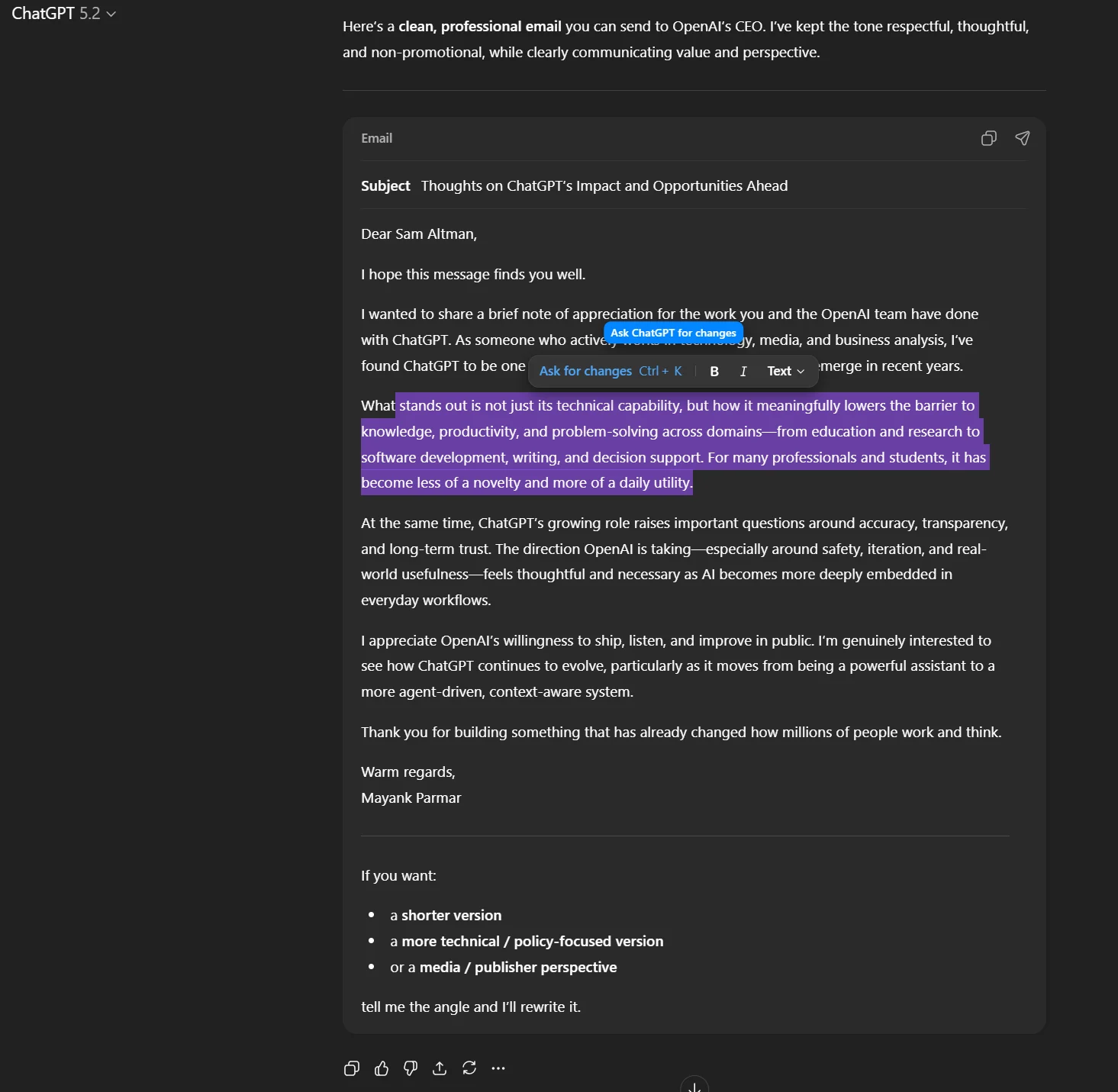
How will inline editing change the way people write with ChatGPT?
Inline editing is the second big theme emerging from the same set of leaks. Where ChatGPT has traditionally replied with a block of generated text that users copy, paste, or edit elsewhere, the new experience appears to add rich inline editing and “formatting blocks.” That means you may be able to edit text, apply basic rich-text formatting (bold, italics, lists), and make local revisions directly inside the ChatGPT UI — without jumping into an external document editor. Early references imply a WYSIWYG-like editing area that the model can interact with in place.
What does “inline editing” actually enable for writers and editors?
- Fewer context switches: Draft, ask for rewrites, and fine-tune formatting without leaving the browser tab.
- Iterative collaboration: If ChatGPT can edit your text inline, it can also propose targeted changes (e.g., "tighten the intro" or "expand the methodology section") that you can accept or reject in place.
- Better fidelity for structured content: Emails, tables, and bulleted lists often lose shape when moved between editors; an inline editor that respects structure reduces that risk.
- Faster polish cycles for product copy, proposals, and blogs: Combine ChatGPT’s generative abilities with local edits in a single loop.
The new inline editing features, specifically targeting code blocks and math equations, will allow users to click directly into the generated output and make changes. This transforms the interface from a read-only display into a collaborative canvas. If the AI hallucinates a variable name, you can simply backspace and correct it instantly. This "human-in-the-loop" approach is faster and grants users a sense of agency that has been missing from chat-based interfaces.
How might formatting blocks work under the hood?
The leaks reference “formatting blocks” and specialized editor widgets in the web client. A plausible architecture is a hybrid content model where plain chat messages can be converted into structured blocks (paragraph, list, code snippet, table), each of which the model can recognize and operate on. That lets the UI present rich controls for each block while still retaining model-level awareness (so ChatGPT understands which exact block you asked it to revise). This block-based approach mirrors modern document editors and would allow selective regeneration or inline substitutions without touching surrounding material.
A Challenge to "Canvas" Interfaces?
This move is likely a direct response to competitors like Anthropic, whose "Artifacts" feature allows for a side-by-side view of code and rendered content. OpenAI seems to be taking a slightly different approach by embedding the editing capabilities directly into the flow of conversation (or "inline"). This keeps the focus on the dialogue while empowering the user to act as an editor. It signals that OpenAI views the future of AI not as a oracle that delivers perfect truths, but as a co-author that drafts content for human refinement.
What other features have the leaks suggested?
Task tracking, file uploads, and local model selection
As noted above, Salute appears designed for task lifecycle management with native file attachments and progress indicators. The references include a “preferred model” flag, which implies that ChatGPT could select or pin models specialized for particular local tasks (for example, a model fine-tuned for local business listings or map-related queries). Such a capability would help optimize responses for localized, domain-specific tasks.
Secure tunnels, developer tooling, and technical blocks
Several reports mention “secure tunnel” support and new secure connectivity features targeted at MCP servers (internal OpenAI infrastructure references). In product terms this could mean improved integrations for enterprise customers who need to allow ChatGPT to access private data sources securely (for example, customer databases, document stores, or privately hosted code repositories) without exposing credentials or otherwise breaking compliance constraints. The inclusion of inline-editable code and math blocks also underscores the emphasis on technical user workflows.
Map/local service optimizations
Leaked strings referencing map-widget behavior and local business results suggest improvements in how ChatGPT handles geographic, map-based queries—potentially routing such queries to models optimized for local search or using a “preferred model” to answer commerce-related questions. That could yield better answers for travel planning, local business discovery, and contextually accurate recommendations.
Sonata: A New Platform?
Security researchers spotted SSL certificates for sonata.openai.com. The use of a distinct subdomain (rather than a subdirectory like chatgpt.com/sonata) often indicates a standalone product. Speculation points to "Sonata" being a specialized interface for autonomous agents—a place where AI can perform multi-step workflows without constant human supervision. If "Salute" is for managing tasks with the user, "Sonata" might be for tasks done for the user.
Pulse: Asynchronous Research
The codename "Pulse" refers to a feature that allows ChatGPT to conduct research while you sleep. The leaks describe it as an asynchronous background process that can "do research on your behalf once a day." This moves the AI from a synchronous "chat" model (you talk, it replies) to an asynchronous "worker" model (you assign a task, it reports back tomorrow).
Will this shift change the competitive landscape for AI assistants?
Short answer: yes — but not overnight.
The combination of in-editor AI, task-tracking, and enterprise tunnels moves ChatGPT closer to workspace platforms (e.g., Notion, Google Docs + Google Workspace, or dedicated project-management tools) and to rival AI assistants that pursue end-to-end workflows. Competitors will likely accelerate their own integrations: some vendors may offer more deeply embedded task automation, while others may emphasize open platform play (e.g., plugins and third-party extensions). The net effect will be intensifying competition around two axes:
- Integration depth: Who connects most tightly with enterprise systems and preserves control?
- Workflow intelligence: Who builds the best in-context capabilities (e.g., answer retrieval, document understanding, and task automation)?
OpenAI’s strength has been model performance and developer mindshare. Building workflow and editor capabilities into the core web experience shifts the battleground toward product UX, platform openness, and enterprise readiness.
Conclusion
The leaked "Salute" update and inline editing features represent the most significant shift in ChatGPT’s UX since its launch. By moving beyond simple text exchange into task management, document editing, and local search, OpenAI is positioning ChatGPT to be the operating system of the future.
While we await official confirmation, the code speaks for itself: the era of the passive chatbot is ending. The era of the AI co-worker is about to begin.
To begin, explore the capabilities of models like gpt 5.2 on CometAPI in the Playground. Make sure you have logged in to obtain your API key and start building today.
Ready to start? → Free trial of ChatGPT's models via CometAPI!