Zentrale Funktionen
- Multimodale Generierung (Video + Audio) — Sora-2-Pro erzeugt Videoframes zusammen mit synchronisiertem Audio (Dialog, Umgebungsgeräusche, SFX) statt Video und Audio getrennt zu produzieren.
- Höhere Wiedergabetreue / „Pro“-Stufe — abgestimmt auf höhere visuelle Wiedergabetreue, schwierigere Aufnahmen (komplexe Bewegung, Okklusion und physische Interaktionen) und längere Konsistenz pro Szene als Sora-2 (non-Pro). Das Rendern kann länger dauern als beim Standardmodell Sora-2.
- Vielseitige Eingaben — unterstützt reine Textprompts und kann Bild-Input-Frames oder Referenzbilder akzeptieren, um die Komposition zu steuern (input_reference Workflows).
- Cameos / Likeness-Injektion — kann das vom Nutzer erfasste Abbild mit Einwilligungs-Workflows in der App in generierte Szenen einsetzen.
- Physikalische Plausibilität: verbesserte Objektpersistenz und Bewegungsgetreue (z. B. Impuls, Auftrieb), wodurch unrealistische „Teleportations“-Artefakte, die in früheren Systemen verbreitet waren, reduziert werden.
- Steuerbarkeit: unterstützt strukturierte Prompts und Anweisungen auf Shot-Ebene, sodass Erstellende Kamera, Beleuchtung und Sequenzen mit mehreren Einstellungen festlegen können.
Technische Details & Integrationsoberfläche
Modellfamilie: Sora 2 (Basis) und Sora 2 Pro (hochwertige Variante).
Eingabemodalitäten: Textprompts, Bildreferenz und kurz aufgezeichnetes Cameo-Video/Audio für Likeness.
Ausgabemodalitäten: kodiertes Video (mit Audio) — Parameter über die Endpunkte /v1/videos verfügbar (Modellwahl via model: "sora-2-pro"). API-Oberfläche folgt der Videos-Endpunktfamilie von OpenAI für Erstellen/Abrufen/Auflisten/Löschen.
Training & Architektur (öffentliche Zusammenfassung): OpenAI beschreibt Sora 2 als auf großskaligen Videodaten trainiert, mit Nachtraining zur Verbesserung der Weltsimulation; Spezifika (Modellgröße, genaue Datensätze und Tokenisierung) sind nicht in Einzelheiten öffentlich aufgelistet. Es ist von hohem Rechenaufwand, spezialisierten Video-Tokenizern/Architekturen und multimodalen Alignment-Komponenten auszugehen.
API-Endpunkte & Workflow: zeigt einen Job-basierten Workflow: Senden Sie eine POST-Erstellungsanfrage (model="sora-2-pro"), erhalten Sie eine Job-ID oder Location, dann pollen oder auf Abschluss warten und die resultierenden Datei(en) herunterladen. Häufige Parameter in veröffentlichten Beispielen umfassen prompt, seconds/duration, size/resolution und input_reference für bildgeführte Starts.
Typische Parameter:
model:"sora-2-pro"prompt: Beschreibung der Szene in natürlicher Sprache, optional mit Dialoghinweisenseconds/duration: Ziel-Cliplänge (Pro unterstützt die höchste Qualität in den verfügbaren Laufzeiten)size/resolution: Berichte aus der Community deuten darauf hin, dass Pro in vielen Anwendungsfällen bis zu 1080p unterstützt.
Inhaltseingaben: Bilddateien (JPEG/PNG/WEBP) können als Frame oder Referenz bereitgestellt werden; bei Verwendung sollte das Bild der Zielauflösung entsprechen und als Kompositionsanker dienen.
Renderverhalten: Pro ist darauf abgestimmt, Bild-zu-Bild-Kohärenz und realistische Physik zu priorisieren; dies führt typischerweise zu längerer Rechenzeit und höheren Kosten pro Clip als bei Non‑Pro-Varianten.
Benchmark-Leistung
Qualitative Stärken: OpenAI verbesserte Realismus, physikalische Konsistenz und synchronisiertes Audio** gegenüber früheren Videomodellen. Andere VBench-Ergebnisse deuten darauf hin, dass Sora-2 und Ableitungen an der Spitze oder nahe der Spitze zeitgenössischer Closed-Source-Modelle in Bezug auf zeitliche Kohärenz liegen.
Unabhängige Timing/Throughput (Beispiel-Benchmark): Sora-2-Pro benötigte im Schnitt ~2,1 Minuten für 20‑Sekunden‑Clips in 1080p in einem Vergleich, während ein Konkurrent (Runway Gen‑3 Alpha Turbo) auf derselben Aufgabe schneller war (~1,7 Minuten) — Trade-offs zwischen Qualität, Renderlatenz und Plattformoptimierung.
Einschränkungen (praktisch & Sicherheit)
- Nicht perfekte Physik/Konsistenz — verbessert, aber nicht fehlerfrei; Artefakte, unnatürliche Bewegungen oder Audio-Synchronisationsfehler können weiterhin auftreten.
- Dauer- & Rechenbeschränkungen — lange Clips sind rechenintensiv; viele Praxis-Workflows begrenzen Clips auf kurze Dauer (z. B. einstellige bis niedrige zweistellige Sekunden für hochwertige Ausgaben).
- Datenschutz-/Einwilligungsrisiken — Likeness-Injektion („Cameos“) birgt Einwilligungs- sowie Miss-/Desinformationsrisiken; OpenAI verfügt über explizite Sicherheitskontrollen und Widerrufsmechanismen in der App, dennoch ist verantwortungsvolle Integration erforderlich.
- Kosten & Latenz — Pro-Renderings können teurer und langsamer sein als leichtere Modelle oder Wettbewerber; berücksichtigen Sie Abrechnung pro Sekunde/Render und Warteschlangen.
- Sicherheits-Content-Filter — die Generierung schädlicher oder urheberrechtlich geschützter Inhalte ist eingeschränkt; Modell und Plattform beinhalten Sicherheits- und Moderationsschichten.
Typische und empfohlene Anwendungsfälle
Anwendungsfälle:
- Marketing- & Anzeigen-Prototypen — schnelle Erstellung filmischer Proofs of Concept.
- Previsualisierung — Storyboards, Kamera-Blocking, Shot-Visualisierung.
- Kurzer Social-Content — stilisierte Clips mit synchronisiertem Dialog und SFX.
- So greifen Sie auf die Sora 2 Pro API zu
Schritt 1: Für API-Schlüssel registrieren
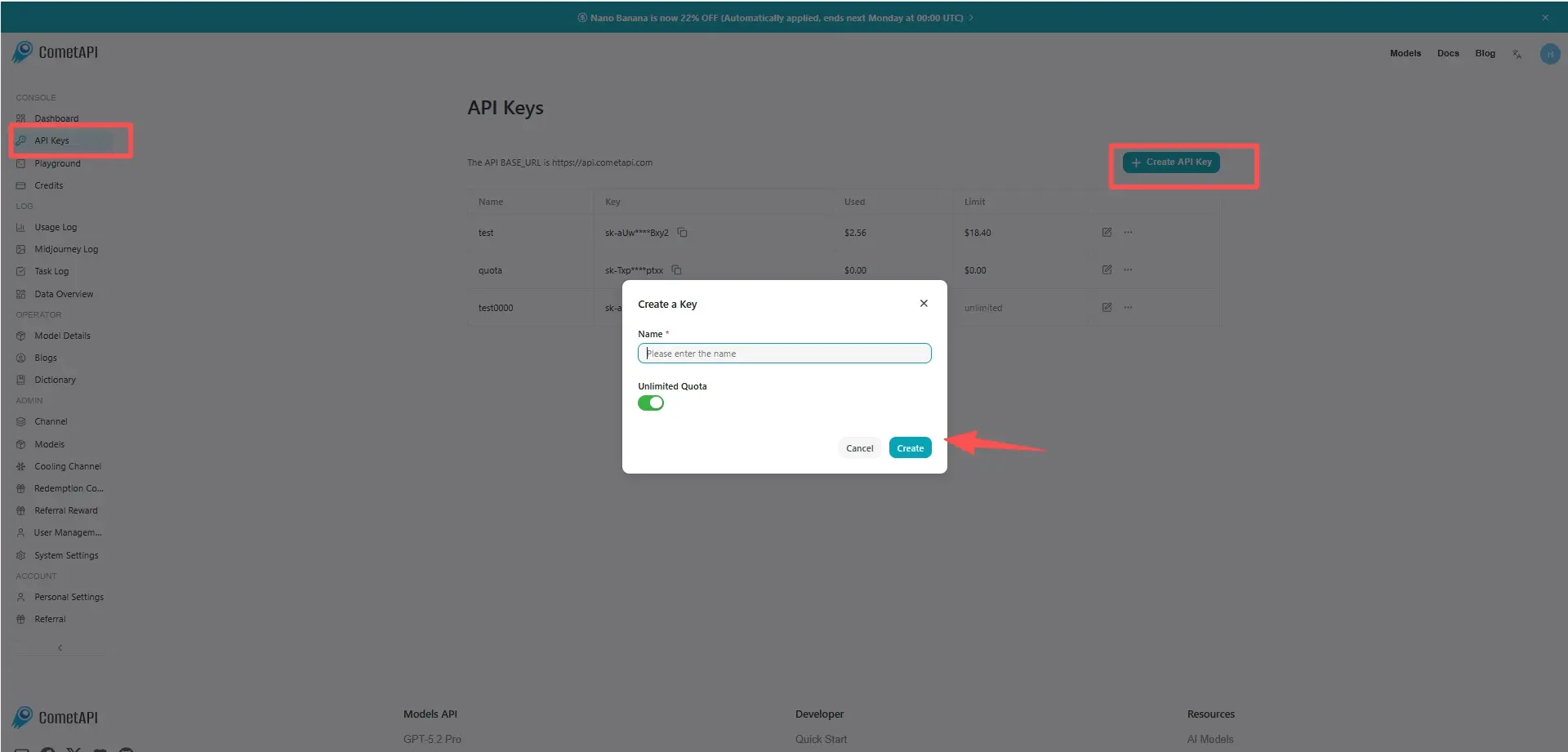
Melden Sie sich bei cometapi.com an. Wenn Sie noch kein Nutzer sind, registrieren Sie sich bitte zuerst. Melden Sie sich in Ihrer CometAPI-Konsole an. Holen Sie sich den Zugriffsnachweis (API-Schlüssel) der Schnittstelle. Klicken Sie im persönlichen Zentrum beim API-Token auf „Add Token“, erhalten Sie den Token-Schlüssel: sk-xxxxx und senden Sie ab.
Schritt 2: Anfragen an die Sora 2 Pro API senden
Wählen Sie den „sora-2-pro“-Endpunkt, um die API-Anfrage zu senden, und legen Sie den Request-Body fest. Die Anfragemethode und der Request-Body werden aus unserer Website-API-Dokumentation entnommen. Unsere Website bietet außerdem Apifox-Tests zu Ihrer Bequemlichkeit. Ersetzen Sie <YOUR_API_KEY> durch Ihren tatsächlichen CometAPI-Schlüssel aus Ihrem Konto. base url is office Video erstellen
Fügen Sie Ihre Frage oder Anforderung in das Content-Feld ein — darauf wird das Modell reagieren. Verarbeiten Sie die API-Antwort, um die generierte Antwort zu erhalten.
Schritt 3: Ergebnisse abrufen und verifizieren
Verarbeiten Sie die API-Antwort, um die generierte Antwort zu erhalten. Nach der Verarbeitung antwortet die API mit dem Task-Status und Ausgabedaten.
- Internes Training / Simulation — Szenariovisualisierungen für RL- oder Robotikforschung generieren (mit Sorgfalt).
- Kreative Produktion — in Kombination mit menschlichem Editing (Kurzclips zusammenfügen, Grading, Audio ersetzen).