Mistral 3 is the headline release of Mistral AI’s late-2025 model family. It brings a mix of compact, fast models geared for local/edge deployment and a very large sparse flagship that pushes state-of-the-art scale and context length. This article explains what Mistral 3 is, how it’s built, why you might want to run it locally, and three practical ways to run it on your machine or private server — from the “click-to-run” convenience of Ollama to production GPU serving with vLLM/TGI, to tiny-device CPU inference using GGUF + llama.cpp.
What is Mistral 3?
Mistral 3 is the latest generation of open-weight models from Mistral AI. The family includes both a massive Mistral Large 3 (a sparse Mixture-of-Experts — MoE — model) and several edge/“ministral” variants (3B, 8B, 14B) tuned for instruction following and multimodal (text+vision) tasks. Mistral positioned the release to be broadly usable: from high-performance datacenter inference (with specialized optimized checkpoints) to edge and laptop usage via quantized formats and smaller variants.
Key practical properties :
- A Mixture-of-Experts (MoE) architecture in the Large 3 variant that yields a very large “total” parameter count while only activating a subset of experts per token — this improves efficiency at scale.
- A family of Ministral 3 models (3B / 8B / 14B) intended for edge and local use, with instruction-tuned and multimodal variants.
- Official checkpoints and a set of optimized checkpoints (NVFP4/FP8) for accelerated runtimes like vLLM and NVIDIA platforms.
- Multimodal + multilingual + long context — ministers and large variants emphasize image+text understanding and broad language coverage. For applications that mix images + long documents, this matters.
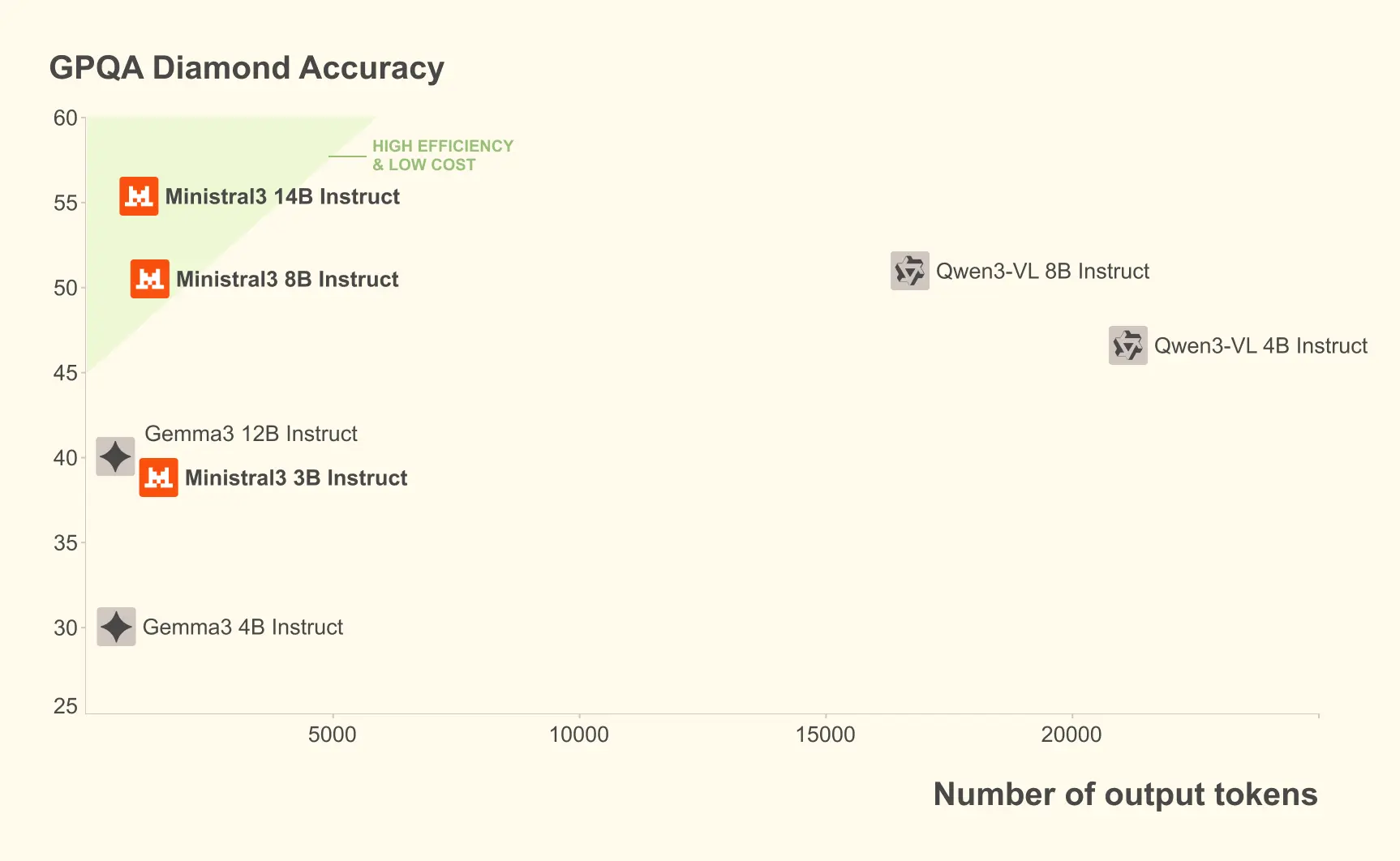
On the GPQA Diamond dataset (a rigorous scientific reasoning test), various variants of Miniral 3 maintain high accuracy even with increasing numbers of output tokens. For example, the Miniral 3B Instruct model maintains 35-40% accuracy when handling up to 20,000 tokens, comparable to larger models like Gemma 2 9B, while using fewer resources.
What is the architecture of Mistral 3?
Mistral 3 is a family rather than a single architecture, but the two architectural patterns you need to understand are:
Dense small models (Ministral 3)
- Standard transformer stacks, optimized for efficiency and edge inference.
- Offered in multiple sizes (3B/8B/14B) and in different fine-tuned variants: base, instruct, and reasoning; many variants include native multimodal (vision + text) support and long context operation. The Minstral models are released with optimized FP8 weights for compactness in some distributions.
Sparse Mixture-of-Experts (Mistral Large 3)
- MoE architecture: the model has many experts (huge total parameter count), but only a routing-selected subset is evaluated per token — that yields better scale-for-compute tradeoffs.
- Mistral Large 3 cites ~675B total parameters with ~41B active parameters during inference, reflecting this MoE design. The model was trained on modern NVIDIA hardware and optimized for efficient low-precision execution (NVFP4/TensorRT/Large-kernel optimizations).
Technical features that matter when running locally:
- Long context: some Mistral 3 variants support very long contexts (vLLM docs and Mistral docs mention massive context windows for certain variants; e.g., 256k in some Ministral variants). That affects memory and serving patterns.
- Weight formats & quantization: Mistral provides weights in compressed/optimized formats (FP8, NVFP4) and works with modern quantization toolchains (BitsAndBytes, GPTQ, vendor toolchains) for practical local inference.
Why would you run Mistral 3 locally?
Running LLMs locally is no longer a niche hobby — it’s a practical option for teams and individuals who care about:
- Data privacy and compliance. Local hosting keeps sensitive inputs inside your infrastructure (important for finance, healthcare, legal). Reuters reported high-profile customers choosing to self-host Mistral models.
- Latency and cost control. For tight latency SLOs and predictable costs, local or private cluster inference can beat cloud API bill shock. Smaller ministral variants and quantized formats make this practical.
- Customization and fine-tuning. When you need custom behavior, function calling, or new modalities, local control enables custom fine-tuning and data handling. Hugging Face and vLLM integration make this more turnkey.
If those reasons align with your priorities — privacy, control, cost predictability, or research — local deployment is worth considering.
How can you run Mistral 3 locally (three practical methods)?
There are many ways to run Mistral 3 locally. I’ll cover three approaches that cover the most common user scenarios:
- Ollama (zero-config desktop / local server, easiest for many users)
- Hugging Face Transformers + PyTorch / vLLM (full control, GPU clusters)
- llama.cpp / ggml / GGUF quantized CPU inference (lightweight, runs on laptops/CPU)
For each method I’ll list when it makes sense, the prerequisites, step-by-step commands and small code examples.
1) How can you run Mistral 3 with Ollama (quickest path)?
When to use this: you want a frictionless local experience (macOS/Linux/Windows), an approachable CLI or GUI, and automatic downloads/quantized artifacts when available. Ollama has model entries for Ministral 3 and other Mistral family members.
Prerequisites
- Ollama installed (follow the installer on ollama.com). The Ollama library indicates specific minimum versions for some ministral releases.
- Enough disk space to store the model artifacts (model sizes differ — ministal 3B quantized versions may be a few GBs; larger BF16 variants are many tens of GB).
Steps (example)
- Install Ollama (macOS example — replace per platform):
# macOS (Homebrew) example — see ollama.com for platform-specific installersbrew install ollama
- Run a ministral model:
# Pull and run the model interactivelyollama run ministral-3
- Serve locally (API) and call from code:
# Run Ollama server (default port shown in docs)ollama serve# Then curl against it (example)curl -s -X POST "http://localhost:11434/api/v1/generate" \ -H "Content-Type: application/json" \ -d '{"model":"ministral-3","prompt":"Summarize Mistral 3 in one sentence."}'
Notes & tips
- Ollama handles model download and (when available) local quantized variants — very convenient for trying models quickly.
- If you’re planning to use the model in production with many concurrent requests, Ollama is great for prototyping, but evaluate scaling and resource orchestration for steady load.
2) How can you run Mistral 3 with Hugging Face Transformers (GPU / vLLM integration)?
When to use this: you need programmatic control for research or production, want to fine-tune, or want to use accelerated inference stacks like vLLM on GPU clusters. Hugging Face provides Transformers support and Mistral offers optimized checkpoints for vLLM/NVIDIA.
Prerequisites
- GPU with sufficient memory (varies by model and precision). Ministral 3 smalls (3B/8B) can run on a single mid-range GPU when quantized; larger variants require multiple H100/A100 or optimized NVFP4 checkpoints for vLLM. NVIDIA and Mistral documentation recommend specific node sizes for the large models.
- Python, PyTorch, transformers, accelerate (or vLLM if you want that server).
Python example — basic Hugging Face pipeline (3B instruct variant, GPU):
# Example: CPU/GPU inference with transformers pipeline# Assumes you have CUDA and a compatible PyTorch build.import torchfrom transformers import pipelinemodel_name = "mistralai/Ministral-3-3B-Instruct-2512-BF16" # example HF model idgenerator = pipeline( "text-generation", model=model_name, device_map="auto", torch_dtype=torch.bfloat16, # use bfloat16 if your hardware supports it)prompt = "Explain how attention helps transformers, in 3 sentences."out = generator(prompt, max_new_tokens=120, do_sample=False)print(out[0]["generated_text"])
Using vLLM for production GPU inference
vLLM is designed to serve large models efficiently, supports the Mistral 3 family, and Mistral published checkpoints optimized for vLLM/NVIDIA hardware (NVFP4/FP8) to reduce memory footprint and speed. Starting a vLLM server gives you a low-latency, batched inference endpoint. See vLLM recipes and Mistral guidance for model paths and recommended flags.
Notes & tips
- For production, prefer optimized checkpoints (NVFP4/FP8) and run on recommended GPUs (e.g., H100/A100) or use an orchestration layer that supports tensor/model parallelism. Mistral and NVIDIA have documentation and blog posts on optimized runtimes.
- Always pin the exact model checkpoint on disk (or a reproducible HF snapshot) for reproducible results and to avoid silent model updates.
3) How can you run Mistral 3 on CPU with llama.cpp / GGUF quantized models?
When to use this: you need local, offline inference on CPU (e.g., developer laptop, secure air-gapped environment) and are willing to trade some accuracy for runtime and memory efficiency. This method uses ggml/llama.cpp and GGUF quantized weights (q4/q5/etc.).
Prerequisites
- A GGUF quantized build of a Ministral model (many community members publish quantized GGUFs on Hugging Face or convert BF16 weights to GGUF locally). Search for
Ministral-3-3B-InstructGGUF variants. - Compiled llama.cpp binary (follow the project README).
Quantize (if you have original weights) — example (conceptual)
# Example: quantize from an FP16/BF16 model to a GGUF q4_K_M (syntax depends on llama.cpp version)./quantize /path/to/original/model.bin /path/to/out.gguf q4_k_m
Run a GGUF with llama.cpp
# run interactive inference with a quantized GGUF model./main -m /path/to/ministral-3-3b-instruct.gguf -t 8 -c 2048 --interactive# -t sets threads, -c sets context (tokens) if supported
Python client example (local llama.cpp server or subprocess)
You can spawn llama.cpp as a subprocess and feed it prompts, or use a small wrapper client. Many community projects offer a simple HTTP server wrapper around llama.cpp for local app integration.
Notes & tradeoffs
- Quantization reduces VRAM and enables CPU inference but can drop quality (mild to moderate, depending on quant format). Formats like q4_K_M or q5 variants are common compromises for CPU use. Japanese and technical posts explain Q4/ Q5 types and GGUF conversions in detail.
- For small to medium workloads, GGUF + llama.cpp is often the cheapest and most portable way to run local LLMs.
What hardware and memory considerations matter?
Short, practical guidance:
- 3B models: can often be quantized and run on a decent laptop CPU or a single GPU with 8–16 GB VRAM (depending on precision/quantization). GGUF q4 variants can run on many modern CPUs.
- 8B and 14B ministers: typically need a mid-range GPU (e.g., 24–80 GB depending on precision and activation caching) or quantization across multiple devices.
- Mistral Large 3 (675B total, 41B active): intended for data-center deployment and typically runs best with multi-GPU nodes (e.g., 8×A100 or H100) and specialized formats (NVFP4/FP8) for vLLM. Mistral explicitly published optimized checkpoints to make such deployments tractable.
If your priority is local laptop usage, aim for the ministral 3B quantized GGUF + llama.cpp route. If your priority is production throughput, look at vLLM + NVFP4 checkpoints on GPUs. If you want ease of experimentation, Ollama is the fastest to get started.
How should you choose quantization and precision?
Quantization is a trade: memory and speed vs. raw model quality. Common choices:
- q4_0 / q4_1 / q4_K_M: popular 4-bit options used for CPU inference; q4_K_M (k-means variant) often offers a better quality/performance balance.
- q5 / q8 / imatrix variants: intermediate formats that might preserve more fidelity at cost of size.
- FP16 / BF16 / FP8 / NVFP4: GPU precisions — BF16 and FP16 are common for training/inference on modern GPUs; FP8 / NVFP4 are emerging formats that save memory for very large models and are supported by optimized runtimes and Mistral’s checkpoint releases.
Rule of thumb: for local CPU runs pick q4_K_M or similar; for GPU inference with high fidelity use BF16/FP16 or vendor-specific FP8/NVFP4 when supported by the runtime.
Conclusion — should you run Mistral 3 locally?
If you require privacy, low latency, or customization, yes: the Mistral 3 family gives you a broad palette — tiny models for edge CPU, mid-sized models for a single GPU or modest cluster, and a large MoE flavor for datacenter scale — and the ecosystem (Ollama, Hugging Face, vLLM, llama.cpp) already supports practical local and private deployment patterns. Mistral also worked with NVIDIA and vLLM to provide optimized checkpoints for high throughput and reduced memory footprints, which makes production self-hosting more realistic than before.
To begin, explore more model (such as Gemini 3 Pro) ’s capabilities in the Playground and consult the API guide for detailed instructions. Before accessing, please make sure you have logged in to CometAPI and obtained the API key. CometAPI offer a price far lower than the official price to help you integrate.
Ready to Go?→ Sign up for CometAPI today !