
OpenAI announced GPT Image 1.5, the company’s new flagship image-generation and editing model, and shipped a refreshed “ChatGPT Images” experience across ChatGPT and the API. OpenAI markets the release as a step toward production-grade image creation: stronger instruction following, more precise edits that preserve important details (faces, lighting, logos), output that’s up to 4× faster, and lower image input/output costs in the API.The good news is that CometAPI has integrated GPT-image 1.5 (gpt-image-1.5) and offers a lower price than OpenAI.
What is GPT Image 1.5?
GPT Image 1.5 is OpenAI’s latest generation image model, released as the engine behind a rebuilt ChatGPT Images experience and made available through the OpenAI API as gpt-image-1.5. OpenAI positions it not just as a novelty art tool but as a production-ready creative studio: it aims to make precise, repeatable edits and to support workflows like ecommerce catalogs, brand asset variant generation, creative asset pipelines, and fast prototyping. Explicitly highlights advances in preserving important image details—faces, logos, lighting—and in following step-by-step editing instructions.
Two operational details to remember: GPT Image 1.5 renders images up to four times faster than its predecessor and that image inputs/outputs are ~20% cheaper in the API compared with GPT Image 1.0 — both important for teams that iterate a lot. The new ChatGPT Images UI also adds a dedicated sidebar workspace, preset filters and trending prompts, and a one-time “likeness” upload for repeated personalizations.
How did GPT Image 1.5 evolve from previous OpenAI image models?
OpenAI’s image line has moved from DALL·E → multiple internal image experiments → GPT Image 1 (and smaller variants). Compared with earlier OpenAI image models (e.g., GPT-image-1 and earlier ChatGPT image stacks), 1.5 is explicitly optimized for:
- Tighter instruction following — the model adheres more closely to textual directives.
- Improved image-editing fidelity — it preserves composition, facial features, lighting, and logos across edits so repeated edits remain consistent.
- Faster, cheaper inference — OpenAI claims up to 4× speed improvements over the previous image model and reduced token/image costs for inputs and outputs.
In short: instead of treating image generation as a one-off “art toy,” OpenAI is pushing image models toward predictable, repeatable tools for creative teams and enterprise workflows.
Main features of GPT Image 1.5
Editing and image-preservation capabilities
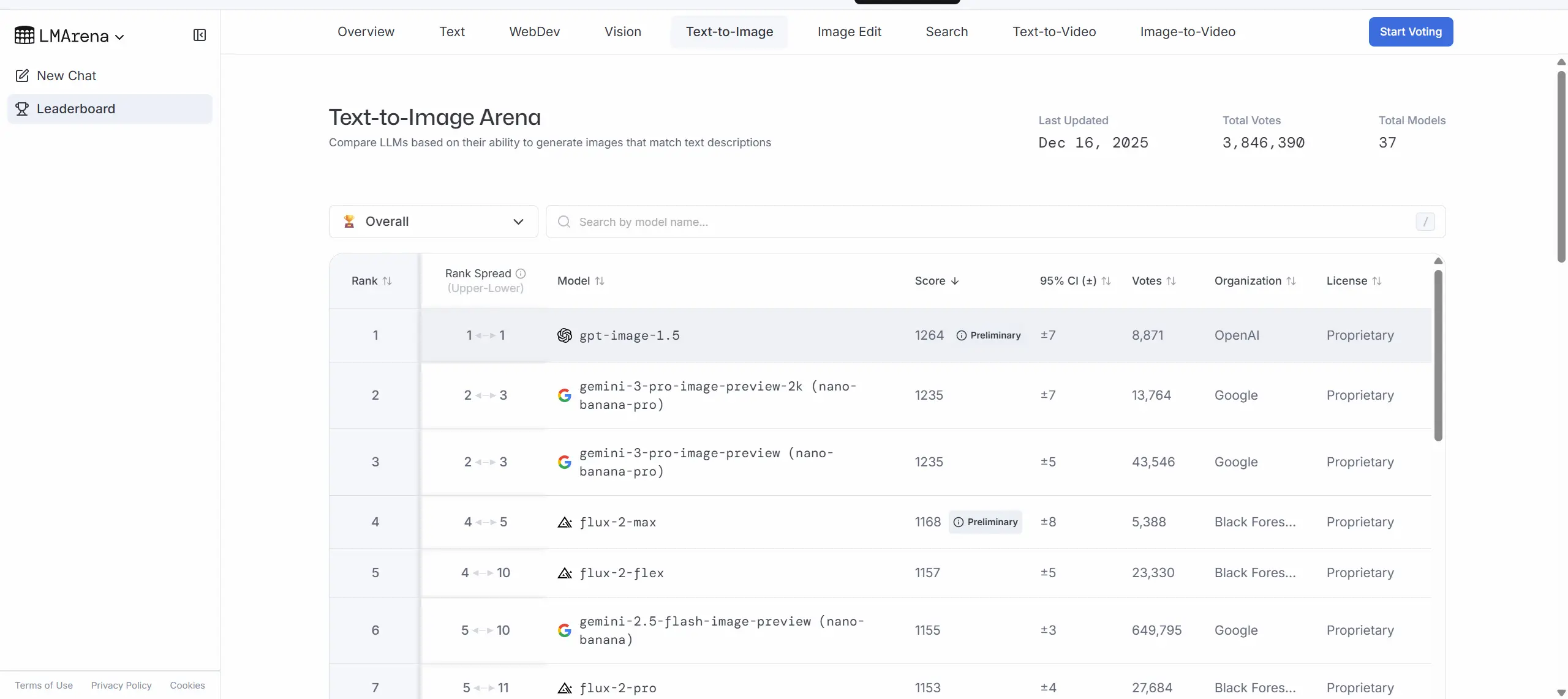
GPT Image 1.5 performing strongly across several image-generation and editing leaderboards published since launch.LMArena report GPT Image 1.5 ranking at or near the top of image text-to-image and image-editing leaderboards, sometimes narrowly ahead of competitors like Google’s Nano Banana Pro.
One of the headline features for GPT Image 1.5 is precise editing that preserves “what matters”: when you ask the model to change a particular object or attribute it aims to change only that element while keeping composition, lighting, and people’s appearance consistent across edits. For brands and ecommerce teams this translates to fewer manual touchups after automated edits.
How fast is it and what does "4× faster" mean?
OpenAI reports that image generation in ChatGPT Images is up to 4× faster than before, ~20% cheaper image I/O costs in the API compared to GPT Image 1. That’s a product-level claim: faster render time means you can iterate more images in the same session, start additional generations while others are still processing, and reduce friction in exploratory workflows. Faster inference not only reduces latency for end-users, it also lowers energy per request and operational cost for deployments. Note: “up to” means real-world gains will depend on prompt complexity, image size, and system load.
Instruction following and text rendering improved
Stronger instruction following versus GPT Image 1.0: the model is better at interpreting multi-step prompts and retaining user intent across chained edits. They also highlight improved text rendering (legible text embedded in images) and better small-face rendering, but it still flags multilingual/text rendering limits in some edge cases, but overall the model aims to close the longstanding gap where generated images would produce illegible or nonsensical signage.
GPT Image 1.5 vs Nano Banana Pro (Google) vs Qwen-Image (Alibaba)?
What is Google’s Nano Banana Pro?
Nano Banana Pro (branded in Google’s Gemini family as Gemini 3 Pro Image / Nano Banana Pro) is Google/DeepMind’s studio-grade image model. Google emphasizes excellent text rendering, multi-image composition (blend many images into one), and integration with broader Gemini capabilities (search grounding, locale-aware translations, and enterprise workflows in Vertex AI). Nano Banana Pro aims to be production-ready for designers who need high fidelity and predictable text layout inside images.
What is Qwen-Image?
Qwen-Image (from the Qwen/Tongyi family) is an image model released by Alibaba that has been evaluated across academic and public benchmarks. The Qwen team’s technical report documents strong cross-benchmark performance (GenEval, DPG, OneIG-Bench) and highlights particular strengths in prompt understanding, multilingual text rendering (notably Chinese), and robust editing. Qwen-Image is often discussed as one of the leading open-source / enterprise-friendly options outside the US hyperscalers.
Head-to-head: where each shines
- GPT Image 1.5 (OpenAI) — Strengths: fast generation, strong instruction-following in multi-step workflows, well-integrated ChatGPT UX, and broad API accessibility. Early benchmarks place it at or very near the top in combined generation & editing metrics; OpenAI’s presentation focuses on the model as a “creative studio” for practical productivity.
- Nano Banana Pro (Google) — Strengths: exceptional text rendering and enterprise integrations (Vertex AI, Google Workspace), strong localization and multi-image composition features, studio-grade controls for angle/lighting/aspect/2K output. Google emphasizes the model’s utility for marketing/localization pipelines and precise poster/mockup generation.
- Qwen-Image (Alibaba) — Strengths: cross-benchmark performance across international datasets, open technical reporting, and strong multilingual text rendering. It represents a compelling choice for developers and enterprises focusing on Asian markets and teams seeking transparent benchmark results.
Practical differences developers will notice
- APIs & integration patterns: OpenAI exposes GPT Image 1.5 through the Image API and the Responses API; Google exposes Nano Banana Pro via Gemini/Vertex; Alibaba publishes model docs and demo endpoints. Pricing and rate limits differ across providers and will affect production costs and throughput decisions.
- Control vs. speed trade-offs: Some providers offer “fast/flash” modes vs “thinking/pro” modes — e.g., Nano Banana (fast) vs Nano Banana Pro (thinking). OpenAI’s messaging suggests GPT Image 1.5 reduces the practical need to trade quality for speed, but cost/performance tuning will still matter for bulk generation.
How to access and use GPT Image 1.5
There are two ways to access GPT Image 1.5:
ChatGPT (UI) — GPT Image 1.5 powers the new ChatGPT Images experience (Images tab). Use it to generate from text, upload images and make edits, or iterate interactively.
API — Use the Image API (/v1/images/generations and /v1/images/edits) to generate and edit images with gpt-image-1.5. Responses are base64-encoded images for GPT image models.
The good news is that CometAPI has integrated GPT-image 1.5 (gpt-image-1.5) and offers a lower price than OpenAI. You can use CometAPI to simultaneously use and compare Nano banana pro and Qwen image.
What are practical use cases and recommended workflows?
Use cases that benefit most
- E-commerce & product cataloging: create many consistent product photos from a single specimen, change backgrounds, and keep lighting/facets consistent across images. GPT Image 1.5’s edit stability helps here.
- Ad creative & rapid iteration: faster generation reduces cycle time for A/B creative variants.
- Photo retouching and localization: swap props or outfits while keeping model identity consistent for regionally localized campaigns.
- Design prototyping & concept art: the model supports both photoreal and highly stylized outputs, useful for early-stage concept exploration.
Who benefits most from GPT Image 1.5?
- Content creators and social media teams who need fast, iterative editing and creative transformations.
- Designers and product teams prototyping UI/UX assets, hero images, or advertising mockups that require rapid drafts.
- E-commerce teams performing product mockups (clothing try-ons, background swaps, copy overlays).
- Developers building conversational, image-driven experiences (e.g., chat-based photo editors, marketing automation).
Suggested workflow for creators
- Prototype in ChatGPT Images to refine instructions (use presets to discover styles).
- Pin a snapshot in API usage for production stability (
gpt-image-1.5-YYYY-MM-DD). - Run controlled A/B tests comparing model outputs and human post-processing costs.
- Integrate moderation checks and a human-in-the-loop for brand or safety-sensitive tasks.
Cost and performance considerations
Faster generation can reduce latency and (depending on pricing) cost-per-image, but enterprise usage should measure both throughput and token/compute pricing.
Safety, bias, and hallucination
GPT Image 1.5 reduces certain failure modes (bad edits, inconsistent faces) but does not eliminate hallucinated or biased outputs. Like other generative models, it can reproduce cultural biases or produce inaccurate depictions if prompts are poorly specified. Implement guardrails: content filters, human review, and test suites that reflect expected edge cases.
Conclusion — Should you try GPT Image 1.5?
If your project needs high-quality image generation or robust, iterative editing within conversational workflows (for example: marketing creatives, product mockups, virtual try-ons, or an image-enabled SaaS pro.
To begin, explore GPT Image 1.5’s capabilities in the Playground and consult the API guide for detailed instructions. Before accessing, please make sure you have logged in to CometAPI and obtained the API key. CometAPI offer a price far lower than the official price to help you integrate.
Ready to Go?→ Free trial of GPT image 1.5 models !