
In December 2025 two of the most-talked-about image models — OpenAI’s GPT Image 1.5 and Google/DeepMind’s Nano Banana Pro (part of the Gemini image family) — are positioned as direct rivals: both push for high-fidelity generation, stronger instruction-following, and professional editing toolsets. OpenAI emphasizes speed, instruction-adherence and tighter integration with ChatGPT; Google focuses on studio-grade controls (camera, lighting, multilingual text rendering) and product integration across Gemini and Ads.
What is GPT Image 1.5?
GPT Image 1.5 is OpenAI’s latest image-focused model released as part of its ChatGPT Images offering. It’s positioned as a production-ready image generation and editing engine with tighter instruction-following, faster turnaround, and improved preservation of image elements across edits. The model is available in the ChatGPT interface and via the OpenAI API.
Core capabilities and features
- Faster generation and editing: OpenAI reports generation/editing speeds that in many use cases are up to four times faster than prior ChatGPT image models — a major practical improvement for iterative creative work.
- Stronger instruction following / localized edits: GPT Image 1.5 emphasizes making targeted changes (for example: change hat color, adjust lighting on a face) while preserving composition, shadows, and unrelated elements. This reduces the “redraw everything” behavior common in older pipelines.
- Cost and efficiency updates: OpenAI’s announcement states image inputs/outputs are approximately 20% cheaper in GPT Image 1.5 compared with GPT Image 1, enabling more iterations for the same spend.
- New “Images” workspace in ChatGPT: a sidebar/dedicated entry point with presets, trending prompts, and filters aimed at making ideation and iteration faster for creators and marketing teams.
Typical use cases
- Product catalog generation (variant renders from a single source photograph). (OpenAI)
- Iterative photo retouching and localized edits (clothing/hairstyle try-ons, small compositional adjustments).
- Brand-preserving edits: the model emphasizes keeping logos, color schemes and visual identity consistent across edits.
What is Nano Banana Pro?
Nano Banana Pro (also referred to as Gemini 3 Pro Image) is Google/DeepMind’s high-end image generation and editing model built on the Gemini 3 Pro multimodal backbone. It’s the commercial successor to Google’s earlier Nano Banana models, focused on delivering high-fidelity, reasoning-guided image synthesis and tight integration across Google’s ecosystem (Slides, Ads, Drive, etc.). Google presents Nano Banana Pro as a studio-caliber image creation and editing option optimized for production assets that require precise control, multilingual text rendering, and high-resolution outputs.
What are the headline technical and UX upgrades?
- Gemini 3 Pro reasoning + visual fidelity: Nano Banana Pro leverages Gemini 3 Pro’s multimodal reasoning to produce images that are contextually consistent (useful for infographics, diagrams, and photos that must reflect real-world facts).
- High-resolution / 4K outputs and fast render modes: Nano Banana Pro advertises pro-tier quality up to 4K, and short render times for many edits. Some previews mention near-10-second responses for common edits in optimized contexts.
- Accurate multi-language text rendering: Strong emphasis on rendering readable, correctly localized text within images — a persistent challenge for image models — enabling globalized marketing assets and internationalized UI snapshots.
- Integrated editing UI / chat-first workflow: Natural-language driven editing in a chat-style interface (e.g., “change the background to a rainy skyline, preserve subject shadows”) and a drawing/brush edit mode for local edits.
Typical use cases
- Enterprise creative production (ad campaigns, product catalogs, packaging).
- Technical diagrams, maps, and training materials where factual accuracy matters.
- Multilingual marketing materials with embedded legible text.
- Integration into large enterprises’ content pipelines with governance and search grounding.
How does GPT Image 1.5 compare to Nano Banana Pro?
Here’s a clean comparison table summarizing the key differences between GPT Image 1.5 and Nano Banana Pro across the most important categories – based on the latest available feature comparisons and tests:
| Category | GPT Image 1.5 (OpenAI) | Nano Banana Pro (Google / Gemini) |
|---|---|---|
| Core Focus | Fast, instruction-following image generation & editing with improved detail control and practical workflows. | High-quality, realistic image generation & editing with strong semantic grounding and layout/text fidelity. |
| Parent Model / Architecture | OpenAI’s GPT-Image-1.5 (Diffusion/Transformer hybrid) | Google Gemini 3 Pro Image (Native multimodal MoE transformer) |
| Speed | Up to ~4× faster than previous OpenAI image models; meaningful improvements for iterations. | Very fast generation at 1K resolutions (~10–15 s), and still competitive at higher sizes. |
| Image Quality | Strong and flexible quality; excellent for expressive and stylistic tasks. | Consistently sharper photorealism, especially at higher resolutions. |
| Text Rendering | Good text rendering; improved over older versions but variable for complex layouts. | Better text clarity, layout fidelity, and multilingual support. |
| Resolution / Output Range | Supports high-quality outputs; ~1024×1536 / ~1.5K (approx. 1–2 MP) | Broader resolution support including 2K and Up to 4096×4096 (4K) modes. |
| Reference Images Support | Yes (multiple reference images, strong control fidelity). | Yes (supports up to 14 reference images for character/brand consistency). |
| Prompt Adherence / Interpretation | Very literal and consistent, which helps strict intent alignment. | Creative interpretation with strong aesthetic fidelity. |
| Editing Precision | Solid for iterative and targeted edits; good at semantic consistency. | Slight edge in precise, instruction-faithful editing and complex photo tasks. |
| Photorealism | Good for many tasks; sometimes shows generative “look.” | Tends to produce more photographic, real-world plausible results. |
| Best Use Cases | Fast iteration, e-commerce variants, creative exploration, expressive edits. | High-fidelity production work, infographics/layouts, large-scale design tasks. |
| Cost Efficiency | Notably cheaper per image generation at lower settings; good for high volume. | Premium tier with broader output quality and resolution — may cost more at high resolution. |
| Strength in Real-World Context | Strong for creative and narrative image tasks. | Performs exceptionally for real-world and semantically grounded imagery. |
Quick Interpretation
- Instruction fidelity: GPT Image 1.5 emphasizes following instructions and iterative edits with identity/lighting preservation. Nano Banana Pro historically prioritized photorealistic rendering and material/lighting finesse. In many prompts the two look closely matched, but GPT Image 1.5’s wins often show up when the task demands precise, multi-step editing.
- Speed and throughput: Both models claim strong performance; OpenAI advertised up to 4× improved speeds over its predecessor. Nano Banana Pro has been praised for quick generation too, and real-world latency depends heavily on the serving setup and model sizes.
- Preservation vs. aesthetic flourish: GPT Image 1.5 is tuned to preserve key elements during edits (good for branding and face consistency). Nano Banana Pro sometimes favors overall cinematic finish and material rendering — excellent for single-shot photorealism. Which is better depends on your workflow: iterative edits vs single-pass stylized render.
- GPT Image 1.5 is optimized for speed, flexibility, and iterative editing workflows — excellent when you want quick results, interpret complex natural-language instructions, and run large batches of creative tasks cost-effectively.
- Nano Banana Pro shines when ultimate output fidelity, text/layout precision, and realistic photography quality matter — making it a strong choice for high-resolution commercial work and enterprise publishing.
Who wins on raw leaderboard position?
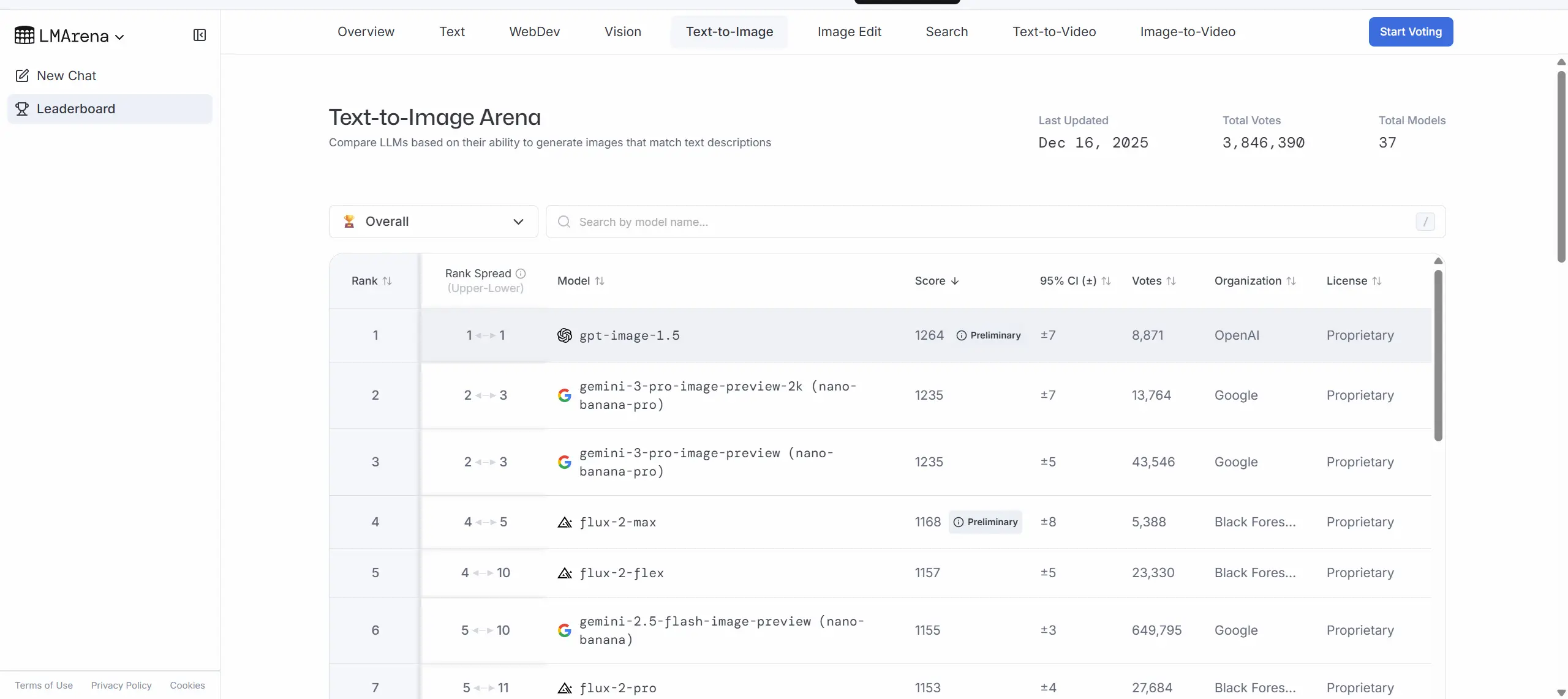
At the moment of the 1.5 rollout, LM Arena’s Text-to-Image leaderboard listed GPT Image 1.5 at #1 (score ~1264) with Nano Banana Pro near the top but behind (around 1235 in certain snapshots). On Image Editing, the new OpenAI alias (chatgpt-image-latest) sat at the top with a narrow margin over Nano Banana Pro. These are meaningful signals that OpenAI’s iteration pushed its model into immediate competitive parity or a slight lead on popular public leaderboards.
Model base and inference backbone
- GPT Image 1.5: Built from OpenAI’s image-capable model family and integrated directly with ChatGPT; marketed for instruction-following edits and iterative workflows. Exact layer/parameter counts are not public in the announcement; OpenAI focuses on API access and platform integrations.
- Nano Banana Pro: Built on Gemini 3 Pro (Google/DeepMind), described as a multimodal reasoning core fused with rendering pipelines (GemPix / diffusion hybrids according to some engineers’ writeups). Google emphasizes reasoning + grounding as the differentiator. Exact parameter counts are similarly not publicly disclosed.
Latency and throughput (practical benchmarks)
- GPT Image 1.5: OpenAI and coverage report up to 4× speedups versus prior GPT image models in many tasks; practical latency will vary by image size, quality settings, and load.
- Nano Banana Pro: Google pitches very fast “pro” modes and 4K capability; hands-on reviews report highly responsive edits (sub-10s for common operations in some demos), though enterprise usage at scale will depend on service tier and infrastructure.
Costing and quotas
- GPT Image 1.5: OpenAI’s documentation indicates updated pricing and token models for image tokens; the official announcement also notes a ~20% cost reduction vs the prior image model for image inputs/outputs. Exact per-image pricing depends on API plan and tokens used.
- Nano Banana Pro: Available through Gemini app tiers; Google has a freemium model for casual use with higher quotas on paid plans (Google AI Pro, AI Ultra, Enterprise). Published local articles summarize subscription pricing tiers and daily generation caps; exact enterprise pricing can vary.
Output fidelity and constraints
- GPT Image 1.5: Emphasizes composition preservation, brand/logo consistency, and iterative fidelity. It also claims improvements in text rendering vs earlier OpenAI image models.
- Nano Banana Pro: Emphasizes 4K fidelity, robust typography, and semantic grounding (e.g., real-world plausibility in generated scenes). Both they exist persistent edge cases (mislabeling, odd artifacts with complex scene understanding).
Image editing and iterative workflows
- GPT Image 1.5: Designed for conversational, iterative editing in ChatGPT; set up to take a user's image, receive natural language edit instructions, and produce edits that preserve identity and photorealism. The faster generation speed contributes directly to a smoother edit-and-review cycle. This favors design workflows where a human in the loop makes rapid adjustments.
- Nano Banana Pro: Also supports precise editing and creative controls but is pitched more toward production environments where final output fidelity and brand consistency matter. Its search grounding and text rendering help create assets that are both visually accurate and contextually correct for enterprise publishing.
Which model is better at concrete image-edit commands?
Below are some image generation and editing tests I conducted comparing xx and xx. Both models have their advantages and disadvantages, and the appropriate model should be chosen based on the specific needs of the application.
Test case A — “Color/Material swap on clothing while preserving pose & lighting”
Prompt (representative): “Change the man’s red hat to light-blue velvet. Do not change lighting, shadows, or anything else.”
- Reported GPT Image 1.5 result: Solidly preserves pose, shadow and general lighting; color/texture change applied with high photorealism; minor haloing in some high-frequency edges in lower-quality presets; better results when
input_fidelity="high"andquality="high"are used. - Reported Nano Banana Pro result: Also excellent; tends to preserve micro-shadows and fabric grain more faithfully at Pro/resolution settings, especially when the user specifies camera/lighting context (e.g., “match 50mm portrait lighting”). Slightly slower in the highest quality modes but produces cleaner textile rendering at 4K outputs.
Practical takeaway: For quick, iterative edits GPT Image 1.5 is often faster and very reliable; for pixel-perfect textile/retouch work at very large sizes Nano Banana Pro’s studio controls can edge out during final outputs.
Test case B — “Replace background (indoor studio → rainy urban night) while preserving subjects”
Prompt (representative): “Replace the studio background with a rainy city night. Preserve subject lighting and reflections.”
- Reported GPT Image 1.5 result: Preserves subject integrity and lighting well; careful prompting needed to keep reflections and cast shadows consistent. Works quicker for multiple iterations.
- Reported Nano Banana Pro result: With camera/lighting parameters specified, Nano Banana Pro often produced scenes with more consistent environmental lighting and realistic reflections (glass, wet pavement). Recommended for final compositing when you need physical plausibility in lighting.
Practical takeaway: GPT Image 1.5 gives excellent, fast background swaps with strong subject preservation. Nano Banana Pro can produce more physically consistent environmental lighting if you use its studio controls.
Test case C — “Add/modify legible text on an image (e.g., magazine cover / sign)”
Prompt (representative): “On the billboard, replace the English headline with ‘WINTER SALE — 50%’ in a condensed sans serif; preserve orientation and perspective.”
- Reported GPT Image 1.5 result: Marked improvements in text fidelity vs prior generations — small, dense text is more legible and oriented correctly in many cases. Still some failure modes with very small decorative fonts.
- Reported Nano Banana Pro result: Strong text rendering, especially in multiple languages; Google emphasizes multilingual legibility as a selling point. Pro tier outputs at high-res show crisp text at billboard scales.
Practical takeaway: Both models are much better than earlier generations. For multilingual advertising and very fine typography at print scale, Nano Banana Pro’s messaging suggests it has a slight lead; GPT Image 1.5 is faster for iterative prototyping.
Test case D — “Consistent character across multiple poses / scenes”
Prompt (representative): “Render the same female character (same outfit & facial details) walking in three different city locations, maintaining identity across renders.”
- Reported GPT Image 1.5 result: Good identity preservation with careful seed/prompt structure and
input_fidelitycontrol; works well for limited character counts. - Reported Nano Banana Pro result: Nano Banana Pro advertises “character consistency” as part of its Pro capability (and reviewers corroborate improved cross-scene consistency in Pro modes). It may be the better choice when many consistent outputs are required at high resolution.
Practical takeaway: Both can do it; Nano Banana Pro is pitched for multi-output consistency at production scales.
What should teams test to choose between them?
Run the following blind tests with your own data:
- Consistency tests: Start from a real subject photo and iterate 5–10 edits; measure identity drift or artifact introduction.
- Text and logo rendering: Generate or edit images with small textual elements and logos; evaluate legibility and fidelity.
- Throughput: Measure end-to-end latency in your production environment.
- Edge cases: Try hard compositional changes (replacing objects, changing multiple attributes at once).
These empirical checks will reveal which model suits your product needs: absolute realism, repeatable editing, or best-in-class layout and text handling.
Conclusion — How to decide
Both GPT Image 1.5 and Nano Banana Pro represent the current generation of image AI offerings from two major platform incumbents. They are optimized for slightly different priorities. Which should you choose:
- Choose GPT Image 1.5 if: you need predictable, repeatable edits (e-commerce, brand photography), integrated ChatGPT workflows, and fast iteration inside a conversational creative studio.
- Choose Nano Banana Pro if: your top priority is the absolute pinnacle of photorealism and on-image text accuracy for production assets.
Both models are close competitors; practical selection usually comes down to subtle differences in style, specific dataset strengths, and the workflow integration you need.
To begin, explore Nano Banana Pro and GPT image 1.5’s capabilities in the Playground and consult the API guide for detailed instructions. Before accessing, please make sure you have logged in to CometAPI and obtained the API key. CometAPI offer a price far lower than the official price to help you integrate.
Ready to Go?→ Free trial of Nano Banana Pro and GPT image 1.5 !