

GLM-5 is Zhipu AI’s new open-weight, agent-centric foundation model built for long-horizon coding and multi-step agents. It’s available via several hosted APIs (including CometAPI and provider endpoints) and as a research release with code and weights; you can integrate it using standard OpenAI-compatible REST calls, streaming, and SDKs.
What is GLM-5 from Z.ai?
GLM-5 is Z.ai’s fifth-generation flagship foundation model designed for agentic engineering: long-horizon planning, multi-step tool use, and large-scale code/system design. Released publicly in February 2026, GLM-5 is a Mixture-of-Experts (MoE) model with ~744 billion total parameters and an active parameter set in the 40B range per forward pass; the architecture and training choices prioritize long-context coherence, tool-calling, and cost-efficient inference for production workloads. These design choices let GLM-5 run extended agentic workflows (for example: browse → plan → write/test code → iterate) while preserving context over very long inputs.
Key technical highlights :
- MoE architecture at ~744B total / ~40B active parameters; scaled pretraining (~28.5T tokens reported) to close the gap with frontier closed models.
- Long-context support and optimizations (deep sparse attention, DSA) for reduced deployment cost versus naive dense scaling.
- Agentic features built in: tool/function calling, stateful session support, and integrated outputs (capable of producing
.docx,.xlsx,.pdfartifacts as part of agent workflows in vendor UIs). - Open-weights availability (weights published to model hubs) and hosted access options (vendor APIs, inference microservices).
What are the main advantages of GLM-5?
Agentic planning and long-horizon memory
GLM-5’s architecture and tuning prioritise consistent multi-step reasoning and memory across workflows — a benefit for:
- autonomous agents (CI pipelines, task orchestrators),
- large multi-file code generation or refactors, and
- document intelligence that needs to hold large histories.
Large context windows
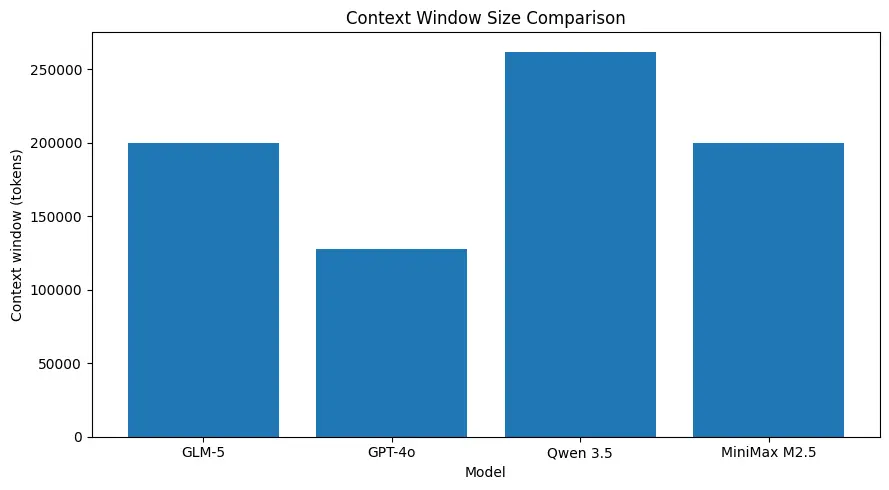
GLM-5 supports very large context sizes (on the order of ~200k tokens in published model specs), letting you keep more of a session in one request and reducing the need for aggressive chunking or external memory for many use cases. (See comparison chart below.)
Strong coding performance for system-level tasks
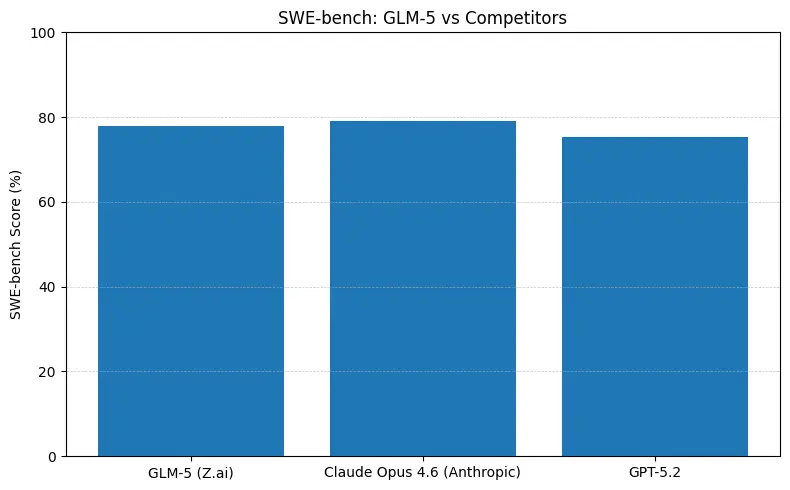
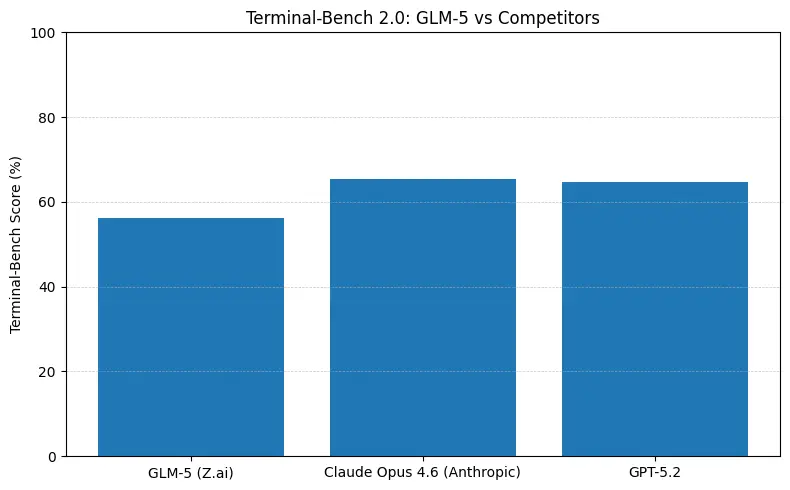
GLM-5 reports top open-source performance on software engineering benchmarks (SWE-bench and applied code + agent suites). On SWE-bench-Verified it reports ~77.8%; on coding/terminal-style agent tests (Terminal-Bench 2.0) scores cluster in the mid-50s—evidence of practical coding ability approaching frontier proprietary models. These metrics mean GLM-5 is suitable for tasks like code generation, automated refactoring, multi-file reasoning, and CI/CD assistant scenarios.
Cost/efficiency tradeoffs
Because GLM-5 uses MoE and “sparse” attention innovations, it aims to reduce inference cost per unit of capability versus brute-force dense scaling. CometAPI provide competitive price points that make GLM-5 attractive for heavy-throughput agentic workloads.
How do I use the GLM-5 API via CometAPI?
Short answer: treat CometAPI like an OpenAI-compatible gateway — set your base URL and API key, pick glm-5 as the model, then call the chat/completions endpoint. CometAPI provides an OpenAI-style REST surface (endpoints like /v1/chat/completions) plus SDKs and sample projects that make migrating trivial.
Below is a practical, production-oriented cookbook: auth, basic chat call, streaming, function/tool calling, and cost/response handling.
The basic steps to access GLM-5 via CometAPI are:
- Sign up on CometAPI, obtain an API key.
- Find the exact model id for GLM-5 in CometAPI’s catalog (
"glm-5"depending on the listing). - Send an authenticated POST request to the CometAPI chat/completions endpoint (OpenAI-style).
Base details (CometAPI patterns): the platform supports OpenAI-style paths like https://api.cometapi.com/v1/chat/completions, Bearer authentication, model parameter, system/user messages, streaming, and both curl/python examples in docs.
Example: quick Python (requests) chat completion with GLM-5
# Python requests example (blocking)import osimport requestsimport jsonCOMET_KEY = os.getenv("COMETAPI_KEY") # store your key securelyURL = "https://api.cometapi.com/v1/chat/completions"payload = { "model": "zhipuai/glm-5", # CometAPI model identifier for GLM-5 "messages": [ {"role": "system", "content": "You are a helpful devops assistant."}, {"role": "user", "content": "Create a bash script to backup /etc daily and keep 30 days."} ], "max_tokens": 800, "temperature": 0.0}headers = { "Authorization": f"Bearer {COMET_KEY}", "Content-Type": "application/json"}resp = requests.post(URL, headers=headers, json=payload, timeout=60)resp.raise_for_status()data = resp.json()print(data["choices"][0]["message"]["content"])
Example: curl
curl -X POST "https://api.cometapi.com/v1/chat/completions" \ -H "Authorization: Bearer $COMETAPI_KEY" \ -H "Content-Type: application/json" \ -d '{ "model": "zhipuai/glm-5", "messages": [{"role":"user","content":"Summarize the following architecture doc..." }], "max_tokens": 600 }'
Streaming responses (practical pattern)
CometAPI supports OpenAI-style streaming (SSE / chunked). The simplest approach in Python is to request "stream": true and iterate over the response data as it arrives. This is important when you need low-latency partial output (build real-time dev assistants, streaming UIs).
# Streaming (requests)import requests, osurl = "https://api.cometapi.com/v1/chat/completions"headers = {"Authorization": f"Bearer {os.environ['COMETAPI_KEY']}"}payload = { "model": "zhipuai/glm-5", "messages": [{"role":"user","content":"Write a test scaffold for the following function..."}], "stream": True, "temperature": 0.1}with requests.post(url, headers=headers, json=payload, stream=True) as r: r.raise_for_status() for chunk in r.iter_lines(decode_unicode=True): if chunk: # Each line is a JSON chunk (OpenAI-compatible). Parse carefully. print(chunk)
Reference: OpenAI-style streaming and CometAPI compatibility docs.
Function / tool calling (how to call an external tool)
GLM-5 supports function or tool calling patterns that are compatible with OpenAI / aggregator conventions (the gateway passes structured function calls in the model response). Example use-case: ask GLM-5 to call a local “run_tests” tool; the model returns a structured instruction you can parse and execute.
# Example request fragment (pseudo-JSON){ "model": "zhipuai/glm-5", "messages": [ {"role":"system","content":"You can call the 'run_tests' tool to run unit tests."}, {"role":"user","content":"Run tests for repo X and summarize failures."} ], "functions": [ {"name":"run_tests","description":"Run pytest in the repo root","parameters": {"type":"object", "properties":{"path":{"type":"string"}}}} ], "function_call": "auto"}
When the model returns a function_call payload, execute the tool server side, then feed the tool result back as a message with role "tool" and resume the conversation. This pattern enables safe tool invocation and stateful agent flows. See CometAPI’s docs and examples for concrete SDK helpers.
Practical parameters & tuning
function_call: use to enable structured tool invocation and safer execution flows.
temperature: 0–0.3 for deterministic system-level outputs (code, infra), higher for ideation.
max_tokens: set for expected output length; GLM-5 supports very long outputs when hosted (vendor limits vary).
top_p / nucleus sampling: useful to cap unlikely tails.
stream: true for interactive UIs.
GLM-5 compare to Anthropic's Claude Opus and other frontier models
Short answer: GLM-5 closes the gap with frontier closed models in agentic and coding benchmarks while offering open-weights deployment and often better cost per token when hosted by aggregators. The nuance: on some absolute coding benchmarks (SWE-bench, Terminal-Bench variants) Anthropic’s Claude Opus (4.5/4.6) still leads by a few points in many published leaderboards — but GLM-5 is highly competitive and outperforms many other open models.
What the numbers mean in practice
- SWE-bench (~code correctness / engineering): Claude Opus shows marginal lead (≈79% vs GLM-5 ≈77.8%) on published leaderboards; for many real tasks that gap will translate to fewer manual edits, but not necessarily to a different architecture choice for prototyping or scaled agentic workflows.
- Terminal-Bench (command-line agentic tasks): Opus 4.6 leads (≈65.4% vs GLM-5 ≈56.2%) — if you need robust terminal automation and highest reliability on out-of-distribution shell ops, Opus is often better at the margin.
- Agentic and long-horizon: GLM-5 performs extremely well on long-horizon business simulations (Vending-Bench 2 balance $4,432 reported) and shows strong planning coherence for multi-step workflows. If your product is a long-running agent (finance, ops), GLM-5 is strong.
How do I design prompts and systems to get reliable GLM-5 outputs?
System messages & explicit constraints
Give GLM-5 a strict role and constraints, especially for code or tool-calling tasks. Example:
{"role":"system","content":"You are GLM-5, an expert engineer. Return concise, tested Python code that follows PEP8 and includes unit tests."}
Ask for tests and short reasoning for each nontrivial change.
Decompose complex tasks
Instead of “write the full product,” ask for:
- design outline,
- interface signatures,
- implementation and tests,
- final integration script.
This stepwise decomposition reduces hallucination and gives deterministic checkpoints you can validate.
Use low temperature for deterministic code
When asking for code, set temperature = 0–0.2 and max_tokens to a safe upper bound. For creative writing or design brainstorming, raise temperature.
Best practices when integrating GLM-5 (via CometAPI or direct hosts)
Prompt engineering & system prompts
- Use explicit system instructions that define agent roles, tool access policies, and safety constraints. Example: “You are a system architect: only propose changes when unit tests pass locally; list exact CLI commands to run.”
- For coding tasks, provide repository context (file lists, key code snippets) and attach unit-test outputs if available. GLM-5’s long-context handling helps — but always keep essential context first (role, task) then supporting artifacts.
Session & state management
- Use session IDs for long agent conversations and keep a compacted “memory” of prior steps (summaries) to prevent context bloat. CometAPI and similar gateways provide session/state helpers — but application-level state compaction is essential for long-running agents.
Tooling & function calls (safety + reliability)
- Expose a narrow, auditable set of tools. Do not allow arbitrary shell execution without human oversight. Use structured function definitions and validate their arguments server-side.
- Always log tool calls and model responses for traceability and post-mortem debugging.
Cost control & batching
- For high-volume agents, route background processing to cheaper model variants when quality tradeoffs are acceptable (CometAPI lets you switch models by name). Batch similar requests and reduce
max_tokenswhere possible. Monitor input vs output token ratio — output tokens are often more expensive.
Latency & throughput engineering
- Use streaming for interactive sessions. For background agent jobs, prefer async runtimes, worker queues, and rate-limiters. If you self-host (open weights), tune your accelerator topology to the MoE architecture — FPGA / Ascend / specialized silicon options may yield cost wins.
Closing notes
GLM-5 represents a practical, open-weight step toward agentic engineering: large context windows, planning capabilities, and strong code performance make it attractive for developer tools, agent orchestration, and system-level automation. Use CometAPI for quick integration or a cloud model garden for managed hosting; always validate on your workload and instrument heavily for cost and hallucination controls.
Developers can access GLM-5 via CometAPI now.To begin, explore the model’s capabilities in the Playground and consult the API guide for detailed instructions. Before accessing, please make sure you have logged in to CometAPI and obtained the API key. CometAPI offer a price far lower than the official price to help you integrate.
Ready to Go?→ Sign up fo M2.5 today !
If you want to know more tips, guides and news on AI follow us on VK, X and Discord!