
In 2026, AI is no longer a standalone tool—it's the engine driving automated business processes. Platforms like Make.com (formerly Integromat) empower users to build complex visual workflows connecting thousands of apps, while AI models handle intelligent decision-making, content generation, data analysis, and more.
However, integrating dozens of AI providers (OpenAI, Anthropic, Google, xAI, etc.) means managing multiple API keys, billing accounts, rate limits, and inconsistent SDKs. This creates friction, vendor lock-in, and higher costs.
CometAPI solves this by offering unified access to 500+ cutting-edge AI models through a single OpenAI-compatible API endpoint. Users get one key, one dashboard for billing and analytics, real-time model access, and typical savings of 20-40% compared to direct provider pricing.
Pairing Make with CometAPI creates a powerful no-code/low-code solution for AI-powered automations. Whether you're generating content, classifying support tickets, building AI agents, or creating multimodal workflows (text, image, video), this integration delivers speed, flexibility, and scalability.
Make's CometAPI integration includes dedicated modules: Create a Chat (with fallback models), Create an API Call (arbitrary authorized requests), and List Models.
What is Make? Why It's Ideal for AI Automations
Make.com is a visual workflow automation platform supporting 3,000+ pre-built app integrations. It excels at:
- Drag-and-drop scenario builder with routers, iterators, filters, and error handlers.
- Native support for webhooks, scheduling, data parsing, and JSON mapping.
- Built-in AI tools and agents (next-gen agents with multimodal support announced in 2026).
- Enterprise features: SSO, audit logs, team collaboration.
Why Use CometAPI with Make
Users consolidate traffic (LLM + images) for savings. Developers praise support and pricing transparency. Integration is verified and maintained by CometAPI on Make.
For no-code developers, the traditional method of building AI workflows involves installing separate modules for OpenAI, Anthropic, and Google. This creates "vendor sprawl," where you must monitor multiple billing dashboards and manage separate API credits. Using CometAPI with Make simplifies this architecture by providing one single connection that grants access to over 500 models. Instead of switching modules when you want to move from GPT to Claude, you simply change a text field in your configuration.
Cost efficiency is another primary driver for this integration. CometAPI utilizes institutional bulk purchasing power to set prices permanently 20% to 40% below official vendor rates. In high-volume production environments—such as a Make scenario that processes thousands of customer emails daily—these savings can translate into hundreds of dollars of reclaimed margin every month. Furthermore, CometAPI provides a 99.9% Service Availability SLA, ensuring that if a specific provider like OpenAI experiences a regional outage, your Make scenario remains operational through intelligent multi-region routing.
Prerequisites
To follow this guide, you will need the following:
- A Make account (Works on all plans, including Free and Pro).
- A CometAPI account (Registration includes free trial credits with no credit card required).
- An active CometAPI API Key from your personal dashboard.
Step-by-Step Setup Guide
Step 1: Get Your CometAPI API Key
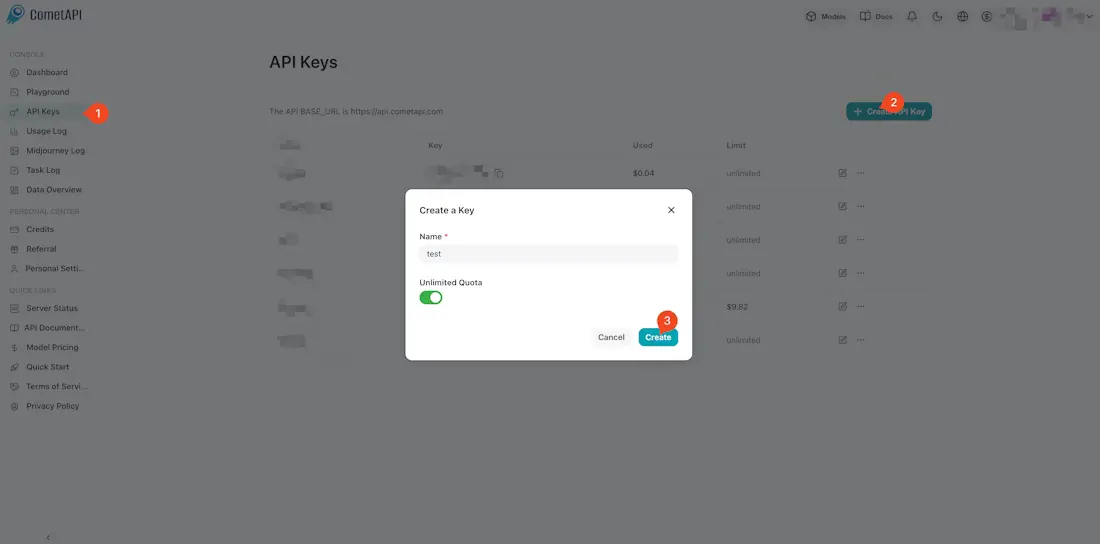
First, log in to your CometAPI dashboard. Navigate to the API Token section and click the Add API Key button. This will generate a unique key (formatted as sk-xxxx) that acts as your "master key" for all 500+ models. Copy this key and keep it secure. Note the unified Base URL provided in the documentation: https://api.cometapi.com/v1.
Step 2: Create a New Scenario in Make
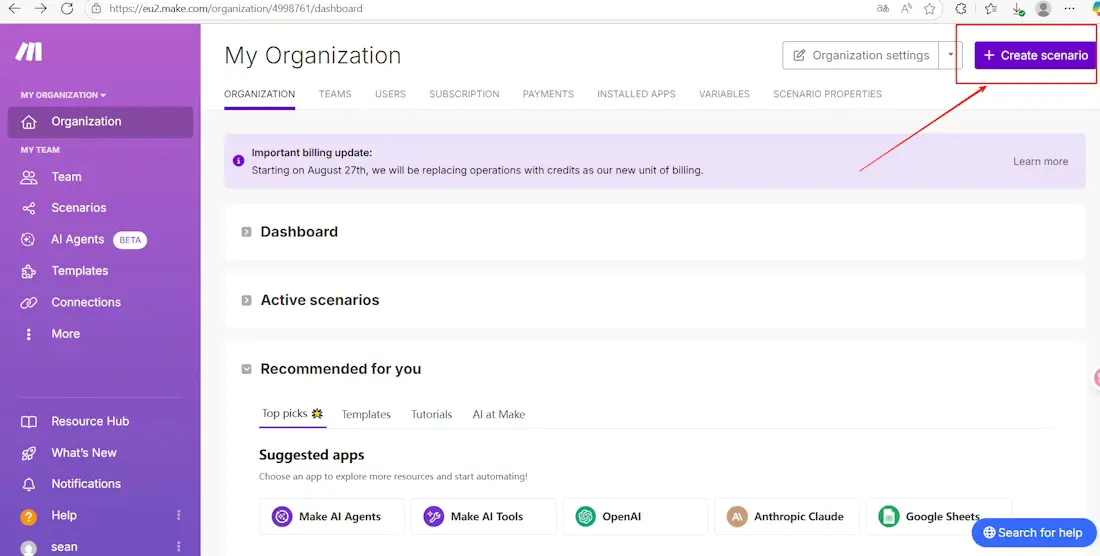
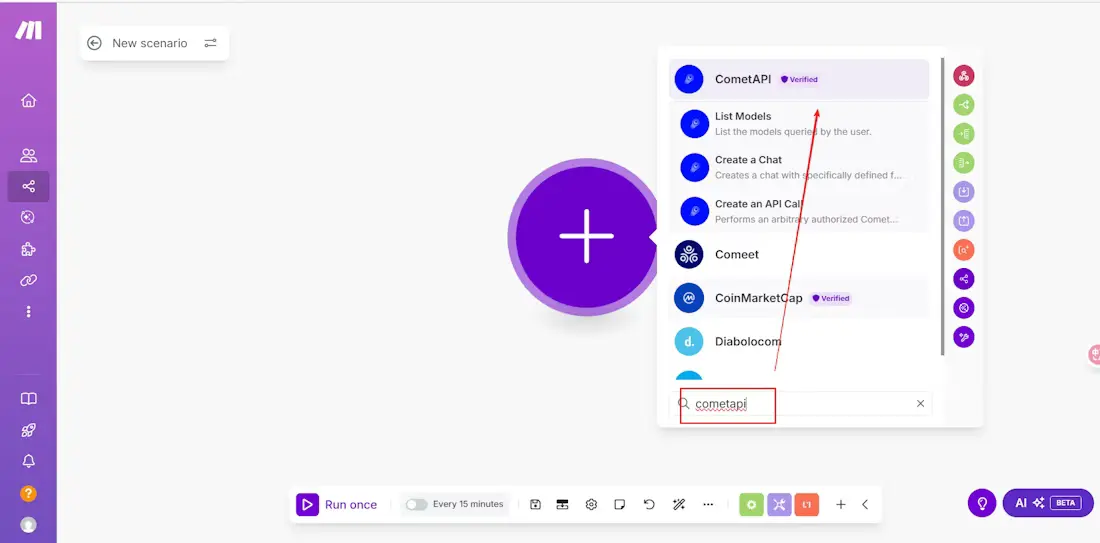
Log in to your Make account and click Create a new scenario. In the scenario editor, click the large plus icon to add your first module. Search for CometAPI in the search bar. You will see the official CometAPI module listed; select it to see the available actions. For most workflows, you will use the Make an API Call action.
Step 3: Connect Your CometAPI Account
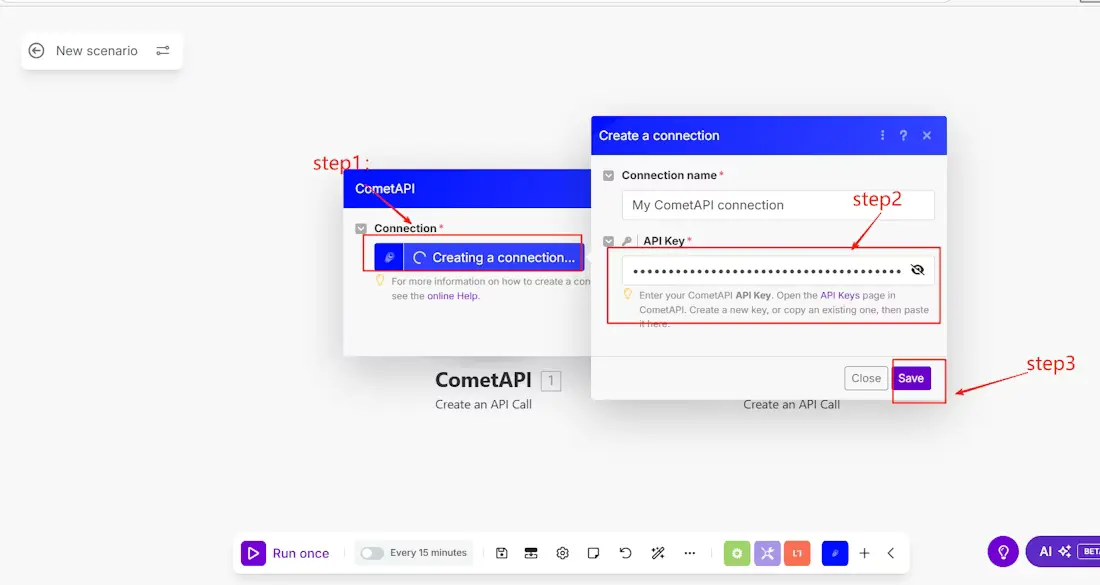
After selecting the action, a configuration window will appear. Click the Add button next to the Connection field. In the "API Key" field, paste the secret key you copied from the CometAPI dashboard in Step 1. Give your connection a descriptive name, such as "My Production CometAPI," and click Save. This connection is now authorized to call any model in the catalog.
Step 4: Configure the API Call
Example using Create a Chat:
- Choose model (e.g.,
claude-opus-4-7orgpt-5-4-pro). - Set messages, temperature, max_tokens, etc.
- Add fallback models for resilience.
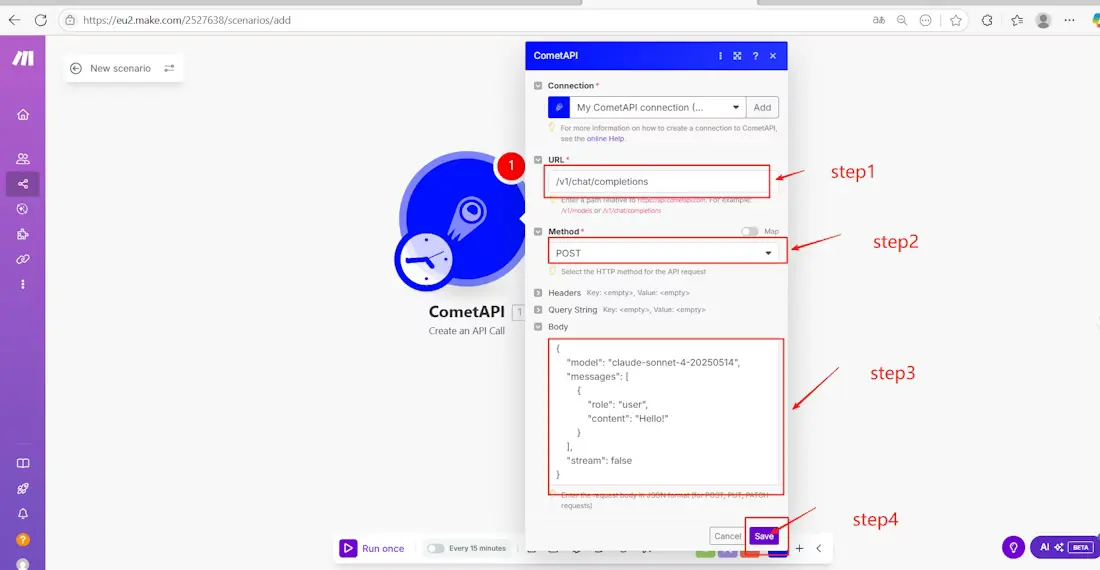
Now you must define which model you want to use and what data you want to send.
For text tasks, set the URL to /v1/chat/completions and the Method to POST. In the Body field, use the following JSON structure:
{ "model": "gpt-5.5", "messages": [ { "role": "user", "content": "{{1.text}}" } ], "stream": false}
The {{1.text}} syntax is standard Make mapping. You can replace this by clicking into the field and selecting a variable from a previous module (like a Gmail message or a Google Sheet cell). If you want to generate images, change the URL to /v1/images/generations and use the image-specific body format.
Step 5: Test and Publish
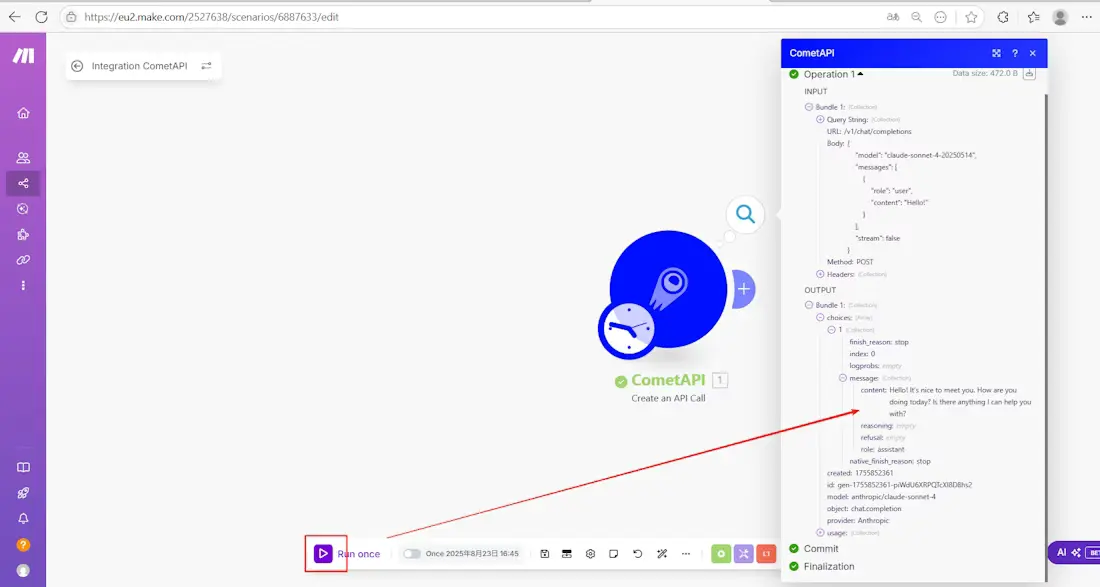
Click the Run once button at the bottom of the scenario editor. Make will execute the scenario and send your request to CometAPI. Once finished, click the bubble above the CometAPI module to inspect the output. You should see a successful 200 OK response with the AI-generated text or image URL. If everything looks correct, toggle the Scheduling switch to "On" to activate your automation.
Which Models Can You Use
The versatility of a unified API means you can use the best tool for every specific task in your Make no-code AI workflow.
| Model Category | Example Model ID | Best Make Scenario Use Case |
|---|---|---|
| Logic & Reasoning | claude-opus-4-7 | Analyzing complex legal contracts or multi-step support tickets. |
| Coding & Data | deepseek-v4-pro | Writing SQL queries or refactoring code snippets from Airtable. |
| Efficient Chat | gpt-5.5 | Daily conversational assistants and email drafting. |
| Image Creation | flux-2-max | Creating high-fidelity marketing banners and product mockups. |
| Video Automation | sora-2 | Turning social media posts into short cinematic clips with audio. |
Ready-to-Use Make Scenario Templates
Template 1: Customer Support Auto-Reply
This workflow reduces human response time for common inquiries while escalating complex issues.
- Trigger: A Gmail or Typeform module detects a new customer message.
- Processing: Use Claude Opus 4.7 via the CometAPI module to analyze the message. This model is chosen for its superior context window and low hallucination rate.
- Router: Use a Router module to check the AI's "Sentiment" or "Urgency" output.
- Branch A: If the issue is simple, the scenario sends an Automated Reply via Gmail.
- Branch B: If the issue is a high-priority bug, the scenario sends a Slack notification to the engineering team.
- Parameters: Set the body to request a JSON response containing
{"category": "bug", "urgency": 10}for easy filtering.
Template 2: Content Repurposing Pipeline
This template allows you to scale your social media presence across multiple languages with extreme cost efficiency.
- Trigger: A new row is added to Google Sheets containing a blog post URL.
- Action 1: An HTTP module scrapes the text from the URL.
- Processing 1: Use GPT 5.5 to generate a high-quality 200-word summary in English.
- Processing 2: Send that summary to DeepSeek V3 to translate it into Chinese and generate SEO keywords.
- Why Two Models?: DeepSeek is used for the translation step because it is significantly cheaper ($0.216/M tokens vs $4/M for GPT 5.5), allowing you to optimize your per-run costs.
- Output: Post the results to a Buffer or Notion module.
Template 3: Image Generation Automation
Automate your e-commerce design process by turning product descriptions into visual assets.
- Trigger: A new record is created in Airtable with a product name and "Design Brief."
- Action: Use the CometAPI module with the
/v1/images/generationsendpoint and the Flux 2 Max model. - JSON Body:
{ "model": "flux-2-max", "prompt": "E-commerce product shot of {{1.Product_Name}}, {{1.Brief}}, photorealistic, 4k", "n": 1, "size": "1024x1024"}
- Storage: Use an Airtable Update Record module to save the resulting image URL back into a checkbox field for review.
Comparison Table: CometAPI + Make vs. Alternatives
| Aspect | CometAPI + Make | Direct Provider + Make | Other Aggregators (e.g., OpenRouter) | Zapier + Single Provider |
|---|---|---|---|---|
| # Models | 500+ unified | Limited per provider | Many, but variable | Fewer |
| Setup Complexity | Low (pre-built modules) | Medium (multiple connections) | Medium | Medium |
| Cost Savings | 20-40% + unified billing | None | Varies | None |
| Fallbacks & Routing | Native in modules | Manual | Some | Limited |
| Observability | Excellent (unified dashboard) | Fragmented | Good | Basic |
| Multimodal | Full support | Per provider | Good | Varies |
| No-Code Ease | Highest | Medium | Medium | High |
| Vendor Lock-in | None | High | Low | High |
Cost Optimization Tips for Make + CometAPI
To get the most out of your automation budget, implement these three strategies:
- DeepSeek Routing: For classification or simple data extraction tasks, route your traffic to DeepSeek V4 Flash. This model offers a 1M-token context window but costs 90% less than flagship models. By using DeepSeek for the "dirty work" of your scenario and reserving GPT or Claude for the final "polished" output, you can reduce your total scenario cost by over 60%.
- Make Filter Modules: Always use a Filter module before your CometAPI call. If a field is empty or does not meet specific criteria, the filter will stop the scenario, preventing unnecessary API calls and saving you "Operations" in Make as well as tokens in CometAPI.
- Aggregator Batching: If your scenario processes many records at once, use the Array Aggregator module to combine them into a single list, then send them to CometAPI in one large prompt. This reduces the number of separate API requests, which helps you stay within rate limits and simplifies your usage logs in the dashboard.
Pricing Insights and ROI Calculation
CometAPI: Pay-as-you-go, credits roll over, volume discounts. Examples show significant savings vs. official rates.
Make: Starts low (e.g., ~$9/mo for operations). Combined, ideal for high-ROI automations (time saved >> subscription).
Example ROI: Automate content for 10x output at fraction of manual cost; support triage reduces tickets by 50%+.
Troubleshooting Common Issues
401 Unauthorized Error
This error nearly always points to an issue with your API Key. Double-check that you have not added an extra space at the beginning or end of the key when pasting it into Make. Also, ensure your CometAPI account has a positive credit balance; although signup is free, you must have active credits to make calls beyond the trial.
422 Unprocessable Entity
If you receive a 422 error, check your JSON formatting in the body field. Ensure every opening brace { has a corresponding closing brace } and that you are using straight quotes " rather than "curly" quotes. Additionally, verify that the model name you entered matches the official identifier in the CometAPI model catalog exactly (e.g., gpt-5.5 instead of GPT 5.5).
Scenario Timeouts
Some advanced reasoning models take longer to generate a response. If your Make scenario times out, first ensure that "stream": false is set in your JSON body, as Make does not support raw stream processing in its standard API call module. If the error persists, consider switching to a "Flash" tier model like Gemini 3.1 Flash-Lite or DeepSeek V4 Flash, which are optimized for sub-second responses.
Future-Proofing Your AI Stack with CometAPI on Make
As AI evolves (new models weekly in 2026), this integration lets you adopt instantly without refactoring. Combine with Make Grid, AI Agents, and CometAPI's continuous updates for a robust, scalable system.
CometAPI Recommendation: Start with free credits on CometAPI. Use the playground to test models, then refer to guide and build your first Make scenario. For high volume, explore enterprise options for custom SLAs and dedicated support.
Conclusion
Integrating Make with CometAPI unlocks the full potential of no-code AI automations with unparalleled model choice, cost efficiency, and simplicity. One integration gives access to the entire AI ecosystem—saving time, money, and engineering effort while delivering production-grade reliability.
Ready to get started?
- Sign up for CometAPI (free credits) → CometAPI
- Build your first scenario on Make.com
- Explore more templates and guides on both platforms.
This powerful combo positions your workflows for 2026 and beyond. Experiment, iterate, and scale confidently.
FAQ
Q: Is there an official CometAPI module in Make?
A: Yes. You can find it by searching for "CometAPI" in the module selector. It provides a standardized way to call any model in the catalog without writing custom code.
Q: Can I use multiple different models in a single Make scenario?
A: Absolutely. You can add as many CometAPI modules as you need to a single workflow. For example, you can use one module for text analysis and another for image generation within the same automation path.
Q: Is the CometAPI integration compatible with the Make Free plan?
A: Yes. As long as you have your API key and are using the "Make an API Call" action, it will function perfectly on the Free tier.
Q: How does this integration compare to the native OpenAI module in Make?
A: While the native OpenAI module is restricted to OpenAI models, CometAPI gives you access to 500+ models from all providers (OpenAI, Google, Anthropic, etc.) using the exact same connection, plus a 20-40% cost saving.
Q: Does the integration support image generation?
A: Yes. You can call the /v1/images/generations endpoint to access models like GPT Image 2, Flux 2 Max, and Nano Banana 2 directly from Make.