
In 2026, generating high-quality AI images has never been more accessible or powerful. Whether you're a blogger creating visuals for posts, a marketer designing social media graphics, a developer building apps, or a hobbyist exploring creativity, free (or nearly free) tools now deliver professional-grade results. Tools like ChatGPT's Images 2.0 (often called GPT Image 2), Google's Nano Banana 2, and Flux 2 variants lead the pack, offering photorealism, accurate text rendering, and fast generation without upfront costs.
CometAPI offers a free API key plus test credits and integrates with most of the best AI image model APIs on the market, such as Nano Banana 2, GPT Image 2, Flux 2 etc.
Why AI Image Generation Matters in 2026
AI image tools have evolved rapidly. OpenAI's ChatGPT Images 2.0 (launched with upgrades in late 2025) improved text rendering and multilingual support. Google's Nano Banana 2 (Gemini-based) emphasizes speed and 4K output. Black Forest Labs' Flux models (including Flux 2 variants) excel in prompt adherence and photorealism.
Data supports the boom: Platforms report millions of daily generations, with free tiers handling 2–unlimited images depending on the tool. Free users on ChatGPT generate 2–3 images per 24-hour rolling window with DALL·E 3 / Images 2.0 capabilities. Gemini/Nano Banana 2 offers limited free access (often 10–20+ daily via Gemini). Flux powers many no-signup or credit-based free hosts.
For businesses and developers, free tiers suffice for testing, but scaling requires APIs. That's where unified platforms shine for cost efficiency.
Key Benefits of Free AI Image Generation:
- Zero or low cost for prototyping.
- Rapid iteration (seconds per image).
- No design skills needed.
- Applications: Blog thumbnails, e-commerce mockups, social content, presentations.
Limitations include daily quotas, watermarks on some free outputs, and variable quality without optimized prompts.
Why “free” does not mean the same thing for every image model
There are three different “free” paths in AI image generation, and they are not interchangeable.
The first path is a free consumer tier, such as ChatGPT Free. That is useful for quick experimentation, but it usually comes with rate limits and limited workflow control. OpenAI says Free tier users can create images in ChatGPT, but the tool has separate usage limits from text chat.
The second path is a free credit trial, such as Google Cloud’s $300 new-customer credit. That is better if you want a production-style API test without paying up front. The tradeoff is that you still need to create a cloud project and work inside cloud billing and IAM.
The third path is a free playground or local/open-weight model. FLUX.2 is the best fit here because Black Forest Labs offers a free playground and also ships FLUX.2 [klein] with open-weight options that can run locally. That is the most developer-friendly route when you want repeated experiments without depending on a consumer app quota.
Which Free AI Image Generator Should You Use?
1) GPT Image 2 for clean, publish-ready visuals
Use GPT Image 2 when the image must contain readable text, structured layout, or brand-sensitive details. OpenAI explicitly recommends gpt-image-2 for customer-facing assets, photorealistic generation, editing-heavy workflows, brand-sensitive creative, and text-in-image work. The same guide also notes that it supports high-quality rendering, flexible quality/latency tradeoffs, and strong preservation of identity and layout across edits.
That makes GPT Image 2 a strong fit for blog headers, ad-style visuals, software mockups, and infographics where layout matters. GPT Image 2 can use broad world knowledge and supports both the Image API and the Responses API, which is helpful when building repeatable content workflows.
2) Nano Banana 2 for speed, facts, and infographics
Use Nano Banana 2 when the workflow depends on quick iteration, good text rendering, and visually grounded prompts. Google says the model uses real-time information and images from web search to render specific subjects more accurately, which is especially useful for infographics, localizations, and content that needs visual consistency across multiple elements. Google also says it can maintain character resemblance for up to five characters and preserve up to 14 objects in a single workflow.
That combination makes Nano Banana 2 particularly attractive for content teams that want fast social assets, diagram-style explainers, and multilingual images. For free usage, the key detail is Flow: Google says Flow users can access Nano Banana 2 for zero credits.
3) FLUX.2 for realism and multi-reference consistency
Use FLUX.2 when photorealism and reference consistency matter most. Black Forest Labs presents FLUX.2 as a production-grade image generation and editing model with 4MP photorealistic output and multi-reference control, while FLUX.2 [klein] is positioned as the fastest model family and can run locally on capable hardware.
This matters for product photography, character consistency, reference-based editing, and creative pipelines where you want one source image to anchor many variations. If your budget is zero but you already have a machine that can run the model, FLUX.2 [klein] is one of the most practical free routes.
The Best Free Path for Different Users
If you are a non-technical creator, the easiest free path is ChatGPT Images 2.0 because it is available on all ChatGPT plans. If you are a visual designer making infographics or social assets, Nano Banana 2 in Flow is the best zero-credit option to test first. If you are technical and want long-term cost control, FLUX.2 [klein] is the strongest open/free-playground route. If you need to compare multiple vendors without juggling accounts, CometAPI’s free API key and test credits make it easy to experiment.
How to Access These Tools for Free (Step-by-Step)
GPT Image 2 via ChatGPT:
- Go to chatgpt.com (free account).
- Type a prompt like "Generate an image of…".
- Free limit: 2–3/day. Upgrade to Plus for more.
- Tip: Use "thinking" or "reflection" modes on paid for better results.
Nano Banana 2 via Google Gemini:
- Visit gemini.google.com.
- Select image tools or type "Create image with Nano Banana 2".
- Free with Gemini account; higher limits on paid plans. Supports editing uploaded photos.
Flux 2:
- Free hosts: Search "free Flux AI image generator" (sites like genimg.ai, fluxpro.ai offer credits or Schnell mode).
- Local: Download Flux.1 Schnell (open weights) and run via ComfyUI or Automatic1111 web UI (requires GPU).
Aggregators like CometAPI let you test Flux alongside others with signup credits.
Tool Comparison: GPT Image 2 vs Nano Banana 2 vs Flux 2
Choosing the right model depends on your needs: ease of use, photorealism, text in images, speed, or free limits.
| Aspect | GPT Image 2 (ChatGPT / OpenAI) | Nano Banana 2 (Google Gemini) | Flux 2 (Black Forest Labs variants: Schnell/Dev/Pro) |
|---|---|---|---|
| Best For | Prompt understanding, complex instructions, editing | Speed, 4K output, Google ecosystem integration | Photorealism, anatomy accuracy, prompt adherence |
| Free Tier Limits | 2–3 images/day (rolling 24h); higher on Plus (~40–50/3h) | Limited free (10–20+ via Gemini); included in AI Plus (~$8–20/mo) | Varies by host: Unlimited local/self-hosted; 5–150 daily credits on platforms; many no-signup options |
| Image Quality | Excellent overall; strong text rendering & multilingual | High fidelity, fast "Flash" mode; good reasoning for edits | Top-tier photorealism; superior human anatomy & details |
| Speed | Fast on paid; moderate on free | Lightning-fast (Flash mode) | Schnell: Very fast; Pro: Balanced |
| Strengths | Natural language prompts; "thinking" mode for refinement | Native editing, world knowledge; 4K native | Open weights (local run); high detail without heavy prompting |
| Weaknesses | Strict safety filters; daily caps on free | Google account required; occasional over-detailing | Hosted free tiers may add watermarks/slower queues |
| Text Rendering | Very good (improved in 2.0) | Strong | Excellent in recent variants |
| API Access / Scaling | OpenAI API (pay-per-use) | Google Gemini API | Multiple providers; open-source base |
| Cost for Scale | ~$0.02–0.10+ per image (API) | Pay-per-use via Google | $0.01–0.05/image on APIs; free local |
Insights from Data:
- Free Volume Winner: Flux hosts (e.g., some no-signup sites or WaveSpeedAI-style aggregators) or Meta AI for near-unlimited casual use. ChatGPT free is restrictive but high-quality.
- Quality Leader: Flux 2 for realism; Nano Banana 2 for speed; GPT Image 2 for instruction-following.
- User Reports (2026): In side-by-side tests, Flux excels in technical precision, Nano Banana in quick iterations, GPT in coherent storytelling via images.
- Commercial use: Check terms—many free tiers allow personal use; paid unlocks rights.
Verdict: Start with free web interfaces. For developers or high volume, use APIs. CometAPI aggregates models (including GPT Image variants, Flux access points) with ~20% savings on official rates, transparent per-image pricing, and unified endpoints—ideal for switching models without multiple accounts.
Prompt writing: how to get better images with fewer retries
The best prompts are not long; they are precise. A strong image prompt usually includes five parts: subject, composition, style, lighting, and constraints. For example: “A minimalist hero image of a developer desk, top-down view, soft daylight, white and blue palette, no extra text, 16:9.” That gives the model enough structure to make a good first pass without turning the prompt into a novel.
A useful template is:
Subject + scene + style + camera/composition + lighting + aspect ratio + output constraint
For example:
“Create a photorealistic hero banner of a startup founder editing an AI image on a laptop in a bright studio, modern editorial style, shallow depth of field, warm daylight, 16:9, clean composition, no watermarks, room for headline text.”
That template works because it maps cleanly to what each model is good at. GPT Image 2 is strong when you care about clean layout and faithful editing, Nano Banana 2 is strong when the prompt requires fast iteration or text rendering, and FLUX.2 is strong when you care about multi-reference consistency and photo realism.
Prompt template you can reuse
Subject: [what should appear]Scene: [where it happens]Style: [photorealistic / editorial / flat illustration / 3D / anime]Composition: [wide / close-up / centered / negative space / aspect ratio]Details: [lighting, materials, mood, color palette]Constraints: [no watermark, no extra text, preserve logo, clean background]Use case: [blog hero / social post / infographic / product ad]
3 prompt examples for a blog about free AI image generation
Hero image
Create a 16:9 editorial hero image for a blog post about generating AI images for free. A modern creator desk, laptop open with subtle glowing AI interface elements, clean room, warm daylight, premium commercial style, lots of empty space for headline text, no watermark, no extra text.
Comparison graphic
Design a clean comparison infographic for GPT Image 2, Nano Banana 2, and FLUX.2. Three columns, minimal icons, clear labels, white background, blue accent lines, high readability, no watermark, no extra text.
Social banner
Create a bold vertical social banner about free AI image generation. High-contrast modern style, abstract shapes, large title area, sharp typography, simple layout, no clutter, no watermark.
Actual Image Output Compare
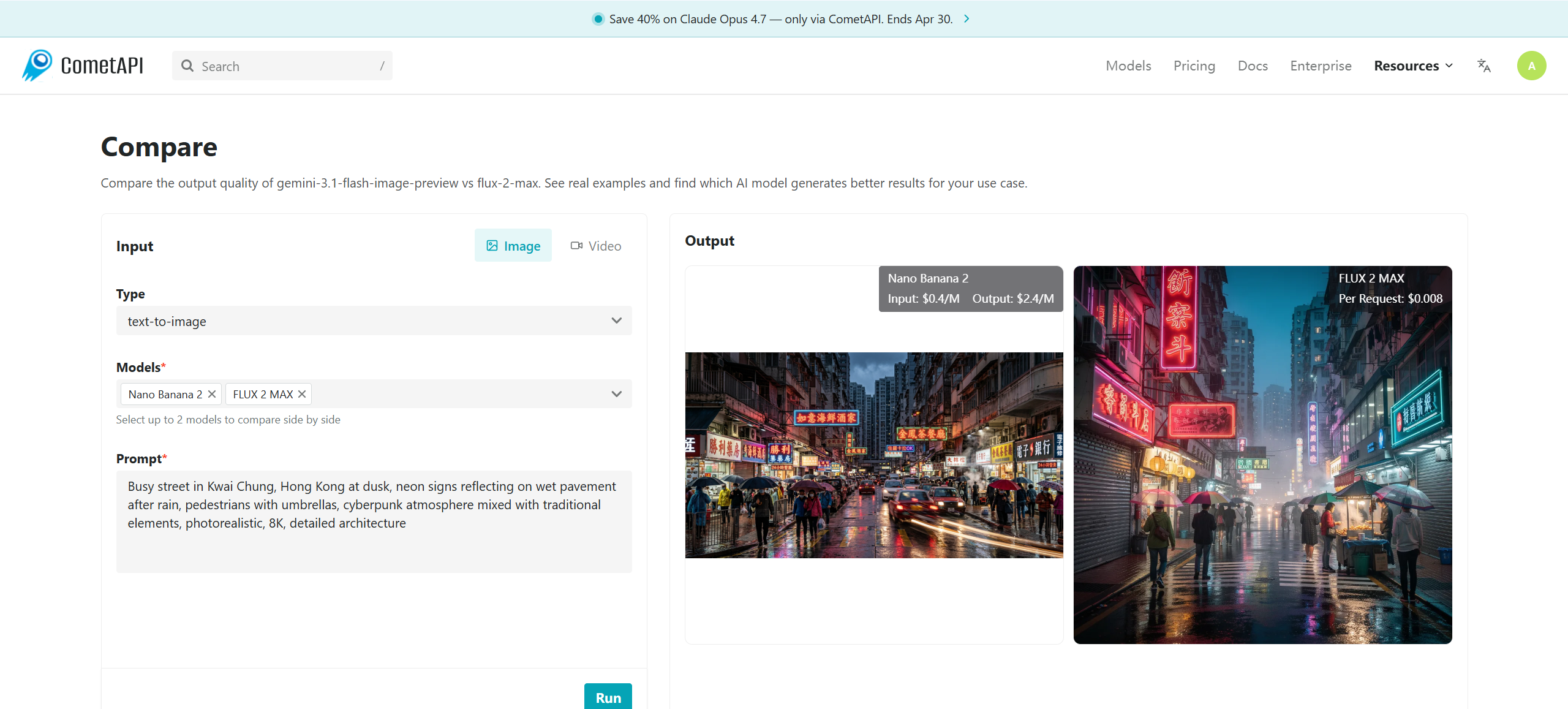
Realistic Urban Scene (Tested Prompt)
Prompt: "Busy street in Kwai Chung, Hong Kong at dusk, neon signs reflecting on wet pavement after rain, pedestrians with umbrellas, cyberpunk atmosphere mixed with traditional elements, photorealistic, 8K, detailed architecture."
- GPT Image 2: Strong narrative coherence; good text on signs.
- Nano Banana 2: Fast; excellent lighting and speed.
- Flux 2: Superior reflections and anatomy of people; most photorealistic.
Example 2: Abstract Art
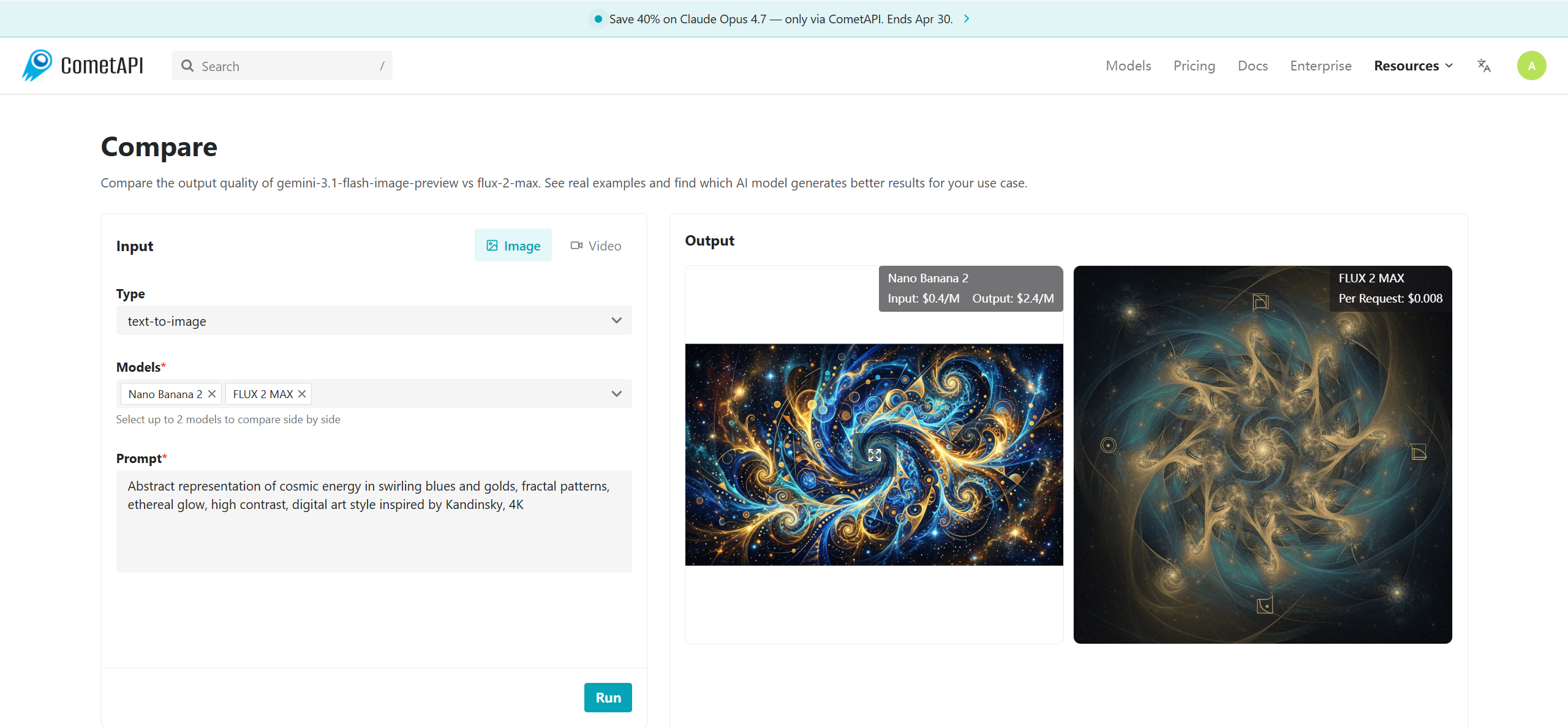
Prompt: "Abstract representation of cosmic energy in swirling blues and golds, fractal patterns, ethereal glow, high contrast, digital art style inspired by Kandinsky, 4K."
Flux often wins for intricate details; Nano Banana for vibrant colors.
Real-World Outputs (2026 Benchmarks): In aggregated tests (e.g., same prompt across tools), Flux scores highest on realism metrics, GPT on prompt fidelity, Nano Banana on speed/versatility. Users report 80–90% satisfaction when using structured prompts vs. 50% with basic ones.
For visual demonstration, generate these in your chosen tool and compare side-by-side with CometAPI Comparison tools .
With CometAPI (Recommended for Savings & Multi-Model): CometAPI provides a unified endpoint with 20%+ discounts. Swap models easily (e.g., Flux, GPT variants). Ideal for batch generation without hitting free limits.
Conclusion: Start Generating Today
If your goal is simply to start generating AI images for free today, the easiest path is ChatGPT Images 2.0 because OpenAI now makes it available on all ChatGPT plans. If you care most about fast experimentation and strong infographic-style results, Nano Banana 2 is a standout, especially because Google offers it in Flow for zero credits and exposes it in the Gemini ecosystem. If realism and reference control matter most, FLUX.2 is the strongest free-playground option. And if you want to build a reliable, vendor-flexible workflow around all of them, CometAPI is the most practical API-layer recommendation because it gives you one key, one integration, and access to 500+ models.
For seamless scaling, explore CometAPI—it unifies access to these models (and hundreds more) with competitive pricing, savings, and developer-friendly features, helping you focus on creativity rather than infrastructure.