
In 2026, autonomous AI agents have moved beyond simple chatbots into persistent, learning systems that remember your projects, create their own skills, and operate 24/7 across CLI, Telegram, Discord, and more. Hermes Agent, the open-source self-improving agent from Nous Research, stands out as one of the most capable options—especially when powered by CometAPI’s unified OpenAI-compatible endpoint.
Whether you’re a developer automating workflows, a researcher building long-term agents, or a business scaling AI operations, this tutorial delivers everything you need to launch a truly personal AI that grows smarter with every task.
What Is Hermes Agent?
Hermes Agent is an open-source (MIT-licensed), self-hostable AI agent built by Nous Research—the team behind the Hermes model family. Unlike traditional agents that reset after every session, Hermes features a built-in learning loop that:
- Creates reusable skills (Markdown documents) from successful task completions
- Refines those skills over time through self-evaluation
- Maintains persistent cross-session memory (MEMORY.md, USER.md, and full-text searchable history)
- Builds a deepening model of you—your preferences, projects, and workflows
- Supports 40+ built-in tools (web search, browser automation, code execution, file operations, vision, TTS/STT, cron scheduling, sub-agents)
- Runs anywhere: $5 VPS, Docker, cloud VM, even Termux on Android
- Connects via CLI, Telegram, Discord, Slack, WhatsApp, and more
Key differentiator: Hermes is agent-first. Its architecture centers on a repeatable “do → learn → improve” cycle rather than a central gateway controller. As of April 2026, version 0.9.0 introduced a polished local web dashboard, Fast Mode, background monitoring, Android Termux support, and major security hardening.
GitHub stars have grown rapidly (over 22,000 reported in early community discussions), and usage on OpenRouter shows Hermes climbing to the #2 position among agent runtimes.
What Hermes Agent actually does
Hermes includes terminal access, file operations, web search, memory, skills, and messaging integrations, it can work across CLI and platforms such as Telegram, Discord, Slack, WhatsApp, and more. That combination makes Hermes useful when you need an agent that can do real work instead of only generating text.
Why Integrate Hermes Agent with CometAPI?
CometAPI is a developer-first AI gateway that unifies 500+ models (OpenAI, Anthropic, Google, DeepSeek, Qwen, Llama, and many more) behind a single OpenAI-compatible endpoint: https://api.cometapi.com/v1.
Hermes already supports custom and OpenAI-compatible endpoints, including direct base_url routing and OPENAI_BASE_URL plus OPENAI_API_KEY for custom/main endpoint use. CometAPI, meanwhile, presents itself as OpenAI-compatible and publishes the same base URL pattern. Put together, the integration is straightforward: Hermes becomes the orchestration layer, and CometAPI becomes the model gateway.
The practical benefits are easy to see. You get model portability, because Hermes can keep its agent logic stable while CometAPI routes requests to different model families; you get operational simplicity, because one key and one endpoint can cover a broad set of tasks; and you can apply a cost-conscious strategy by assigning the best model to each job instead of standardizing everything on one vendor.
Why pair Hermes with CometAPI?
- Cost savings: Users report 20-40% lower pricing than OpenRouter or direct providers, with unified billing and no vendor lock-in.
- Model flexibility: Switch between 500+ models instantly—no code changes. Use
hermes modelto pick the best model for reasoning, speed, or cost. Hermes can focus on agent behavior, memory, and tooling, while CometAPI acts as the upstream model layer. - Low latency: Average <400ms response times, ideal for real-time agent loops.
- Single key, zero telemetry concerns: One
sk-key powers everything; CometAPI does not collect or store prompts for training. - Seamless Hermes compatibility: Hermes treats CometAPI as a standard OpenAI-compatible custom endpoint—zero custom adapters needed.
- Scalability & failover: Built-in routing and discounts at scale make it perfect for production agents running 24/7.
CometAPI as a “no-brainer” for cost-conscious Hermes users who previously relied on OpenRouter.
Environment and Prerequisites
Supported platforms (as of v0.9.0):
- Linux (Ubuntu, Debian, Fedora, etc.)
- macOS
- Windows via WSL2
- Android via Termux
Minimum requirements:
- 4 GB RAM (8 GB+ recommended for heavy tool use)
- 10 GB free disk space
- git installed (installer handles everything else)
- Internet connection for initial setup and model calls
CometAPI-specific prep:
- Sign up at https://www.cometapi.com/console/ and generate your API key (format: sk-...).
- Note your preferred models (e.g., claude-sonnet-4.6 etc.) from the model list.
No manual Python/Node.js installation required—the one-line installer uses uv and handles dependencies automatically.
Hermes Agent vs OpenClaw: Head-to-Head Comparison
Both are open-source agent runtimes, but they solve different problems.
| Feature | Hermes Agent | OpenClaw | Winner for Most Users |
|---|---|---|---|
| Self-improving skills loop | Built-in (auto-creates & refines) | Manual / limited | Hermes |
| Cross-session memory & user modeling | Deep (searches past convos) | Basic | Hermes |
| Setup complexity | Very low (one-line + wizard) | Moderate | Hermes |
| Tool ecosystem size | 40+ built-in + MCP | Larger community skills | OpenClaw |
| Multi-agent orchestration | Supported (sub-agents) | Native gateway focus | OpenClaw |
| Terminal execution options | 6 backends (local, Docker, SSH, Modal, Daytona, Singularity) | Primarily local/Docker | Hermes |
| Messaging platforms | 10+ (Telegram, Discord, etc.) | Strong multi-channel | Tie |
| Cost to run (with CometAPI) | $5-15/month VPS + inference | Similar | Tie |
| Learning curve | Opinionated & polished | More knobs | Hermes |
| Best for | Personal, long-term, learning agents | Enterprise, multi-agent platforms | Depends on use case |
Verdict:
- Choose Hermes + CometAPI if you want an agent that learns you over time. Many users now run both side-by-side.
- Self-improving loop maturity: Hermes now automatically persists knowledge, searches past conversations, and nudges itself to create skills—features OpenClaw still lacks natively.
Below is Step-by-Step Tutorial, How to Integrate Hermes Agent with CometAPI:
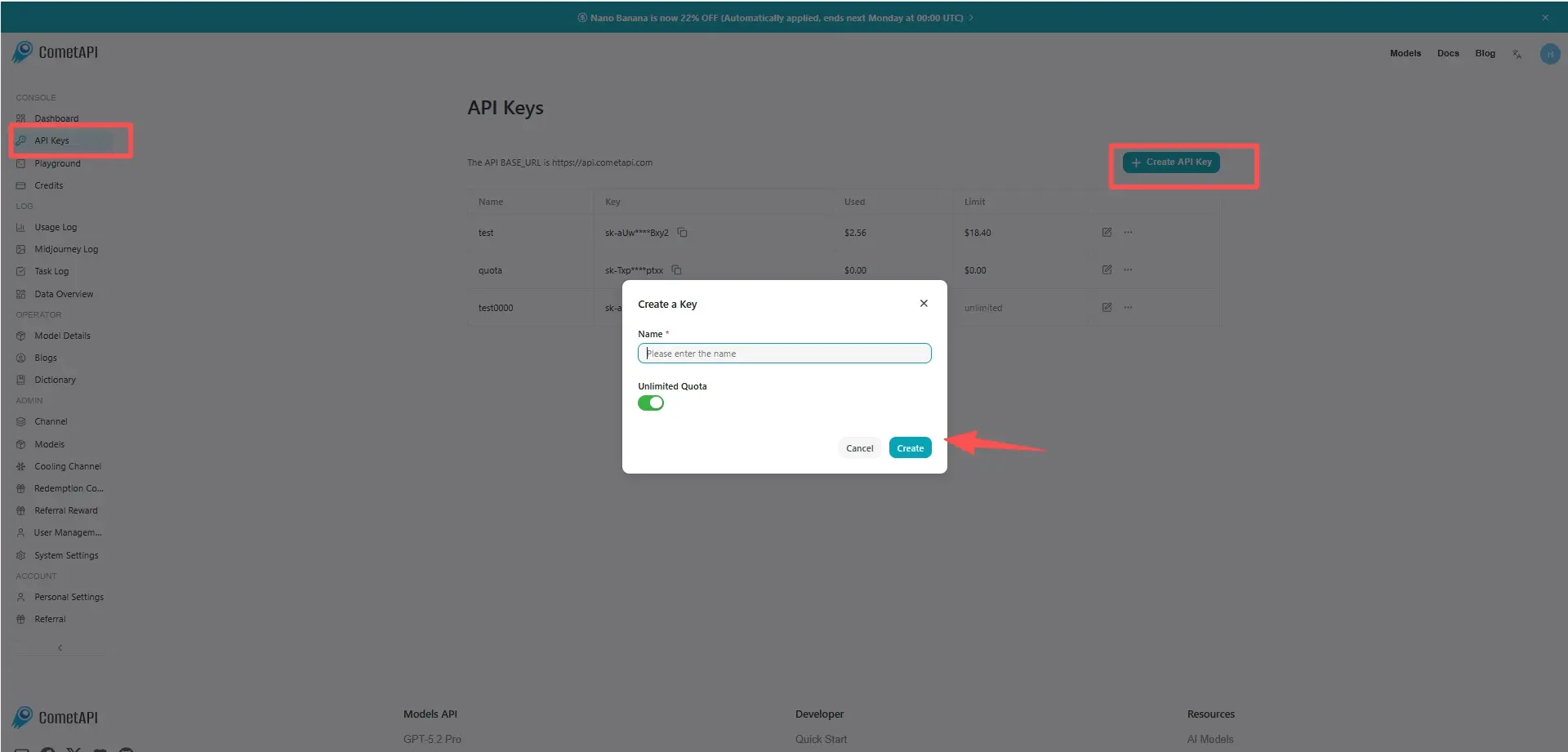
Step 1. Get Your CometAPI API Key
- Visit https://www.cometapi.com/console/ and sign up / log in.
- Navigate to API Keys → Create new key.
- Copy the sk-... key. Store it securely.
Pro tip: Start with CometAPI’s free tier or low-cost credits to test. Scale seamlessly as your agent grows.
Step 2. Install Hermes Agent
Open your terminal (Linux/macOS/WSL/Termux) and run:
Bash
curl -fsSL https://raw.githubusercontent.com/NousResearch/hermes-agent/main/scripts/install.sh | bash
If the current shell does not see the hermes command yet, reload the shell configuration:
source ~/.zshrc
# or
source ~/.bashrc
The installer:
- Detects your OS and installs Python 3.11+, Node.js 22, ripgrep, ffmpeg
- Clones the repo to ~/.hermes,, links the hermes command in ~/.local/bin, and may add ~/.local/bin to your shell PATH.
- Sets up virtual environment and global hermes command
- Launches the setup wizard
After completion, reload your shell:
Bash
source ~/.bashrc   # or source ~/.zshrc
Run hermes doctor to verify everything is healthy.
Step 3. Configure Hermes Agent with CometAPI
Option A: Interactive (recommended)
hermes model
- Select “Custom endpoint (self-hosted / VLLM / etc.)”
- Enter base URL:
https://api.cometapi.com/v1 - Paste your CometAPI API key
- Choose your default model (e.g.,
anthropic/claude-sonnet-4or any model ID from CometAPI’s list)
Option B: Manual config (for automation/scripts)
Edit ~/.hermes/config.yaml:
model:
  provider: custom
  default: anthropic/claude-sonnet-4   # or your preferred CometAPI model
  base_url: https://api.cometapi.com/v1
  api_key: ${COMETAPI_API_KEY}         # references .env
Open ~/.hermes/.env and add the following line:
OPENAI_API_KEY=<COMETAPI_KEY>
Hermes uses OPENAI_API_KEY as the auth fallback for custom OpenAI-compatible endpoints.
Save and run:
hermes config set model.base_url https://api.cometapi.com/v1
hermes config migrate
You can switch models anytime inside a session with /model custom:claude-opus-4 or run hermes model again.
Keep the API key in ~/.hermes/.env. Do not hardcode secrets in config.yaml.This setup configures the main chat model. Hermes can use separate auxiliary models for tasks such as vision or web extraction.
Step 4. Verification and First Chat
Check the configuration
The following commands confirm that Hermes can read the config and the API key:
hermes config check
hermes doctor
hermes status
If hermes config check reports missing options after an update, run hermes config migrate and check again.
Run a real chat test
Start the agent:
hermes
Type a test prompt:
Hello Hermes! Tell me about yourself and confirm you're using CometAPI.
Clean reinstall (optional)
If you are replacing an older Hermes install, use the built-in uninstaller first:
hermes uninstall
In the uninstaller, choose Full uninstall to remove the CLI, PATH entry, and ~/.hermes/ data. Then rerun the install step and continue with the same CometAPI configuration.
Optional Configurations
1. Clean reinstall (optional)
If you are replacing an older Hermes install, use the built-in uninstaller first:
hermes uninstall
In the uninstaller, choose Full uninstall to remove the CLI, PATH entry, and ~/.hermes/ data. Then rerun the install step and continue with the same CometAPI configuration.
2. Terminal backend (security recommendation):
YAML
terminal:
  backend: docker
  docker_image: nikolaik/python-nodejs:python3.11-nodejs20
3. Messaging platforms (Telegram example):
Bash
hermes gateway setup
Follow prompts to create a Telegram bot and link it.
4. Skill & memory management:
- Skills live in ~/.hermes/skills/
- Use the built-in skill_manage tool or web dashboard
5. Context compression & auxiliary models (cost saver):
YAML
compression:
  enabled: true
  target_ratio: 0.20
auxiliary:
  vision:
    provider: custom
    base_url: https://api.cometapi.com/v1
    model: gpt-4o
Best practices for production use
Keep the first working path simple
Hermes’ quickstart is explicit: get one clean conversation working before adding gateway, cron, skills, voice, or routing. That advice matters because most failures come from configuration drift, not model quality.
Use precise prompts and project context
Hermes’ tips page recommends specific prompts, explicit file paths, error messages, and upfront context. It also recommends AGENTS.md for project rules such as test frameworks, APIs, and coding conventions. In practice, this reduces the number of turns needed to complete a task.
Let Hermes use its tools
Do not over-constrain the agent. Hermes is designed to search, browse, edit, execute code, and delegate to subagents. The best-practices doc says to ask for the result, not to micromanage every step. That is especially important in long-horizon tasks such as debugging, repository analysis, and multi-file refactors.
Treat security as part of setup, not an afterthought
Hermes has a dedicated security model with command approval, authorization, and container isolation. That makes it better suited to unattended or semi-autonomous workflows than a bare prompt wrapper, but it also means you should review permissions before letting it operate on sensitive systems or channels.
A clean starter configuration
A minimal setup for Hermes on CometAPI should look like this:
# Installcurl -fsSL https://raw.githubusercontent.com/NousResearch/hermes-agent/main/scripts/install.sh | bash# Store CometAPI credentialshermes config set OPENAI_API_KEY "sk-your-cometapi-key"hermes config set OPENAI_BASE_URL "https://api.cometapi.com/v1"# Verify provider and run chathermes modelhermes --tui
That configuration matches Hermes’ documented storage model for secrets and custom endpoints, and it uses CometAPI exactly where its OpenAI-compatible gateway is intended to be used.
Troubleshooting & FAQs
- Command not found? →
source ~/.bashrc - API key error? →
hermes config set COMETAPI_API_KEY sk-... - Slow responses? → Switch to a faster CometAPI model or enable Fast Mode
- Memory not persisting? → Run
hermes config check - OpenClaw migration? → Guides available in docs
Conclusion: Your Self-Improving AI Awaits
You now have a complete, production-ready Hermes Agent powered by CometAPI—cost-effective, flexible, and truly personal. The agent will literally improve itself the more you use it.
Next step: Head to CometAPI, grab your free API key, and run the one-line installer today. Your future self (and your agent) will thank you.