
Mistral Small 4 is a newly released multimodal AI model by Mistral AI (March 2026) that unifies inference, reasoning, coding, and multimodal capabilities into a single architecture. It features a 256K context window, Mixture-of-Experts (MoE) design (~119B total parameters, ~6.5B active per token), and delivers faster inference (up to 40% latency reduction) while outperforming comparable open models like GPT-OSS 120B in benchmarks.
To run it locally, you need high-memory GPUs (≥48GB VRAM recommended) or quantized deployments, along with frameworks like Transformers, vLLM, or Ollama.
What is Mistral Small 4?
A single model for multiple jobs
Mistral Small 4 is best understood as an “all-rounder”: it combines the strengths of Mistral’s prior instruction, reasoning, and coding families into one model. In the company’s own release language, Small 4 is the first Mistral model to unify the capabilities of Magistral for reasoning, Pixtral for multimodal tasks, and Devstral for agentic coding. It accepts text and image inputs, outputs text, and is intended for chat, coding, agentic workflows, document understanding, research, and visual analysis.
Why this release matters
The practical significance is that Mistral Small 4 reduces model-switching overhead. Instead of routing one prompt to a fast instruct model, a second prompt to a reasoning model, and a third to a vision model, you can use a single endpoint and adjust the reasoning_effort setting as needed. Mistral explicitly says reasoning_effort="none" gives fast, lightweight responses comparable to Small 3.2-style chat, while reasoning_effort="high" produces deeper, more verbose reasoning similar to its previous Magistral models.
Performance Benchmarks of Mistral Small 4
Key Performance Highlights
| Metric | Mistral Small 4 |
|---|---|
| Architecture | MoE |
| Context Window | 256K |
| Latency | ↓ up to 40% |
| Coding Benchmarks | Beats GPT-OSS 120B |
| Output Efficiency | 20% fewer tokens |
👉 This makes it ideal for production-grade AI systems.
Architecture (Key Technical Insight)
- Model Type: Mixture-of-Experts (MoE)
- Total Parameters: ~119B
- Active Parameters per Token: ~6.5B
- Experts: ~128 (4 active per forward pass)
👉 This architecture allows large-model intelligence at small-model cost, making it ideal for local deployment compared to dense models.
Deployment requirements should you plan for Mistral Small 4
Official minimum and recommended infrastructure
Mistral is unusually explicit here. Minimum infrastructure of 4x NVIDIA HGX H100, 2x NVIDIA HGX H200, or 1x NVIDIA DGX B200. Its recommended setup for optimal performance is 4x HGX H100, 4x HGX H200, or 2x DGX B200. That is a strong signal that the fully official path is aimed at datacenter-class machines rather than a single consumer GPU.
What that means in practice
Mistral Small 4 is open-weight and efficient for its size, but it is still a 119B MoE system with a 256k context window. In real deployments, that combination means memory pressure rises quickly as context length grows, and sustained performance usually depends on multi-GPU tensor parallelism and efficient serving software. That is why recommend vLLM as the primary self-deployment engine and expose OpenAI-compatible serving patterns rather than single-machine “it just works” defaults.
Recommended Setup (Professional)
| Component | Recommendation |
|---|---|
| GPU | 48GB–80GB VRAM (A100 / H100) |
| CPU | 16–32 cores |
| RAM | 128GB |
| Storage | NVMe SSD |
Why Hardware Matters
Because:
- 119B parameter model (even MoE)
- Large context (256K tokens)
- Multimodal processing
👉 Without optimization, it is too heavy for consumer GPUs
How to Run Mistral Small 4 Locally (Step-by-Step)
Step 1) Get the weights and accept the access conditions
vLLM sources weights from Hugging Face by default, so you need a Hugging Face access token with READ permission and you must accept the conditions on the model card. For a practical local setup, prepare a Linux machine with NVIDIA drivers, CUDA-compatible runtime support, Python, and enough GPU memory for the selected checkpoint. If you already have the artifacts on your own storage, you can skip Hugging Face setup and point vLLM to the local path instead.
Step 2) Use the official recommended server stack
Recommends self-deployment through vLLM, which it describes as a highly optimized serving framework that can expose an OpenAI-compatible API. Its self-deployment docs also mention TensorRT-LLM and TGI as alternatives, but vLLM is the recommended path for this model family.
Step 3) Pull the Mistral-recommended Docker image or install vLLM manually
Mistral Small 4 recommends using a custom Docker image with the necessary tool-calling and reasoning-parsing fixes, or installing a patched vLLM build manually. The card provides a custom image and notes that Mistral is working with the vLLM team to upstream the changes.
A practical starting point is:
docker pull mistralllm/vllm-ms4:latestdocker run -it mistralllm/vllm-ms4:latest
Step 4) Serve the model
Mistral’s recommended server command is:
vllm serve mistralai/Mistral-Small-4-119B-2603-NVFP4 \ --max-model-len 262144 \ --tensor-parallel-size 2 \ --attention-backend TRITON_MLA \ --tool-call-parser mistral \ --enable-auto-tool-choice \ --reasoning-parser mistral \ --max_num_batched_tokens 16384 \ --max_num_seqs 128 \ --gpu_memory_utilization 0.8
That command is the most important practical clue in the whole local-story: it tells you the model is intended to be run with a serious GPU backend, a long context window, and Mistral-specific tool and reasoning parsers enabled.
Step 5) Connect your application to the local endpoint
Because vLLM exposes an OpenAI-compatible REST API, you can usually point existing OpenAI SDK code at http://localhost:8000/v1 and keep most of your application logic unchanged. Mistral’s example uses base_url="http://localhost:8000/v1" and an empty API key, which is a common local-development pattern.
from openai import OpenAIclient = OpenAI(api_key="EMPTY", base_url="http://localhost:8000/v1")resp = client.chat.completions.create( model="mistralai/Mistral-Small-4-119B-2603-NVFP4", messages=[{"role": "user", "content": "Summarize the document in five bullets."}], temperature=0.7, reasoning_effort="none",)print(resp.choices[0].message.content)
Step 6) Tune for speed or quality
If you are testing the model locally, suggests reasoning_effort="high" for complex prompts and temperature=0.7 in that mode, while lower temperatures are more appropriate when reasoning is off. The same card also separates the FP8 checkpoint for best accuracy from the NVFP4 checkpoint for throughput and lower memory use, so the right configuration depends on whether you are optimizing for quality, speed, or hardware footprint.
Step 7: Optional – Run via Ollama (Simplified)
ollama run mistral-small-4
👉 Best for:
- Local dev
- Fast setup
Mistral Small 4 vs GPT-OSS vs Qwen 3.5 (Full Comparison)
Mistral Small 4: extreme efficiency MoE
- 119B total parameters
- ~6.5B active per token
- 128 experts (4 active)
- Multimodal (text + image)
👉 Key idea: very large capacity but low compute per token
This gives:
- High performance
- Low latency
- Lower cost per inference
GPT-OSS: practical MoE for deployment
- 120B version: ~117B total / 5.1B active
- 20B version: ~21B total / 3.6B active
- Text-only
👉 Key idea: fit powerful models on minimal hardware
- Can run on single H100 GPU
- Strong tool use / structured output support
Qwen 3.5: high-capability scaling
- Up to 122B parameters
- Higher active parameter count (~20B+)
- Multimodal + strong multilingual
👉 Key idea: maximize capability even if compute cost rises
Performance Benchmark Comparison
| Category | Mistral Small 4 | GPT-OSS (120B / 20B) | Qwen 3.5 (Plus / MoE) |
|---|---|---|---|
| Input / Output | Text + Image input → Text outputContext: 256K tokens | Text input → Text outputContext: ~128K tokens | Text + Image + Video → Text outputContext: up to 1M tokens |
| Price (API) | $0.15 /M input$0.60 /M output | No official API pricing (self-hosted)→ Infra-dependent cost | $0.40–0.50 /M input$2.40–3.00 /M output |
| Architecture | MoE (Mixture-of-Experts)119B total / 6.5B active128 experts (4 active) | MoE Transformer120B: 117B / 5.1B active20B: 21B / 3.6B active | Hybrid MoE + advanced layersUp to 397B total (A17B active) |
| Multimodal | ✅ Image support | ❌ Text-only | ✅ Image + Video |
| Reasoning Control | ✅ (reasoning_effort) | ✅ (low/med/high modes) | ✅ Adaptive reasoning |
| Context Efficiency | ⭐⭐⭐⭐⭐ (short outputs) | ⭐⭐⭐⭐ | ⭐⭐⭐ (long outputs) |
| Tool / Agent Support | ✅ Native tools, agents, structured outputs | ✅ Strong tool use, structured outputs | ✅ Advanced agent ecosystem |
| Coding Ability | ⭐⭐⭐⭐⭐ (Devstral-level) | ⭐⭐⭐⭐ | ⭐⭐⭐⭐⭐ |
| Deployment | Heavy (multi-GPU recommended) | Flexible (single GPU possible) | Heavy (cloud-scale preferred) |
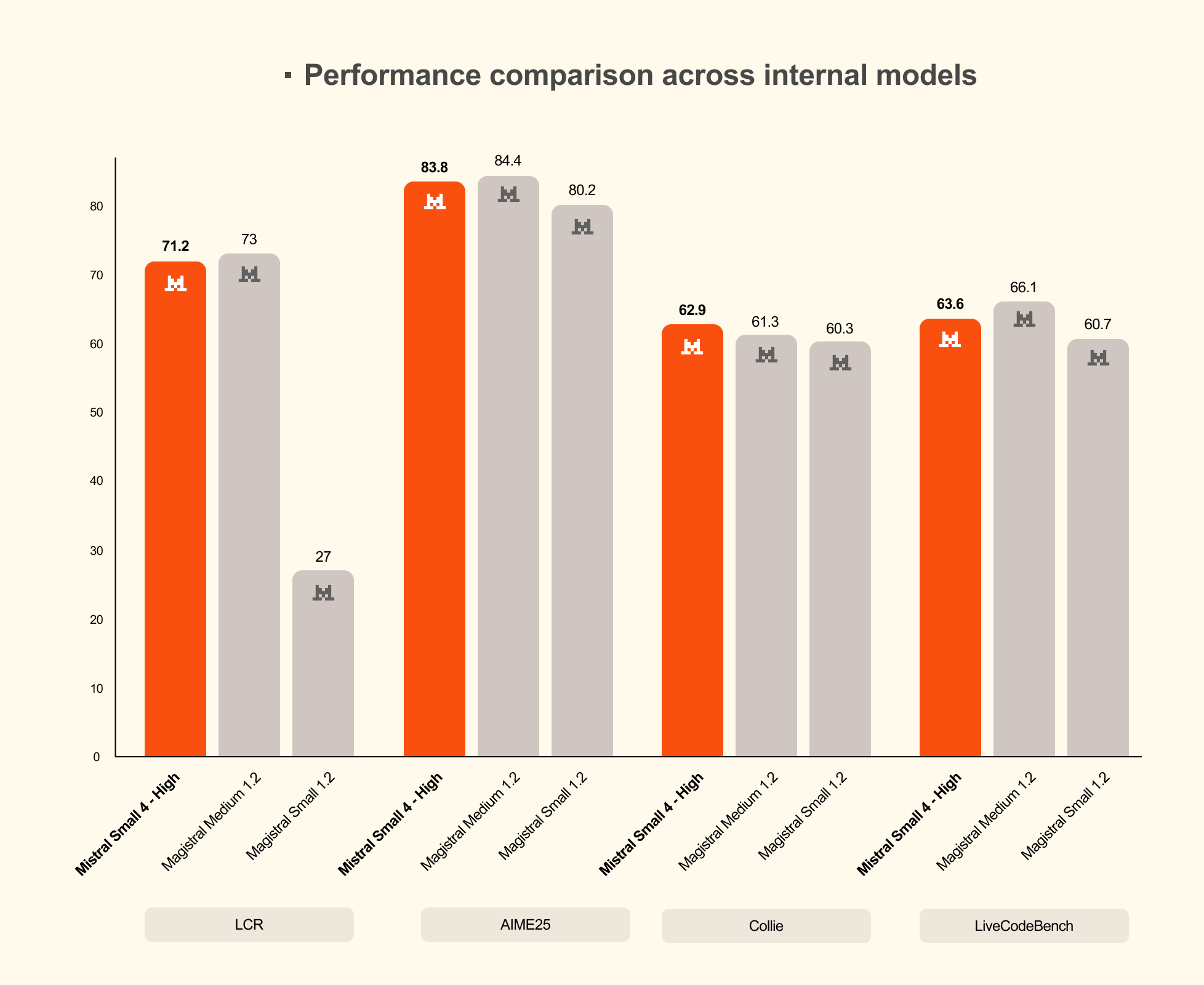
With reasoning enabled, Small 4 matches or surpasses GPT-OSS 120B on LCR, LiveCodeBench, and AIME 2025, while generating shorter outputs. Mistral cites one example where Small 4 scores 0.72 on AA LCR with only 1.6K characters, whereas comparable Qwen results needed 5.8K–6.1K characters, and says Small 4 outperforms GPT-OSS 120B on LiveCodeBench while producing 20% less output.


Which one is the best local choice?
My take: Mistral Small 4 is the best “single-model” pick if you want a balanced local or private deployment with strong general chat, coding, agentic work, and multimodal support. GPT-OSS is the clearest choice if you want an openly available OpenAI model with very explicit local-serving guidance, especially the smaller 20B version. Qwen3.5 is the broadest family, and it is the one to look at if you care most about multilingual coverage, multiple size tiers, and flexible local-serving options.
If you want to access these top open-source models using APIs and don't want to switch vendors, then I recommend CometAPI, it provides GPT-oss-120B and Qwen 3.5 plus API etc.
In other words, you can consume Small 4 as a hosted model, or pull the weights and self-host it on your own infrastructure.
Conclusion
Small 4 is a very strong fit when you need an open-weight, multimodal, reasoning-capable model that can be self-hosted, fine-tuned, and integrated into existing OpenAI-style application stacks. It is especially compelling for teams that care about deployment control, data residency, and lower marginal token costs, while still wanting a modern general-purpose model.
Ready to access Mistral Small 4? Then come to CometAPI!