
Building production-grade AI applications in 2026 requires more than just a single model; it requires a strategy for model orchestration, cost management, and vendor flexibility. By integrating CometAPI with LangChain, developers can access over 500 frontier models—including GPT 5.5, Claude Opus 4.7, and DeepSeek V4 Pro—through a single OpenAI-compatible gateway. This guide provides a comprehensive walkthrough for Python developers looking to build scalable, high-availability LangChain applications while reducing API expenditure by 20% to 40%.
LangChain: The Framework Powering LLM Apps
LangChain simplifies building applications with LLMs through components like:
- Chat Models / LLMs
- Prompt Templates
- Chains & LCEL (LangChain Expression Language)
- Agents & Tools
- Memory & Retrievers (RAG)
- Callbacks & Tracing
It abstracts provider differences, making it ideal for multi-model strategies—precisely where CometAPI shines.
LangChain is a popular framework for building LLM-powered applications. CometAPI is fully compatible with langchain-openai — just point it at our base URL.
Why Use CometAPI with LangChain
CometAPI acts as a single OpenAI-compatible endpoint that aggregates frontier models (GPT-5 series, Claude Opus/Sonnet, Gemini, Grok, DeepSeek, Qwen, and multimodal tools for images/video) at 20-40% lower costs than direct providers, with no monthly fees and pay-as-you-go billing.
The modern AI stack is moving toward "Model Swarms" and specialized agentic workflows where different tasks are routed to the most efficient model. Using CometAPI as your infrastructure layer within LangChain offers three foundational benefits:
It eliminates the operational burden of managing dozens of individual provider SDKs. Instead of installing and maintaining langchain-anthropic, langchain-google-genai, and langchain-mistralai, you only need the standard langchain-openai package.
CometAPI leverages institutional bulk purchasing power to provide permanent discounts that are generally unavailable to individual developers. Whether you are calling flagship reasoning models or high-throughput efficiency models, your costs are set 20% to 40% below official retail rates. This allows teams to extend their operational runway significantly during the scaling phase.
CometAPI provides a critical reliability layer. LangChain agents can be configured to switch models instantly if a primary provider experiences an outage, without requiring a code refactor or new authentication flows. Every request is backed by a 99.9% Service Availability SLA and intelligent multi-region routing
Prerequisites
Before you begin the implementation, ensure your development environment is prepared with the following:
- Python 3.8 or higher.
- An active CometAPI account with a valid API key (new users receive free trial credits at signup).
- The langchain-openai integration package.
Install the necessary libraries using pip:
pip install langchain-openai langchain-community faiss-cpu
How LangChain Integrates with CometAPI: Core Methods
There are two primary methods to configure the CometAPI LangChain integration, depending on your deployment strategy.
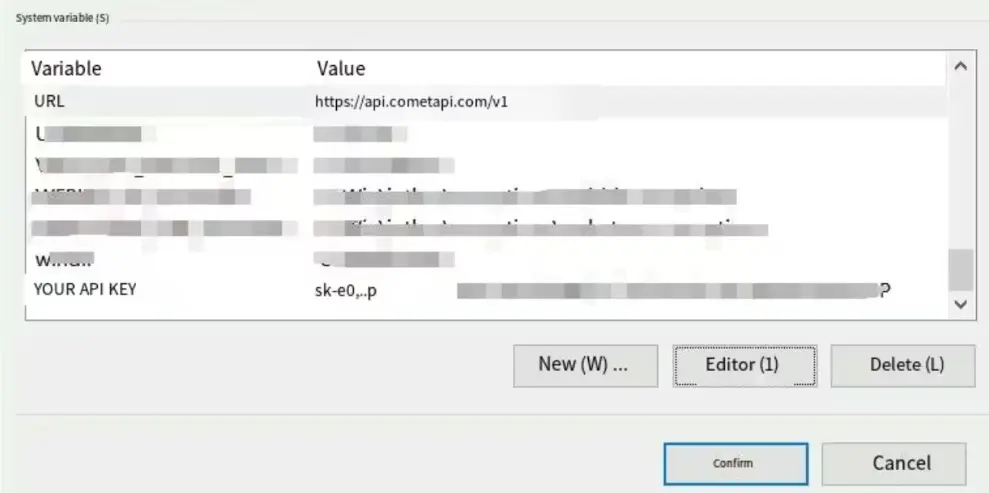
Option A: Environment Variables (Recommended)
This is the preferred method for production environments as it keeps credentials out of your source code and allows LangChain to automatically route traffic to the CometAPI gateway.
# Set your unique CometAPI key from the dashboard
export OPENAI_API_KEY=<YOUR_COMETAPI_KEY>

# Redirect standard OpenAI traffic to the CometAPI v1 endpoint
export OPENAI_API_BASE=https://api.cometapi.com/v1
Option B: Inline Configuration
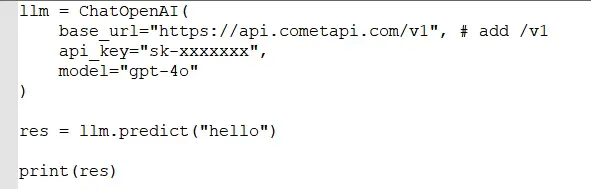
For testing, prototyping, or applications that need to switch between multiple keys, you can specify the parameters directly when initializing the ChatOpenAI class.
Assumptions, code, and process:
from langchain_openai import ChatOpenAI

# Initialize the client pointing at the CometAPI gateway
model = ChatOpenAI(
    # Specify any model ID from the 500+ catalog
    model="gpt-5.5",
    # Use the unified CometAPI base URL
    base_url="https://api.cometapi.com/v1",
    # Pass your CometAPI key
    api_key="sk-xxxx",
    # Enable streaming for real-time responses
    streaming=True
)

# Validate the connection with a simple call
response = model.invoke("Analyze the impact of 2M-token context windows.")
print(response.content)
Switching Between Models
One of the most powerful features of the CometAPI LangChain integration is the ability to swap models with a single string change. You no longer need to re-authenticate or import different libraries to move from OpenAI to Anthropic or DeepSeek.
llm = ChatOpenAI(
    model="gpt-5.4",  # or "claude-3-7-sonnet-latest", "gemini-3-1-pro", etc.
    base_url="https://api.cometapi.com/v1",
    temperature=0.7,
    max_tokens=1024
)

response = llm.invoke([HumanMessage(content="Explain how LangChain integrates with CometAPI in detail.")])
print(response.content)
```

This works for any supported model. Change `model` string to switch instantly (e.g., from reasoning-heavy Claude to fast DeepSeek).
This works for any supported model. Change model string to switch instantly (e.g., from reasoning-heavy Claude to fast DeepSeek).
Advanced Params: Pass extra_headers, custom `timeout`, or streaming.
Test the connection
Run a simple chain (e.g., a prompt asking for the current date). A successful response confirms CometAPI is connected.
Using with LangChain Ecosystem Tools
- LlamaIndex: Dedicated
llama_index.llms.cometapi.CometAPIwrapper. - Langflow: Native support in main branch.
- FlowiseAI: Drag-and-drop
ChatCometAPInode with credential setup.
CometAPI vs. Direct Providers vs. Alternatives
| Aspect | CometAPI | Direct (OpenAI/Anthropic) | OpenRouter / Other Aggregators | LangChain Native (Multiple) |
|---|---|---|---|---|
| # Models | 500+ (Text, Image, Video) | Provider-specific | 100s | Varies |
| Pricing Savings | 20-40% lower | Baseline | Variable | N/A (pay per provider) |
| API Keys Needed | 1 | Multiple | 1 | Multiple |
| Integration Effort | OpenAI SDK (1-line change) | Native | Similar | Higher |
| Vendor Lock-in | None | High | Low | Medium |
| Observability | Unified Dashboard | Per-provider | Good | LangSmith |
| Multimodal Support | Excellent (unified) | Fragmented | Good | Requires orchestration |
| Best for LangChain | High (seamless) | Good | Good | Flexible but complex |
Real-World Examples
Example 1: RAG (OpenAIEmbeddings + ChatOpenAI)
In a high-volume Retrieval-Augmented Generation system, managing embedding and inference costs is vital. CometAPI provides 20% savings on the entire pipeline.
from langchain_openai import OpenAIEmbeddings, ChatOpenAI

# Initialize embeddings via CometAPI
embeddings = OpenAIEmbeddings(
    model="text-embedding-3-small",
    base_url="https://api.cometapi.com/v1"
)

# Use an efficient reasoner for the final answer
# DeepSeek V4 Flash provides 1M context at a very low rate
llm = ChatOpenAI(
    model="deepseek-v4-flash",
    base_url="https://api.cometapi.com/v1"
)

# Standard LangChain RAG logic continues here
# The 20% discount applies to both embedding and completion steps
Example 2: Multi-Model Agent (Router Logic)
You can build a router that sends simple queries to a cheap model and complex logic to a flagship model, all within the same SDK.
# Router detects complexity
# Routing to DeepSeek V4 Flash for 20% less than official rates
cheap_model = ChatOpenAI(model="deepseek-v4-flash", base_url="https://api.cometapi.com/v1")

# Routing to GPT 5.5 Pro for mission-critical steps
premium_model = ChatOpenAI(model="gpt-5.5-pro", base_url="https://api.cometapi.com/v1")

# Logic: If query involves complex math or coding, use premium_model
# otherwise, use cheap_model to save costs
Example 3: Streaming (streaming=True)
Streaming is essential for user-facing chat applications. CometAPI supports standard OpenAI-style streaming for over 500 models.
from langchain_openai import ChatOpenAI

model = ChatOpenAI(
    model="claude-opus-4-7",
    base_url="https://api.cometapi.com/v1",
    streaming=True
)

# Stream the response chunk by chunk
for chunk in model.stream("Write a research summary on 2026 AI trends."):
    print(chunk.content, end="|", flush=True)
Cost Optimization Tips for LangChain + CometAPI
To maximize the value of your integration, implement these three architectural strategies:
- Model Hierarchy Routing: Use the most affordable model that can reliably complete a task. For example, use DeepSeek V4 Flash ($0.12/M tokens) for classification or intent detection, and reserve GPT 5.5 Pro ($24/M tokens) for final output generation.
- Prompt Caching Support: Many models available via CometAPI, such as the Claude and DeepSeek series, support prompt caching. When building LangChain applications with large context windows (like RAG), structure your prompts to take advantage of these cache-hits to reduce latency and input token costs.
- The
batch()Method: For background tasks such as batch data processing or document indexing, use LangChain's.batch()function. CometAPI's high-throughput infrastructure handles concurrent requests efficiently, allowing you to process millions of tokens without hitting standard provider rate limits.
Troubleshooting Common Issues
AuthenticationError or 401 Unauthorized
This is almost always caused by an incorrect base_url or a trailing slash error. Ensure your URL is exactly https://api.cometapi.com/v1. Some frameworks append their own paths, so double-check that /v1 is explicitly present.
Model ID Case Sensitivity
Model IDs must match the CometAPI catalog exactly. For instance, using GPT-5.5 instead of gpt-5.5 may result in a "Model not found" error depending on the SDK version. Always use the lowercase identifier found in the dashboard.
Environment Variable Persistence
If you set your OPENAI_API_BASE in one terminal window, ensure it is persisted to your .env file or cloud secrets manager. A common mistake is running a script in a process that does not have access to the modified environment variables.
Conclusion: Get Started with LangChain and CometAPI Today
Integrating LangChain with CometAPI transforms fragmented AI development into a streamlined, cost-optimized powerhouse. One integration unlocks hundreds of models, dramatic savings, and unmatched flexibility—perfect for prototypes, startups, and enterprises alike.
Visit CometAPI for your free API key and test credits. Experiment with the code snippets above, then scale with their dashboard analytics. For custom implementations or enterprise support, explore their docs and contact team.
Recommended Next Steps on Cometapi.com:
- Sign up and test top models (Claude Sonnet 4.6, GPT-5.4, Gemini variants).
- Review pricing page for your use case.
- Join community for LangChain-specific patterns.
- Monitor changelog for new models (e.g., DeepSeek-V4 promos).
This integration isn't just technical—it's a strategic advantage. Start building smarter, cheaper, and faster AI applications now.
FAQ
Q: Do I need a special LangChain package for Claude or Gemini?
A: No. Because CometAPI unifies all models into the OpenAI format, you only need langchain-openai.
Q: Are Claude 4.7 and Gemini 3.1 Pro truly supported?
A: Yes. CometAPI provides full dual-protocol support, meaning you can call these models through the OpenAI format via LangChain immediately.
Q: Does streaming work across all 500+ models?
A: Yes. Streaming is a core feature of the CometAPI gateway and is fully compatible with LangChain's .stream() and streaming=True parameters.
Q: Can I use CometAPI for OpenAI-compatible embeddings?
A: Absolutely. Use the OpenAIEmbeddings class and point the base_url to CometAPI to save 20% on vector indexing.
Q: Is CometAPI compatible with LangGraph?
A: Yes. LangGraph utilizes standard LangChain ChatModel instances. Simply pass your CometAPI-configured ChatOpenAI object into your LangGraph nodes.