
Doubao Seed 1.8 — part of ByteDance’s Doubao family and the Seed research line — is attracting attention for being engineered as an “agentic” multimodal model with very large context handling and improved tool/agent support.
For developers and enterprises, the immediate question is no longer "How smart is it?" but "How do we build with it?" I will delve deep into the technical specifications, pricing structures, and practical implementation strategies for the Doubao Seed 1.8 API in article.
What Is Doubao Seed 1.8?
Doubao Seed 1.8 is the latest flagship model in ByteDance’s "Doubao" (formerly Skylark) family. Unlike its predecessors, which focused primarily on conversational fluency and content generation, Seed 1.8 was trained with a specific objective: autonomous task execution.
The model introduces a unified architecture that integrates Multimodal Perception (Vision, Audio, Video) with Action Execution (Tool Use, GUI Navigation). This allows the model to function as a digital worker capable of navigating operating systems, browsing the web, and managing complex workflows without constant human oversight.
The "Seed" Philosophy
The "Seed" designation in the version name highlights its role as a foundational "seed" for agentic applications. It is designed to grow into specific use cases—whether acting as a coding assistant that can debug a live environment or a customer service agent that can navigate a CRM database to process refunds.
What “quality of life” and developer features exist?
- Context caching and prefill/continuation for keeping longer workflows cheaper and faster.
- Streaming output for progressive responses (useful for chat UIs or real-time agent feedback).
- Agent / tool calling: richer primitives for invoking tools, interacting with GUIs, and orchestrating multi-step flows (including “previous_response_id” style context linking).
- Long-horizon planning: tuned for tasks that require many sequential steps (e.g., scraping multiple sites and consolidating results), with improved stability and reasoning trajectories.
Key Release Stats (Jan 2026):
- Release Date: December 18, 2025
- Model ID:
doubao-seed-1-8-251228 - Architecture: Sparse Mixture-of-Experts (MoE) with Native Agentic Optimization
- Access: CometAPI
Why did ByteDance / Volcengine build Seed1.8 and what makes it different?
What problem is it trying to solve?
Seed1.8 targets a real-world gap: models that can act across multiple modalities and environments (webpages, videos, GUIs, tool APIs) rather than just answer isolated prompts. The design priorities reported by the team are (1) robust multimodal perception, (2) reliable tool/instrument calling and (3) efficient reasoning for long, multi-step tasks (e.g., planning, multi-site data aggregation, or GUI navigation). Seed1.8 completes complex, multi-step tasks that require chaining visual understanding, search and tool use.
How does this differ from earlier Doubao/Seed versions?
Rather than only refining raw model scale, Seed1.8 introduces architectural and system changes that improve “agentic” performance: better context handling, improved low-frame-rate long-video understanding (support for very long video horizons with tool-assisted high-frame-rate inspection), and optimizations that give similar reasoning power with fewer tokens in some tiers (according to early community writeups). These tradeoffs make the model more cost-effective for persistent agent workloads.
3 Key Features and Multimodal Capabilities
Doubao Seed 1.8 distinguishes itself through three core pillars: Extreme Multimodality, Agentic Reasoning, and Native Context Management.
1. High-Fidelity Video and Visual Understanding
While many models struggle with "blind spots" in video analysis, Seed 1.8 introduces a breakthrough in Long-Video Understanding.
- 1280-Frame Analysis: The model can process up to 1280 frames of video in a single pass, double the capacity of the previous V1.5 Vision model. This allows it to "watch" a 30-minute meeting recording or a security feed and extract specific details (e.g., "At what timestamp did the presenter switch to the financial slide?").
- Low-Frame-Rate Logic: For extremely long videos, the model uses an optimized sparse sampling technique to maintain context without exploding token costs.
2. "Thinking" Mode (Deep Reasoning)
Following the industry trend set by OpenAI’s o1/o3 series, Seed 1.8 includes a configurable "Thinking Mode."
When enabled via the API, the model engages in a "Chain of Thought" process before outputting a final answer. This is particularly effective for:
- Complex Math: Solving multi-step calculus or statistical problems.
- Code Architecture: Planning a microservices architecture before writing specific function code.
- Logic Puzzles: Handling queries that require diverse constraints (e.g., scheduling shifts for 50 employees with conflicting availability).
3. UI-TARS and GUI Interaction
A unique feature of Seed 1.8 is its native integration with UI-TARS (User Interface Tool-Augmented Reasoning System). This gives the model "eyes" and "hands" for computer interfaces.
- Visual Grounding: The model can look at a screenshot of a software interface and identify coordinates for buttons, input fields, and menus.
- Action Generation: It can generate specific OS-level commands (Click, Drag, Type) to operate software, making it the engine behind ByteDance's new "Auto-operate" features in enterprise tools.
How Does It Perform in Benchmarks?
The AI community has been rigorous in testing Seed 1.8 since its beta release. Early benchmarks paint a picture of a model that punches above its weight class, particularly in tool use and coding.
Agentic Benchmarks
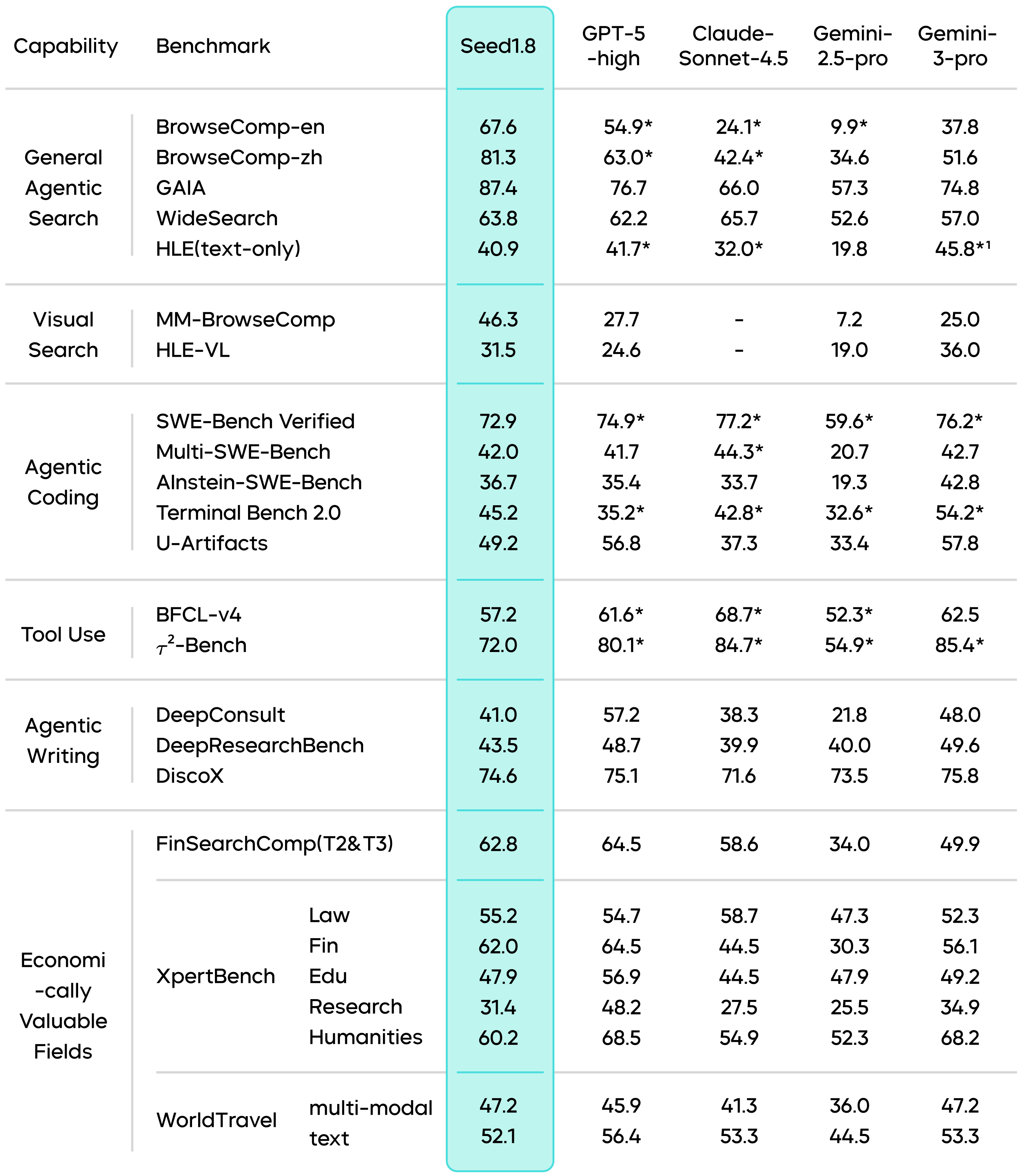
- BrowseComp-en: In this benchmark, which evaluates an AI's ability to browse the web and synthesize information, Seed 1.8 scored 67.6%, reportedly outperforming the standard GPT-4o and edging out Claude 3.5 Sonnet in navigation efficiency.
- SWE-bench (Software Engineering): Seed 1.8 has shown a high pass rate in resolving GitHub issues. Its ability to "read" the file structure of a repository and understand dependencies allows it to propose fixes that are syntactically correct and contextually valid.
Comparative Analysis
| Metric | Doubao Seed 1.8 | Gemini 3 Flash | GPT-4o |
|---|---|---|---|
| Context Window | 256k | 1M+ | 128k |
| Video Understanding | 1280 Frames | High | Moderate |
| Reasoning (Math/Logic) | Very High (Thinking Mode) | High | Very High |
| GUI Operation | Native (UI-TARS) | Tool-based | Tool-based |
| Pricing (Input) | ~¥0.80 / 1M | Low | High |
Note: Benchmark scores are based on reported figures from the Force Conference and independent tests as of Jan 2026.
Seed1.8 attains state-of-the-art scores on several agentic and search benchmarks (e.g., top GAIA score in their comparison; strong BrowseComp and WideSearch performance), demonstrating real-world decision capability.
How Can Developers Access and Use the API?
Accessing Doubao Seed 1.8 is straightforward, primarily done through the CometAPI platform.
Below is a step-by-step guide to integrating the API into your workflow.
Step 1: Create a CometAPI Account
Navigate to the CometAPI website and register for an account.Seed 1.8 page describe the model itself.
Step 2: Access the CometAPI Console
In the CometAPI console, enable the model service and create an API Key / Access Key with model invocation permissions. Go to API Key Management in the console and generate a new key. Keep this secure; it starts with sk-... (or similar).
Step 3: Select the Model and Create Endpoint
In the model selection screen:
- Model: Select
Doubao-Seed-1.8(Look for the tagdoubao-seed-1-8-251228). - Endpoint Name: Give your endpoint a unique name (e.g.,
ep-20260112-xyz).
Step 4: Make Your First Request
The Doubao API is fully compatible with the OpenAI SDK format, making migration easy.
You simply need to change the base_url and model parameters.
Python Example (using OpenAI SDK):
python
from openai import OpenAI

# [...](asc_slot://start-slot-53)Initialize client with Volcano Engine config
client = OpenAI(
    api_key="YOUR_API_KEY",
    base_url="https://api.cometapi.com/v1"
)

# Call the model
response = client.chat.completions.create(
    model="doubao-seed-1-8-251228",
    messages=[
        {
            "role": "system",
            "content": "You are Doubao Seed 1.8, an expert AI agent."
        },
        {
            "role": "user",
            "content": "Analyze the attached video context and explain the user's intent."
        }
    ],
    # Enable Thinking Mode (if available for your endpoint)
    # extra_body={"thinking_mode": "enable"}
)

print(response.choices[0].message.content)
Advanced Usage: Tool Calling and Multimodal
To use the Agentic capabilities, you define tools in the standard JSON schema.
For Image/Video input, you can pass base64 encoded strings or URLs in the content list, similar to GPT-4 Vision.
python
# Multimodal Input Example
messages=[
    {
        "role": "user",
        "content": [
            {"type": "text", "text": "What is happening in this image?"},
            {
                "type": "image_url",
                "image_url": {
                    "url": "https://example.com/image.jpg"
                }
            }
        ]
    }
]
Conclusion:
Seed 1.8 brings serious capability for agentic, multimodal and long-context applications — it’s a strong choice when your workload requires integrated perception, planning and action across long documents or media. However, real engineering value depends on usage patterns: latency needs, token volumes, and the ability to orchestrate caching, retrieval and tool chains effectively.
Developers are encouraged to log into CometAPI today, claim their free tokens, and start planting the seeds of the next generation of AI applications.
Developers can access Doubao seed 1.8 API model through CometAPI. To begin, explore the model capabilities of CometAPI in the Playground and consult the API guide for detailed instructions. Before accessing, please make sure you have logged in to CometAPI and obtained the API key. CometAPI offer a price far lower than the official price to help you integrate.
Ready to Go?→ Free trial of Doubao seed 1.8!