
Google announced Gemini 3 Flash on December 17–18, 2025 as a low-latency, cost-efficient member of the Gemini 3 family. It brings Pro-grade reasoning into a Flash-class footprint, supports extensive multimodal inputs (text, image, audio, video), introduces thinking_level and media resolution controls, and is available through Google AI Studio, the Gemini API (REST / SDKs), Vertex AI, Gemini CLI, and as the default model in Google Search / Gemini app.
What is Gemini 3 Flash and why it matters
Gemini 3 Flash is part of Google’s 3-series models. It was designed to push the Pareto frontier of quality vs. cost vs. latency: delivering much of the reasoning capability of Gemini 3 Pro while being significantly faster and cheaper to run. That combination makes it well suited to high-frequency interactive scenarios (chatbots, IDE assistants, real-time agentic flows), bulk content generation where latency matters, and applications that need multimodal reasoning (images + text + audio) with low overhead.
Key high-level points:
- It is explicitly optimized for speed + low cost while retaining strong reasoning and multimodal fidelity(Three times faster than the old Gemini 2.5 Pro; Retains the top-tier inference capabilities of the Gemini 3.).
- It is positioned as the “sweet spot” for agentic loops and iterative developer workflows (e.g., code assistance, multi-turn agents).
- Flexible: It can "adjust its thinking time" according to the complexity of the problem—answering simple questions instantly and considering more steps for complex tasks.
Technical Performance and Benchmark Results
Gemini 3 Flash achieves a triple breakthrough in speed, intelligence, and cost:
1) Agentic loops and multimodal understanding
Gemini 3 Flash inherits architectural and training improvements from the broader Gemini 3 family, producing strong multimodal competence (text, image, video, audio inputs) and improved reasoning compared with earlier Flash models. Google positions Flash as able to handle tasks like document analysis (OCR + reasoning), video summarization, image-plus-text Q&A, and multimodal coding tasks. This multimodal capability, combined with low latency, is one of the model’s defining technical selling points.
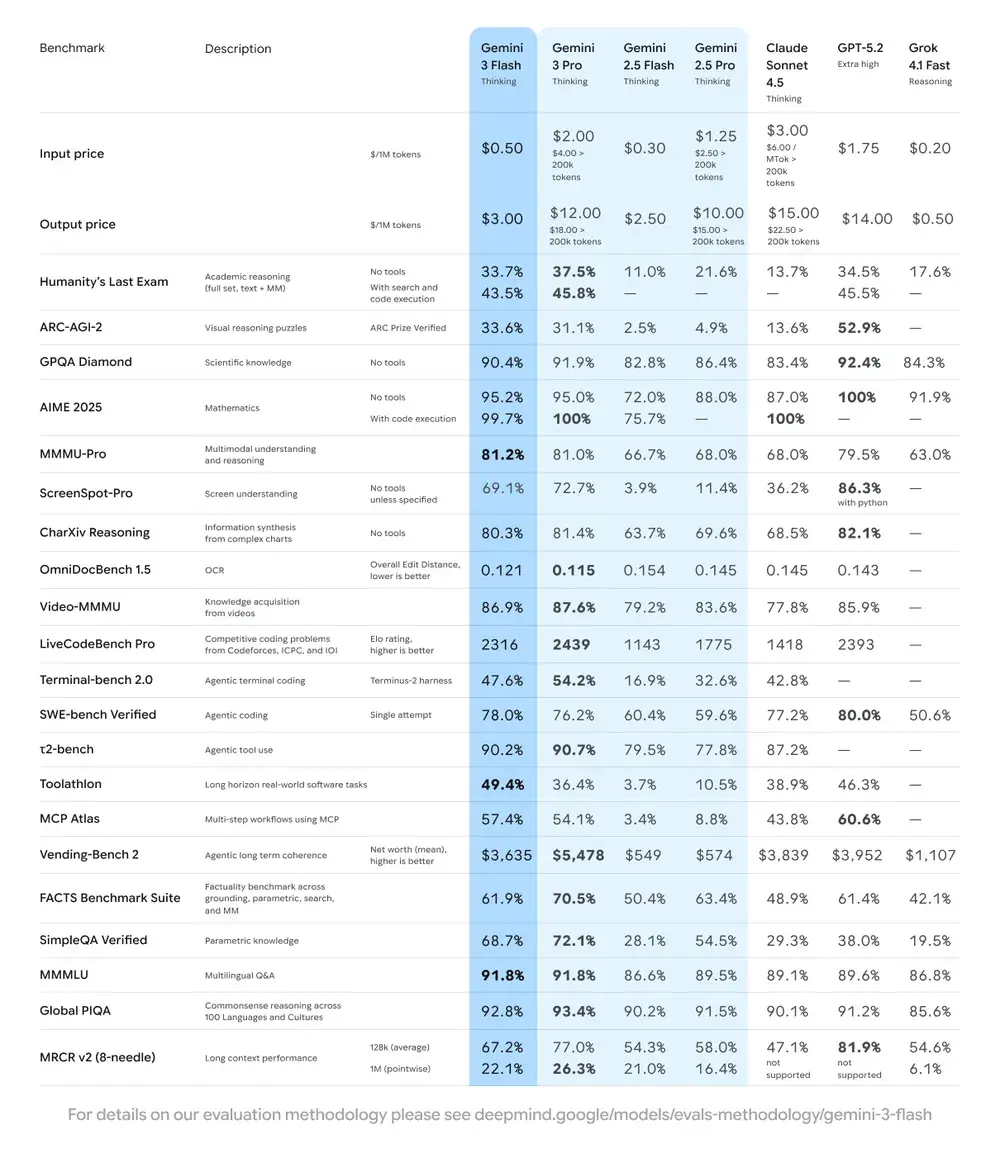
Google published internal benchmark claims highlighting strong agentic coding performance (SWE-bench Verified ~78% for agentic coding workflows) and Flash approaches Pro-grade reasoning on many tasks while remaining fast enough for agentic loops and near-real-time workflows.
| Benchmark | Gemini 3 Flash Score | Comparison Model | Improvement |
|---|---|---|---|
| GPQA Diamond (PhD-level reasoning) | 90.4% | Outperforms Gemini 2.5 Pro | Significant |
| Humanity’s Last Exam (General knowledge test) | 33.7% (no tools) | Close to Gemini 3 Pro | Advanced reasoning |
| MMMU Pro (Multimodal understanding) | 81.2% | On par with Gemini 3 Pro | — |
| SWE-bench Verified (Coding capability benchmark) | 78% | Higher than Gemini 3 Pro and 2.5 series | Excellent |
2) Cost and efficiency
The development philosophy of Gemini 3 Flash is "Pareto Frontier": that is, to find the optimal balance between speed, quality and cost. Gemini 3 Flash is explicitly optimized for price-performance. Google lists Flash’s pricing significantly below Pro for comparable tasks, and positions it to process large volumes of requests at lower operational cost. For many workloads the Flash variant is intended to be the cost-efficient default — for example, Flash preview pricing at roughly $0.50 per 1M input tokens and $3.00 per 1M output tokens for the Flash preview tier. In practice, that makes it viable for high-frequency tasks where Pro’s higher per-token charge would be prohibitive.
Efficiency indicators
- Speed: 3x faster than Gemini 2.5 Pro (based on Artificial Analysis testing).
- Token Efficiency: Uses an average of 30% fewer tokens to complete the same task. In other words, you get faster, better results for the same amount of money.
- The Gemini 3 Flash features a "Dynamic Thinking Mode"—adapting its reasoning depth to the task's complexity, "thinking a little more" when needed, and responding quickly to simple tasks.
Practical implications: Lower per-token or per-call cost means you can run more queries, longer contexts, or higher sampling rates for the same budget. Efficiency gains can also reduce infrastructure complexity (fewer hot-instances needed) and improve response time guarantees.
3) Performance benchmark
Gemini 3 Flash achieves “frontier-class” performance across several academic and application benchmarks while providing better latency and cost than earlier Pro models. Google presents numbers such as high scores on complex reasoning and knowledge benchmarks (e.g., GPQA variants) to illustrate its competence.
How do I use the Gemini 3 Flash API?
Which access method should I use?
- Recommended (simple + robust): Use the SDK integration pattern Comet shows — it simply points an existing GenAI SDK at Comet’s base URL and supplies your Comet API key. This avoids needing to replicate request/stream parsing yourself.
- Alternate (raw HTTP / curl / custom stacks): You can POST directly to CometAPI endpoints (Comet accepts OpenAI-style or provider-specific shapes). Use
Authorization: Bearer <sk-...>(Comet examples use a Bearer header) and the model stringgemini-3-flashin the body. Confirm exact path and query parameters in Comet’s API doc for the model you want.
Quick summary — what you’ll do
- Sign up on CometAPI and create an API token.
- Pick an access method (recommended: SDK wrapper pattern shown below; fallback: raw HTTP/cURL).
- Call the
gemini-3-flashmodel via CometAPI’s base URL (Comet routes your request to Google’s Gemini backend). - Handle streaming / function-calls / multimodal inputs per the model requirements (details below).
Below is a compact example (based on CometAPI’s sample patterns) showing how to call gemini-3-flash via CometAPI; replace <YOUR_COMETAPI_KEY> with your actual key. The model ID and endpoints below match CometAPI’s docs.
from google import genaiimport os# Get your CometAPI key from https://api.cometapi.com/console/token, and paste it hereCOMETAPI_KEY = os.environ.get("COMETAPI_KEY") or "<YOUR_COMETAPI_KEY>"BASE_URL = "https://api.cometapi.com"client = genai.Client( http_options={"api_version": "v1beta", "base_url": BASE_URL}, api_key=COMETAPI_KEY,)response = client.models.generate_content( model="gemini-3-flash", contents="Explain how AI works in a few words",)print(response.text)
Key request parameters to consider
thinking_level— controls internal reasoning depth:MINIMAL,LOW,MEDIUM,HIGH. UseMINIMALfor lowest latency and cost when you do not need deep multi-step reasoning.media_resolution— for vision/video inputs:low,medium,high,ultra_high. Lower resolution reduces token equivalence and latency.streamGenerateContentvsgenerateContent— use streaming for better perceived latency when you want partial replies as they arrive.- Function calling / JSON Mode — use structured responses when you need machine-parseable outputs.
Sending multimodal inputs (practical pointers)
- Images/PDFs: prefer Cloud Storage URIs (gs://) for large media; many APIs accept base64 for small images. Watch modality token accounting — PDFs may be counted under image/document quotas depending on the endpoint.
- Video/audio: for short clips you can pass URIs; for long media use batch processing workflows or stream chunks. Check maximum input sizes and encoding constraints on the API docs.
- Function calling / tools: use structured function schemas to get JSON outputs and enable safe tool invocation. Gemini 3 Flash supports streaming function calling for improved UX.
Where can I access Gemini 3 Flash?
Gemini 3 Flash is available across Google’s consumer and developer surfaces:
- Google Search and the Gemini app — Flash has been rolled out as the default model for AI Mode in Search and is integrated into the Gemini app experience for end users.
- Google AI Studio — immediate place for developers to experiment and generate API keys for testing.
- Gemini API (Generative Language / AI Developer API) — available as
gemini-3-flash-preview(model ID used in docs/release notes) and through the standard generateContent / streamGenerateContent endpoints. - Vertex AI (Google Cloud) — production-grade access through Vertex AI’s Generative AI model APIs and pricing/quotas suitable for enterprise workloads.
- Gemini CLI — for terminal-based development and scripting workflows.
Third-party gateway CometAPI
CometAPI has already added gemini-3-flash to its catalogue, and its model page explains how to call it through CometAPI’s unified endpoint. The provided model API is priced at 20% of the official price.
What are best practices when using Gemini 3 Flash?
1) Choose thinking_level per task and tune
- Set
MINIMAL/LOWfor simple Q&A and high-frequency interactive tasks. - Use
MEDIUM/HIGHselectively for tasks that require deeper chain-of-thoughts or multi-step planning. - Benchmark cost vs quality when you change
thinking_level. Google’s documentation warns thatthinking_levelchanges internal thought signatures and latency.
2) Use media_resolution to control vision compute
If you pass images or video, choose the lowest acceptable media_resolution for the task; for example, use low for thumbnails and bulk extraction, high for visual design critique. This reduces token equivalence for images and drops latency.
3) Prefer structured outputs for automation
Use JSON Mode / function calling when your application needs machine-parseable outputs (e.g., entity extraction, tool invocation). This dramatically simplifies downstream processing. Enforce strict JSON schemas where possible and validate at the client.
4) Make liberal use of streaming for long responses
streamGenerateContent reduces perceived latency and allows UI progressive rendering. For long multimodal tasks, stream partial outputs so users see immediate progress.
5) Control costs with caching and context management
- Use context caching for repeated references (pricing and tokens differ across models).
- Avoid sending unnecessary long context if not required — prefer concise prompts and use retrieval + grounding for large knowledge bases.
Typical usage scenarios for Gemini 3 Flash
High-volume conversational agents
Flash is a natural fit for chatbots and customer support assistants that need low latency and low cost per inference. With streaming support and high tokens/sec, Flash reduces perceived wait times and operational costs.
Multimodal assistants and document pipelines
Because Flash handles images, PDFs, and short videos well, common applications include invoice extraction, multimodal Q&A over manuals, customer support with images, and PDF ingestion for knowledge bases.
Real-time video analytics and moderation
Reported high output speed (≈218 t/s in pre-release tests) enables near-real-time analysis and summarization of short videos, highlight detection, and live content moderation pipelines when properly architected.
Agentic developer tooling and coding assistance
SWE-bench scores and reported coding performance make Flash a good option for fast coding assistants, CLI helpers, and other developer workflows that prioritize low latency.
Conclusion — should you adopt Gemini 3 Flash now?
Gemini 3 Flash is a strategic offering for teams that need strong reasoning and multimodal intelligence without the latency and cost of top-end Pro models. The model is especially well suited to agentic coding assistants, interactive multimodal agents, document processing pipelines, and any system where low latency and scale are primary concerns. Early benchmarks (both Google’s and independent analysis) indicate Flash is competitive on quality while offering substantial throughput and cost advantages
To begin, explore Gemini 3 Flash’s capabilities in the Playground and consult the API guide for detailed instructions. Before accessing, please make sure you have logged in to CometAPI and obtained the API key. CometAPI offer a price far lower than the official price to help you integrate.
Ready to Go?→ Free trial of Gemini 3 Flash !