
MiniMax-M2.5 is a new, productivity-focused large language model from MiniMax that’s optimized for coding, agentic tool use, and office workflows. You can call it through its native MiniMax platform or through API aggregators such as CometAPI. You only need to obtain the CometAPI API key to use the API, as Minimax-M2.5 also supports the chat format.
What is MiniMax-M2.5?
MiniMax-M2.5 is the latest major model release from MiniMax: an evolution of the M2 family that the company positions as a general-purpose, agent-capable model with particularly strong performance in code generation, tool use, and multi-step reasoning. The M2.5 family was announced as a February 2026 release and includes both the standard M2.5 and “highspeed” variants optimized for lower latency while keeping the same core capabilities. M2.5 family improved benchmark scores in software engineering evaluations and better behavior when interacting with external tools (search, agents, etc.).
The vendor positions M2.5 as a step up from earlier M2.x releases with stronger reasoning, better code generation, and improved tool-calling reliability. MiniMax’s public release notes for early February 2026 flagged M2.5 as a milestone: refined instruction tuning, stronger code understanding, and measurable gains on several code-focused benchmarks. The release includes:
- A standard M2.5 model (emphasizing accuracy and reasoning).
- An M2.5-highspeed variant with lower latency for interactive developer workflows.
- Explicit guidance and billing options for a “Coding Plan” aimed at heavy code generation usage.
Key technical highlights
- Architecture: MoE (large total parameter count with a much smaller active set during inference), enabling a cost/performance sweet spot for heavy tasks.
- Strengths: state-of-the-art coding performance, multi-turn reasoning, long-context handling and agents/tool integrations.
- Flavors: MiniMax publishes variants (e.g.,
MiniMax-M2.5andM2.5-highspeed) tuned for throughput vs latency.
Why this matters today: many teams building developer tools, programming assistants, and agentic automations value a model that can reason across multiple turns, call tools safely, and emit high-quality code. M2.5 — by virtue of architecture and training choices — is explicitly marketed for those scenarios .
Benchmarking of MiniMax-M2.5
Where M2.5 lands on coding-specific benchmarks
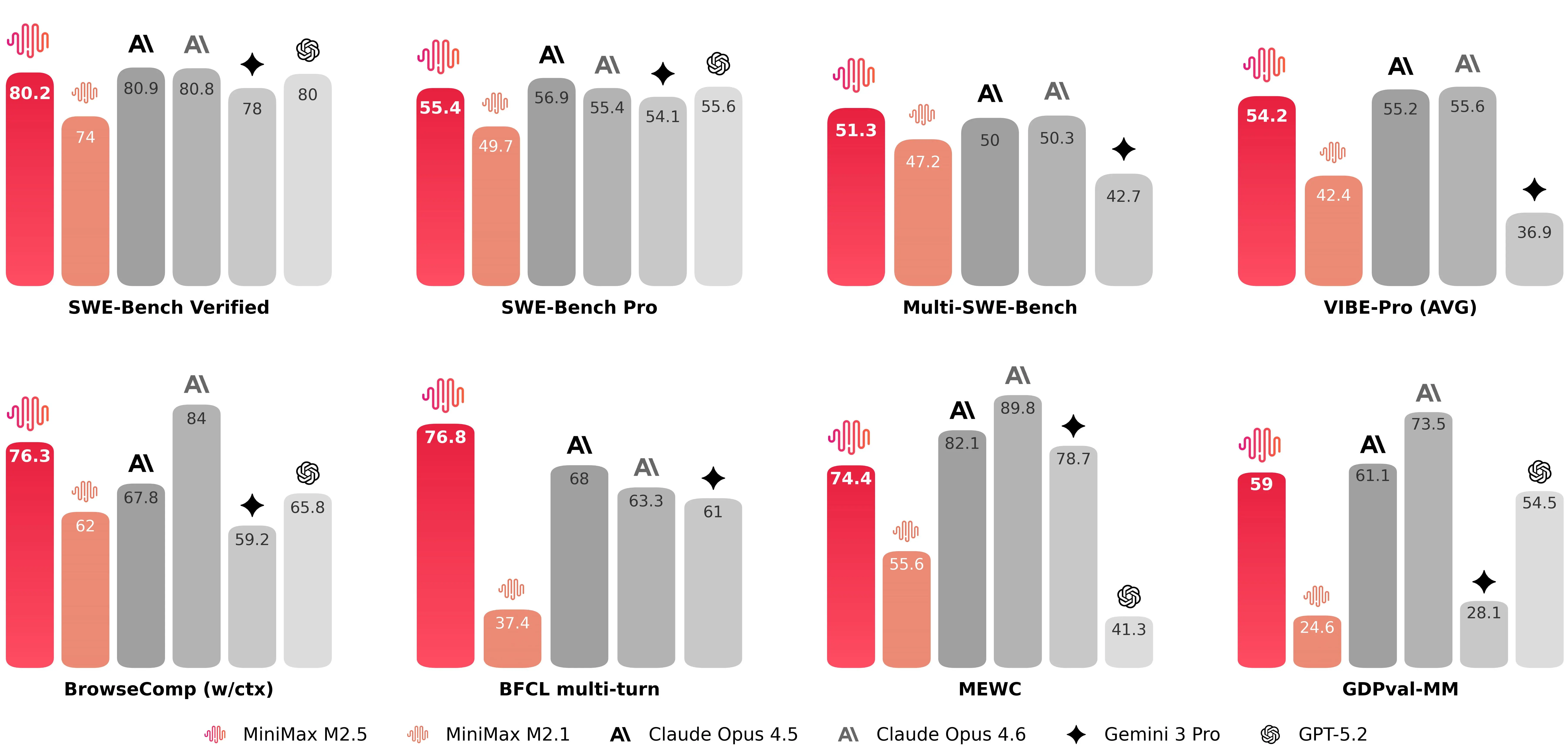
MiniMax-M2.5 scoring 80.2% on SWE-Bench Verified, together with strong marks on multi-task coding and browsing-augmented benchmarks (notable figures released by the company include 51.3% on Multi-SWE-Bench and 76.3% on BrowseComp when context management is enabled). These numbers position M2.5 among the highest performing publicly available models for code generation and problem solving at launch. MiniMax-M2.5’s launch corroborate that M2.5 is competing with the top tier of coding models.
For developers, the benefit is twofold:
- Higher first-pass success rate: fewer rounds of fixes, less human debugging, and lower “babysitting” overhead for autonomous coding agents.
- Better full-stack coverage: M2.5 is described as supporting full-stack workflows across desktop apps, mobile, and cross-platform toolchains, meaning it aims to generate not just snippets but coherent multi-file solutions and build scripts.
Built for agentic workflows
M2.5 is described as “natively designed for Agent scenarios.” Practically, that means the architecture and training regimen prioritize:
- Tool invocation fidelity: issuing API calls or running shell/SQL commands with correct syntax and parameters.
- Context switching and memory: continuing an interrupted multi-step operation without losing previously computed state.
- File manipulation: producing and editing common office formats programmatically (for instance, generating a Powerpoint and then revising it based on a follow-up request).
Search and browsing augmentation
When M2.5 is paired with browsing or retrieval layers, MiniMax reports markedly improved scores on browsing benchmarks, reflecting stronger performance at integrating external information and citations into outputs. That makes M2.5 suitable for tools that must fetch up-to-date content, cross-check API results, or augment code generation with real-world data (for example, fetching the latest SDK docs and using them correctly during codegen). These capabilities matter for teams building “agentic” features like automated QA, CI toolchains, or document-driven assistants.

How can I use MiniMax-2.5 API (via CometAPI)?
CometAPI is an API aggregation platform that exposes hundreds of models via a single, OpenAI-compatible REST surface. Because CometAPI’s interface mirrors the OpenAI chat/completions endpoints, you can often reuse existing OpenAI-style clients by switching api_base and the API key. If you prefer not to integrate directly with MiniMax’s platform (for reasons like unified billing, multi-model A/B testing, or vendor abstraction), you can call MiniMax-M2.5 through CometAPI’s “chat” surface. The CometAPI platform provides a consistent request format, an SDK and a web playground — and it exposes per-model names and parameters (so you select the exact provider/model string when calling).
Below is a concise, practical guide to calling MiniMax-M2.5 via CometAPI, with examples in curl and Python.
What are the basic steps to get started?
- Sign up for a CometAPI account and obtain an API key. (CometAPI provides a playground and SDKs to test models.)
- Check CometAPI’s model list or the CometAPI playground to find the exact model name for MiniMax-M2.5.
- Make an authenticated POST request with the
modelparameter set to the selected MiniMax model and a payload following CometAPI’s chat/completion schema. - Tune parameters (temperature, max_tokens, system messages, streaming) per your workflow.
Authentication & endpoint basics
- Base URL:
https://api.cometapi.com/v1(OpenAI-style paths such as/chat/completionsare supported). - Header:
Authorization: Bearer YOUR_COMETAPI_KEY - Content-Type:
application/json - Model field: use the exact model string from CometAPI’s model catalog (examples:
"minimax-m2.5"
Example 1 — Quick curl (REST, OpenAI-style)
# Replace $COMETAPI_KEY with your CometAPI key
curl -s -X POST "https://api.cometapi.com/v1/chat/completions" \
  -H "Authorization: Bearer $COMETAPI_KEY" \
  -H "Content-Type: application/json" \
  -d '{
    "model": "minimax-m2.5",
    "messages": [
      {"role":"system","content":"You are a concise, safety-conscious coding assistant."},
      {"role":"user","content":"Refactor this synchronous Python function to async and add basic error handling:\n\n```\ndef fetch(user_id):\n    resp = http_get(f\"https://api.example.com/users/{user_id}\")\n    return resp.json()\n```"}
    ],
    "max_tokens": 800,
    "temperature": 0.0,
    "stream": false
  }'
Notes:
- Use the model string exactly as shown in CometAPI’s catalog; s.
stream: trueis supported for streaming outputs (handle server-sent events or chunked responses if you want partial tokens).
Example 2 — Python (requests) for a chat completion
import os, requests

COMET_KEY = os.environ.get("COMETAPI_KEY")  # recommended
URL = "https://api.cometapi.com/v1/chat/completions"
headers = {
    "Authorization": f"Bearer {COMET_KEY}",
    "Content-Type": "application/json",
}

payload = {
    "model": "minimax-m2.5",  # or "minimax/minimax-m2.5" — verify Comet's model page
    "messages": [
        {"role": "system", "content": "You are a helpful engineer who returns clear, tested code."},
        {"role": "user", "content": "Write a pytest for the following function that asserts edge cases..."}
    ],
    "temperature": 0.1,
    "max_tokens": 1000,
}

r = requests.post(URL, json=payload, headers=headers, timeout=120)
r.raise_for_status()
out = r.json()
print(out["choices"][0]["message"]["content"])
Example 3 — Using litellm / CometAPI integration (Python convenience layer)
CometAPI is supported by several community SDKs and adapters. The liteLLM docs show a compact flow where you set COMETAPI_KEY and call the model by name. This is great for prototyping:
import os
from litellm import completion

os.environ["COMETAPI_KEY"] = "your_cometapi_key_here"

messages = [{"role":"user", "content":"Explain async/await in Python in 3 bullets."}]
resp = completion(model="minimax-m2.5", messages=messages)
print(resp.choices[0].message.content)
Litellm / Comet integrations provide helpful utilities (streaming, async, explicit api_key param) that mirror many existing OpenAI SDK patterns.
How should you design prompts and system messages for M2.5
Be explicit about role and constraints
Give M2.5 a clear system role when asking for code. Example:
{"role": "system","content": "You are MiniMax M2.5, an assistant specialized in robust, readable, and well-documented code. Use Python 3.11 conventions, include type hints, and provide brief unit tests."}
Use step decomposition for complex problems
When asking M2.5 to implement complex features, use a short decomposition:
- Ask for a design outline.
- Request interface signatures.
- Ask for implementation and tests.
This reduces hallucination risk and yields modular, reviewable outputs.
Temperature, max_tokens and safety
- For deterministic code: set
temperatureclose to 0.0. - For exploratory design:
temperaturein 0.2–0.5 may surface creative approaches. - Keep
max_tokensgenerous for big refactors or long test suites.
Ask for unit tests and reasoning
When requesting code, also ask for unit tests and a short explanation of the algorithm. That helps you detect subtle bugs and get runnable artifacts on the first pass.
Long-Task Inference and State Tracking
The M2.5 model features an excellent state tracking mechanism, effectively ensuring the continuity and directionality of thought over long time sequences by focusing on a limited number of objectives each time rather than processing everything in parallel. M2.5 is equipped with context-aware functionality, enabling efficient task execution and optimized context management.
Practical M2.5 usage tips for production
MiniMax-M2.5 is tuned for multi-step toolings and code. Below are practical, experience-driven tips for getting the best results in production.
Prompt engineering & system messages
- Use explicit system messages for role and constraints. For code tasks, include required runtime/test frameworks (e.g., “Return a pytest compatible with Python 3.11”).
- Supply context: for agentic or multi-step jobs include step metadata and tool descriptions as structured JSON or bullet lists. M2.5 responds well to structured inputs because it’s optimized for tool use.
Function / tool calling
- If you’re using CometAPI as a gateway for tool-calling, ensure your extra fields (e.g.,
function_callin OpenAI style) match CometAPI/model expectations. Confirm model support on the Comet model page since tool semantics can vary by provider. - For robust orchestration, break large tasks into smaller calls and maintain deterministic checkpoints. M2.5 is strong at following multi-step instructions, but you’ll get the most reliable behavior by validating after each step.
Temperature, max_tokens, and cost control
- For code generation or refactoring, set
temperaturelow (0.0–0.2) and usemax_tokenstailored to expected output size. - For exploratory prompts, raise
temperaturebut watch the increased token usage. When routing via CometAPI, compare provider pricing and fallback rules — CometAPI lists token pricing per model instance in their catalog.
Context window & long documents
- M2.5 variants often support long contexts (check the model spec for context length). For very long documents, chunk and summarize — then feed the summaries plus relevant chunks, rather than sending entire files in one call.
Safety, toxic content, and hallucination mitigation
- Use guardrails: system messages, external validators, and test suites (e.g., unit tests for generated code) reduce risk.
- Validate external references: if the model cites facts or code from the web, verify programmatically before trusting or shipping those results.
What are common pitfalls and how to avoid them
Pitfall: Overtrusting a single model output
Mitigation: Run tests, static checks, and, for critical logic, request multiple independent completions and compare. CometAPI allows switching between multiple models, and you can switch between them at any time using OpenAI's chat format.
Pitfall: Using high temperature for production code
Mitigation: Keep temperature low; if you need creative alternatives, request multiple low-temperature variations or ask the model to explain differences.
Pitfall: Ignoring model versioning
Mitigation: Track model names and provider strings in your deployment manifests. When switching from MiniMax-M2.5 to MiniMax-M2.5-highspeed or to another provider, treat it as a release change and run regression tests
Final recommendations and realistic expectations
MiniMax-M2.5 is a notable step forward for code-centric, agentic LLMs — it promises strong code generation, multi-turn reasoning, and tool-safe behavior. If your team’s priorities are building robust developer tools, agent frameworks, or code assistants, M2.5 deserves a spot in your comparison matrix. Using CometAPI as a unified gateway can accelerate experimentation and let you switch providers or A/B models without reworking your entire integration.
A few pragmatic takeaways:
- Prototype rapidly using CometAPI’s playground, then lock down model identifiers in code.
- Use a low temperature, ask for tests and explanations, and always run automated validation.
- Treat the model as a powerful co-developer — not an infallible one: apply human review, CI pipelines, and telemetry.
Developers can access MInimax-M2.5 via CometAPI now.To begin, explore the model’s capabilities in the Playground and consult the API guide for detailed instructions. Before accessing, please make sure you have logged in to CometAPI and obtained the API key. CometAPI offer a price far lower than the official price to help you integrate.
Ready to Go?→ Sign up fo M2.5 today !
If you want to know more tips, guides and news on AI follow us on VK, X and Discord!