
Nano Banana 2 — the shorthand the community uses for Google’s newest image-generation model in the Gemini family — has quickly re-shaped expectations for fast, high-fidelity image generation and editing. Launched in late February 2026, this “Flash Image” variant (Gemini 3.1 Flash Image / Nano Banana 2) targets developers and product teams who need pro-level output at high throughput and low latency. In this article I combine the latest reporting and documentation to explain what Nano Banana 2 is, how it performs in benchmarks, how to access and call it (including via third-party gateways like CometAPI), and practical prompt and usage patterns you can adopt in production.
CometAPI provides a single HTTP-style interface that exposes many models (including image models) under consistent endpoints. This can simplify switching between vendors or combining outputs from several models. Nano Banana 2 (Gemini 3.1 Image) is Live in CometAPI.
What is Nano Banana 2?
Nano Banana 2 (internally aligned with Gemini 3.1 Flash Image) is a focused, high-efficiency image generation model from Google that prioritizes speed, lower cost per image, and stronger instruction-following for creative and editorial image tasks. It’s designed to sit alongside higher-fidelity “Pro” variants: Nano Banana 2 for high throughput and Nano Banana Pro (Gemini 3 Pro Image) for premium, asset-grade outputs.
It’s designed to deliver:
- Fast inference (targeting very low latency so image generation and edits feel near-instant).
- High visual quality approaching the “Pro” family but at lower compute/cost.
- Better instruction following (more accurate rendering of requested subjects, text-in-image, and multi-character scenes).
- Wide resolution and aspect ratio support, from quick small previews up to native 2K/4K pipelines for final assets.
What makes Nano Banana 2 different from the original Nano Banana / Pro?
- Architecture / engine: Built on Gemini’s Flash inference stack (Gemini 3.1 Flash Image) so it trades some maximal-quality settings for dramatic speed and cost improvements.
- Use cases: Ideal for large-scale automation (marketing assets, thumbnails, UIs), near-real-time editing, and workflows where latency and cost matter but you still need Pro-level subject fidelity.
Benchmark Performance of Nano Banana 2
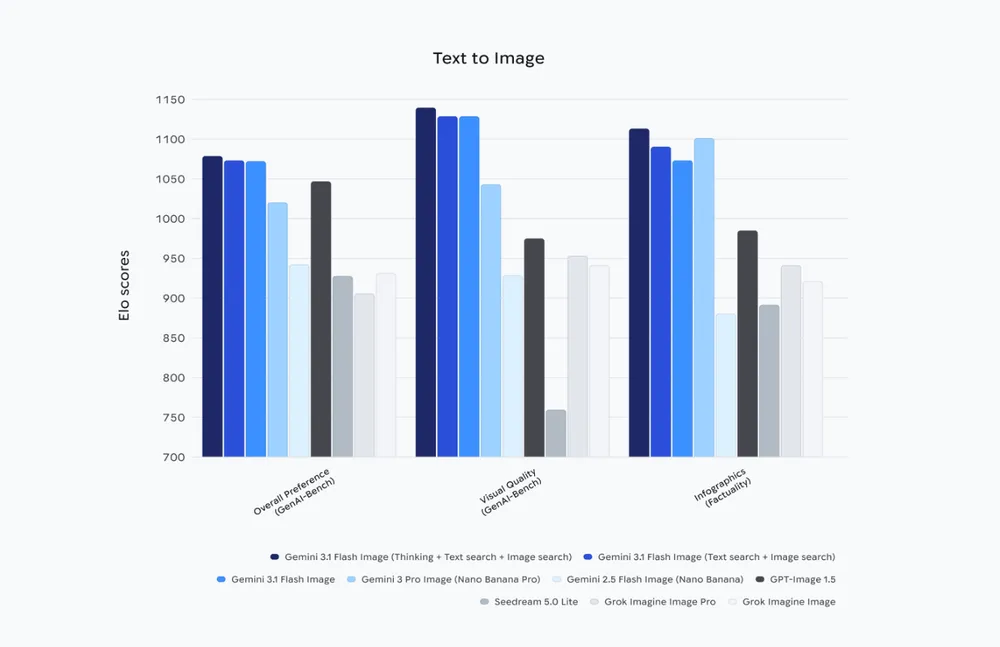
Consistent Across Categories
Gemini 3.1 Flash Image demonstrates measurable improvement in every reported category compared to Gemini 2.5 Flash.
Strongest Gains
- Visual quality
- Multi-input compositional editing
- General editing robustness
Competitive Positioning
- Leads internal GenAI-Bench overall preference.
- Outperforms GPT-Image 1.5 in overall and visual metrics.
- Narrow incremental improvements suggest architectural refinement rather than a radical shift.
How can I access Nano Banana 2?
Where it’s available
Nano Banana 2 is accessible through Google’s Gemini tooling (Gemini app), the Gemini API (documented under Google’s AI developer docs), and is being surfaced through cloud enterprise products like Vertex AI for preview/enterprise integrations. CometAPI have also announced support and wrappers to make integration easy.
How to Use Nano Banana 2 API (cometapi): what are the options?
CometAPI’s guide uses a Gemini-style
generateContentshape and returns images as Base64 incandidates[0].content.parts[].inline_data.data. You must decode that Base64 to save a file client-side.,You only need to replacehttps: //generativelanguage.googleapis.comwithhttps://api.cometapi.com. The returned image is usually provided as Base64-encodedinline_data. You will need to decode it on the client side and save it as a file. CometAPI provides discounts helps you use Use Nano Banana 2 API.
CometAPI provides a unified REST wrapper and explicit endpoints for Gemini models — ideal if you prefer one credential and wish to switch providers without changing your application code. For Nano Banana 2, the CometAPI page includes a direct curl snippet for their gemini-3.1-flash-image-preview:generateContent endpoint. Below is a cleaned-up curl example based on CometAPI docs.
Prerequisites for Using Nano Banana 2 via CometAPI
CometAPI Account & API Key:Create an account on CometAPI and generate your API access key (sk-…). This key is what you’ll use for authenticating all API requests to CometAPI’s endpoints.
Programming Languages & Runtimes:
- Node.js 18+ (for JavaScript/TypeScript)
- Python 3.10+
- (Or any language that can make HTTP requests)
HTTP Tools or SDKs:
- For JavaScript:
fetch,axios, or the OpenAI-compatible client - For Python:
requests,httpx, or the OpenAI client - These tools help you send API calls and handle responses.
Quick overview of the request pattern
- Base URL:
https://api.cometapi.com(CometAPI base). - Model names:
gemini-3.1-flash-image-preview(Nano Banana 2 / gemini 3.1 Flash Image) orgemini-2.5-flash-imagedepending on availability. - Auth:
Authorization: sk-xxxxheader — CometAPI typically uses ansk-style key. - Response: images are returned as Base64 under
response.candidates[0].content.parts[].inline_data.data. Decode and write to disk.
Example Workflow (High-Level)
- Get an API key from CometAPI.
- Choose your model identifier (e.g.,
gemini-3.1-flash-imageor similar, depending on availability). - Send a POST request to the model’s generate endpoint with your prompt.
- Handle the returned image data in your app (decode base64, serve as PNG, etc.).
- For image editing, include the existing image data and edit instructions in your request.
Using the official Gemini API (text → image)
Below is a short Node.js example showing how to call the Gemini generateContent endpoint for gemini-3.1-flash-image-preview (this mirrors official snippets in the docs). Replace YOUR_API_KEY with your credential and add error handling for production.
# Get your CometAPI key from https://api.cometapi.com/console/token
# Export it as: export COMETAPI_KEY="your-key-here"

mkdir -p ./output

curl -s "https://api.cometapi.com/v1beta/models/gemini-3.1-flash-image-preview:generateContent" \
  -H "Authorization: $COMETAPI_KEY" \
  -H 'Content-Type: application/json' \
  -X POST \
  -d '{
    "contents": [
      {
        "role": "user",
        "parts": [
          {
            "text": "A woman leaning on a wooden railing of a traditional Chinese building. She is wearing a blue cheongsam with pink and red floral motifs and a headdress made of colorful flowers, including roses and lilacs. Realistic painting style, focusing on the textural details of the clothing patterns and wooden buildings."
          }
        ]
      }
    ],
    "generationConfig": {
      "responseModalities": ["IMAGE"],
      "imageConfig": {
        "aspectRatio": "9:16"
      }
    }
  }' | python3 -c "
import sys, json, base64
data = json.load(sys.stdin)
parts = data['candidates'][0]['content']['parts']
for part in parts:
    if 'text' in part:
        print(part['text'])
    elif 'inlineData' in part:
        img = base64.b64decode(part['inlineData']['data'])
        with open('./output/gemini-3.1-flash-image-preview.png', 'wb') as f:
            f.write(img)
        print('Image saved to ./output/gemini-3.1-flash-image-preview.png')
"
CometAPI provides SDKs and OpenAI-compatible client wrappers, so some teams can switch providers with minimal code changes, let you request Base64-encoded image outputs or hosted URLs depending on your configuration. Always check the official generateContent schema for the exact payload fields.
Image→Image (edit) flow
To edit an existing image:
- Convert your source image to Base64 (without the
data:image/...;base64,prefix). - POST with a payload that includes
inline_data.datacontaining that Base64 string and an editing prompt (e.g., “change background to dusk sky, remove watermark”). - The response will include a new Base64 output to decode and save.
curl
--location
--request POST 'https://api.cometapi.com/v1beta/models/gemini-3.1-flash-image-preview:generateContent' \
--header 'Authorization: ' \
--header 'Content-Type: application/json' \
--data-raw '{ "contents":
[ { "role": "user", "parts":
[ { "text": "Blend three images to output a high-resolution image" }, { "inline_data": { "mime_type": "image/jpeg", "data": "<your_first_image_base64_data_here>" } }, { "inline_data": { "mime_type": "image/jpeg", "data": "<your_second_image_base64_data_here>" } }, { "inline_data": { "mime_type": "image/jpeg", "data": "<your_third_image_base64_data_here>" } }
] }
], "generationConfig": { "responseModalities": [ "TEXT", "IMAGE"
] } }'
Typical parameters to tune
model: choosegemini-3.1-flash-image-preview(Nano Banana 2) orgemini-3-pro-image-preview(Pro).imageConfig.aspect_ratioandimageConfig.image_size(512,1K,2K,4K) — affects cost and latency.responseModalities:["Image"]or["Text","Image"]for multimodal flows.
How should I craft prompts for Nano Banana 2?
Prompt engineering for image models mixes composition, style, camera/lighting hints, and constraint statements. Nano Banana 2 is tuned to follow instructions reliably, so balance brevity with explicitness.
Prompt structure (recommended)
- Primary subject: who/what is in the image.
- Action or state: what the subject is doing.
- Environment & mood: setting, lighting, atmosphere.
- Technical directives: camera lens, aspect ratio, resolution, composition.
- Style & references: art style, artist references (be mindful of copyright rules), era.
- Constraints: number of characters/objects, avoid certain colors, include legible text.
Example prompt:
“A photorealistic image of a tiny yellow banana shaped like a vintage rocket, resting on a glossy mahogany table in a sunlit studio. 50mm lens, shallow depth of field, warm golden hour lighting, high detail, no visible logos, 2048×1152.”
Tips for editing prompts (inpainting / replace)
- Provide the mask clearly and specify which regions should change.
- Use “preserve” wording for areas to keep (e.g., “preserve the subject’s facial features, replace background only”).
- For text in images, provide the exact text, and state font/style (e.g., “legible sans-serif, center-aligned”). Nano Banana 2 emphasizes better text rendering, but be explicit.
Prompt debugging checklist
- If the output is off, try simplifying: reduce creative style instructions first, then re-introduce detail.
- If text is illegible: specify font, size, and contrast in the prompt and increase resolution.
- If composition is wrong: use camera angle and lens specifiers.
What are common pitfalls and how do I avoid them?
Pitfall: Over-reliance on one-shot prompts
Avoid expecting a single prompt to take care of trimming, layout, and multi-step edits. Break work into: generate base → edit/replace → final polish. Use seed and masks for precision.
Pitfall: Ignoring provenance and copyright checks
Don’t deploy at scale without SynthID/C2PA or other provenance. Many enterprises require traceability for AI-origin content.
Pitfall: Budget surprises
Track usage at the model and endpoint level, and set hard usage caps via the provider or a proxy. Flash tiers are cheaper but can still cost a lot if you render thousands of 4K images unintentionally.
Recommended best practices with Nano Banana 2?
Productionizing image generation requires attention to cost, latency, quality control, provenance and safety. Below are practical best practices distilled from field reports, Google docs, and community tests.
Prompt engineering & deterministic outputs
- Template your prompts: for repeatable outputs (e.g., product shots), use structured prompts with fixed segments (subject, camera, lighting, texture, post-process). This reduces drift between calls.
- Use reference images and mask instructions for edits rather than trying to achieve complex localized edits via pure text — it reduces semantic errors and artifacts.
Cost & performance tuning
- Choose Flash/“Nano Banana 2” mode for high volume: If you need many quick iterations, use Flash-tier models and smaller sizes (2K vs 4K) to reduce cost and latency.
- Batch requests where possible: some providers allow multi-prompt batching — it reduces total latency per generated asset in high-throughput pipelines. (Check your provider docs.)
Safety, provenance and legal
- Enable SynthID and C2PA metadata on generated assets to support downstream auditing and compliance (particularly when images are used in advertising/PR). Google and partners emphasize SynthID as the provenance mechanism.
- Human-in-the-loop review for sensitive content: automated policy layers are strong but imperfect — use manual checks for public-facing campaigns or content involving public figures.
Quality assurance
- Automate QA checks: run a quick post-generation classifier for unexpected artifacts (text misrenders, low face fidelity, accidental logo creation). Keep a scoring system and fail-safe fallback to Pro-tier renders if auto-check fails.
- Store prompts and seeds: for auditability and reproducibility, save the exact prompt, timestamp, model version and any seed or deterministic parameter used.
Latency-sensitive UX
- Progressive UX: return a low-res/fast draft first, and replace with a high-res/Pro render when ready. This keeps your app responsive (many providers offer a “draft” or Flash flavor).
Final notes & next steps
Nano Banana 2 is built to change the economics of image-first production workflows: lower latency and lower cost per call open up use-cases like on-demand ad asset generation, rapid A/B creative testing, and real-time collaborative design tools. The model is already integrated across Google's consumer and cloud surfaces; for developers wanting to go live fast, CometAPI provides a convenient marketplace wrapper that supports Gemini image endpoints plus other models — a practical move when you want to experiment with multiple engines without changing app code.
Developers can access Nano Banana 2 via CometAPI now.To begin, explore the model’s capabilities in the Playground and consult the API guide for detailed instructions. Before accessing, please make sure you have logged in to CometAPI and obtained the API key. CometAPI offer a price far lower than the official price to help you integrate.
Ready to Go?→ Sign up fo Nano Banana 2 today !
If you want to know more tips, guides and news on AI follow us on VK, X and Discord!