Caratteristiche principali
- Generazione multimodale (video + audio) — Sora-2-Pro genera fotogrammi video insieme ad audio sincronizzato (dialoghi, suoni ambientali, SFX) invece di produrre video e audio separatamente.
- Maggiore fedeltà / livello “Pro” — ottimizzato per una fedeltà visiva superiore, riprese più impegnative (movimenti complessi, occlusioni e interazioni fisiche) e una coerenza per scena più lunga rispetto a Sora-2 (non Pro). Il rendering può richiedere più tempo rispetto al modello Sora-2 standard.
- Versatilità di input — supporta prompt puramente testuali e può accettare frame di input immagine o immagini di riferimento per guidare la composizione (workflow input_reference).
- Cameo / iniezione di somiglianza — può inserire la fisionomia acquisita di un utente nelle scene generate con workflow di consenso nell'app.
- Plausibilità fisica: migliorata permanenza degli oggetti e fedeltà del movimento (ad es. quantità di moto, galleggiabilità), riducendo artefatti irrealistici di “teletrasporto” comuni nei sistemi precedenti.
- Controllabilità: supporta prompt strutturati e indicazioni a livello di inquadratura, così i creator possono specificare camera, illuminazione e sequenze multi-shot.
Dettagli tecnici e superficie di integrazione
Famiglia di modelli: Sora 2 (base) e Sora 2 Pro (variante di alta qualità).
Modalità di input: prompt testuali, immagini di riferimento e brevi registrazioni video/audio cameo per la somiglianza.
Modalità di output: video codificato (con audio) — parametri esposti tramite gli endpoint /v1/videos (selezione del modello tramite model: "sora-2-pro"). Superficie API conforme alla famiglia di endpoint video di OpenAI per le operazioni di creazione/recupero/elenco/eliminazione.
Training e architettura (sintesi pubblica): OpenAI descrive Sora 2 come addestrato su dati video su larga scala con post-training per migliorare la simulazione del mondo; i dettagli specifici (dimensione del modello, dataset esatti e tokenizzazione) non sono elencati pubblicamente in modo puntuale. Aspettarsi carichi computazionali elevati, tokenizzatori/architetture video specializzati e componenti di allineamento multimodale.
Endpoint API e workflow: mostra un flusso basato su job: inviare una richiesta di creazione POST (model="sora-2-pro"), ricevere un job id o una location, quindi effettuare polling o attendere il completamento e scaricare il/i file risultante/i. I parametri comuni negli esempi pubblicati includono prompt, seconds/duration, size/resolution e input_reference per avvii guidati da immagine.
Parametri tipici :
model:"sora-2-pro"prompt: descrizione della scena in linguaggio naturale, opzionalmente con indicazioni di dialogoseconds/duration: durata target del filmato ( Pro supporta la qualità più alta nelle durate disponibili)size/resolution: segnalazioni dalla community indicano che Pro supporta fino a 1080p in molti casi d'uso.
Input di contenuto: file immagine (JPEG/PNG/WEBP) possono essere forniti come frame o riferimento; quando utilizzata, l'immagine dovrebbe corrispondere alla risoluzione target e fungere da ancoraggio della composizione.
Comportamento di rendering: Pro è ottimizzato per dare priorità alla coerenza fotogramma per fotogramma e a una fisica realistica; ciò implica tipicamente tempi di calcolo più lunghi e costi più elevati per clip rispetto alle varianti non Pro.
Prestazioni nei benchmark
Punti di forza qualitativi: OpenAI ha migliorato realismo, coerenza fisica e audio sincronizzato** rispetto ai modelli video precedenti. Altri risultati VBench indicano che Sora-2 e i derivati si collocano ai vertici, o vicino, tra i sistemi closed-source contemporanei per coerenza temporale.
Tempi/throughput indipendenti (benchmark di esempio): Sora-2-Pro ha registrato una media di ~2.1 minutes per clip da 20 secondi in 1080p in un confronto, mentre un concorrente (Runway Gen-3 Alpha Turbo) è risultato più veloce (~1.7 minutes) sullo stesso task — il compromesso è tra qualità vs latenza di rendering e ottimizzazione della piattaforma.
Limitazioni (pratiche e di sicurezza)
- Fisica/coerenza non perfette — migliorate ma non impeccabili; possono ancora verificarsi artefatti, movimenti innaturali o errori di sincronizzazione audio.
- Vincoli di durata e calcolo — i clip lunghi sono intensivi in termini di calcolo; molti workflow pratici limitano i clip a durate brevi (ad es. da poche unità a poche decine di secondi per output di alta qualità).
- Rischi per privacy/consenso — l'iniezione della fisionomia (“cameo”) comporta rischi di consenso e di mis-/disinformazione; OpenAI dispone di controlli di sicurezza espliciti e meccanismi di revoca nell'app, ma è necessaria un'integrazione responsabile.
- Costo e latenza — i render di qualità Pro possono essere più costosi e lenti rispetto a modelli più leggeri o concorrenti; considerare la fatturazione per secondo/per render e l'accodamento.
- Filtri di sicurezza dei contenuti — la generazione di contenuti dannosi o protetti da copyright è limitata; il modello e la piattaforma includono livelli di sicurezza e moderazione.
Casi d'uso tipici e consigliati
Casi d'uso:
- Marketing e prototipi pubblicitari — creare rapidamente proof of concept cinematici.
- Previsualizzazione — storyboard, blocking della camera, visualizzazione delle inquadrature.
- Contenuti brevi per i social — clip stilizzati con dialoghi sincronizzati e SFX.
- Come accedere all'API Sora 2 Pro
Passaggio 1: Sign Up for API Key
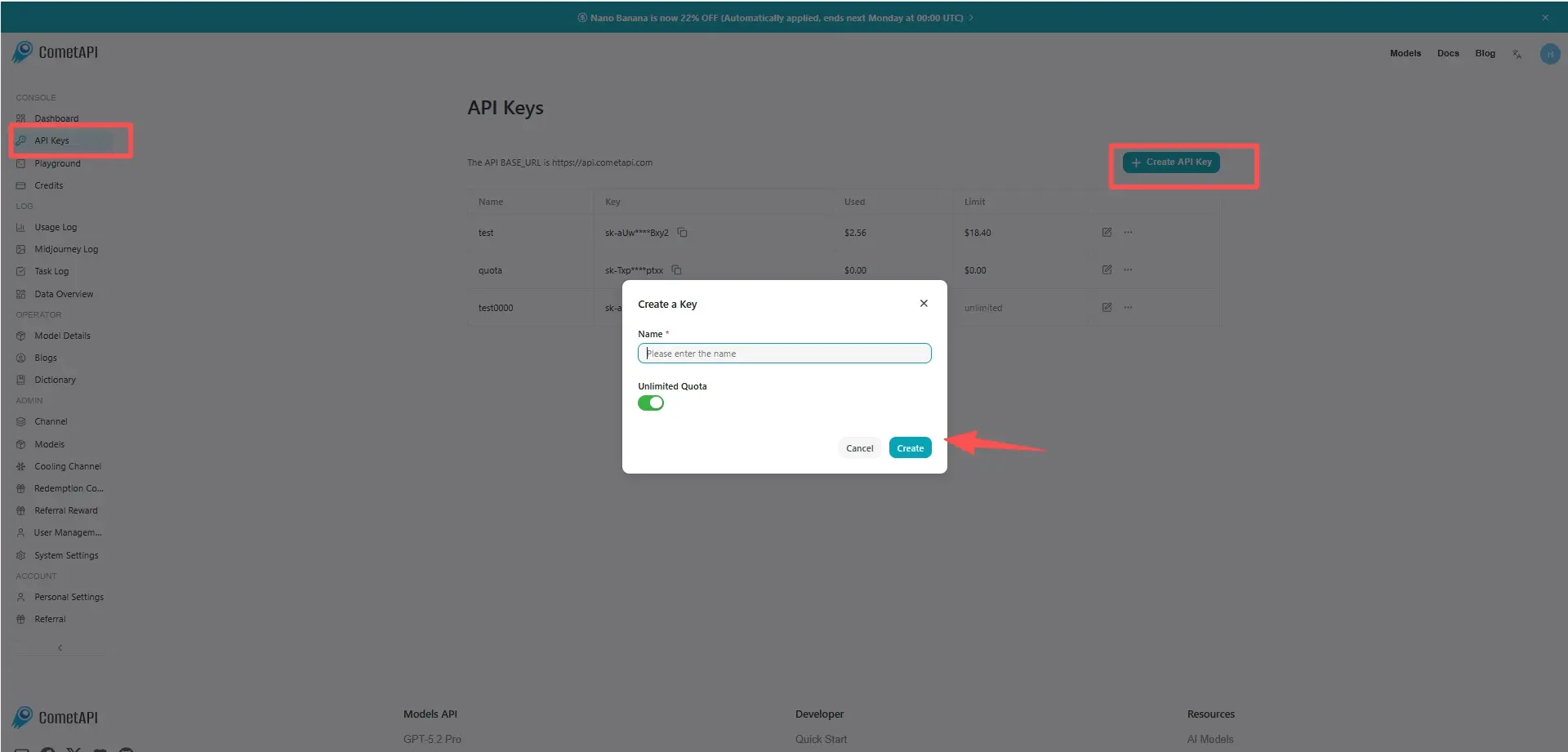
Accedi a cometapi.com. Se non sei ancora nostro utente, registrati prima. Accedi alla tua console CometAPI. Ottieni la chiave API delle credenziali di accesso dell'interfaccia. Clicca su “Add Token” nel token API nel centro personale, ottieni la chiave del token: sk-xxxxx e invia.
Passaggio 2: Send Requests to Sora 2 Pro API
Seleziona l'endpoint “sora-2-pro” per inviare la richiesta API e imposta il body della richiesta. Il metodo e il body della richiesta sono ottenuti dalla nostra doc API sul sito web. Il nostro sito web fornisce anche un test Apifox per la tua comodità. Sostituisci <YOUR_API_KEY> con la tua effettiva chiave CometAPI dal tuo account. base url is office Create video
Inserisci la tua domanda o richiesta nel campo content—è ciò a cui il modello risponderà. Elabora la risposta dell'API per ottenere la risposta generata.
Passaggio 3: Retrieve and Verify Results
Elabora la risposta dell'API per ottenere la risposta generata. Dopo l'elaborazione, l'API risponde con lo stato dell'attività e i dati di output.
- Training/simulazione interna — generare visuali di scenari per ricerca in RL o robotica (con cautela).
- Produzione creativa — se combinata con editing umano (montaggio di clip brevi, color grading, sostituzione dell'audio).