GPT-5.2
What is GPT-5.2 API
GPT-5.2 API is the same as GPT-5.2 Thinking in ChatGPT. GPT-5.2 Thinking is the mid-tier flavor of OpenAI’s GPT-5.2 family designed for deeper work: multi-step reasoning, long-document summarization, quality code generation, and professional knowledge-work where accuracy and usable structure matter more than raw throughput. In the API it’s exposed as the model gpt-5.2 (Responses API / Chat Completions), and it sits between the low-latency Instant variant and the higher-quality but more expensive Pro variant.
Main features
- Very long context & compaction: 400K effective window and compaction tools to manage relevance across long conversations and documents.
- Configurable reasoning effort:
none | medium | high | xhigh(xhigh enables maximum internal compute for tough reasoning).xhighis exposed to Thinking/Pro variants. - Stronger tool and function support: first-class tool calling, grammars (CFG/Lark) to constrain structured outputs, and improved agentic behaviors that simplify complex multi-step automation.
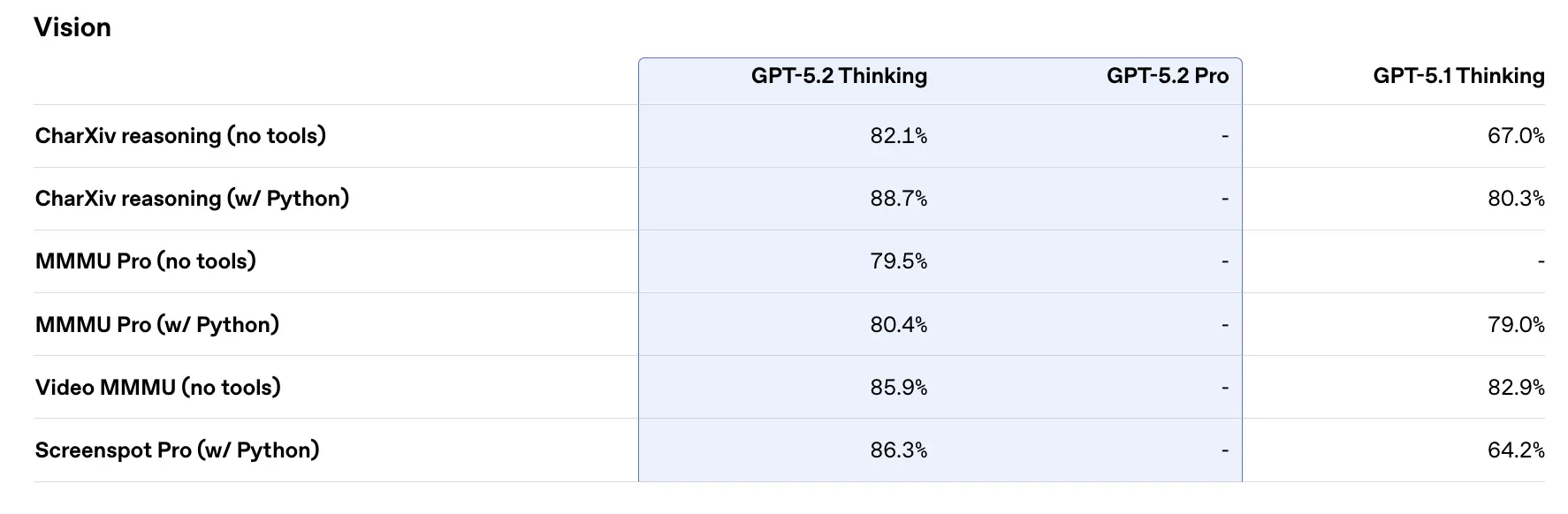
- Multimodal understanding: richer image + text comprehension and integration into multi-step tasks.
- Improved safety / sensitive-content handling: targeted interventions to reduce undesirable responses in areas like self-harm and other sensitive contexts.
Technical capabilities & specifications (developer view)
- API endpoints & model IDs:
gpt-5.2for Thinking (Responses API),gpt-5.2-chat-latestfor chat/instant workflows, andgpt-5.2-profor the Pro tier; available via Responses API and Chat Completions where indicated. - Reasoning tokens & effort management: the API supports explicit parameters to allocate compute (reasoning effort) per request; higher effort increases latency and cost but improves output quality for complex tasks.
- Structured output tools: support for grammars (Lark / CFG) to constrain model output to a DSL or exact syntax (useful for SQL, JSON, DSL generation).
- Parallel tool calling & agentic coordination: improved parallelism and cleaner tool orchestration reduce the need for elaborate system prompts and multi-agent scaffolding.
Benchmark performance & supporting data
OpenAI published a variety of internal and external benchmark results for GPT-5.2. Selected highlights (OpenAI’s reported numbers):
- GDPval (44 occupations, knowledge work) — GPT-5.2 Thinking “beats or ties top industry professionals on 70.9% of comparisons”; OpenAI reports outputs were produced at >11× the speed and <1% the cost of expert professionals on their GDPval tasks (speed and cost estimates are historical-based). These tasks include spreadsheet models, presentations and short videos.
- SWE-Bench Pro (coding) — GPT-5.2 Thinking achieves ≈55.6% on SWE-Bench Pro and ~80% on SWE-Bench Verified (Python only) per OpenAI, establishing a new state of the art for code-generation / engineering evaluation in their tests. This translates to more reliable debugging and end-to-end fixes in practice, according to OpenAI’s examples.
- GPQA Diamond (graduate-level science Q&A) — GPT-5.2 Pro: 93.2%, GPT-5.2 Thinking: 92.4% on GPQA Diamond (no tools, max reasoning).
- ARC-AGI series — On ARC-AGI-2 (a harder fluid reasoning benchmark), GPT-5.2 Thinking scored 52.9% and GPT-5.2 Pro 54.2% (OpenAI says these are new state-of-the-art marks for chain-of-thought style models).
- Long-context (OpenAI MRCRv2) — GPT-5.2 Thinking shows near-100% accuracy on the 4-needle MRCR variant out to 256k tokens and substantially improved scores vs GPT-5.1 across long-context settings. (OpenAI published MRCRv2 charts and tables.)
Comparison with contemporaries
- vs Google Gemini 3 (Gemini 3 Pro / Deep Think): Gemini 3 Pro has been publicized with a ~1,048,576 (≈1M) token context window and broad multimodal inputs (text, image, audio, video, PDFs) and strong agentic integrations via Vertex AI / AI Studio. On paper, Gemini 3’s larger context window is a differentiator for extremely large single-session workloads; tradeoffs include tooling surface and ecosystem fit.
- vs Anthropic Claude Opus 4.5: Anthropic’s Opus 4.5 emphasizes enterprise coding/agent workflows and reports strong SWE-bench results and robustness for long agentic sessions; Anthropic positions Opus for automation and code generation with a 200k context window and specialized agent/Excel integrations. Opus 4.5 is a strong competitor in enterprise automation and code tasks.
Practical takeaway: GPT-5.2 targets a balanced set of improvements (400k context, high token outputs, improved reasoning/coding). Gemini 3 targets the absolute largest single-session contexts (≈1M), while Claude Opus focuses on enterprise engineering and agentic robustness. Choose by matching context size, modality needs, feature/tooling fit, and cost/latency tradeoffs.
How to access and use GPT-5.2 API
Step 1: Sign Up for API Key
Log in to cometapi.com. If you are not our user yet, please register first. Sign into your CometAPI console. Get the access credential API key of the interface. Click “Add Token” at the API token in the personal center, get the token key: sk-xxxxx and submit.
Step 2: Send Requests to GPT-5.2 API
Select the “gpt-5.2” endpoint to send the API request and set the request body. The request method and request body are obtained from our website API doc. Our website also provides Apifox test for your convenience. Replace <YOUR_API_KEY> with your actual CometAPI key from your account. Developers call these via the Responses API / Chat endpoints.
Insert your question or request into the content field—this is what the model will respond to . Process the API response to get the generated answer.
Step 3: Retrieve and Verify Results
Process the API response to get the generated answer. After processing, the API responds with the task status and output data.
See also Gemini 3 Pro Preview API