Key Features of Claude Sonnet 4
- Hybrid Reasoning Architecture: Claude Sonnet 4 employs a hybrid reasoning approach, combining rapid response generation with extended, step-by-step thinking. This dual-mode processing allows the model to adapt its reasoning depth based on task complexity.
- Enhanced Coding and Reasoning: The model demonstrates significant improvements in coding tasks, complex problem-solving, and precise instruction following compared to its predecessors.
- Improved Memory Retention: Claude Sonnet 4 exhibits better memory retention over long conversations, enabling it to maintain context and coherence in extended interactions.
- Safety and Coherence: Anthropic emphasizes safety and coherence in Claude Sonnet 4, implementing measures to reduce issues like reward hacking and ensuring reliable performance in various applications.
Technical Specifications
- Model Type: Large Language Model (LLM), Generative Pre-trained Transformer (GPT), Foundation Model
- Developer: Anthropic
- Release Date: May 22, 2025
- Access: Available to both free and paid users via Anthropic API, Amazon Bedrock, and Google Cloud’s Vertex AI
- Safety Level: Classified under safety level ASL-3, with steps taken to mitigate potential risks associated with advanced AI capabilities
Evolution from Previous Models
Claude Sonnet 4 builds upon the foundation laid by its predecessor, Claude 3.7 Sonnet, which introduced hybrid reasoning capabilities and demonstrated improved performance in various benchmarks. The evolution to Claude Sonnet 4 includes further enhancements in coding proficiency, reasoning accuracy, and memory retention, positioning it as a more robust and reliable AI model for diverse applications.
Benchmark Performance
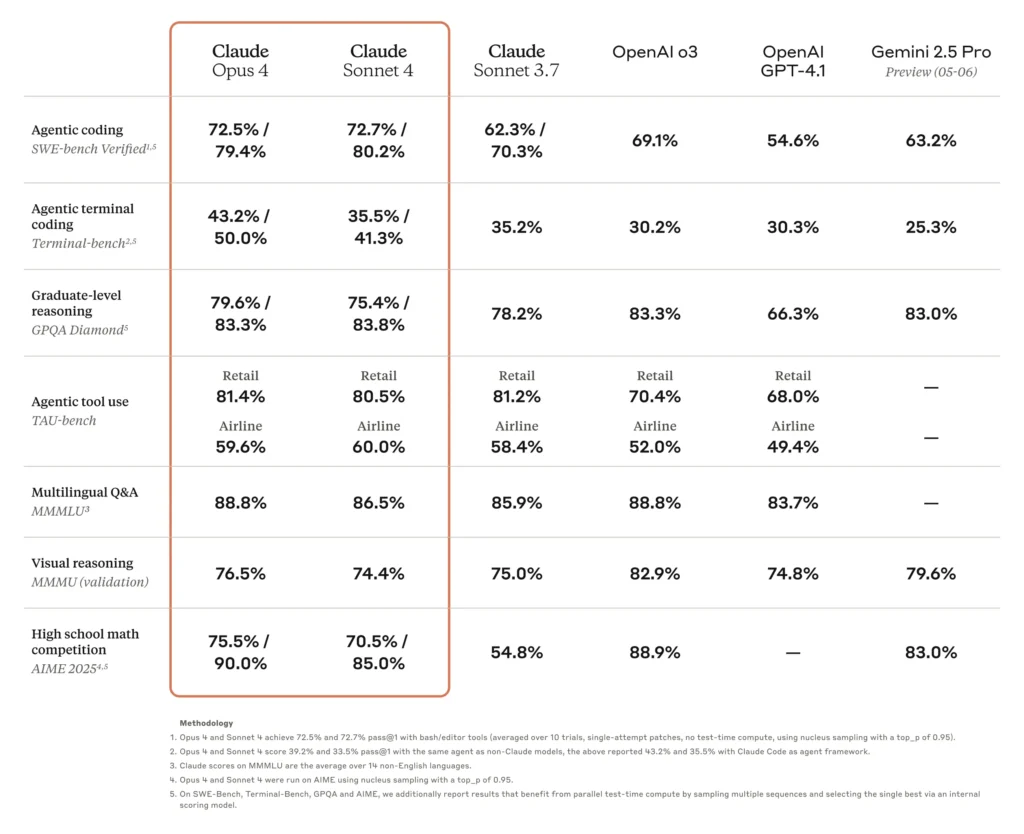
Claude Sonnet 4 significantly enhances the capabilities of its predecessor, Sonnet 3.7, excelling in both coding and reasoning tasks with improved precision and controllability. Achieving state-of-the-art performance on SWE-bench (72.7%), Sonnet 4 balances capability and computational efficiency, making it suitable for a broad range of applications from routine coding tasks to complex software development projects. Key enhancements include improved autonomous codebase navigation, reduced error rates in agent-driven workflows, and increased reliability in following intricate instructions.
Technical Indicators
- Context Window: While specific details for Claude Sonnet 4 are not provided, Claude 3.7 Sonnet featured a context window of 200,000 tokens, suggesting that the newer model maintains or improves upon this capacity.
- Extended Thinking Mode: Claude Sonnet 4 includes a beta “extended thinking” mode, allowing users to optimize reasoning versus tool use, enhancing the model's adaptability to complex tasks.
- Thinking Summaries: A new feature that condenses the chatbot’s reasoning process into easily understandable insights, aiding users in comprehending the model's decision-making pathways.
Application Scenarios
Claude Sonnet 4's enhanced capabilities make it suitable for a wide range of applications:
- Software Development: The model's improved coding proficiency supports tasks such as code generation, debugging, and software refactoring, streamlining development workflows.
- Customer Support: With better memory retention and reasoning, Claude Sonnet 4 can manage prolonged and intricate customer interactions, providing consistent and coherent support.
- Data Analysis: The model's ability to process and analyze large datasets enables it to assist in complex data analytics tasks, offering valuable insights and summaries.
- Educational Tools: Claude Sonnet 4 can serve as an educational assistant, helping students and educators with explanations, problem-solving, and content generation.
- Content Creation: The model's proficiency in generating coherent and contextually relevant text makes it a valuable tool for content creators in drafting articles, reports, and creative writing.
How to access Claude Sonnet 4 API
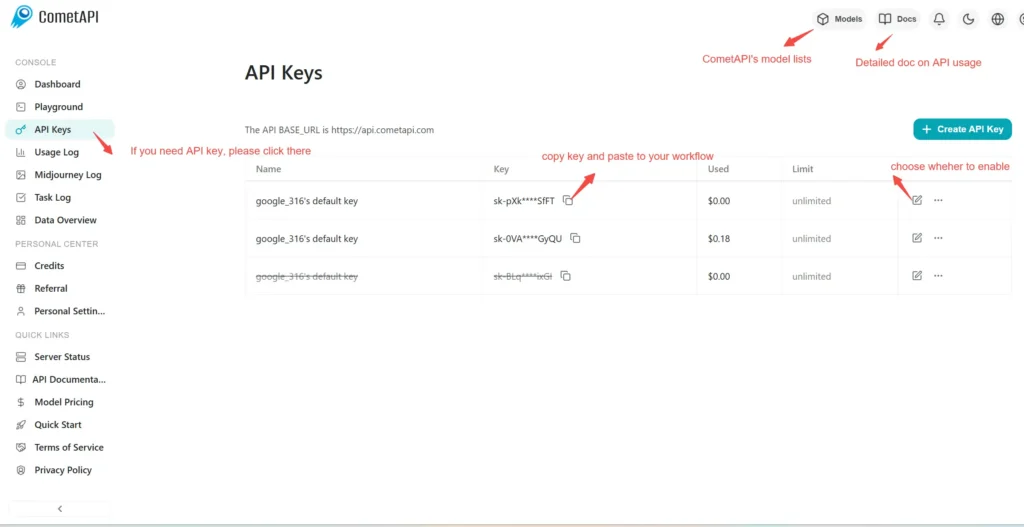
Step 1: Sign Up for API Key
Log in to cometapi.com. If you are not our user yet, please register first. Sign into your CometAPI console. Get the access credential API key of the interface. Click “Add Token” at the API token in the personal center, get the token key: sk-xxxxx and submit.
Step 2: Send Requests to Claude Opus 4.1
Select the “\**claude-sonnet-4-20250514\**” endpoint to send the API request and set the request body. The request method and request body are obtained from our website API doc. Our website also provides Apifox test for your convenience. Replace <YOUR_API_KEY> with your actual CometAPI key from your account. base url is Anthropic Messages format and Chat format.
Insert your question or request into the content field—this is what the model will respond to . Process the API response to get the generated answer.
Step 3: Retrieve and Verify Results
Process the API response to get the generated answer. After processing, the API responds with the task status and output data.