ModelsPricingEnterprise
500+ AI Model API, All In One API.Just In CometAPI
Models API
Developer
Quick StartDocumentationAPI Dashboard
Company
About usEnterprise
Resources
AI ModelsBlogChangelogSupport
Terms of ServicePrivacy Policy
© 2026 CometAPI · All rights reserved
Home/Models/DeepSeek/DeepSeek-OCR2
D

DeepSeek-OCR2

Per Request:$0.04
DeepSeek-OCR 2 is a model released by DeepSeek on January 27, 2026, using the innovative DeepEncoder V2 method, which allows AI to dynamically rearrange parts of an image based on its meaning, rather than just mechanically scanning from left to right. While maintaining high data compression efficiency, the model has achieved significant breakthroughs in multiple benchmarks and production metrics. The model can cover complex document pages with only 256 to 1120 vision tokens, achieving an overall score of 91.09% in the OmniDocBench v1.5 evaluation
New
Commercial Use
Playground
Overview
Features
Pricing
API

Technical specifications of DeepSeek-OCR-2

FieldDeepSeek-OCR-2 (published)
Release date / VersionJan 27, 2026 — DeepSeek-OCR-2 (public repo / HF card).
Parameters~3 billion (3B) model (DeepSeek 3B MoE decoder + compressor).
ArchitectureVision encoder (DeepEncoder V2 / optical compression) → 3B vision-language decoder (MoE variants referenced in DeepSeek materials).
InputHigh-resolution images / scanned pages / PDFs (image formats: PNG, JPEG, multi-page PDFs via conversion pipelines).
OutputPlain text (UTF-8), structured layout metadata (bounding/flow), optional JSON K-V for downstream parsing.
Context length (effective)Uses compressed visual token sequences — design goal: long, document-scale contexts (practical limits depend on compression ratio; typical pipeline yields 10× token reduction versus naïve tokenization).
Languages100+ languages / scripts (claimed multilingual coverage in product notes).

What is DeepSeek-OCR-2

DeepSeek-OCR-2 is the second major OCR/document understanding model from DeepSeek AI. Rather than treating OCR as plain character extraction, the model compresses visual document information into compact visual tokens (a process DeepSeek calls vision-text compression or its DeepEncoder family), then decodes those tokens with a 3B parameter mixture-of-experts (MoE) style VLM decoder that models text generation and layout reasoning together. The approach targets long-context documents (tables, multi-column layouts, diagrams, multilingual scripts) while reducing the sequence length and overall runtime cost compared with tokenizing every pixel/patch.

Main features of DeepSeek-OCR-2

  • Human-like reading order & layout awareness — learns logical ordering of text (headings→paragraphs→tables) rather than scanning fixed grids.
  • Vision-text compression — compresses visual input to much shorter token sequences (10× typical compression target), enabling long-document contexts for the decoder.
  • Multilingual & multi-script — claims support for 100+ languages and diverse scripts.
  • High throughput / self-hostable — designed for on-prem inference (A100 examples), and community GGUF/local builds reported.
  • Fine-tunable — repo and guides include fine-tuning instructions for domain adaptation (invoices, science papers, forms).
  • Layout + content output — not just plain text: structured outputs to facilitate downstream KIE/NER and RAG pipelines.

Benchmark performance of DeepSeek-OCR-2

  • Fox benchmark / internal metric: ~97% exact-match accuracy at 10× compression on its Fox benchmark (the company’s benchmark focused on document fidelity under compression). This is one of the headline claims in DeepSeek marketing materials.
  • Compression trade-offs: While accuracy remains high at moderate compression (≈10×), it degrades with more aggressive compression (Tom’s Hardware summarized tests showing accuracy falling to ~60% at 20× in some scenarios). This highlights the practical tradeoffs between throughput & fidelity.
  • Throughput: ~200k pages/day on a single NVIDIA A100 for typical workloads — useful when evaluating cost/scale vs cloud OCR APIs.

Use cases & recommended deployments

  • Enterprise document ingestion & indexing: convert large corpora of annual reports, PDFs, and scanned documents into searchable text + layout metadata for RAG/LLM pipelines. (DeepSeek throughput claim is attractive for scale.)
  • Structured table extraction / financial reporting: the layout-aware encoder helps preserve table cell relationships for downstream KIE extraction and reconciliation. Validate compression level against numeric-precision needs.
  • Multilingual archive digitization: 100+ language support makes it suitable for libraries, government archives, or multinational document processing.
  • On-prem, privacy-sensitive deployments: self-hostable HF/GGUF variants enable keeping data in-house versus cloud providers.
  • Preprocessing for LLM RAG: compressing and extracting faithful text + layout for RAG ingestion where context length is a bottleneck.

How to access DeepSeek-OCR-2 via CometAPI

Step 1: Sign Up for API Key

Log in to cometapi.com. If you are not our user yet, please register first. Sign into your CometAPI console. Get the access credential API key of the interface. Click “Add Token” at the API token in the personal center, get the token key: sk-xxxxx and submit.
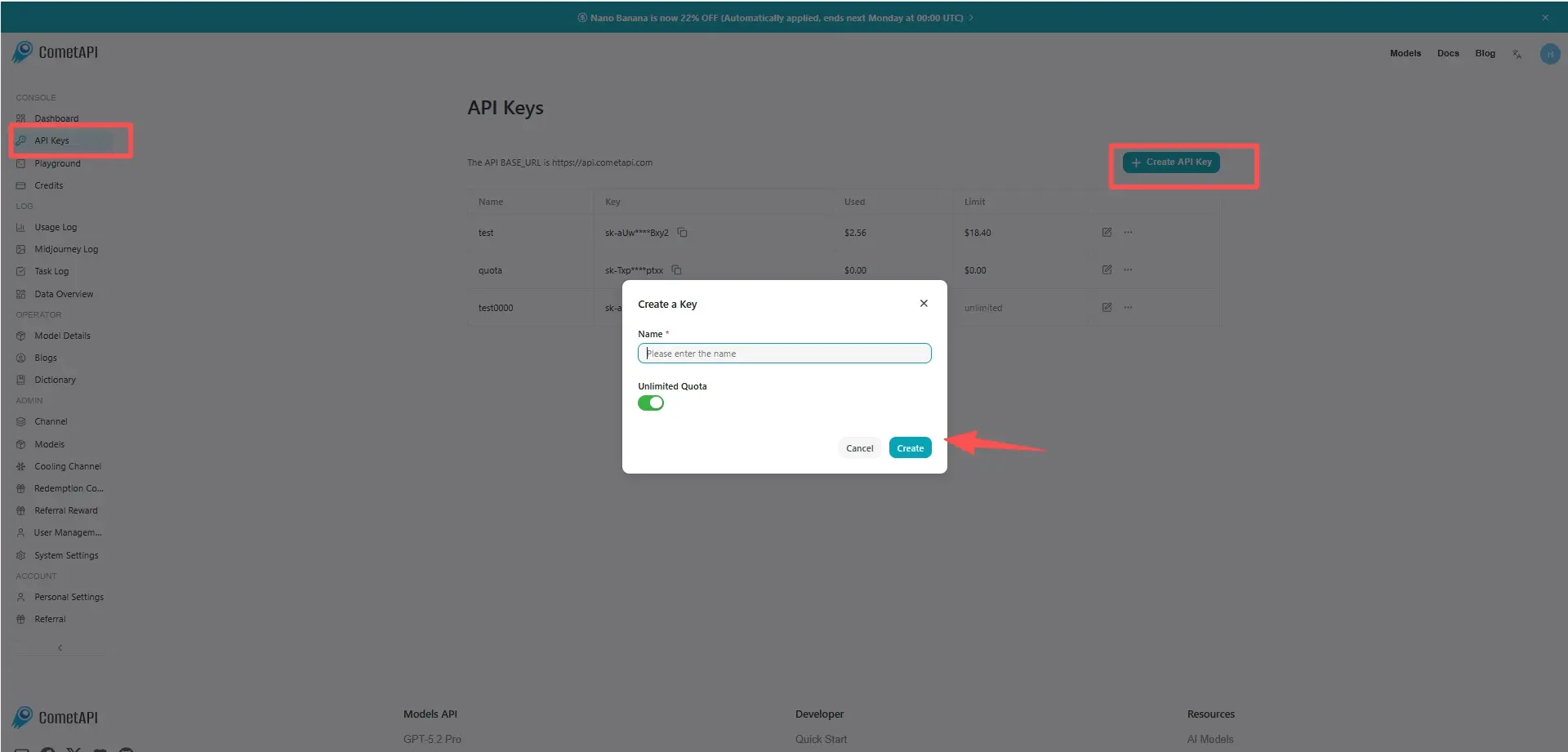
cometapi-key

Step 2: Send Requests to DeepSeek-OCR-2 API

Select the “deepseek-ocr-2” endpoint to send the API request and set the request body. The request method and request body are obtained from our website API doc. Our website also provides Apifox test for your convenience. Replace with your actual CometAPI key from your account. base url is Chat Completions.

Insert your question or request into the content field—this is what the model will respond to . Process the API response to get the generated answer.

Step 3: Retrieve and Verify Results

Process the API response to get the generated answer. After processing, the API responds with the task status and output data.

FAQ

How is DeepSeek-OCR-2 different from traditional OCR APIs?

DeepSeek-OCR-2 uses Visual Causal Flow to determine semantic reading order, allowing it to reconstruct tables and multi-column layouts more accurately than grid-based OCR engines.

Can DeepSeek-OCR-2 handle complex tables and formulas?

Yes, it is specifically optimized to preserve table structure and mathematical notation in structured Markdown or JSON output.

Is DeepSeek-OCR-2 suitable for RAG pipelines?

Yes, its structured output makes it well-suited for document preprocessing in retrieval-augmented generation workflows.

How does DeepSeek-OCR-2 compare to DeepSeek-OCR-1?

OCR-2 improves layout understanding, reduces character error rates, and performs better on complex documents compared to OCR-1.

Does DeepSeek-OCR-2 support multilingual OCR?

Yes, it supports over 100 languages, including non-Latin scripts and mixed-language documents.

Can DeepSeek-OCR-2 be fine-tuned for specific domains?

Community tooling supports fine-tuning, with reported improvements in domain-specific OCR accuracy such as finance and scientific documents.

When should I choose DeepSeek-OCR-2 over general vision models like GPT-4o?

Choose DeepSeek-OCR-2 when document structure fidelity and OCR accuracy matter more than general multimodal reasoning.

Pricing for DeepSeek-OCR2

Explore competitive pricing for DeepSeek-OCR2, designed to fit various budgets and usage needs. Our flexible plans ensure you only pay for what you use, making it easy to scale as your requirements grow. Discover how DeepSeek-OCR2 can enhance your projects while keeping costs manageable.
Comet Price (USD / M Tokens)Official Price (USD / M Tokens)Discount
Per Request:$0.04
Per Request:$0.05
-20%

Sample code and API for DeepSeek-OCR2

Access comprehensive sample code and API resources for DeepSeek-OCR2 to streamline your integration process. Our detailed documentation provides step-by-step guidance, helping you leverage the full potential of DeepSeek-OCR2 in your projects.
POST
/v1/chat/completions
Python
JavaScript
Curl
from openai import OpenAI
import os

# Get your CometAPI key from https://api.cometapi.com/console/token, and paste it here
COMETAPI_KEY = os.environ.get("COMETAPI_KEY") or "<YOUR_COMETAPI_KEY>"
BASE_URL = "https://api.cometapi.com/v1"

client = OpenAI(base_url=BASE_URL, api_key=COMETAPI_KEY)

completion = client.chat.completions.create(
    model="deepseek-ocr-2",
    messages=[
        {"role": "system", "content": "You are a helpful assistant."},
        {"role": "user", "content": "Hello!"},
    ],
)

print(completion.choices[0].message.content)

Python Code Example

from openai import OpenAI
import os

# Get your CometAPI key from https://api.cometapi.com/console/token, and paste it here
COMETAPI_KEY = os.environ.get("COMETAPI_KEY") or "<YOUR_COMETAPI_KEY>"
BASE_URL = "https://api.cometapi.com/v1"

client = OpenAI(base_url=BASE_URL, api_key=COMETAPI_KEY)

completion = client.chat.completions.create(
    model="deepseek-ocr-2",
    messages=[
        {"role": "system", "content": "You are a helpful assistant."},
        {"role": "user", "content": "Hello!"},
    ],
)

print(completion.choices[0].message.content)

JavaScript Code Example

import OpenAI from "openai";

// Get your CometAPI key from https://api.cometapi.com/console/token, and paste it here
const api_key = process.env.COMETAPI_KEY || "<YOUR_COMETAPI_KEY>";
const base_url = "https://api.cometapi.com/v1";

const openai = new OpenAI({
  apiKey: api_key,
  baseURL: base_url,
});

const completion = await openai.chat.completions.create({
  messages: [
    { role: "system", content: "You are a helpful assistant." },
    { role: "user", content: "Hello!" }
  ],
  model: "deepseek-ocr-2",
});

console.log(completion.choices[0].message.content);

Curl Code Example

#!/bin/bash

# Get your CometAPI key from https://api.cometapi.com/console/token
# Export it as: export COMETAPI_KEY="your-key-here"

curl https://api.cometapi.com/v1/chat/completions \
  -H "Content-Type: application/json" \
  -H "Authorization: Bearer $COMETAPI_KEY" \
  -d '{
    "model": "deepseek-ocr-2",
    "messages": [
      {
        "role": "system",
        "content": "You are a helpful assistant."
      },
      {
        "role": "user",
        "content": "Hello!"
      }
    ]
  }'