Technical Specifications of Gemini 3.5 Flash
| Item | Gemini 3.5 Flash |
|---|---|
| Provider | |
| Model family | Gemini 3.5 |
| Official model ID | gemini-3.5-flash |
| Input types | Text, image, video, audio, PDF |
| Output types | Text |
| Context window | 1 million tokens |
| Max output tokens | ~65K output tokens |
| Primary strengths | Agentic workflows, coding, multimodal reasoning |
| Tool support | Function calling, code execution, search grounding, structured outputs, URL context, file search |
| Thinking support | Adjustable thinking/reasoning levels |
| Safety framework | Google Frontier Safety Framework |
What is Gemini 3.5 Flash?
Google Gemini 3.5 Flash is Google's flagship high-speed multimodal reasoning model optimized for agentic execution, coding, and long-horizon workflows. It extends the Gemini Flash series with substantially stronger reasoning and software engineering capabilities while maintaining low-latency inference characteristics.
Unlike earlier Flash models primarily focused on lightweight inference, Gemini 3.5 Flash is designed for persistent AI agents, multi-step coding systems, and enterprise automation pipelines. Google positions it as its strongest agentic Flash-tier model to date.
Main Features of Gemini 3.5 Flash
- 1M token long-context support: Handles extremely large repositories, lengthy documentation, PDFs, transcripts, and multi-session workflows in a single prompt context.
- Strong agentic execution: Optimized for multi-step autonomous workflows, tool orchestration, terminal tasks, and long-running AI agents.
- Advanced coding performance: Outperforms Gemini 3.1 Pro on several coding and agentic benchmarks including Terminal-Bench and MCP Atlas.
- Native multimodal reasoning: Accepts text, images, audio, video, and PDFs for unified reasoning tasks.
- Production-grade tooling: Supports structured outputs, function calling, code execution, grounding with Google Search and Maps, and file search.
- Configurable reasoning/thinking modes: Developers can tune latency versus reasoning depth using thinking-level controls.
Benchmark Performance of Gemini 3.5 Flash
Google-reported benchmark results position Gemini 3.5 Flash among the strongest agentic Flash-tier models currently available:
| Benchmark | Gemini 3.5 Flash |
|---|---|
| Terminal-Bench 2.1 | 76.2% |
| GDPval-AA | 1656 Elo |
| MCP Atlas | 83.6% |
| CharXiv Reasoning | 84.2% |
These scores indicate major gains in autonomous execution, multimodal reasoning, and software engineering reliability compared with earlier Gemini Flash variants.
Gemini 3.5 Flash vs Other Models
| Capability | Gemini 3.5 Flash | Gemini 3.1 Pro | Claude Sonnet 4 |
|---|---|---|---|
| Context window | 1M tokens | Large-context | Large-context |
| Agentic workflows | Excellent | Strong | Strong |
| Coding performance | Very strong | Strong | Excellent |
| Inference speed | Optimized Flash latency | Slower | Moderate |
| Multimodal inputs | Native multimodal | Native multimodal | Vision + text |
| Tool ecosystem | Extensive Google tooling | Extensive | Strong API tooling |
Key Differences
- vs Gemini 3.1 Pro: Gemini 3.5 Flash delivers better coding and autonomous task execution while maintaining significantly faster inference.
- vs Claude Sonnet 4: Claude often remains stronger in nuanced long-form reasoning and writing quality, while Gemini 3.5 Flash emphasizes speed, agent execution, and Google ecosystem integration.
- vs GPT-series reasoning models: Gemini 3.5 Flash is particularly competitive in multimodal agent workflows and large-context orchestration, especially for enterprise automation use cases.
Known Limitations of Gemini 3.5 Flash
- Does not currently support native image or audio generation outputs.
- Live conversational APIs are not supported on this model tier.
- Community benchmarks show mixed performance across certain specialized evaluation tasks, especially vision-heavy niche workflows
How to Access Gemini 3.5 Flash API
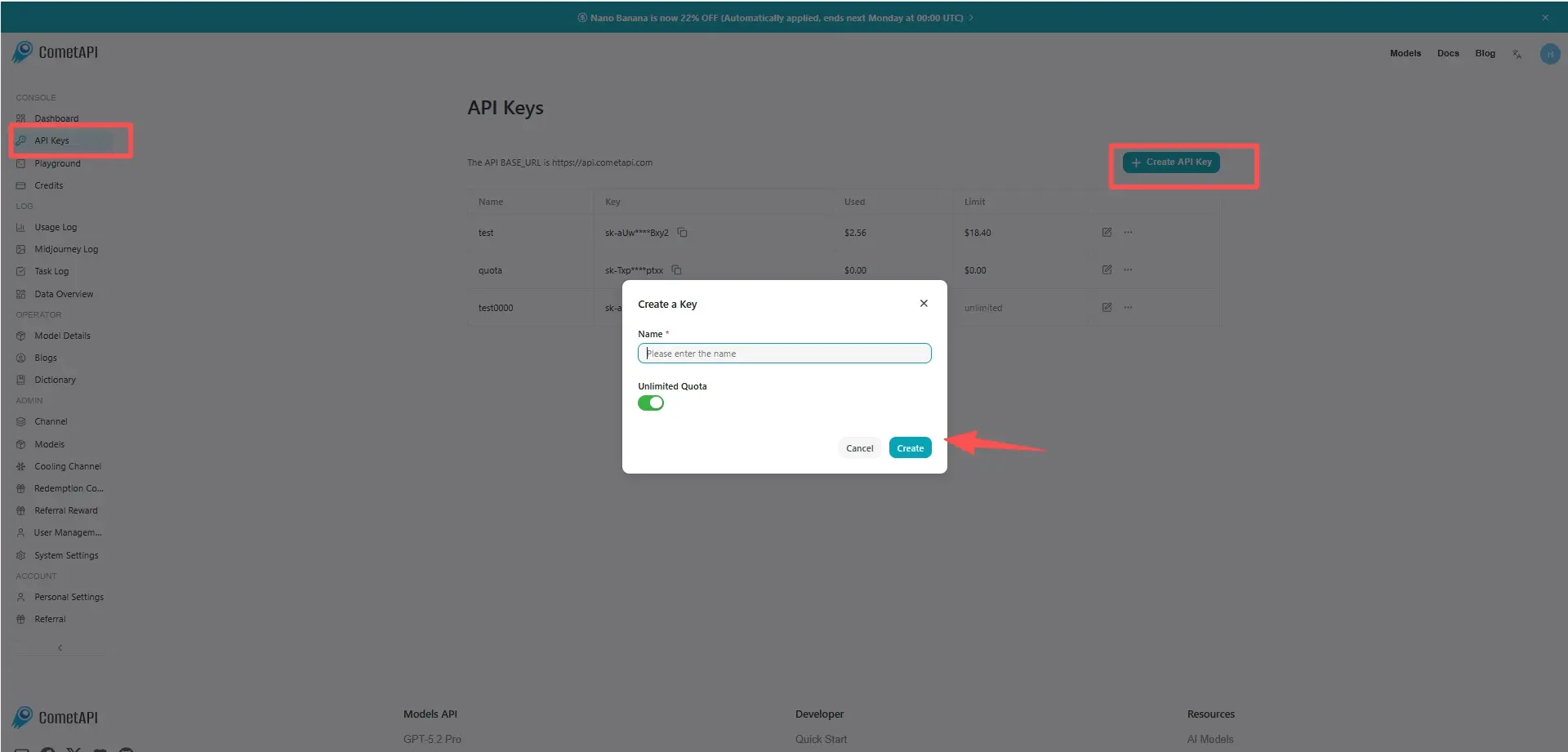
Step 1: Get API Access
Log in to cometAPI. If you are not our user yet, please register first. Sign into your CometAPI console. Get the access credential API key of the interface. Click “Add Token” at the API token in the personal center, get the token key: sk-xxxxx and submit.
Step 2: Send Requests to Gemini 3.5 Flash API
Select the “` gemini-3.5-flash” endpoint to send the API request and set the request body. The request method and request body are obtained from our website API doc. Our website also provides Apifox test for your convenience. Replace <YOUR_API_KEY> with your actual CometAPI key from your account. base url is Gemini Generating Content
Insert your question or request into the content field—this is what the model will respond to . Process the API response to get the generated answer.
Step 3: Process Responses
The API returns structured candidate responses including generated text, citations, safety metadata, and optional tool outputs.