ModelsPricingEnterprise
500+ AI Model API, All In One API.Just In CometAPI
Models API
Developer
Quick StartDocumentationAPI Dashboard
Company
About usEnterprise
Resources
AI ModelsBlogChangelogSupport
Terms of ServicePrivacy Policy
© 2026 CometAPI · All rights reserved
Home/Models/Hunyuan/Hunyuan3D
H

Hunyuan3D

Per Request:$0.08
Hunyuan3D-2 (Tencent Hunyuan 3D Large Model 2.0) is the latest generation 3D generative large model developed by the Tencent Hunyuan team.
Commercial Use
Overview
Features
Pricing
API

What is Hunyuan3D 2.0 ?

Short definition: Hunyuan3D 2.0(*Hunyuan3D-2*) is a two-stage, large-scale generative system from Tencent for producing high-resolution textured 3D assets from multimodal inputs (text, 1–4 images, sketches). The system separates shape generation (Hunyuan3D-DiT / ShapeVAE) and texture synthesis (Hunyuan3D-Paint), plus a production UI/platform (Hunyuan3D-Studio).

Main features

  • Multi-modal inputs: Text-to-3D, image-to-3D (1–4 views), sketch-to-3D. The global site and docs explicitly list these modes.
  • Two-stage pipeline:
    1. Shape generation — Hunyuan3D-DiT (latent diffusion / flow-matching on ShapeVAE latents) produces a bare mesh.
    2. Texture synthesis — Hunyuan3D-Paint generates multi-view images conditioned on geometry; outputs are baked into high-resolution texture maps.
  • Output formats & integration: Exports common 3D formats (OBJ, GLB) and is designed to integrate with Unity, Unreal, Blender and standard production pipelines. Enterprise API supports PBR material generation and topology options (triangles/quads).
  • Production features: Smart topology (mesh optimization), low-poly stylization, texture baking, and in-studio animation support (skeletal skinning via GNN for simple retargeting in Hunyuan3D-Studio).

Benchmark performance (published metrics)

From the Hunyuan3D 2.0 technical report / evaluation (representative metrics from paper Table 4; higher CLIP-score is better; lower CMMD / FID metrics are better):

ModelCMMD (↓)FID_CLIP (↓)FID_Inception (↓)CLIP-score (↑)
Trellis (open-source baseline)3.59154.639289.2870.787
Closed-source Model 13.60055.866305.9220.779
Closed-source Model 23.36849.744294.6280.806
Closed-source Model 33.21851.574295.6910.799
Hunyuan3D 2.0 (Ours)3.19349.165282.4290.809

The authors report superior geometry detail, condition alignment fidelity and texture map quality across automatic metrics and a 300-case user study (50 participants) where Hunyuan3D 2.0 outperformed comparative methods on visual quality and adherence to the conditional image.

Representative production use cases

  • Game asset generation: rapid prototyping of props, set pieces, low- and high-poly character or prop meshes + baked textures; Hunyuan3D’s low-poly stylization module + texture baking integrate into game pipelines.
  • 3D e-commerce / product visualization: convert product photos or sketches into rotatable 3D product previews for catalogs.
  • Creative tools / studios: sketch→3D workflows for artists, automatic UV/texture baking, and quick iteration for look development.
  • AR/VR content & rapid prototyping: generate environment assets or props for immersive experiences, then optimize via the low-poly stylizer and retargeting/animation modules.

How to Use Hunyuan3D 2.0

Step 1: Sign Up for API Key

Log in to cometapi.com. If you are not our user yet, please register first. Sign into your CometAPI console. Get the access credential API key of the interface. Click “Add Token” at the API token in the personal center, get the token key: sk-xxxxx and submit.

Step 2: Send Requests to Hunyuan3D 2.0 API

Select the “"Hunyuan3D-2"” endpoint to send the API request and set the request body. The request method and request body are obtained from our website API doc. Our website also provides Apifox test for your convenience. Replace <YOUR_API_KEY> with your actual CometAPI key from your account. base url is Hunyuan3D

Insert your request and image into the content field—this is what the model will respond to . Process the API response to get the generated answer.
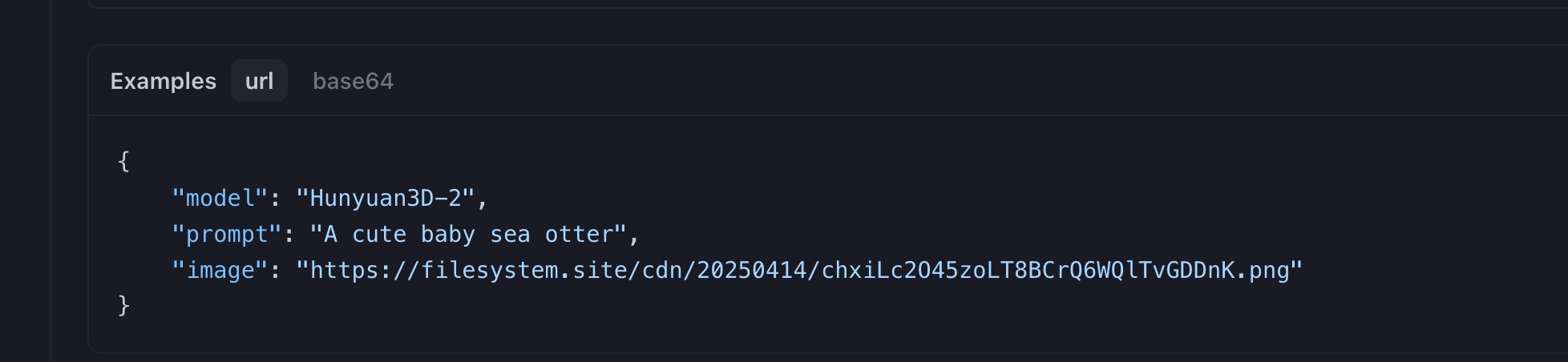
Hunyuan3D

Step 3: Retrieve and Verify Results

Process the API response to get the generated answer. After processing, the API responds with the task status and output data.

Features for Hunyuan3D

Explore the key features of Hunyuan3D, designed to enhance performance and usability. Discover how these capabilities can benefit your projects and improve user experience.

Pricing for Hunyuan3D

Explore competitive pricing for Hunyuan3D, designed to fit various budgets and usage needs. Our flexible plans ensure you only pay for what you use, making it easy to scale as your requirements grow. Discover how Hunyuan3D can enhance your projects while keeping costs manageable.
Comet Price (USD / M Tokens)Official Price (USD / M Tokens)Discount
Per Request:$0.08
Per Request:$0.1
-20%

Sample code and API for Hunyuan3D

Access comprehensive sample code and API resources for Hunyuan3D to streamline your integration process. Our detailed documentation provides step-by-step guidance, helping you leverage the full potential of Hunyuan3D in your projects.
Python
JavaScript
Curl
import os
import requests
import json

# Get your CometAPI key from https://api.cometapi.com/console/token
COMETAPI_KEY = os.environ.get("COMETAPI_KEY") or "<YOUR_COMETAPI_KEY>"
BASE_URL = "https://api.cometapi.com/v1"

# Create output/ folder
folder_path = "output"
os.makedirs(folder_path, exist_ok=True)

# Hunyuan3D-2: 3D model generation from image + prompt
response = requests.post(
    f"{BASE_URL}/images/generations",
    headers={
        "Authorization": f"Bearer {COMETAPI_KEY}",
        "Content-Type": "application/json"
    },
    json={
        "model": "Hunyuan3D-2",
        "prompt": "A cute baby sea otter",
        "image": "https://storage.fonedis.cc/attachments/1452236504373002446/1452848565021049034/ihliawhitne4_Cat_3af95b8a-adc8-4311-a8d8-0213853b1793.png?ex=694b4e2a&is=6949fcaa&hm=1a28b221a1619a82dfbcd041b32bc831d5d5c4da3fd42814ae4b7f43d80214b2"
    }
)

result = response.json()
print(json.dumps(result, indent=2))

# If the response contains a URL or data, save it
if "data" in result and len(result["data"]) > 0:
    data = result["data"][0]
    if "url" in data:
        print(f"
3D Model URL: {data['url']}")
    if "b64_json" in data:
        import base64
        # Save 3D model data if present
        model_data = base64.b64decode(data["b64_json"])
        output_path = os.path.join(folder_path, "hunyuan3d-2-output.glb")
        with open(output_path, "wb") as f:
            f.write(model_data)
        print(f"
3D Model saved to: {output_path}")

Python Code Example

import os
import requests
import json

# Get your CometAPI key from https://api.cometapi.com/console/token
COMETAPI_KEY = os.environ.get("COMETAPI_KEY") or "<YOUR_COMETAPI_KEY>"
BASE_URL = "https://api.cometapi.com/v1"

# Create output/ folder
folder_path = "output"
os.makedirs(folder_path, exist_ok=True)

# Hunyuan3D-2: 3D model generation from image + prompt
response = requests.post(
    f"{BASE_URL}/images/generations",
    headers={
        "Authorization": f"Bearer {COMETAPI_KEY}",
        "Content-Type": "application/json"
    },
    json={
        "model": "Hunyuan3D-2",
        "prompt": "A cute baby sea otter",
        "image": "https://storage.fonedis.cc/attachments/1452236504373002446/1452848565021049034/ihliawhitne4_Cat_3af95b8a-adc8-4311-a8d8-0213853b1793.png?ex=694b4e2a&is=6949fcaa&hm=1a28b221a1619a82dfbcd041b32bc831d5d5c4da3fd42814ae4b7f43d80214b2"
    }
)

result = response.json()
print(json.dumps(result, indent=2))

# If the response contains a URL or data, save it
if "data" in result and len(result["data"]) > 0:
    data = result["data"][0]
    if "url" in data:
        print(f"\n3D Model URL: {data['url']}")
    if "b64_json" in data:
        import base64
        # Save 3D model data if present
        model_data = base64.b64decode(data["b64_json"])
        output_path = os.path.join(folder_path, "hunyuan3d-2-output.glb")
        with open(output_path, "wb") as f:
            f.write(model_data)
        print(f"\n3D Model saved to: {output_path}")

JavaScript Code Example

import fs from "fs";
import path from "path";
import { fileURLToPath } from "url";

const __dirname = path.dirname(fileURLToPath(import.meta.url));

// Get your CometAPI key from https://api.cometapi.com/console/token
const COMETAPI_KEY = process.env.COMETAPI_KEY || "<YOUR_COMETAPI_KEY>";
const BASE_URL = "https://api.cometapi.com/v1";

// Create output/ folder
const folderPath = path.join(__dirname, "../output");
if (!fs.existsSync(folderPath)) {
  fs.mkdirSync(folderPath, { recursive: true });
}

// Hunyuan3D-2: 3D model generation from image + prompt
async function generateModel() {
  const response = await fetch(`${BASE_URL}/images/generations`, {
    method: "POST",
    headers: {
      Authorization: `Bearer ${COMETAPI_KEY}`,
      "Content-Type": "application/json",
    },
    body: JSON.stringify({
      model: "Hunyuan3D-2",
      prompt: "A cute baby sea otter",
      image:
        "https://storage.fonedis.cc/attachments/1452236504373002446/1452848565021049034/ihliawhitne4_Cat_3af95b8a-adc8-4311-a8d8-0213853b1793.png?ex=694b4e2a&is=6949fcaa&hm=1a28b221a1619a82dfbcd041b32bc831d5d5c4da3fd42814ae4b7f43d80214b2",
    }),
  });

  const result = await response.json();
  console.log(JSON.stringify(result, null, 2));

  // If the response contains a URL or data, save it
  if (result.data && result.data.length > 0) {
    const data = result.data[0];
    if (data.url) {
      console.log(`\n3D Model URL: ${data.url}`);
    }
    if (data.b64_json) {
      // Save 3D model data if present
      const modelData = Buffer.from(data.b64_json, "base64");
      const outputPath = path.join(folderPath, "hunyuan3d-2-output.glb");
      fs.writeFileSync(outputPath, modelData);
      console.log(`\n3D Model saved to: ${outputPath}`);
    }
  }
}

generateModel().catch(console.error);

Curl Code Example

#!/bin/bash

# Get your CometAPI key from https://api.cometapi.com/console/token
COMETAPI_KEY="${COMETAPI_KEY:-<YOUR_COMETAPI_KEY>}"

# Create output/ folder
mkdir -p output

# Hunyuan3D-2: 3D model generation from image + prompt
curl --location --request POST 'https://api.cometapi.com/v1/images/generations' \
  --header "Authorization: Bearer $COMETAPI_KEY" \
  --header 'Content-Type: application/json' \
  --data-raw '{
    "model": "Hunyuan3D-2",
    "prompt": "A cute baby sea otter",
    "image": "https://storage.fonedis.cc/attachments/1452236504373002446/1452848565021049034/ihliawhitne4_Cat_3af95b8a-adc8-4311-a8d8-0213853b1793.png?ex=694b4e2a&is=6949fcaa&hm=1a28b221a1619a82dfbcd041b32bc831d5d5c4da3fd42814ae4b7f43d80214b2"
}'

More Models

O

GPT Image 2

Input:$6.4/M
Output:$24/M
GPT Image 2 is openai state-of-the-art image generation model for fast, high-quality image generation and editing. It supports flexible image sizes and high-fidelity image inputs.
G

Nano Banana 2

Input:$0.4/M
Output:$2.4/M
Core Capabilities Overview: Resolution: Up to 4K (4096×4096), on par with Pro. Reference Image Consistency: Up to 14 reference images (10 objects + 4 characters), maintaining style/character consistency. Extreme Aspect Ratios: New 1:4, 4:1, 1:8, 8:1 ratios added, suitable for long images, posters, and banners. Text Rendering: Advanced text generation, suitable for infographics and marketing poster layouts. Search Enhancement: Integrated Google Search + Image Search. Grounding: Built-in thinking process; complex prompts are reasoned before generation.
G

Nano Banana Pro

Input:$1.5616/M
Output:$9.3696/M
Nano Banana Pro is an AI model for general-purpose assistance in text-centric workflows. It is suitable for instruction-style prompting to generate, transform, and analyze content with controllable structure. Typical uses include chat assistants, document summarization, knowledge QA, and workflow automation. Public technical details are limited; integration aligns with common AI assistant patterns such as structured outputs, retrieval-augmented prompts, and tool or function calling.
M

mj_turbo_imagine

M

mj_turbo_imagine

Per Request:$0.168
M

mj_fast_imagine

M

mj_fast_imagine

Per Request:$0.056
Midjourney drawing
D

Doubao Seedream 5

Per Request:$0.032
Seedream 5.0 Lite is a unified multimodal image generation model endowed with deep thinking andonline search capabilities, featuring an all-round upgrade in its understanding, reasoning and generationcapabilities.