Technical specifications of MiniMax-M2.7 API
| Item | Details |
|---|---|
| Model name | MiniMax-M2.7 |
| Model ID | minimax-m2.7 |
| Provider | MiniMax |
| Model family | MiniMax text models |
| Input type | Text |
| Output type | Text |
| Context window | 204,800 tokens |
| Official speed note | ~60 tps for MiniMax-M2.7; ~100 tps for MiniMax-M2.7-highspeed |
| Primary strengths | Programming, tool calling, search, office productivity, agent workflows |
| Availability | MiniMax API / text generation endpoints |
| Public multimodal spec on reviewed pages | Not published on the text-model pages reviewed |
What is MiniMax-M2.7?
MiniMax-M2.7 is MiniMax’s current flagship text model for demanding coding, agent, and productivity workflows. The official docs position it as a model for multilingual programming, tool calling, search, and complex task execution, while the MiniMax model page highlights gains in real-world software engineering, office editing, and complex environment interaction.
Main features of MiniMax-M2.7
- Strong software engineering performance for end-to-end delivery, log analysis, bug troubleshooting, code security, and machine learning tasks.
- Large 204,800-token context window for long prompts, multi-file work, and extended agent sessions.
- Strong office workflow support, including complex edits in Excel, PowerPoint, and Word.
- Tool-calling and search-oriented behavior for agentic API workflows.
- A dedicated high-speed variant,
MiniMax-M2.7-highspeed, for lower-latency interactions. - Broad integration support in popular coding tools such as Claude Code, OpenCode, Kilo Code, Cline, Roo Code, Grok CLI, and Codex CLI.
Benchmark performance of MiniMax-M2.7
The official MiniMax materials published the following benchmark claims for M2.7:
| Benchmark | Reported result | What it suggests |
|---|---|---|
| SWE-Pro | 56.22% | Strong real-world software engineering performance |
| VIBE-Pro | 55.6% | Full-project delivery capability |
| Terminal Bench 2 | 57.0% | Strong understanding of complex engineering systems |
| GDPval-AA | ELO 1495 | Strong office-task performance and high-fidelity editing |
| Complex skills (>2,000 tokens) | 97% skill adherence | Good reliability in long, structured workflows |
How MiniMax-M2.7 compares with nearby MiniMax models
| Model | Positioning | Context window | Speed note | Best fit |
|---|---|---|---|---|
| MiniMax-M2.7 | Current flagship text model | 204,800 | ~60 tps | Highest-end coding, tool use, search, and office tasks |
| MiniMax-M2.7-highspeed | Faster variant of M2.7 | 204,800 | ~100 tps | Same capability profile when latency matters more |
| MiniMax-M2.5 | Prior high-end text model | 204,800 | ~60 tps | Strong coding/productivity when M2.7 is not required |
| MiniMax-M2 | Efficient coding and agent workflows | 204,800 | Official docs list the model, but not the same M2.7 positioning | Cost-conscious agentic coding and general workflow automation |
Best use cases for MiniMax-M2.7 API
- Large codebase refactoring and multi-file implementation work.
- Agentic debugging loops that require planning, search, and tool use.
- Office document generation and revision workflows in Word, Excel, and PowerPoint.
- Terminal-heavy automation where the model needs to reason across logs and build outputs.
- Search-assisted tasks that benefit from long context and multi-step reasoning.
Recommended comparison note
If you are choosing between MiniMax models, use M2.7 when you want the strongest public text-model positioning for engineering, tool use, search, and office editing. Use MiniMax-M2.7-highspeed when the same model behavior matters but faster output is more important. Use M2.5 or M2 when you want a nearby family member with a different performance or workflow tradeoff.
How to access MiniMax-2.7 API
Step 1: Sign Up for API Key
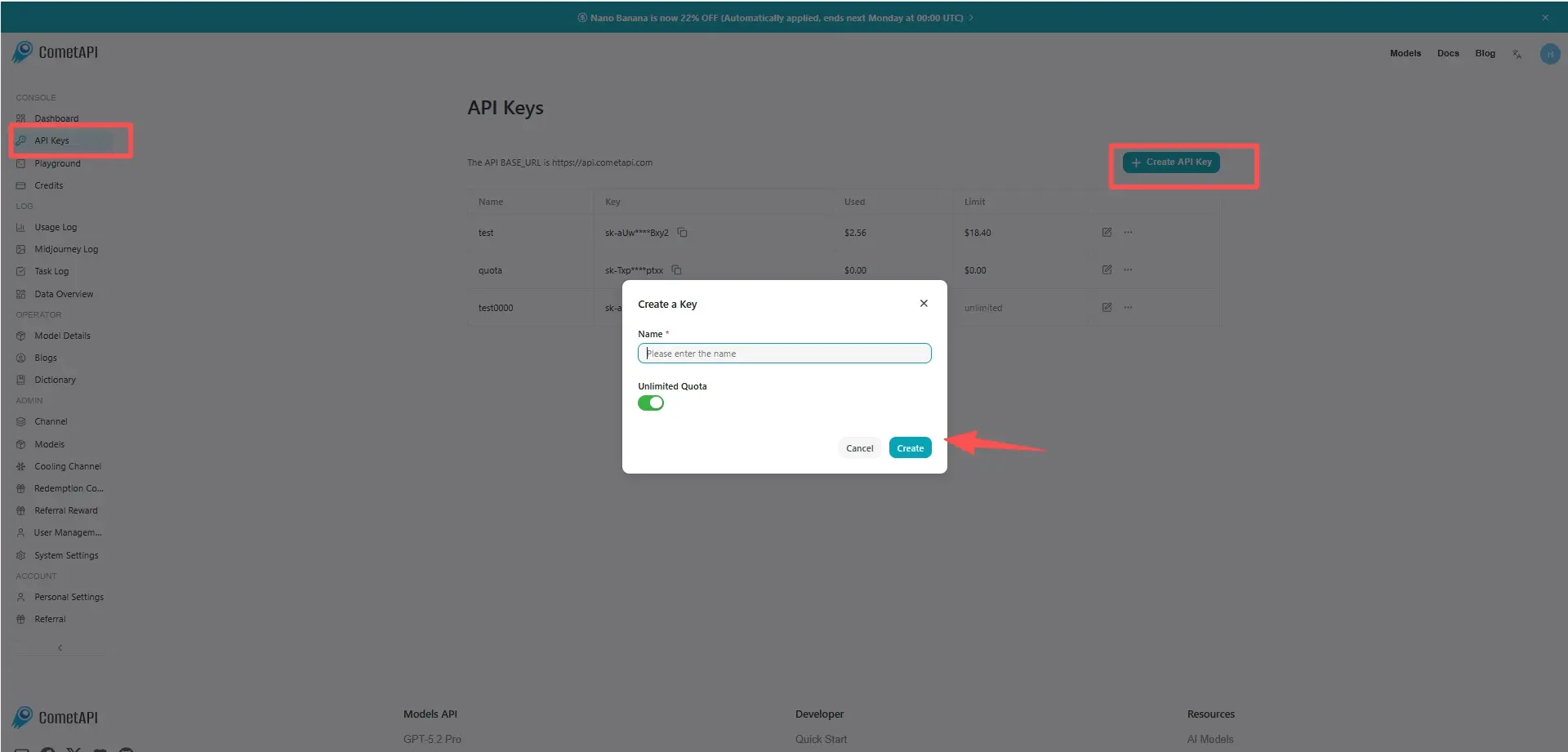
Log in to cometapi.com. If you are not our user yet, please register first. Sign into your CometAPI console. Get the access credential API key of the interface. Click “Add Token” at the API token in the personal center, get the token key: sk-xxxxx and submit.
Step 2: Send Requests to MiniMax-2.7 API
Select the “minimax-2.7” endpoint to send the API request and set the request body. The request method and request body are obtained from our website API doc. Our website also provides Apifox test for your convenience. Replace <YOUR_API_KEY> with your actual CometAPI key from your account. base url is Chat Completions a.
Insert your question or request into the content field—this is what the model will respond to . Process the API response to get the generated answer.
Step 3: Retrieve and Verify Results
Process the API response to get the generated answer. After processing, the API responds with the task status and output data.