Technical specifications of Kimi k2.5
| Item | Value / notes |
|---|---|
| Model name / vendor | Kimi-K2.5 (v1.0) — Moonshot AI (open-weights). |
| Architecture family | Mixture-of-Experts (MoE) hybrid reasoning model (DeepSeek-style MoE). |
| Parameters (total / active) | ≈ 1 trillion total parameters; ~32B active per token (384 experts, 8 selected per token reported). |
| Modalities (input / output) | Input: text, images, video (multimodal). Output: primarily text (rich reasoning traces), optionally structured tool calls / multi-step outputs. |
| Context window | 256k tokens |
| Training data | Continual pretraining on ~15 trillion mixed visual + text tokens (vendor reported). Training labels/dataset composition: undisclosed. |
| Modes | Thinking mode (returns internal reasoning traces; recommended temp=1.0) and Instant mode (no reasoning traces; recommended temp=0.6). |
| Agent features | Agent Swarm / parallel sub-agents: orchestrator can spawn up to 100 sub-agents and execute large numbers of tool calls (vendor claims up to ~1,500 tool calls; parallel execution reduces runtime). |
What Is Kimi K2.5?
Kimi K2.5 is Moonshot AI’s open-weight flagship large language model, designed as a native multimodal and agent-oriented system rather than a text-only LLM with add-on components. It integrates language reasoning, vision understanding, and long-context processing into a single architecture, enabling complex multi-step tasks that involve documents, images, videos, tools, and agents.
It is designed for long-horizon, tool-augmented workflows (coding, multi-step search, document/video understanding) and ships with two interaction modes (Thinking and Instant) and native INT4 quantization for efficient inference.
Core Features of Kimi K2.5
- Native multimodal reasoning
Vision and language are trained jointly from pretraining onward. Kimi K2.5 can reason across images, screenshots, diagrams, and video frames without relying on external vision adapters. - Ultra-long context window (256K tokens)
Enables persistent reasoning over entire codebases, long research papers, legal documents, or extended multi-hour conversations without context truncation. - Agent Swarm execution model
Supports dynamic creation and coordination of up to ~100 specialized sub-agents, allowing parallel planning, tool use, and task decomposition for complex workflows. - Multiple inference modes
- Instant mode for low-latency responses
- Thinking mode for deep multi-step reasoning
- Agent / Swarm mode for autonomous task execution and orchestration
- Strong vision-to-code capability
Capable of converting UI mockups, screenshots, or video demonstrations into working front-end code, and debugging software using visual context. - Efficient MoE scaling
The MoE architecture activates only a subset of experts per token, allowing trillion-parameter capacity with manageable inference cost compared to dense models.
Benchmark Performance of Kimi K2.5
Publicly reported benchmark results (primarily in reasoning-focused settings):
Reasoning & Knowledge Benchmarks
| Benchmark | Kimi K2.5 | GPT-5.2 (xhigh) | Claude Opus 4.5 | Gemini 3 Pro |
|---|---|---|---|---|
| HLE-Full (with tools) | 50.2 | 45.5 | 43.2 | 45.8 |
| AIME 2025 | 96.1 | 100 | 92.8 | 95.0 |
| GPQA-Diamond | 87.6 | 92.4 | 87.0 | 91.9 |
| IMO-AnswerBench | 81.8 | 86.3 | 78.5 | 83.1 |
Vision & Video Benchmarks
| Benchmark | Kimi K2.5 | GPT-5.2 | Claude Opus 4.5 | Gemini 3 Pro |
|---|---|---|---|---|
| MMMU-Pro | 78.5 | 79.5* | 74.0 | 81.0 |
| MathVista (Mini) | 90.1 | 82.8* | 80.2* | 89.8* |
| VideoMMMU | 87.4 | 86.0 | — | 88.4 |
Scores marked with reflect differences in evaluation setups reported by original sources.
Overall, Kimi K2.5 demonstrates strong competitiveness in multimodal reasoning, long-context tasks, and agent-style workflows, especially when evaluated beyond short-form QA.
Kimi K2.5 vs Other Frontier Models
| Dimension | Kimi K2.5 | GPT-5.2 | Gemini 3 Pro |
|---|---|---|---|
| Multimodality | Native (vision + text) | Integrated modules | Integrated modules |
| Context length | 256K tokens | Long (exact limit undisclosed) | Long (<256K typical) |
| Agent orchestration | Multi-agent swarm | Single-agent focus | Single-agent focus |
| Model access | Open weights | Proprietary | Proprietary |
| Deployment | Local / cloud / custom | API only | API only |
Model selection guidance:
- Choose Kimi K2.5 for open-weight deployment, research, long-context reasoning, or complex agent workflows.
- Choose GPT-5.2 for production-grade general intelligence with strong tool ecosystems.
- Choose Gemini 3 Pro for deep integration with Google’s productivity and search stack.
Representative Use Cases
- Large-scale document and code analysis
Process entire repositories, legal corpora, or research archives in a single context window. - Visual software engineering workflows
Generate, refactor, or debug code using screenshots, UI designs, or recorded interactions. - Autonomous agent pipelines
Execute end-to-end workflows involving planning, retrieval, tool calls, and synthesis via agent swarms. - Enterprise knowledge automation
Analyze internal documents, spreadsheets, PDFs, and presentations to produce structured reports and insights. - Research and model customization
Fine-tuning, alignment research, and experimentation enabled by open model weights.
Limitations and Considerations
- High hardware requirements: Full-precision deployment requires substantial GPU memory; production use typically relies on quantization (e.g., INT4).
- Agent Swarm maturity: Advanced multi-agent behaviors are still evolving and may require careful orchestration design.
- Inference complexity: Optimal performance depends on inference engine, quantization strategy, and routing configuration.
How to access Kimi k2.5 API via CometAPI
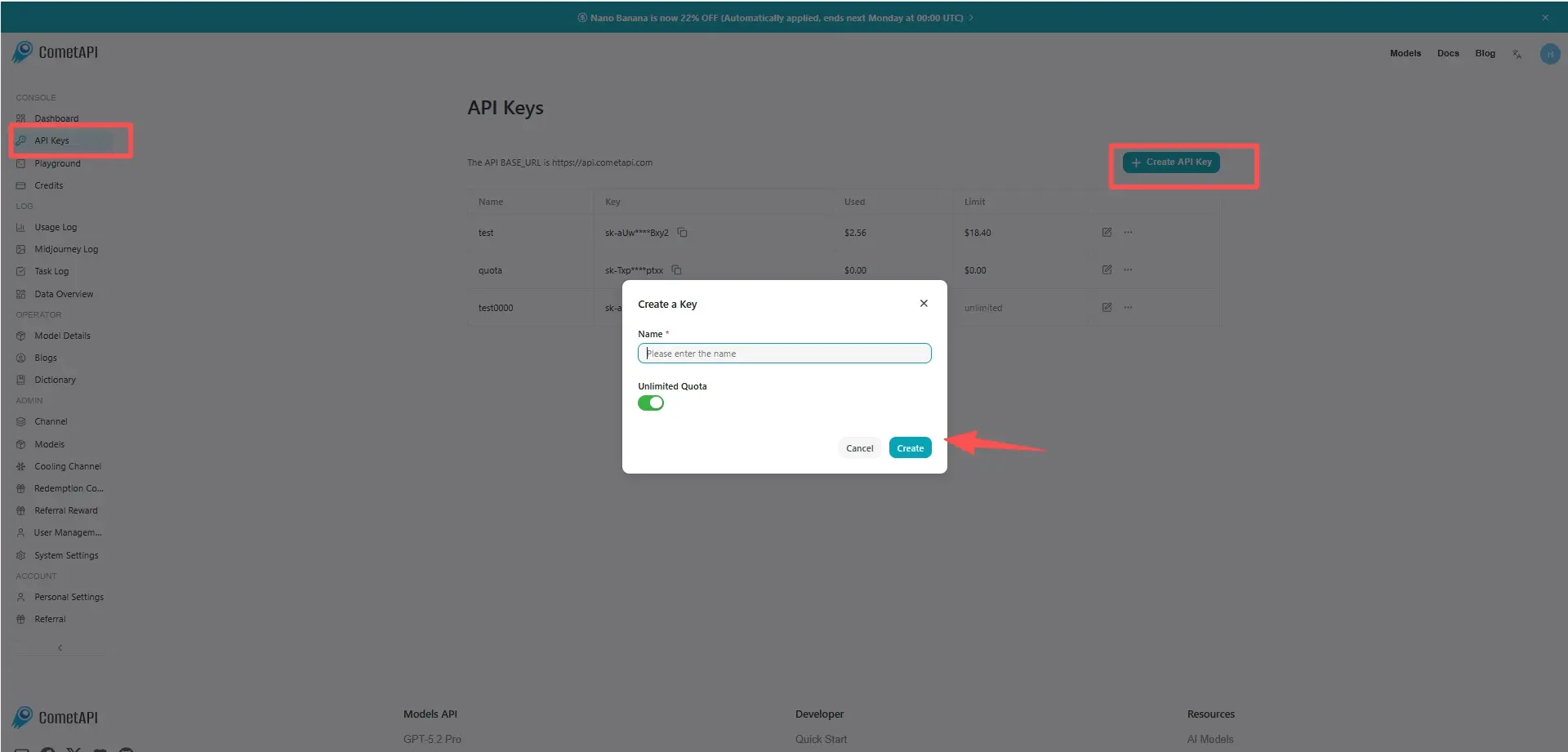
Step 1: Sign Up for API Key
Log in to cometapi.com. If you are not our user yet, please register first. Sign into your CometAPI console. Get the access credential API key of the interface. Click “Add Token” at the API token in the personal center, get the token key: sk-xxxxx and submit.
Step 2: Send Requests to Kimi k2.5 API
Select the “kimi-k2.5” endpoint to send the API request and set the request body. The request method and request body are obtained from our website API doc. Our website also provides Apifox test for your convenience. Replace with your actual CometAPI key from your account. base url is Chat Completions.
Insert your question or request into the content field—this is what the model will respond to . Process the API response to get the generated answer.
Step 3: Retrieve and Verify Results
Process the API response to get the generated answer. After processing, the API responds with the task status and output data.