Technical Specifications of GPT-5.4 Mini
| Item | GPT-5.4 Mini (estimated from official + cross-validation) |
|---|---|
| Model family | GPT-5.4 series (cost-efficient “mini” variant) |
| Provider | OpenAI |
| Input types | Text, Image |
| Output types | Text |
| Context window | 400,000 tokens |
| Max output tokens | 128,000 tokens |
| Knowledge cutoff | ~May 31, 2024 (inherits mini lineage) |
| Reasoning support | Yes (lightweight vs full GPT-5.4) |
| Tool support | Function calling, web search, file search, agents (inferred from GPT-5 family) |
| Positioning | High-speed, cost-efficient near-frontier model |
What is GPT-5.4 Mini?
GPT-5.4 Mini is a cost-efficient, high-speed variant of GPT-5.4 designed for latency-sensitive, high-volume workloads. It brings a significant portion of GPT-5.4’s reasoning, coding, and multimodal capabilities into a smaller, faster model optimized for production-scale systems.
Compared to earlier “mini” models, GPT-5.4 Mini is positioned as a near-frontier small model, meaning it approaches flagship-level performance while dramatically reducing cost and response time.
Key Features of GPT-5.4 Mini
- High-speed inference: Optimized for low-latency applications such as chatbots, copilots, and real-time systems
- Large context window (400K): Supports long documents, multi-step workflows, and agent memory
- Strong coding & agent support: Designed for tool use, multi-step reasoning, and delegated sub-agent tasks
- Multimodal input: Accepts both text and image inputs for richer workflows
- Cost-efficient scaling: Significantly cheaper than GPT-5.4 while retaining strong reasoning ability
- Agent pipeline optimization: Ideal for multi-model architectures where large models plan and mini models execute
Benchmark Performance of GPT-5.4 Mini
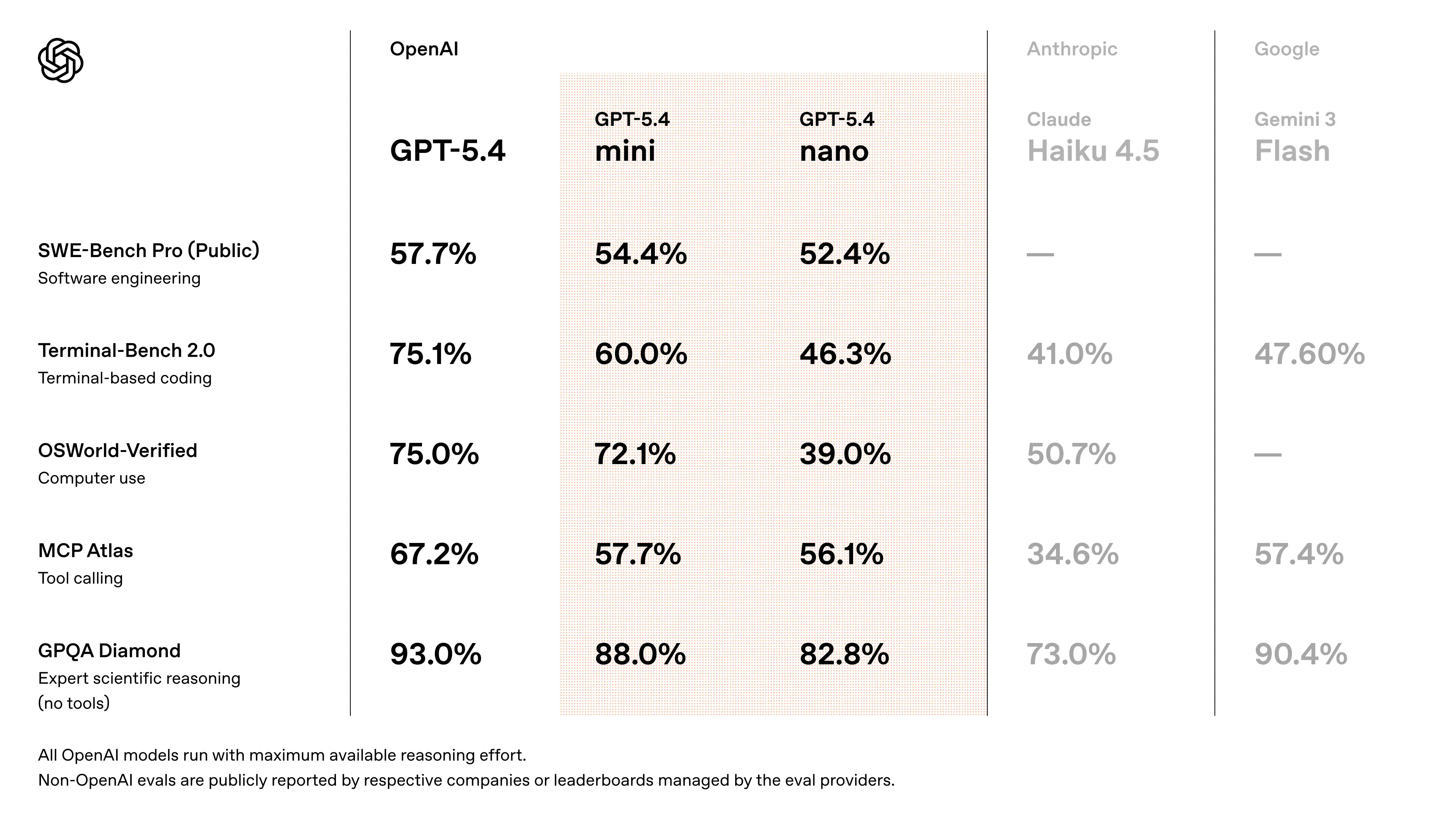
- Approaches GPT-5.4 performance on SWE-Bench-style coding tasks (~94–95% of flagship performance) (cross-validated estimate from release discussions)
- Significant improvements over GPT-5 Mini in:
- reasoning accuracy
- tool usage reliability
- multimodal understanding
- Designed to outperform previous “mini” generations in agent workflows and coding benchmarks
- speed measurements: early API testers report ~180–190 tokens/sec on GPT-5.4 Mini (vs ~55–120 t/s for older GPT-5 mini variants depending on priority modes).
👉 Key takeaway: GPT-5.4 Mini delivers near-frontier performance at a fraction of the cost and latency, making it ideal for scalable systems.
Representative use cases
- Coding assistants & editors (IDE plugins, Copilot): fast context parsing, codebase exploration, and quick completions make GPT-5.4 Mini ideal for in-editor suggestions where time-to-first-token matters. GitHub Copilot is an early integration.
- Subagents / delegated workers: where a master agent delegates short, fast tasks (formatting, small reasoning steps, grep-style searches) to a cheap, fast worker. OpenAI positions mini/nano for these roles.
- High-volume API automation: bulk code generation, automated ticket triage, log summarization at scale where per-call cost and latency are primary constraints. Community throughput numbers indicate material operational advantages for mini.
- Tool-wrapping and toolchains: fast tool calls where the model orchestrates calls to external tools (search, grep, run tests) and returns compact, actionable outputs. GPT-5.4 family includes improved “computer use” capabilities.
How to access GPT-5.4 Mini API
Step 1: Sign Up for API Key
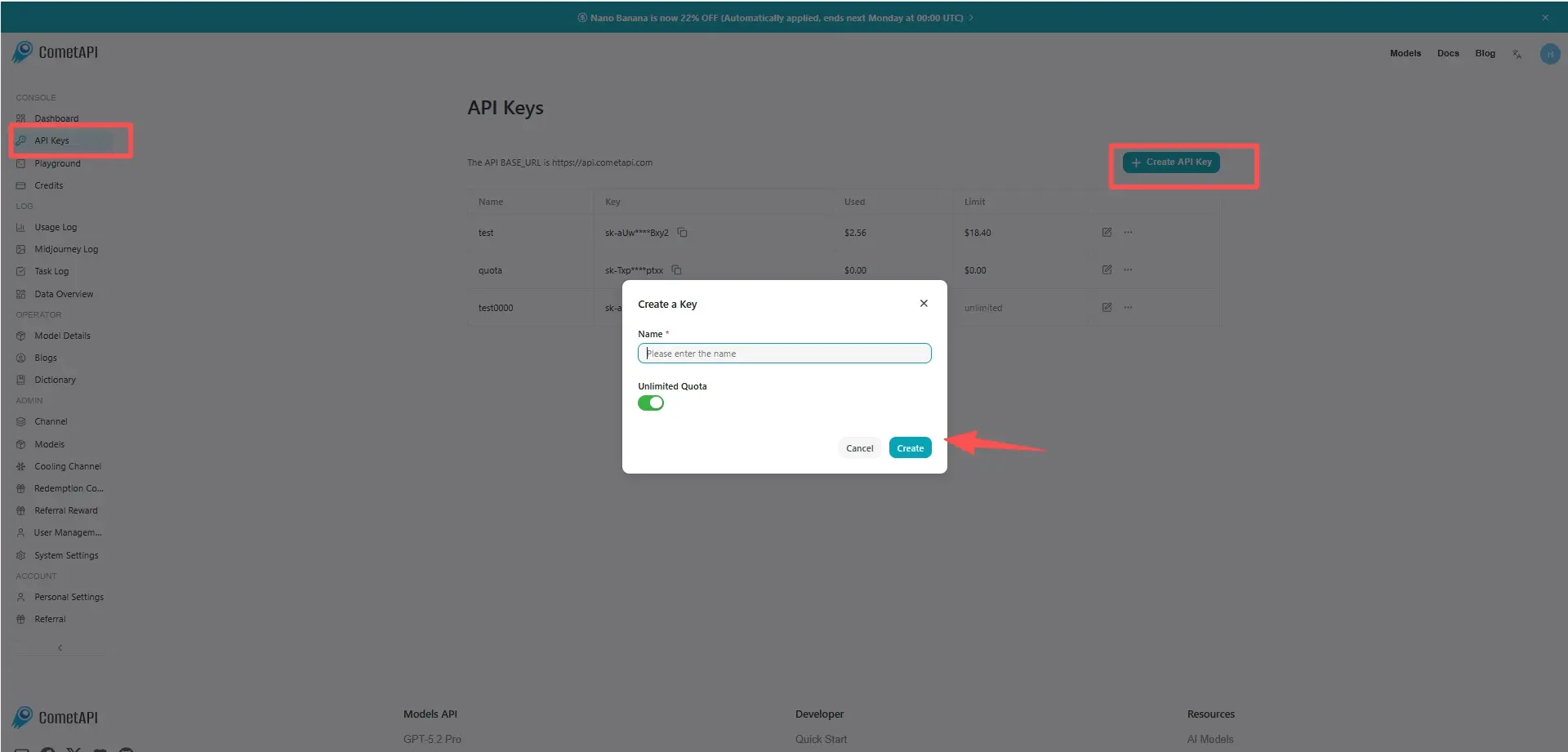
Log in to cometapi.com. If you are not our user yet, please register first. Sign into your CometAPI console. Get the access credential API key of the interface. Click “Add Token” at the API token in the personal center, get the token key: sk-xxxxx and submit.
Step 2: Send Requests to GPT-5.4 Mini API
Select the “gpt-5.4-mini” endpoint to send the API request and set the request body. The request method and request body are obtained from our website API doc. Our website also provides Apifox test for your convenience. Replace <YOUR_API_KEY> with your actual CometAPI key from your account. base url is Chat Completions and Responses.
Insert your question or request into the content field—this is what the model will respond to . Process the API response to get the generated answer.
Step 3: Retrieve and Verify Results
Process the API response to get the generated answer. After processing, the API responds with the task status and output data.