ModelsPricingEnterprise
500+ AI Model API, All In One API.Just In CometAPI
Models API
Developer
Quick StartDocumentationAPI Dashboard
Company
About usEnterprise
Resources
AI ModelsBlogChangelogSupport
Terms of ServicePrivacy Policy
© 2026 CometAPI · All rights reserved
Home/Models/OpenAI/GPT-5.4
O

GPT-5.4

Input:$2/M
Output:$12/M
Context:1,050,000
Max Output:128,000
GPT-5.4 is the frontier model for complex professional work. Reasoning.effort supports: none (default), low, medium, high and xhigh.
New
Commercial Use
Playground
Overview
Features
Pricing
API
Versions

Technical Specifications of GPT-5.4-2026-03-05

ItemGPT-5.4-2026-03-05
Model familyGPT-5
ProviderOpenAI
Release dateMarch 5, 2026
Context window1,050,000 tokens
Max output tokens128,000
Input typesText, Image
Output typesText
AudioNot supported
Reasoning controlsnone, low, medium, high, xhigh
Tool supportWeb search, File search, Code interpreter, Image generation
Knowledge cutoffAug 31, 2025
Snapshot stabilityLocked model behavior

What is GPT-5.4?

GPT-5.4 is a unifying frontier release that merges improvements from recent reasoning and coding lines (including the GPT-5.3-Codex work) into a single model targeted at professional knowledge work. It is positioned as a “Thinking” model for deeper, steerable reasoning and a “Pro” variant for the highest performance/throughput customers. Key themes of the release are: (1) longer context and document-scale understanding, (2) improved tool and “computer use” capabilities (controlling apps, spreadsheet/presentation editing), and (3) reduced factual errors and stronger multi-step planning.

Main features of GPT-5.4

  • Huge long-context capability (1M+ tokens experimental): GPT-5.4 supports experimental 1.05M token sessions (with pricing/limits) enabling whole-book / whole-codebase reasoning and multi-document synthesis. For general availability the standard window remains ≈272K tokens.
  • Improved multi-step tool use & native “computer use”: better desktop/browser control for agentic workflows (keyboard/mouse via a computer-use interface), web search that persists across rounds, and a new Tool Search mechanism to find connectors/tools efficiently. OpenAI reports state-of-the-art success on multiple computer-use and web-agent benchmarks.
  • Spreadsheet, document, and presentation generation/editing: specific tuning for office workflows; internal benchmarks show major gains on spreadsheet modelling and presentation quality. OpenAI also launched a ChatGPT for Excel add-in alongside the release.
  • Steerability & reasoning modes: “Thinking” mode produces an explicit plan/preamble for long tasks and supports mid-response steering (adjusting instructions during generation). Reasoning effort levels let users trade latency for deeper chain-of-thought reasoning.
  • Enhanced multimodal understanding: better interpretation of high-resolution images and charts (image input), used for document understanding and presentations.
  • Safety posture: OpenAI treats GPT-5.4 as a high-cyber-capability model and deploys enhanced safeguards similar to the GPT-5.3-Codex mitigations.

Benchmark performance

GPT-5.4 GPT-5.3-CodexGPT-5.2
GDPval (wins or ties)83.0%70.9%70.9%
SWE-Bench Pro (Public)57.7%56.8%55.6%
OSWorld-Verified75.0%74.0%* 47.3%
Toolathlon54.6%51.9%46.3%
BrowseComp82.7%77.3%65.8%

GPT-5.4 vs Comparable Models

ModelContext WindowKey Strength
GPT-5.4-2026-03-051,050,000 tokensFrontier reasoning + agent workflows
GPT-5.3 InstantSmallerFaster everyday tasks
Claude Opus / Sonnet~200k tokensLong-form reasoning
Gemini 3 Pro~1M tokensMultimodal reasoning

Key difference: GPT-5.4 focuses heavily on professional productivity workflows and agent capabilities, particularly when integrated with external tools.

Representative production use cases

  1. Enterprise document & compliance workflows: processing long contracts, extracting obligations, and drafting commentaries across multi-document corpora (benefits from the 272K→1M context options for single-session synthesis).
  2. Spreadsheet automation & financial modelling: generating formulas, building multi-sheet models from plain-English spec, reconciling inputs — OpenAI reports large gains on junior investment-banking style tasks.
  3. Agentic automation & “computer use”: automated browser / desktop workflows (installation, QA, tool orchestration) and multi-step tool chains (Zapier integrations cited as a use partner).
  4. Software engineering & code maintenance: code generation, refactorings, and terminal/CLI agent tasks (Terminal-Bench gains reported). For large codebases, the long context window helps but must be validated on task heuristics.
  5. Knowledge worker augmentation: research synthesis (BrowseComp improvements), slide generation and visual design for presentations.

How to access GPT-5.4 API

Step 1: Sign Up for API Key

Log in to cometapi.com. If you are not our user yet, please register first. Sign into your CometAPI console. Get the access credential API key of the interface. Click “Add Token” at the API token in the personal center, get the token key: sk-xxxxx and submit.
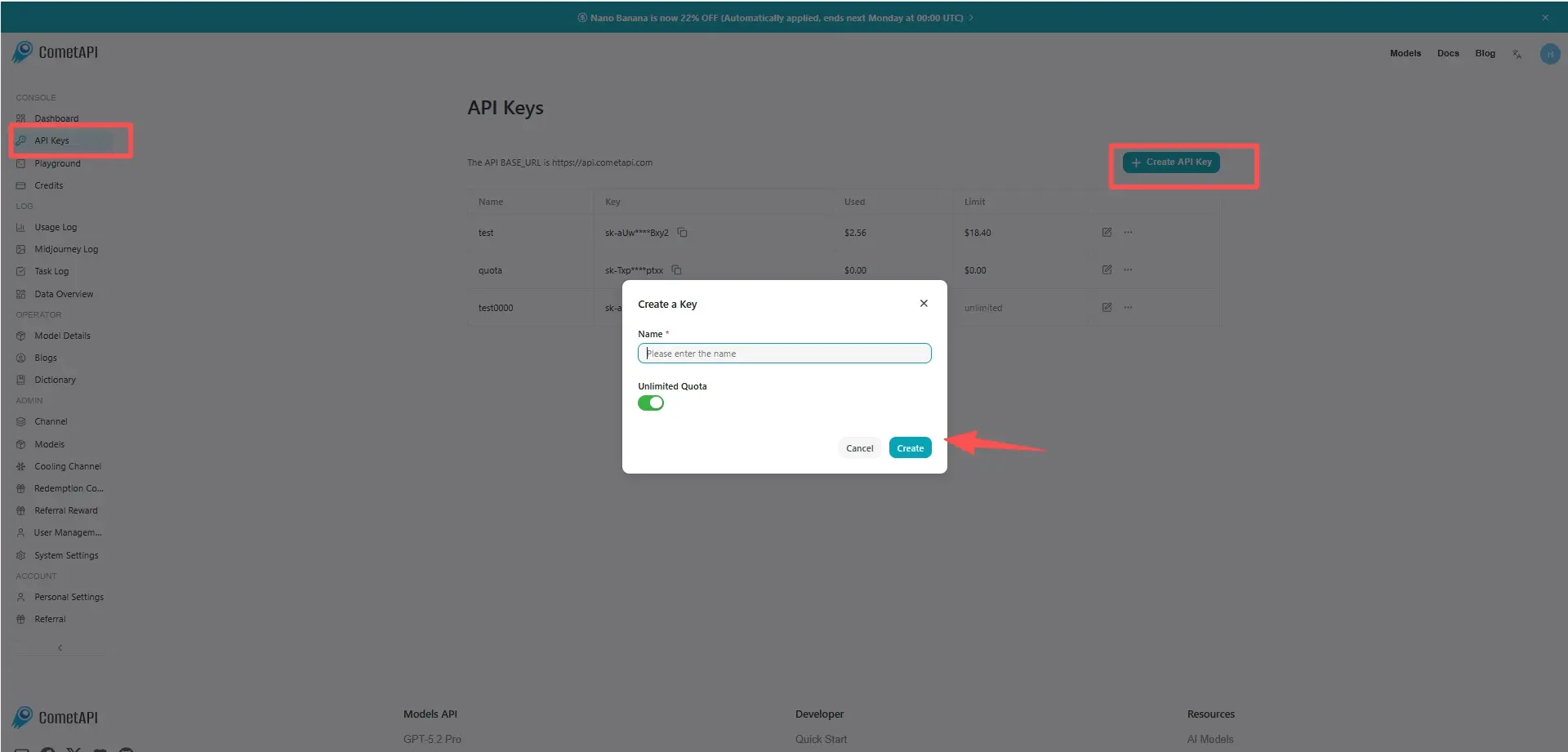
cometapi-key

Step 2: Send Requests to GPT-5.4 API

Select the “gpt-5.4” endpoint to send the API request and set the request body. The request method and request body are obtained from our website API doc. Our website also provides Apifox test for your convenience. Replace <YOUR_API_KEY> with your actual CometAPI key from your account. base url is Chat Completions and Responses.

Insert your question or request into the content field—this is what the model will respond to . Process the API response to get the generated answer.

Step 3: Retrieve and Verify Results

Process the API response to get the generated answer. After processing, the API responds with the task status and output data.

FAQ

What is the difference between gpt-5.4 and gpt-5.4-2026-03-05 in the OpenAI API?

gpt-5.4 is a moving alias that may update as the model improves, while gpt-5.4-2026-03-05 is a snapshot version that guarantees stable behavior and reproducible results in production.

What is the context window size of the GPT-5.4 API model?

GPT-5.4 supports a context window of approximately 1,050,000 tokens with up to 128,000 output tokens.

Does GPT-5.4 support tool calling and external integrations?

Yes. GPT-5.4 supports tool orchestration through the Responses API, including web search, file search, code interpreter, and image generation tools.

How does GPT-5.4 compare to GPT-5.3 Instant?

GPT-5.4 focuses on deeper reasoning and professional workflows, while GPT-5.3 Instant is optimized for faster everyday conversations and lower latency tasks.

Can GPT-5.4 process images through the API?

Yes. GPT-5.4 supports image inputs, allowing the model to analyze screenshots, diagrams, or photos alongside text prompts.

When should developers use the GPT-5.4 snapshot model instead of the alias version?

Developers should use the snapshot model when they need stable outputs for production systems, benchmarking, or regulatory compliance.

Does GPT-5.4 support configurable reasoning levels?

Yes. The API allows developers to set reasoning effort levels such as low, medium, high, or xhigh to control how much internal reasoning the model performs.

Features for GPT-5.4

Explore the key features of GPT-5.4, designed to enhance performance and usability. Discover how these capabilities can benefit your projects and improve user experience.

Pricing for GPT-5.4

Explore competitive pricing for GPT-5.4, designed to fit various budgets and usage needs. Our flexible plans ensure you only pay for what you use, making it easy to scale as your requirements grow. Discover how GPT-5.4 can enhance your projects while keeping costs manageable.
Comet Price (USD / M Tokens)Official Price (USD / M Tokens)Discount
Input:$2/M
Output:$12/M
Input:$2.5/M
Output:$15/M
-20%

Sample code and API for GPT-5.4

Access comprehensive sample code and API resources for GPT-5.4 to streamline your integration process. Our detailed documentation provides step-by-step guidance, helping you leverage the full potential of GPT-5.4 in your projects.
POST
/v1/chat/completions
POST
/v1/responses
Python
JavaScript
Curl
from openai import OpenAI
import os

# Get your CometAPI key from https://api.cometapi.com/console/token, and paste it here
COMETAPI_KEY = os.environ.get("COMETAPI_KEY") or "<YOUR_COMETAPI_KEY>"
BASE_URL = "https://api.cometapi.com/v1"

client = OpenAI(base_url=BASE_URL, api_key=COMETAPI_KEY)

response = client.responses.create(
    model="gpt-5.4-2026-03-05",
    input="How much gold would it take to coat the Statue of Liberty in a 1mm layer?",
    reasoning={"effort": "none"},
)

print(response.output_text)

Python Code Example

from openai import OpenAI
import os

# Get your CometAPI key from https://api.cometapi.com/console/token, and paste it here
COMETAPI_KEY = os.environ.get("COMETAPI_KEY") or "<YOUR_COMETAPI_KEY>"
BASE_URL = "https://api.cometapi.com/v1"

client = OpenAI(base_url=BASE_URL, api_key=COMETAPI_KEY)

response = client.responses.create(
    model="gpt-5.4-2026-03-05",
    input="How much gold would it take to coat the Statue of Liberty in a 1mm layer?",
    reasoning={"effort": "none"},
)

print(response.output_text)

JavaScript Code Example

import OpenAI from "openai";

// Get your CometAPI key from https://api.cometapi.com/console/token, and paste it here
const COMETAPI_KEY = process.env.COMETAPI_KEY || "<YOUR_COMETAPI_KEY>";
const BASE_URL = "https://api.cometapi.com/v1";

const client = new OpenAI({
    apiKey: COMETAPI_KEY,
    baseURL: BASE_URL,
});

async function main() {
    const response = await client.responses.create({
        model: "gpt-5.4-2026-03-05",
        input: "How much gold would it take to coat the Statue of Liberty in a 1mm layer?",
        reasoning: {
            effort: "none",
        },
    });

    console.log(response.output_text);
}

main();

Curl Code Example

curl https://api.cometapi.com/v1/responses \
     --header "Authorization: Bearer $COMETAPI_KEY" \
     --header "content-type: application/json" \
     --data \
'{
    "model": "gpt-5.4-2026-03-05",
    "input": "How much gold would it take to coat the Statue of Liberty in a 1mm layer?",
    "reasoning": {
        "effort": "none"
    }
}'

Versions of GPT-5.4

The reason GPT-5.4 has multiple snapshots may include potential factors such as variations in output after updates requiring older snapshots for consistency, providing developers a transition period for adaptation and migration, and different snapshots corresponding to global or regional endpoints to optimize user experience. For detailed differences between versions, please refer to the official documentation.
Model idAvailabilityRequest
gpt-5.4-2026-03-05✅Responses and Chat Completions
gpt-5.4✅Responses and Chat Completions

More Models

C

Claude Opus 4.7

Input:$3/M
Output:$15/M
Claude Opus 4.7 is a hybrid reasoning model designed specifically for frontier-level coding, AI agents, and complex multi-step professional work. Unlike lighter models (e.g., Sonnet or Haiku variants), Opus 4.7 prioritizes depth, consistency, and autonomy on the hardest tasks.
A

Claude Sonnet 4.6

Input:$2.4/M
Output:$12/M
Claude Sonnet 4.6 is our most capable Sonnet model yet. It’s a full upgrade of the model’s skills across coding, computer use, long-context reasoning, agent planning, knowledge work, and design. Sonnet 4.6 also features a 1M token context window in beta.
O

GPT-5.4 nano

Input:$0.16/M
Output:$1/M
GPT-5.4 nano is designed for tasks where speed and cost matter most like classification, data extraction, ranking, and sub-agents.
O

GPT-5.4 mini

Input:$0.6/M
Output:$3.6/M
GPT-5.4 mini brings the strengths of GPT-5.4 to a faster, more efficient model designed for high-volume workloads.
X

Grok 4.20

Input:$1.6/M
Output:$4.8/M
Grok 4.20 release introduces a multi-agent architecture (multiple specialized agents coordinated in real time), expanded context modes, and focused improvements to instruction-following, hallucination reduction, and structured/tooled outputs.
Q

Qwen3.6-Plus

Input:$0.32/M
Output:$1.92/M
Qwen 3.6-Plus is now available, featuring enhanced code development capabilities and improved efficiency in multimodal recognition and inference, making the Vibe Coding experience even better.

Related Blog

Function Calling in the OpenAI API: What It Actually Does and How to Use It Right
Apr 20, 2026
open-ai
tech

Function Calling in the OpenAI API: What It Actually Does and How to Use It Right

Master OpenAI Function Calling: move beyond prompt engineering to structured orchestration. Learn strict schema enforcement, security best practices, and agentic workflows. Standardize tool calling across GPT, Claude, and Gemini with CometAPI.
How to Use Claude Opus 4.7 API
Apr 18, 2026
claude-opus-4-7

How to Use Claude Opus 4.7 API

Claude Opus 4.7 (model ID: `claude-opus-4-7`) is Anthropic’s most capable generally available model, released April 16, 2026. It delivers step-change improvements in agentic coding, high-resolution multimodal vision (up to 3.75MP), adaptive thinking, and long-running workflows while maintaining $5/$25 per million input/output tokens. Use it via CometAPI for 20-40% lower pricing, one unified key, and instant model switching—no vendor lock-in.
What is Claude Opus 4.7? It is available in CometAPI
Apr 16, 2026
claude-opus-4-7

What is Claude Opus 4.7? It is available in CometAPI

Claude Opus 4.7, released by Anthropic on April 16, 2026, is the latest flagship hybrid reasoning model in the Claude 4 family. It delivers a 13% improvement on a 93-task coding benchmark over Opus 4.6, supports a 1M token context window, higher-resolution vision (up to 2,576 pixels), and adaptive thinking for complex agentic workflows. It excels in production-ready coding, long-running tasks, and professional knowledge work while maintaining the same pricing as its predecessor ($5/$25 per million tokens officially). For developers seeking lower costs and unified API access to 500+ models, CometAPI offers Claude Opus 4.7 at just $4 input / $20 output per million tokens—a 20% savings—plus a free API key and 1M free tokens for new users.
How to Use ChatGPT on iPhone in 2026: Complete Guide
Apr 14, 2026
chat-gpt

How to Use ChatGPT on iPhone in 2026: Complete Guide

To use ChatGPT on iPhone, download the free official app from the App Store, sign in (or use as guest), and start chatting. For deeper integration, enable it in Apple Intelligence & Siri settings for Siri and Writing Tools access. Update to iOS 26.4+ for CarPlay voice support. Advanced users can access the web version in Safari or build custom solutions via CometAPI’s SDK.
DeepSeek v4 is now available on the web: How to access and test it
Apr 9, 2026
deepseek-v4

DeepSeek v4 is now available on the web: How to access and test it

DeepSeek V4 gray-scale test has leaked and is actively rolling out in limited form on the official web platform. Select users now see a redesigned interface with **Fast Mode** (default, high-speed daily use), **Expert Mode** (deep reasoning and complex problem-solving), and **Vision Mode** (multimodal image and video handling). This marks the most significant update since DeepSeek-V3.2, with rumored 1 million token context windows, updated knowledge bases, native multimodal capabilities, and a new underlying architecture optimized for speed, logic, and efficiency.