ModelsPricingEnterprise
500+ AI Model API, All In One API.Just In CometAPI
Models API
Developer
Quick StartDocumentationAPI Dashboard
Company
About usEnterprise
Resources
AI ModelsBlogChangelogSupport
Terms of ServicePrivacy Policy
© 2026 CometAPI · All rights reserved
Home/Models/OpenAI/GPT Image 1.5
O

GPT Image 1.5

Input:$6.4/M
Output:$25.6/M
GPT-Image-1.5 is OpenAI’s image model in the GPT Image family . It is a natively multimodal GPT model designed to generate images from text prompts and to perform high-fidelity edits of input images while following user instructions closely.
New
Commercial Use
Playground
Overview
Features
Pricing
API
Versions

What is the GPT-Image-1.5 API?

GPT-Image-1.5 is the newest member of OpenAI’s GPT Image family and the model behind ChatGPT’s revamped Images experience. It’s designed to move image generation from novelty experiments into production-grade creative tooling: higher photorealism, finer control for iterative edits, and faster inference to support interactive and enterprise workflows.

The gpt-image-1.5 API is a multimodal image model endpoint that accepts one or more image inputs (file identifiers or bytes) plus a text prompt and returns generated images or edited images. It supports:

  • Text-to-image generation (create from prompt),
  • Image editing / in-painting / compositing (apply instructions to existing images, multiple image inputs allowed), and
  • Iterative, multi-turn editing workflows through the Responses API (enables “tweak & iterate” UIs).

The API treats image prompts differently from old DALL·E limits: GPT image models accept significantly longer text prompts (the 32k-character guideline), making complex, constraint-heavy instructions feasible.

Main features (practical)

  • Improved editability / multi-turn consistency: preserves character appearance, lighting and key visual attributes across iterative edits. This makes “same model, repeated edits” more reliable for workflows like product catalogs or brand assets.
  • Faster throughput — 4× speed improvements over GPT Image 1, aimed at lowering latency for iterative creative workflows.
  • Cost optimizations — image input/output costs reduced by about 20% vs. GPT Image 1, lowering per-image iteration costs for high-volume users.
  • Multi-image compositing & style referencing — accept multiple reference images to composite scenes or transfer style/lighting.
  • Quality/fidelity knobs — API parameters that trade off speed vs. fidelity (use lower quality for bulk generation; higher quality for production assets).
  • Multi-turn editing / Responses API integration — enables stepwise workflows (ask for changes, then “make tweaks” preserving state).

Technical capabilities

  • Text prompt limit (image models): up to 32,000 characters (note: OpenAI documents this as the text length allowance for GPT image models). Use this for long, constraint-heavy prompts.
  • Image inputs: accepts File IDs (preferred for multi-turn flows) or raw bytes; multiple images may be provided for compositing and reference.
  • Outputs: PNG/JPEG or platform default image artifacts returned by the API (or as attachments within ChatGPT). Outputs can include multiple candidate images and support iterative requests to refine an output.
  • Generation modes: text-to-image, image editing (inpaint/extend with instructions), and variants. Multi-turn editing supports “add/subtract/combine” style instructions.
  • Instruction-aware editing: models are optimized for instruction fidelity (preserving specified invariants like “do not change the logo”, “keep pose and lighting”). Prompt-engineering patterns (explicit invariants repeated each iteration) reduce semantic drift.

Benchmark performance

  • Leaderboard placement: One aggregate report cited GPT Image 1.5 leading text-to-image rankings with ~1264 points on an Artificial Analysis leaderboard, ahead of the next model by a measurable margin.
  • Task-level metrics (edit & preservation): a Microsoft Foundry summary of evaluation metrics shows GPT-Image-1.5 achieving near-perfect binary modification success (100% on a single-turn BinaryEval) and strong face-preservation scores (around 90% on AuraFace measures) in their comparison table versus competitors and previous OpenAI models. Those comparative metrics place GPT-Image-1.5 ahead of some rivals on preservation and edit fidelity.
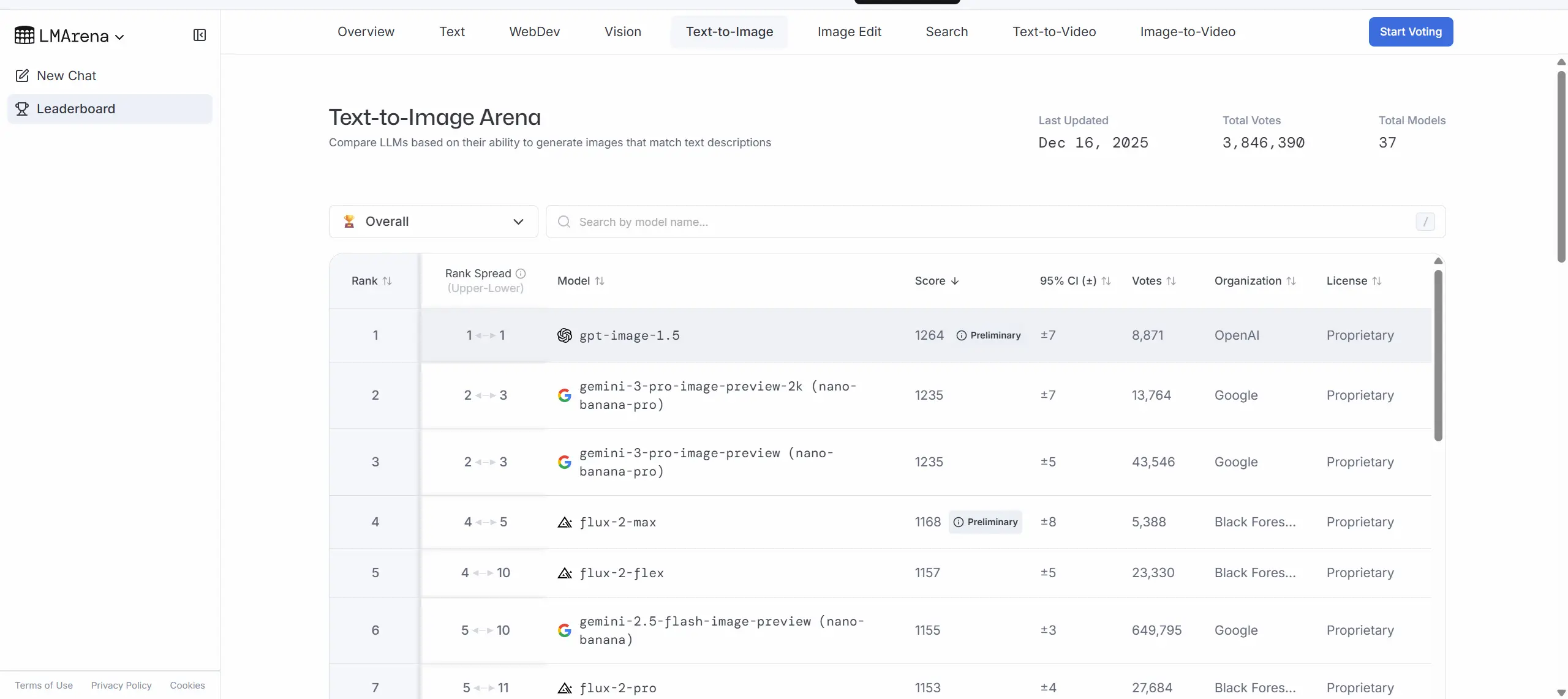
GPT Image 1.5

How GPT-Image-1.5 compares to peers

  • Vs. GPT Image 1 (previous OpenAI generation): faster (up to 4×), cheaper (~20% lower image IO cost), and stronger edit fidelity — targeted at moving from “prototype/demo” to “production-friendly” image workflows.
  • Vs. Google’s Nano Banana Pro / Gemini image models: GPT-Image-1.5 and Google’s Nano Banana Pro / Gemini 3 family as close rivals — each has strengths in different prompt classes. OpenAI’s messaging emphasizes editing fidelity and iteration speed; Google’s offering has been praised for studio-level realism in some examples.
  • Vs. Qwen Image and other open/closed models: GPT-Image-1.5 outperforming Qwen Image on several edit and preservation metrics in single-turn evaluations, but differences narrow in multi-turn or other domain-specific tests.

Where GPT-Image-1.5’s strong

  • E-commerce product imaging: bulk variants, background swaps, consistent product catalogs from a single photo (brand/logo preservation).
  • Creative & marketing asset production: quick concept iterations, photorealistic mockups, controlled style transfers.
  • Photo retouching & editorial workflows: realistic clothing/hairstyle try-ons, selective retouching that preserves identity and lighting.
  • Design tooling integration: plug into design platforms or CMS for on-demand image variants (fidelity knobs help cost control).
  • Multi-step compositing pipelines: multi-image inputs allow compositing and reference-based generation for complex scenes.

How to access GPT Image 1.5 API

Step 1: Sign Up for API Key

Log in to cometapi.com. If you are not our user yet, please register first. Sign into your CometAPI console. Get the access credential API key of the interface. Click “Add Token” at the API token in the personal center, get the token key: sk-xxxxx and submit.

Step 2: Send Requests to GPT Image 1.5 API

Select the “gpt-image-1.5” endpoint to send the API request and set the request body. The request method and request body are obtained from our website API doc. Our website also provides Apifox test for your convenience. Replace <YOUR_API_KEY> with your actual CometAPI key from your account. base url is Images (https://api.cometapi.com/v1/images/generations) and [Image Editing]

Insert your question or request into the content field—this is what the model will respond to . Process the API response to get the generated answer.

Step 3: Retrieve and Verify Results

Process the API response to get the generated answer. After processing, the API responds with the task status and output data.

See also Gemini 3 Pro Preview API

FAQ

How fast is GPT Image 1.5 compared to GPT Image 1?

GPT Image 1.5 delivers up to 4× speed improvements over GPT Image 1, significantly reducing latency for iterative creative workflows.

Does GPT Image 1.5 support multi-turn conversational editing?

Yes, through the Responses API, GPT Image 1.5 supports multi-turn editing workflows where you can iteratively refine images by providing follow-up instructions while preserving context.

What resolutions and quality settings does GPT Image 1.5 support?

GPT Image 1.5 supports 1024×1024 (square), 1536×1024 (landscape), and 1024×1536 (portrait). Quality options include low, medium, high, and auto.

Can GPT Image 1.5 use multiple reference images for compositing?

Yes, GPT Image 1.5 accepts multiple input images for compositing and style reference. The first 5 images are preserved with higher fidelity when using high input_fidelity mode.

How does GPT Image 1.5 compare to Google's Nano Banana Pro?

GPT Image 1.5 emphasizes editing fidelity and iteration speed, while Nano Banana Pro is praised for studio realism. Both are closely competitive—choose based on your workflow needs.

Does GPT Image 1.5 support transparent backgrounds?

Yes, set the background parameter to 'transparent' with PNG or WebP output formats. Transparency works best at medium or high quality settings.

What is the maximum text prompt length for GPT Image 1.5?

GPT Image 1.5 accepts prompts up to 32,000 characters, enabling highly detailed and constrained instructions for complex image generation tasks.

Features for GPT Image 1.5

Explore the key features of GPT Image 1.5, designed to enhance performance and usability. Discover how these capabilities can benefit your projects and improve user experience.

Pricing for GPT Image 1.5

Explore competitive pricing for GPT Image 1.5, designed to fit various budgets and usage needs. Our flexible plans ensure you only pay for what you use, making it easy to scale as your requirements grow. Discover how GPT Image 1.5 can enhance your projects while keeping costs manageable.
Comet Price (USD / M Tokens)Official Price (USD / M Tokens)Discount
Input:$6.4/M
Output:$25.6/M
Input:$8/M
Output:$32/M
-20%

Sample code and API for GPT Image 1.5

The gpt-image-1.5 API is a multimodal image model endpoint that accepts one or more image inputs (file identifiers or bytes) plus a text prompt and returns generated images or edited images. It supports:
POST
/v1/images/generations
Python
JavaScript
Curl
import base64
import os
from openai import OpenAI

# Set your API key if not set globally
COMETAPI_KEY = os.environ.get("COMETAPI_KEY") or "<YOUR_COMETAPI_KEY>"
client = OpenAI(api_key=COMETAPI_KEY, base_url="https://api.cometapi.com/v1")

# Create output/ folder
folder_path = "output"
os.makedirs(folder_path, exist_ok=True)

# Generate the image using gpt-image-1.5
result = client.images.generate(
    model="gpt-image-1.5",
    prompt="A cute baby sea otter",
    n=1,
    size="1024x1024"
)

# Save the image to a file
image_base64 = result.data[0].b64_json
image_bytes = base64.b64decode(image_base64)
with open(os.path.join(folder_path, "gpt-image-1.5-output.png"), "wb") as f:
    f.write(image_bytes)

print("Image saved to: output/gpt-image-1.5-output.png")

Python Code Example

import base64
import os
from openai import OpenAI

# Set your API key if not set globally
COMETAPI_KEY = os.environ.get("COMETAPI_KEY") or "<YOUR_COMETAPI_KEY>"
client = OpenAI(api_key=COMETAPI_KEY, base_url="https://api.cometapi.com/v1")

# Create output/ folder
folder_path = "output"
os.makedirs(folder_path, exist_ok=True)

# Generate the image using gpt-image-1.5
result = client.images.generate(
    model="gpt-image-1.5",
    prompt="A cute baby sea otter",
    n=1,
    size="1024x1024"
)

# Save the image to a file
image_base64 = result.data[0].b64_json
image_bytes = base64.b64decode(image_base64)
with open(os.path.join(folder_path, "gpt-image-1.5-output.png"), "wb") as f:
    f.write(image_bytes)

print("Image saved to: output/gpt-image-1.5-output.png")

JavaScript Code Example

import OpenAI from "openai";
import { writeFile, mkdir } from "fs/promises";
import path from "path";
import { fileURLToPath } from "url";

const __dirname = path.dirname(fileURLToPath(import.meta.url));

// Set your API key if not set globally
const COMETAPI_KEY = process.env.COMETAPI_KEY || "<YOUR_COMETAPI_KEY>";
const client = new OpenAI({
  apiKey: COMETAPI_KEY,
  baseURL: "https://api.cometapi.com/v1",
});

// Create output/ folder
const folderPath = path.join(__dirname, "../output");
await mkdir(folderPath, { recursive: true });

// Generate the image using gpt-image-1.5
const result = await client.images.generate({
  model: "gpt-image-1.5",
  prompt: "A cute baby sea otter",
  n: 1,
  size: "1024x1024",
});

// Save the image to a file
const imageBuffer = Buffer.from(result.data[0].b64_json, "base64");
await writeFile(path.join(folderPath, "gpt-image-1.5-output.png"), imageBuffer);

console.log("Image saved to: output/gpt-image-1.5-output.png");

Curl Code Example

#!/bin/bash

# Set your API key if not set globally
COMETAPI_KEY="${COMETAPI_KEY:-<YOUR_COMETAPI_KEY>}"

# Create output/ folder
mkdir -p output

# Generate the image using gpt-image-1.5
response=$(curl -s https://api.cometapi.com/v1/images/generations \
  -H "Content-Type: application/json" \
  -H "Authorization: Bearer $COMETAPI_KEY" \
  -d '{
    "model": "gpt-image-1.5",
    "prompt": "A cute baby sea otter",
    "n": 1,
    "size": "1024x1024"
  }')

# Extract base64 image data from response
if command -v jq &> /dev/null; then
  image_data=$(echo "$response" | jq -r '.data[0].b64_json')
else
  image_data=$(echo "$response" | sed -n 's/.*"b64_json":"\([^"]*\)".*/\1/p')
fi

if [ -n "$image_data" ] && [ "$image_data" != "null" ]; then
  # Decode base64 and save to file (macOS uses -D, Linux uses -d)
  echo "$image_data" | base64 -d > output/gpt-image-1.5-output.png 2>/dev/null || echo "$image_data" | base64 -D > output/gpt-image-1.5-output.png
  echo "Image saved to: output/gpt-image-1.5-output.png"
else
  echo "Error: Failed to generate image"
  echo "$response"
fi

Versions of GPT Image 1.5

The reason GPT Image 1.5 has multiple snapshots may include potential factors such as variations in output after updates requiring older snapshots for consistency, providing developers a transition period for adaptation and migration, and different snapshots corresponding to global or regional endpoints to optimize user experience. For detailed differences between versions, please refer to the official documentation.
version
gpt-image-1.5
gpt-image-1.5-2025-12-16

More Models

O

GPT Image 2

Input:$6.4/M
Output:$24/M
GPT Image 2 is openai state-of-the-art image generation model for fast, high-quality image generation and editing. It supports flexible image sizes and high-fidelity image inputs.
G

Nano Banana 2

Input:$0.4/M
Output:$2.4/M
Core Capabilities Overview: Resolution: Up to 4K (4096×4096), on par with Pro. Reference Image Consistency: Up to 14 reference images (10 objects + 4 characters), maintaining style/character consistency. Extreme Aspect Ratios: New 1:4, 4:1, 1:8, 8:1 ratios added, suitable for long images, posters, and banners. Text Rendering: Advanced text generation, suitable for infographics and marketing poster layouts. Search Enhancement: Integrated Google Search + Image Search. Grounding: Built-in thinking process; complex prompts are reasoned before generation.
G

Nano Banana Pro

Input:$1.5616/M
Output:$9.3696/M
Nano Banana Pro is an AI model for general-purpose assistance in text-centric workflows. It is suitable for instruction-style prompting to generate, transform, and analyze content with controllable structure. Typical uses include chat assistants, document summarization, knowledge QA, and workflow automation. Public technical details are limited; integration aligns with common AI assistant patterns such as structured outputs, retrieval-augmented prompts, and tool or function calling.
M

mj_turbo_imagine

M

mj_turbo_imagine

Per Request:$0.168
M

mj_fast_imagine

M

mj_fast_imagine

Per Request:$0.056
Midjourney drawing
D

Doubao Seedream 5

Per Request:$0.032
Seedream 5.0 Lite is a unified multimodal image generation model endowed with deep thinking andonline search capabilities, featuring an all-round upgrade in its understanding, reasoning and generationcapabilities.

Related Blog

GPT Image 1.5 vs Seedream 4.5: which is Better in 2026
Apr 12, 2026
gpt-image-1-5
seedream-4-5

GPT Image 1.5 vs Seedream 4.5: which is Better in 2026

GPT Image 1.5 (OpenAI, Dec 2025) leads with 4× faster generation (5–15 seconds), top-tier LM Arena ELO scores (~1,264–1,285), and superior instruction-following for editing. Seedream 4.5 (ByteDance, Dec 2025) excels in typography, 4K resolution, multi-image consistency (up to 14 references), and flat $0.04/image pricing. Choose GPT Image 1.5 for speed and versatility; Seedream 4.5 for design-heavy commercial work. Both are accessible affordably via **CometAPI**’s unified platform for 20%+ savings and single-key integration.
How Long Does ChatGPT Take to Generate an Image in 2026?
Apr 9, 2026
chat-gpt

How Long Does ChatGPT Take to Generate an Image in 2026?

In 2026, ChatGPT typically generates an image in **5–20 seconds** using its latest GPT-Image 1.5 model (the successor to DALL·E 3). Simple prompts finish in as little as 3–8 seconds, while complex or high-detail requests can take 20–60 seconds during peak hours. Free users often wait longer (30–60+ seconds), whereas Plus/Pro subscribers benefit from priority processing. These times represent a major improvement over 2024–2025 DALL·E 3 averages of 15–30 seconds, thanks to OpenAI’s December 2025 GPT-Image 1.5 upgrade that delivers up to 4× faster inference.
How Many Images Can You Create with ChatGPT Free in 2026?
Apr 9, 2026

How Many Images Can You Create with ChatGPT Free in 2026?

As of April 2026, free ChatGPT users can generate 2–3 images per 24-hour rolling window using either DALL·E 3 or the newer GPT-Image-1.5 model. This quota applies to the ChatGPT web and mobile apps and resets exactly 24 hours after your first image generation in the cycle—not at midnight. Once you hit the limit, you must wait for the rolling window to expire before creating more.
Alibaba Wan2.7-Image Review 2026: Revolutionary Unified AI Image Model
Apr 3, 2026

Alibaba Wan2.7-Image Review 2026: Revolutionary Unified AI Image Model

Wan2.7-Image is Alibaba Cloud’s newly launched unified image model, announced on April 1, 2026. It combines image generation, image editing, and visual understanding in one workflow, supports multi-image input, and is designed for faster generation than the Pro variant. Alibaba says the model can handle text-to-image, image editing, image-set generation, and multiple reference images, while Wan2.7-Image-Pro adds 4K output and more stable composition.
Luma AI Unit-1 Image Model (2026): Comprehensive Analysis & Comparison
Mar 24, 2026

Luma AI Unit-1 Image Model (2026): Comprehensive Analysis & Comparison

Luma AI’s Uni-1 is a next-generation autoregressive multimodal image model that unifies image generation and visual understanding into a single architecture. Unlike diffusion models, it processes text and image tokens in a shared sequence, enabling superior reasoning, editing, and multi-turn creative workflows. Uni-1 outperforms competitors like GPT Image 1.5 and Nano Banana 2 on logic-based benchmarks such as RISEBench.