Technical Specifications of gpt-realtime-1.5
| Item | gpt-realtime-1.5 (public positioning) |
|---|---|
| Model family | GPT Realtime 1.5 (voice-optimized variant) |
| Primary modality | Speech-to-speech (S2S) |
| Input types | Audio (streaming), text |
| Output types | Audio (streaming), text, structured tool calls |
| API | Realtime API (WebRTC / persistent streaming sessions) |
| Latency profile | Optimized for low-latency, live conversational interaction |
| Session model | Stateful streaming sessions |
| Tool use | Function calling and tool integrations supported |
| Target use case | Live voice agents, assistants, interactive systems |
Note: Exact token limits and context window sizes are not prominently documented in public summaries; the model is positioned for realtime responsiveness rather than extremely long context sessions.
What is gpt-realtime-1.5?
gpt-realtime-1.5 is a low-latency, speech-to-speech optimized model designed for live conversational systems. Unlike traditional request-response models, it operates through persistent streaming sessions, enabling natural turn-taking, interruption handling, and dynamic voice interaction.
It is purpose-built for applications where conversational flow speed matters more than maximum context length.
Main Features
- True speech-to-speech interaction — Accepts live audio input and streams spoken responses in real time.
- Low-latency architecture — Designed for sub-second conversational responsiveness in voice agents.
- Streaming-first design — Works via persistent sessions (WebRTC or streaming protocols).
- Natural turn-taking — Supports interruption handling and dynamic conversation flow.
- Tool calling support — Can trigger structured function calls during a realtime session.
- Production-ready voice agent foundation — Built specifically for interactive assistants, kiosks, and embedded devices.
Benchmark & Performance Positioning
OpenAI positions gpt-realtime-1.5 as an evolution of earlier realtime models with improved instruction-following, stability during extended voice sessions, and more natural prosody compared to earlier releases.
Unlike coding-focused models (e.g., Codex variants), performance is measured more by conversational latency, voice naturalness, and session stability than by leaderboard-style benchmarks.
gpt-realtime-1.5 vs Related Models
| Feature | gpt-realtime-1.5 | gpt-audio-1.5 |
|---|---|---|
| Primary goal | Live voice interaction | Audio-enabled chat workflows |
| Latency | Optimized for minimal delay | Balanced quality/speed |
| Session type | Persistent streaming session | Standard Chat Completions flow |
| Context size | Optimized for responsiveness | Larger context support |
| Best use case | Realtime voice agents | Conversational assistants with audio |
When to Choose Each
- Choose gpt-realtime-1.5 for call centers, kiosks, AI receptionists, or live embedded assistants.
- Choose gpt-audio-1.5 for voice-enabled chat apps that require longer conversation memory or multimodal workflows.
Representative Use Cases
- AI call center agents
- Smart device assistants
- Interactive kiosks
- Live tutoring systems
- Real-time language practice tools
- Voice-controlled applications
- How to access GPT realtime 1.5 API
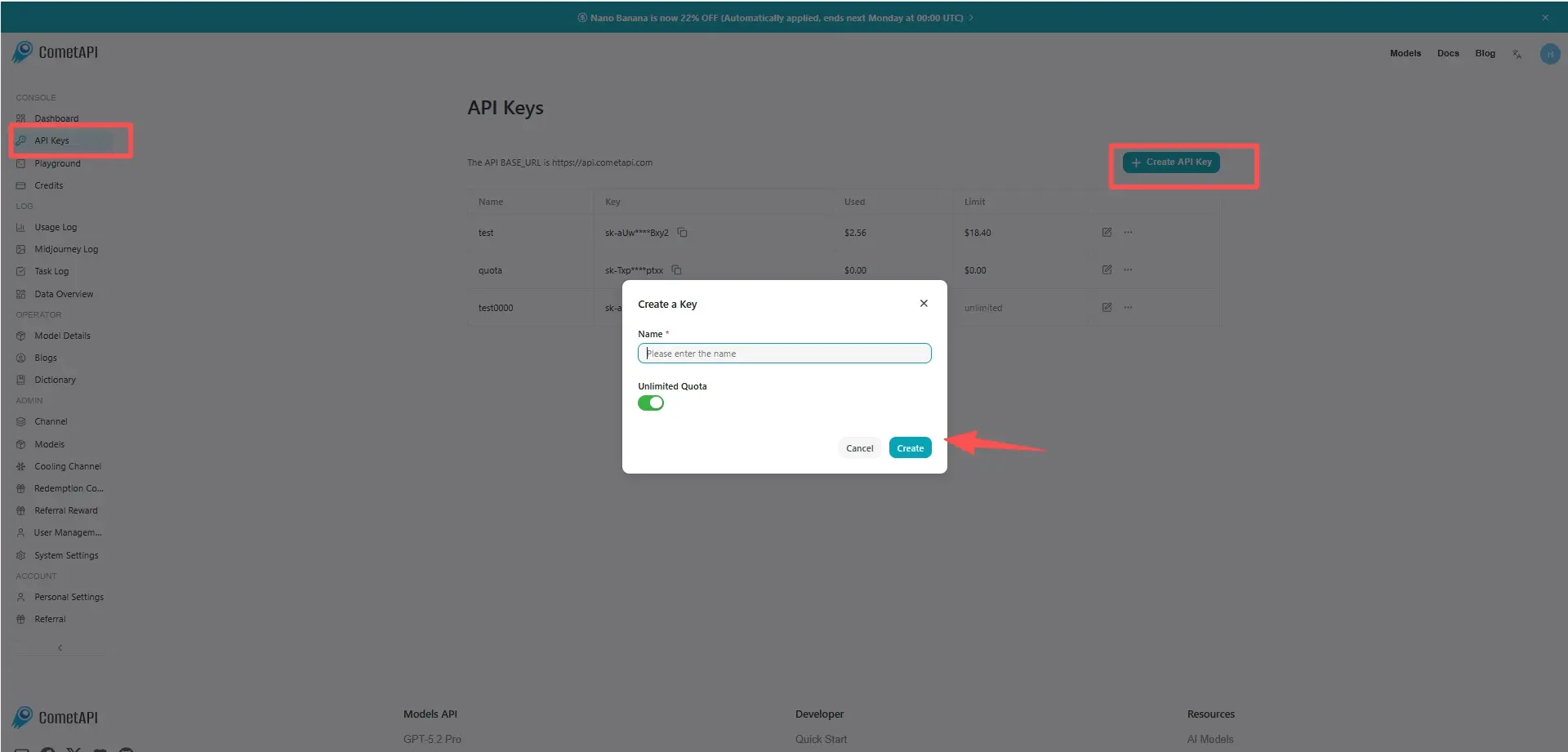
Step 1: Sign Up for API Key
Log in to cometapi.com. If you are not our user yet, please register first. Sign into your CometAPI console. Get the access credential API key of the interface. Click “Add Token” at the API token in the personal center, get the token key: sk-xxxxx and submit.
Step 2: Send Requests to GPT realtime 1.5 API
Select the “gpt-realtime-1.5” endpoint to send the API request and set the request body. The request method and request body are obtained from our website API doc. Our website also provides Apifox test for your convenience. Replace <YOUR_API_KEY> with your actual CometAPI key from your account. base url is Chat Completions
Insert your question or request into the content field—this is what the model will respond to . Process the API response to get the generated answer.
Step 3: Retrieve and Verify Results
Process the API response to get the generated answer. After processing, the API responds with the task status and output data.