Key features
- Multimodal generation (video + audio) — Sora-2-Pro generates video frames together with synchronized audio (dialogue, ambient sound, SFX) rather than producing video and audio separately.
- Higher fidelity / “Pro” tier — tuned for higher visual fidelity, tougher shots (complex motion, occlusion, and physical interactions), and longer per-scene consistency than Sora-2 (non-Pro). It may take longer to render than the standard Sora-2 model.
- Input versatility — supports pure text prompts, and can accept image input frames or reference images to guide composition (input_reference workflows).
- Cameos / likeness injection — can insert a user’s captured likeness into generated scenes with consent workflows in the app.
- Physical plausibility: improved object permanence and motion fidelity (e.g., momentum, buoyancy), reducing unrealistic “teleporting” artifacts common in earlier systems.
- Controllability: supports structured prompts and shot-level directions so creators can specify camera, lighting, and multi-shot sequences.
Technical details & integration surface
Model family: Sora 2 (base) and Sora 2 Pro (high-quality variant).
Input modalities: text prompts, image reference, and short recorded cameo-video/audio for likeness.
Output modalities: encoded video (with audio) — parameters exposed through /v1/videos endpoints (model selection via model: "sora-2-pro"). API surface follows OpenAI’s videos endpoint family for create/retrieve/list/delete operations.
Training & architecture (public summary): OpenAI describes Sora 2 as trained on large-scale video data with post-training to improve world simulation; specifics (model size, exact datasets, and tokenization) are not publicly enumerated in line-by-line detail. Expect heavy compute, specialized video tokenizers/architectures and multi-modal alignment components.
API endpoints & workflow: show a job-based workflow: submit a POST creation request (model="sora-2-pro"), receive a job id or location, then poll or wait for completion and download the resulting file(s). Common parameters in published examples include prompt, seconds/duration, size/resolution, and input_reference for image-guided starts.
Typical parameters :
model:"sora-2-pro"prompt: natural language scene description, optionally with dialogue cuesseconds/duration: target clip length ( Pro supports the highest quality in available durations)size/resolution: community reports indicate Pro supports up to 1080p in many use cases.
Content inputs: image files (JPEG/PNG/WEBP) can be supplied as a frame or reference; when used, the image should match the target resolution and act as a composition anchor.
Rendering behavior: Pro is tuned to prioritize frame-to-frame coherence and realistic physics; this typically implies longer compute time and higher cost per clip than non-Pro variants.
Benchmark performance
Qualitative strengths: OpenAI improved realism, physics consistency, and synchronized audio** versus prior video models. Other VBench results indicate Sora-2 and derivatives sit at or near the top of contemporary closed-source and temporal coherence.
Independent timing/throughput (example bench): Sora-2-Pro averaged ~2.1 minutes for 20-second 1080p clips in one comparison, while a competitor (Runway Gen-3 Alpha Turbo) was faster (~1.7 minutes) on the same task — tradeoffs are quality vs render latency and platform optimization.
Limitations (practical & safety)
- Not perfect physics/consistency — improved but not flawless; artifacts, unnatural motion, or audio sync errors can still occur.
- Duration & compute constraints — long clips are compute-intensive; many practical workflows limit clips to short durations (e.g., single-digit to low-tens of seconds for high-quality outputs).
- Privacy / consent risks — likeness injection (“cameos”) raises consent and mis-/disinformation risks; OpenAI has explicit safety controls and revocation mechanisms in the app, but responsible integration is required.
- Cost & latency — Pro-quality renders can be more expensive and slower than lighter models or competitors; factor in per-second/per-render billing and queuing.
- Safety content filtering — generation of harmful or copyrighted content is restricted; the model and platform include safety layers and moderation.
Typical and recommended use cases
Use cases:
- Marketing & ads prototypes — rapidly create cinematic proofs of concept.
- Previsualization — storyboards, camera blocking, shot visualization.
- Short social content — stylized clips with synchronized dialogue and SFX.
- How to access Sora 2 Pro API
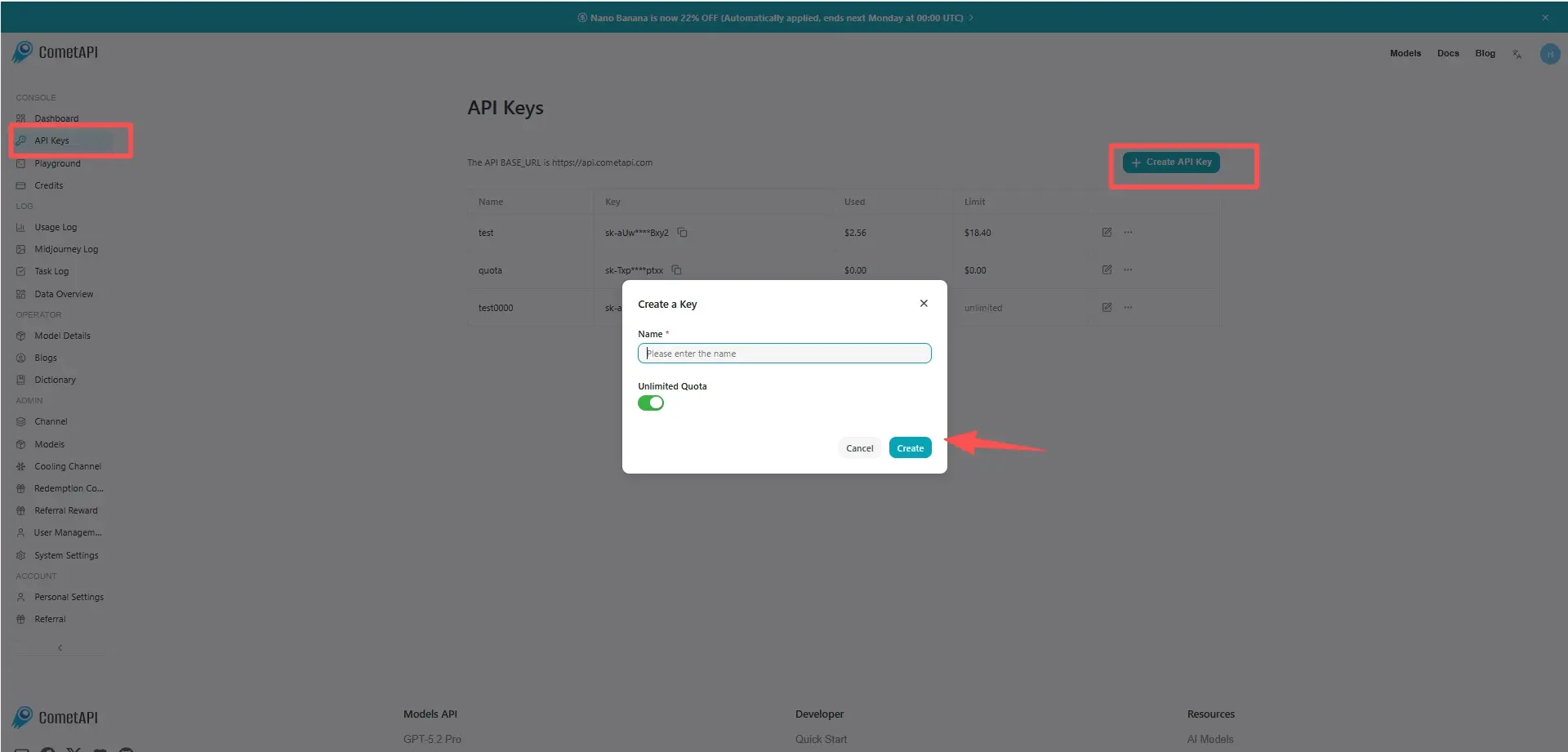
Step 1: Sign Up for API Key
Log in to cometapi.com. If you are not our user yet, please register first. Sign into your CometAPI console. Get the access credential API key of the interface. Click “Add Token” at the API token in the personal center, get the token key: sk-xxxxx and submit.
Step 2: Send Requests to Sora 2 Pro API
Select the “sora-2-pro” endpoint to send the API request and set the request body. The request method and request body are obtained from our website API doc. Our website also provides Apifox test for your convenience. Replace <YOUR_API_KEY> with your actual CometAPI key from your account. base url is office Create video
Insert your question or request into the content field—this is what the model will respond to . Process the API response to get the generated answer.
Step 3: Retrieve and Verify Results
Process the API response to get the generated answer. After processing, the API responds with the task status and output data.
- Internal training / simulation — generate scenario visuals for RL or robotics research (with care).
- Creative production — when combined with human editing (stitching short clips, grade, replace audio).