Technical Specifications (at a glance)
| Specification | Details |
|---|---|
| Model Name / Variant | FLUX.2 [max] (black-forest-labs/flux-2-max) |
| Model Family | FLUX.2 Image Generation & Editing |
| Input Types | Text prompt, reference images (multi-reference) |
| Max Reference Images | Up to 8 via API, up to 10 via playground UI |
| Output Resolution | Up to ~4 megapixels (2048×2048 pixels) |
| Character Limit (prompt) | Up to 32,000 chars |
| Core Tasks | Text-to-image, image editing, inpainting, style control |
| Typical Use Case Domains | Production creative, e-commerce, advertising assets, iterative design |
| Grounded Context | Real-time web context integration supported |
| Photography-grade Output | Yes — for professional product visuals |
| Benchmark Rank | Top 3 (Text-to-Image), Top 7 (Image Editing) globally on independent leaderboards |
What Is the FLUX 2 MAX
FLUX.2 [max] is the flagship, highest-quality variant of the FLUX.2 family from Black Forest Labs (BFL). It is positioned as a professional-grade text→image generation and image-editing model that focuses on maximal fidelity, prompt adherence, and editing consistency across characters, objects, lighting and color. BFL and partner registries describe FLUX.2 [max] as the top-tier FLUX.2 variant with features for multi-reference editing, grounded generation.
The FLUX.2 [max] API is the delivery mechanism used by CometAPI to expose FLUX.2 [max] model inference to developers. The API endpoints accept text prompts and one or more reference images (for image-to-image or editing tasks), and return generated images (commonly as downloadable files or base64 data URIs).
Main Features
1. Photorealistic Image Creation
FLUX.2 [max] produces photorealistic images with rich detail, realistic lighting, spatial logic, and consistent world knowledge. It’s suited for both creative and professional marketing assets.
2. Multi-Reference Fidelity
The model allows up to 8 reference images via the API (10 in interactive playgrounds). This ensures characters, products, or styles stay visually consistent across transformations.
3. Grounded Generation
A unique capability where the model incorporates current web context and real-world information into image outputs — ideal for trend-driven visuals or up-to-date content creation.
4. Advanced Editing and Retexturing
Includes powerful inpainting and editing — from background replacement to object detail refinement — with strong structural coherence and prompt adherence.
5. Text Rendering and Typography
Compared to earlier models, FLUX.2 [max] achieves higher accuracy when rendering legible text, infographics, or UI mockups within an image.
Benchmark Performance
Independent rankings position FLUX.2 [max] among the top AI image models globally:
| Leaderboard Task | Position / Score |
|---|---|
| Text-to-Image Generation | #3 Global (Score ~1167) |
| Image Editing / Inpainting | #7 Global (Score ~1247) |
These placements place FLUX.2 [max] competitive with — and in some metrics exceeding — models such as Gemini-2.5-Flash and offering better prompt adherence and text rendering than some competitors.
LUX.2 [max] Comparison with Other Models
| Feature | FLUX.2 [max] | Gemini-2.5-Flash / Nano Banana | Midjourney v7 |
|---|---|---|---|
| Photorealism | Very High | Very High | High |
| Prompt Accuracy | Excellent | Good | Very Good |
| Text Rendering | Native / Strong | Limited | Supported |
| Multi-Reference Support | Yes (8+) | Limited | Limited |
| Editing (inpainting) | Strong (#7) | Moderate | Good |
Overall, FLUX.2 [max] excels particularly in multi-reference workflows, consistent identity preservation, grounded generation, and prompt adherence, making it strong for production apps compared to models that focus primarily on artistic aesthetics.
How to access black-forest-labs/flux-2-max API
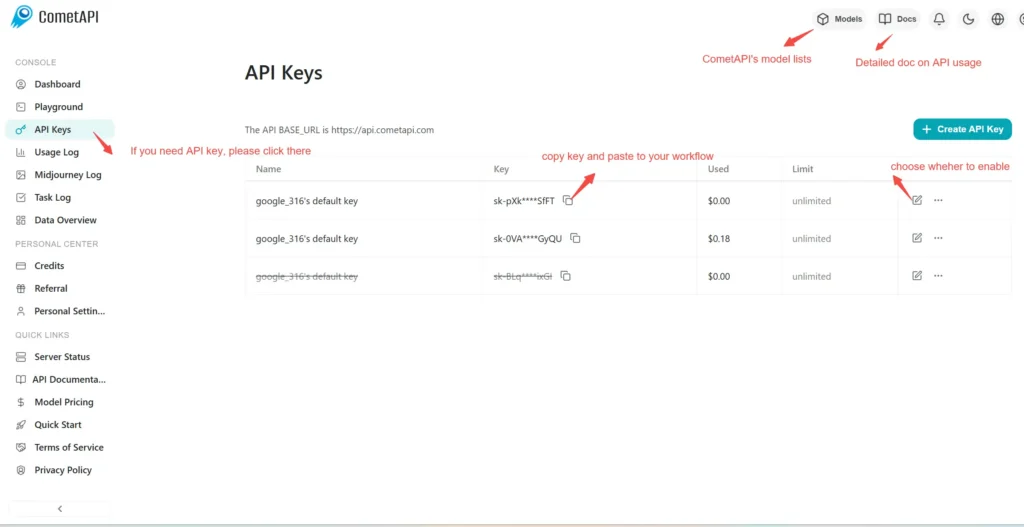
Step 1: Sign Up for API Key
Log in to cometapi.com. If you are not our user yet, please register first. Sign into your CometAPI console. Get the access credential API key of the interface. Click “Add Token” at the API token in the personal center, get the token key: sk-xxxxx and submit.
Step 2: Send Requests to black-forest-labs/flux-2-max API
Select the “black-forest-labs/flux-2-max ”endpoint to send the API request and set the request body. The request method and request body are obtained from our website API doc. Our website also provides Apifox test for your convenience. Replace <YOUR_API_KEY> with your actual CometAPI key from your account.
Insert your question or request into the content field—this is what the model will respond to . Process the API response to get the generated answer.
Step 3: Retrieve and Verify Results
Process the API response to get the generated answer. After processing, the API responds with the task status and output data.
CometAPI also Now Supporting Replicate Format Models: 🔹 black-forest-labs/flux-2-pro 🔹 black-forest-labs/flux-2-dev 🔹 black-forest-labs/flux-2-flex
Limited Time Promotion: Lower than Replicate Official Pricing!
👇 Start Buil