
Integrating CometAPI with n8n allows you to power your automations with the world’s most advanced AI models in just three steps. By using a single OpenAI-compatible credential, you gain instant access to over 500 models, including GPT 5.5, Claude Opus 4.7, and DeepSeek V4 Pro. This setup is identical for both cloud and self-hosted n8n instances, providing a stable, high-availability foundation for your n8n AI workflow automation.
What is n8n and why it matter
n8n is an open-source workflow automation tool. It lets you connect different apps, services, and APIs to automate tasks—without needing to write much code.
What it does
Think of n8n as a visual way to build automations:
- You create workflows using a drag-and-drop editor
- Each step (called a node) performs an action
- Data flows from one step to the next automatically
Key features
- Open source (you can self-host it)
- Supports hundreds of integrations (APIs, apps, databases)
- Allows custom JavaScript logic inside workflows
- Can run on your own server or via the cloud service at n8n official site
Why Connect n8n to CometAPI
Using CometAPI as your central gateway in n8n provides significant operational advantages. By replacing separate keys for OpenAI, Anthropic, and Google with a single credential, your team can eliminate the overhead of managing multiple vendor accounts and complex billing cycles. This architecture ensures zero vendor lock-in; you can switch between the latest models from different providers by simply updating the model name in your node settings, allowing your workflows to remain agile as the AI landscape evolves.
CometAPI serves as a unified REST API aggregating 500+ models for chat, image, video, audio (TTS/STT), and embeddings. Key benefits include:
- OpenAI-compatible endpoint (
https://api.cometapi.com/v1): Drop-in compatibility with OpenAI nodes or HTTP Request. - 20-40% lower pricing than direct vendors, with pay-as-you-go, no monthly fees for basics, and unified billing.
- No vendor lock-in: Switch models with one parameter change.
- Enterprise features: Failover routing, analytics, privacy controls (no prompt collection claimed in some discussions), and reliable access.
Latest developments (as of May 2026): CometAPI maintains a verified/partner integration on n8n.io, with a dedicated community node (n8n-nodes-cometapi) available via npm for local/self-hosted instances. Users report smooth OpenAI-node compatibility and growing adoption for multi-model workflows. Recent n8n updates enhance tool-calling and HTTP nodes, making integrations more robust.
Getting Started: Prerequisites and Account Setup
Sign Up for CometAPI
Visit cometapi.com, create a free account, and generate an API key in the dashboard. New users often get trial credits. Explore the model list and pricing page.
Set Up n8n
- Cloud: n8n.cloud (managed, easy scaling).
- Self-hosted: Docker, npm, or Kubernetes. Recommended for data privacy and unlimited executions. Recent guides cover running CometAPI nodes locally.
Update to the latest version (e.g., 2.20+ as of May 2026) for AI and stability improvements.
Install CometAPI Node (Optional but Recommended for Self-Hosted)
Use the community node:
npm install n8n-nodes-cometapi
Restart n8n. It appears in the nodes panel for native-like experience.
Step-by-Step Setup Guide
Step 1: Get Your CometAPI API Key
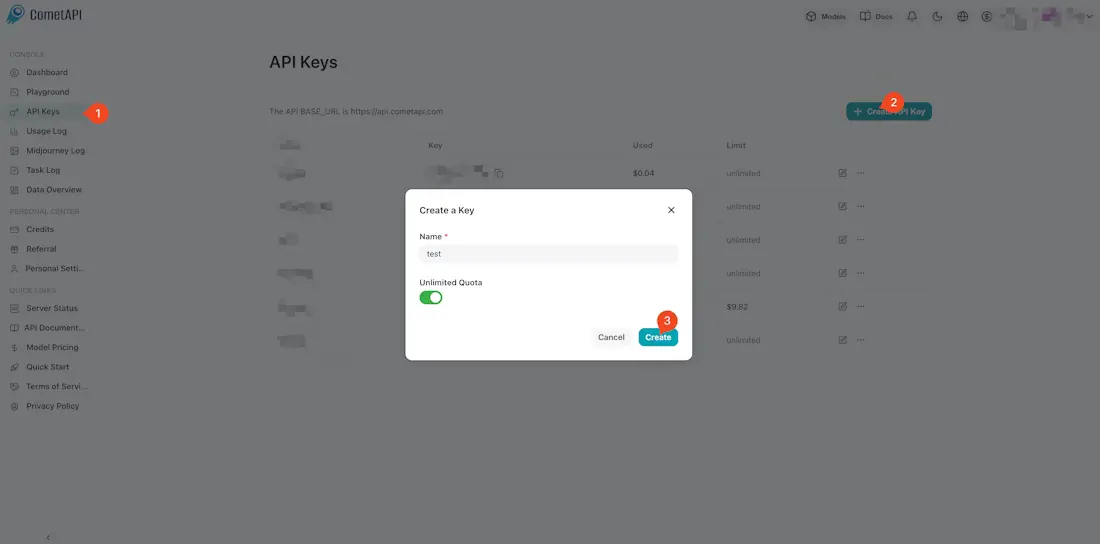
Log in to the CometAPI dashboard and navigate to the API Token section. Click Add API Key to generate your unique credential.
Copy your key (typically formatted as sk-xxxx) and keep the Base URL handy: https://api.cometapi.com/v1.
Step 2: Create OpenAI Credential in n8n
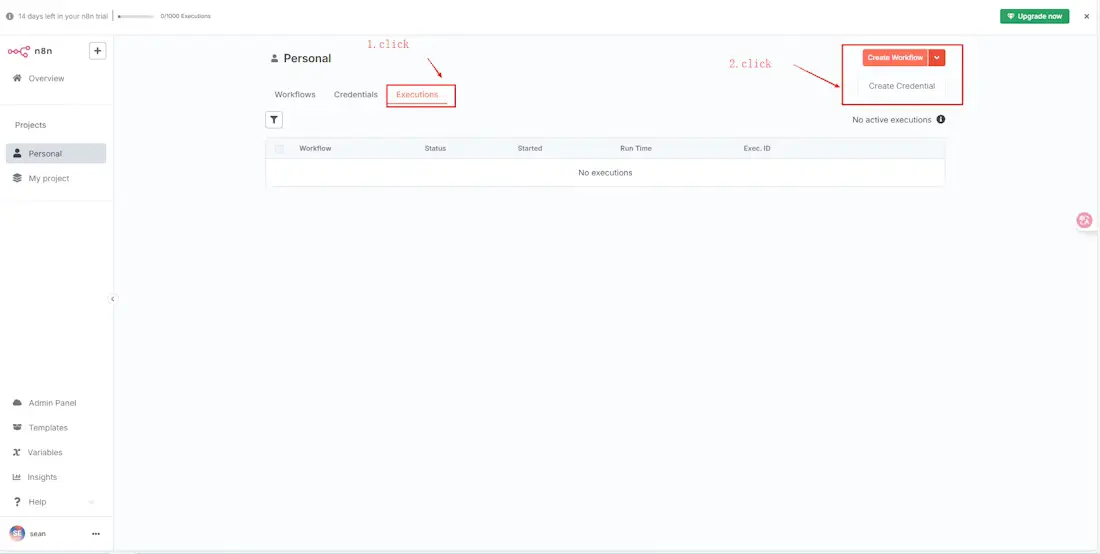
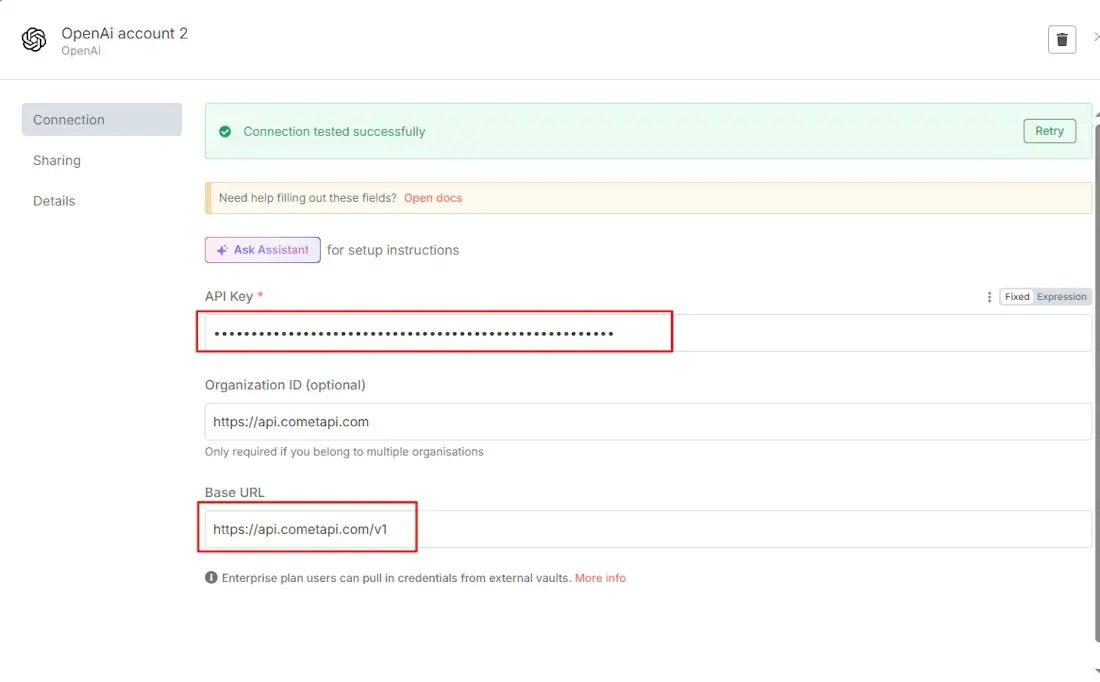
Open your n8n instance and navigate to Credentials → Create Credential. Search for and select the OpenAI API credential type.
- API Key: Paste your CometAPI token here.
- Base URL: Enter
https://api.cometapi.com/v1.
Click Save to finalize the setup.
Step 3: Test Your Connection
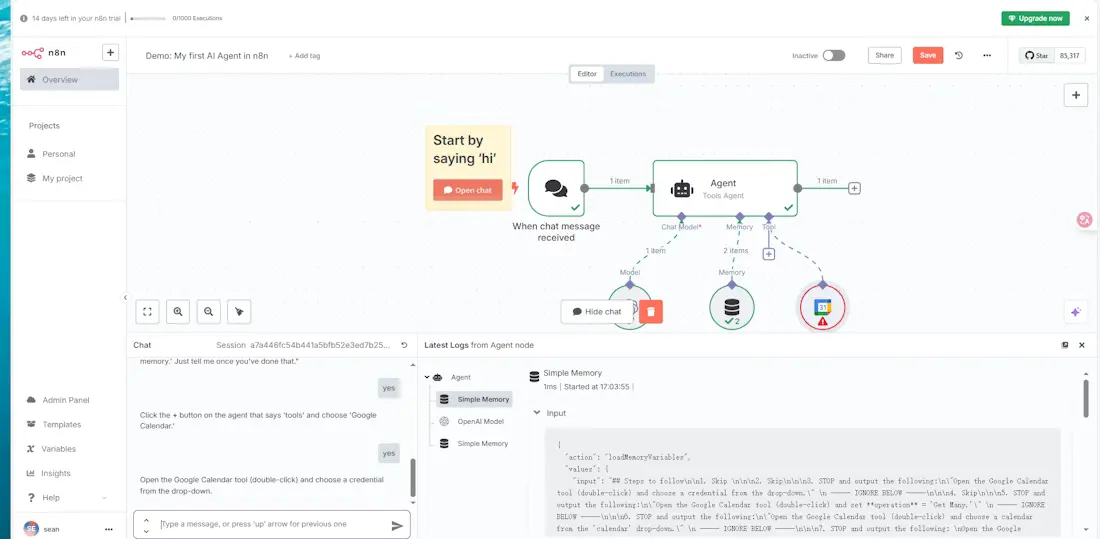
Create a new workflow and add an OpenAI node (such as the Chat Model or AI Agent node). Select the CometAPI credential you just created. In the model field, you can now enter any supported model ID, such as gpt-5.5 or claude-opus-4-7. Execute the node; a successful response verifies that your n8n OpenAI compatible API bridge is correctly configured.
Troubleshooting Common Issues
If your integration does not work immediately, check these three common areas:
API returns a 401 Unauthorized error
This error typically means n8n cannot authenticate with the gateway. First, verify that your API key was copied correctly without any leading or trailing spaces. Second, ensure your Base URL includes the /v1 suffix. Without the version path, the endpoint may reject the request.
Model name not recognized
CometAPI hosts over 500 models, and each has a specific identifier. If n8n returns a "Model not found" error, ensure you are using the exact model ID from the CometAPI documentation. For example, use gpt-5.5-pro instead of just gpt-5-pro if that is the identifier in the current catalog.
Response speed is slow
For real-time applications where latency is a concern, certain reasoning-heavy models may take longer to process. If your workflow requires near-instant responses, try switching to a high-throughput model like Gemini 3.1 Flash-Lite or DeepSeek V4 Flash, which are optimized for speed.
Which Models Can You Use in n8n via CometAPI
| Model Category | Examples | Best For |
|---|---|---|
| Text/Chat | GPT 5.5, Claude Opus 4.7, Gemini 3.1 Pro | Professional reasoning and complex logic |
| Code | DeepSeek V4 Pro, GPT 5.3 Codex | Agentic coding and repo-scale refactors |
| Image | GPT Image 2, Flux 2 Max | High-fidelity visual content and design |
| Video | Sora 2, Doubao-Seedance 2.0 | Cinematic automation and video social clips |
Ready-to-Use n8n Workflow Templates
Implementing CometAPI into n8n allows for sophisticated multi-model logic. Here are three templates you can build today.
Template 1: Customer Support Automation
- Trigger: A Webhook node receives a customer support ticket from your website.
- Processing: A CometAPI (OpenAI) node uses Claude Opus 4.7 to analyze the ticket text.
- Logic: A Switch node evaluates the "severity" or "complexity" output by the AI.
- Branching: Simple inquiries (e.g., "Where is my order?") are routed to an automated reply node. Complex technical issues are routed to a Slack node or Zendesk node for human intervention.
- Node Configuration: Set the Claude node to
thinking: {type: "adaptive"}to ensure it spends more time on difficult sentiment analysis.
Template 2: Automated Content Pipeline
- Trigger: An RSS Feed node detects a new article in your industry.
- Processing 1: Use GPT 5.5 to read the article and generate a 200-word executive summary for your internal newsletter.
- Processing 2: Pass that summary to DeepSeek V3 to generate five SEO-optimized tags and keywords.
- Output: The summary and tags are posted to a Notion database or a WordPress node.
- Why this Swarm?: By using GPT 5.5 for the high-quality summary and the cheaper DeepSeek V3 for simple tagging, you maintain high quality while significantly lowering your total token cost.
Template 3: Image Generation Workflow
- Trigger: A Google Sheets node detects a new row containing a product name and description.
- Processing: The description is sent to a CometAPI (OpenAI) node using the
/v1/images/generationsendpoint with the Flux 2 Max model. - Storage: The generated image URL is passed to a Google Drive node to upload and save the file.
- Node Configuration: Set the
nparameter to 1 and choose a resolution like1024x1024for high-quality product mockups.
Cost Optimization Tips for n8n + CometAPI
To maximize your 20-40% discount, follow these architectural strategies.
Use cheap models for classification and routing
Don't use GPT 5.5 Pro for simple "Yes/No" or "Category A/B" decisions. Use DeepSeek V4 Flash or GPT 5.4 nano for these tasks. These models cost a fraction of flagship models and are often faster, meaning your n8n workflow executes more efficiently.
Set conditional model selection in n8n
Use a Switch node or If node to choose a model based on the input length or priority. For example, if a document is under 1,000 words, route it to a standard model. If it's a massive 500,000-token repository, route it to a long-context model like Grok 4.20 or Claude Opus 4.7.
Batching vs. Real-time processing
If your n8n workflow does not require immediate responses (e.g., an end-of-day report), use a Wait node or a Schedule node to gather inputs and process them in a single batch. CometAPI supports high concurrency, but reducing the frequency of small, separate calls can help you stay within lower-tier rate limits and simplify your usage logs.
Comparison Table: n8n + CometAPI vs. Alternatives
| Feature | n8n + CometAPI | Zapier + Multiple AIs | Make.com + Direct APIs | Custom Code (Python/Node) |
|---|---|---|---|---|
| Cost | Low (20-40% savings + n8n free/self-host) | High (per task + per API) | Medium | Variable (dev time) |
| Ease of Use | Visual, low-code | Very easy | Visual | High coding required |
| Flexibility | Unlimited (HTTP + 400+ nodes) | Limited templates | Good | Highest |
| Model Access | 500+ unified | Fragmented | Depends | Manual |
| Self-Hosting/Data Privacy | Excellent | Limited | Cloud-focused | Full control |
| Scalability | High (queue modes, workers) | Usage-based pricing caps | Good | Depends on infra |
| Maintenance | Low (one integration) | High (multiple connections) | Medium | High |
| AI Agent Support | Native + tools | Basic | Growing | Custom |
Verdict: n8n + CometAPI wins for teams needing power, control, and cost efficiency.
Future Outlook and Optimization Tips
As AI models proliferate in 2026, unified platforms like CometAPI paired with flexible orchestrators like n8n become essential. Expect deeper native nodes, better MCP/server integrations, and advanced agent capabilities.
Optimization on Cometapi.com:
- Track token usage across workflows for ROI analysis.
- Leverage CometAPI's analytics + n8n executions data.
- Experiment with newer models (e.g., DeepSeek-V4) for specialized tasks at lower cost.
- Combine with other CometAPI tools for end-to-end AI solutions.
Quick Guide: Build a simple summarizer workflow today. Scale to full AI operations tomorrow.
Ready to Get Started? Head to CometAPI for your free API key and credits. Self-host or cloud n8n, connect via the steps above, and transform your automations. For custom workflows or enterprise consulting, explore options on Cometapi.com.
This integration isn't just technical—it's a strategic multiplier for productivity and innovation in the AI era.
FAQ
Q: Do I need a separate credential for each AI model?
A: No. One CometAPI credential provides access to all 500+ models in n8n, from GPT and Claude to DeepSeek and Kimi.
Q: Is CometAPI cheaper than using OpenAI directly in n8n?
A: Yes. CometAPI prices are set 20% to 40% below official retail rates for the same models.
Q: Does this work with self-hosted n8n?
A: Yes. The setup process is identical for both the n8n Cloud and self-hosted Docker versions.
Q: Which n8n nodes work with CometAPI?
A: Any node that accepts OpenAI credentials works, including the AI Agent, Chat Model, and standard completion nodes.
Q: Can I switch models without reconfiguring n8n?
A: Yes. Simply update the model name string in the node settings (e.g., change gpt-5.5 to claude-opus-4-7); the underlying credential remains valid for all providers.