โมเดลราคาองค์กร
500+ AI Model API ทั้งหมดในหนึ่ง API เพียงแค่ใน CometAPI
API โมเดล
นักพัฒนา
เริ่มต้นอย่างรวดเร็วเอกสารประกอบแดชบอร์ด API
บริษัท
เกี่ยวกับเราองค์กร
ทรัพยากร
โมเดล AIบล็อกบันทึกการเปลี่ยนแปลงสนับสนุน
ข้อกำหนดการให้บริการนโยบายความเป็นส่วนตัว
© 2026 CometAPI · All rights reserved
Home/Models/MiniMax/MiniMax-M2.7
M

MiniMax-M2.7

อินพุต:$0.24/M
เอาต์พุต:$0.96/M
MiniMax-M2.7 มอบสติปัญญาระดับชั้นนำเทียบเท่ารุ่นมาตรฐาน—รวมถึงการวิวัฒน์ตัวเองแบบวนซ้ำและประสิทธิภาพการทำงานในสำนักงานระดับผู้เชี่ยวชาญ—แต่ได้รับการออกแบบมาสำหรับแอปพลิเคชันที่ต้องการความหน่วงต่ำกว่าหนึ่งวินาทีและการสร้างโทเค็นความเร็วสูง โดยอาศัยสถาปัตยกรรมแกนหลักสำหรับการอนุมานที่ได้รับการเสริมประสิทธิภาพ ความเร็วในการสร้างผลลัพธ์เร็วกว่าโมเดลมาตรฐาน 66% (ถึง 100 tps) จึงเป็นตัวเลือกที่เหมาะสมสำหรับผู้ช่วยการเขียนโปรแกรมแบบโต้ตอบ การรันลูปของเอเจนต์แบบเรียลไทม์ และไปป์ไลน์ระดับองค์กรที่มีอัตราการส่งผ่านสูงซึ่งมีข้อกำหนดเวลาแล้วเสร็จที่เข้มงวด
ใหม่
ใช้งานเชิงพาณิชย์
Playground
ภาพรวม
คุณสมบัติ
ราคา
API

Technical specifications of MiniMax-M2.7 API

ItemDetails
Model nameMiniMax-M2.7
Model IDminimax-m2.7
ProviderMiniMax
Model familyMiniMax text models
Input typeText
Output typeText
Context window204,800 tokens
Official speed note~60 tps for MiniMax-M2.7; ~100 tps for MiniMax-M2.7-highspeed
Primary strengthsProgramming, tool calling, search, office productivity, agent workflows
AvailabilityMiniMax API / text generation endpoints
Public multimodal spec on reviewed pagesNot published on the text-model pages reviewed

What is MiniMax-M2.7?

MiniMax-M2.7 is MiniMax’s current flagship text model for demanding coding, agent, and productivity workflows. The official docs position it as a model for multilingual programming, tool calling, search, and complex task execution, while the MiniMax model page highlights gains in real-world software engineering, office editing, and complex environment interaction.

Main features of MiniMax-M2.7

  • Strong software engineering performance for end-to-end delivery, log analysis, bug troubleshooting, code security, and machine learning tasks.
  • Large 204,800-token context window for long prompts, multi-file work, and extended agent sessions.
  • Strong office workflow support, including complex edits in Excel, PowerPoint, and Word.
  • Tool-calling and search-oriented behavior for agentic API workflows.
  • Broad integration support in popular coding tools such as Claude Code, OpenCode, Kilo Code, Cline, Roo Code, Grok CLI, and Codex CLI.

Benchmark performance of MiniMax-M2.7

The official MiniMax materials published the following benchmark claims for M2.7:

BenchmarkReported resultWhat it suggests
SWE-Pro56.22%Strong real-world software engineering performance
VIBE-Pro55.6%Full-project delivery capability
Terminal Bench 257.0%Strong understanding of complex engineering systems
GDPval-AAELO 1495Strong office-task performance and high-fidelity editing
Complex skills (>2,000 tokens)97% skill adherenceGood reliability in long, structured workflows

How MiniMax-M2.7 compares with nearby MiniMax models

ModelPositioningContext windowSpeed noteBest fit
MiniMax-M2.7Current flagship text model204,800~60 tpsHighest-end coding, tool use, search, and office tasks
MiniMax-M2.7-highspeed(coming soon in CometAPI)Faster variant of M2.7204,800~100 tpsSame capability profile when latency matters more
MiniMax-M2.5Prior high-end text model204,800~60 tpsStrong coding/productivity when M2.7 is not required
MiniMax-M2Efficient coding and agent workflows204,800Official docs list the model, but not the same M2.7 positioningCost-conscious agentic coding and general workflow automation

Best use cases for MiniMax-M2.7 API

  1. Large codebase refactoring and multi-file implementation work.
  2. Agentic debugging loops that require planning, search, and tool use.
  3. Office document generation and revision workflows in Word, Excel, and PowerPoint.
  4. Terminal-heavy automation where the model needs to reason across logs and build outputs.
  5. Search-assisted tasks that benefit from long context and multi-step reasoning.

Recommended comparison note

If you are choosing between MiniMax models, use M2.7 when you want the strongest public text-model positioning for engineering, tool use, search, and office editing. Use M2.5 or M2 when you want a nearby family member with a different performance or workflow tradeoff.

How to access MiniMax-2.7 API

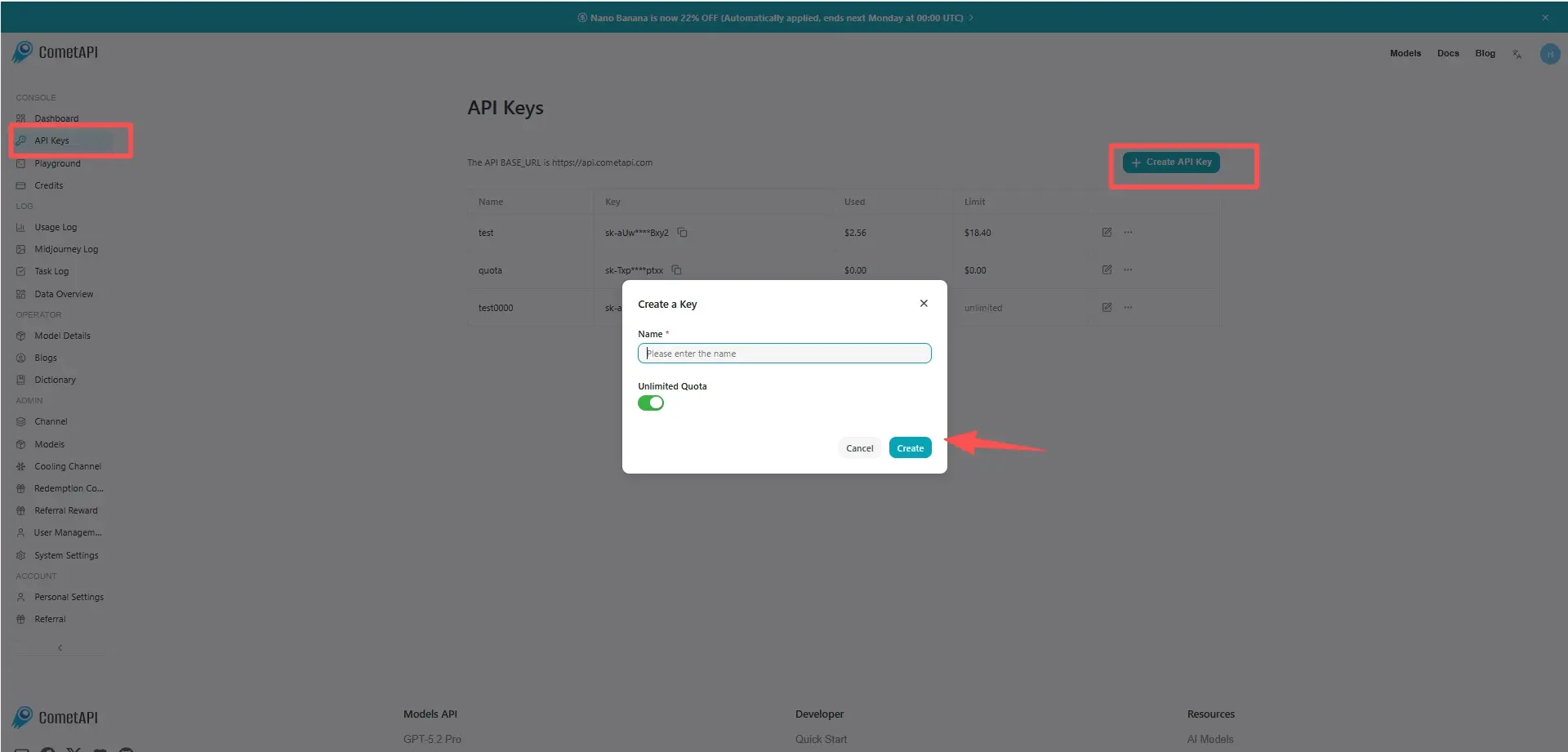
Step 1: Sign Up for API Key

Log in to cometapi.com. If you are not our user yet, please register first. Sign into your CometAPI console. Get the access credential API key of the interface. Click “Add Token” at the API token in the personal center, get the token key: sk-xxxxx and submit.

cometapi-key

Step 2: Send Requests to MiniMax-2.7 API

Select the “minimax-2.7” endpoint to send the API request and set the request body. The request method and request body are obtained from our website API doc. Our website also provides Apifox test for your convenience. Replace <YOUR_API_KEY> with your actual CometAPI key from your account. base url is Chat Completions .

Insert your question or request into the content field—this is what the model will respond to . Process the API response to get the generated answer.

Step 3: Retrieve and Verify Results

Process the API response to get the generated answer. After processing, the API responds with the task status and output data.

คำถามที่พบบ่อย

Can MiniMax-M2.7 handle long coding sessions in the MiniMax API?

ใช่ เอกสารอย่างเป็นทางการสำหรับการสร้างข้อความระบุว่า MiniMax-M2.7 มีหน้าต่างบริบท 204,800 โทเค็น ซึ่งทำให้เหมาะสำหรับพรอมต์ยาว งานเขียนโค้ดหลายไฟล์ และเซสชันเอเจนต์ที่ยาวนาน.

Is MiniMax-M2.7 good for real-world software engineering tasks?

ใช่ MiniMax ระบุว่า M2.7 ทำผลงานได้ดีมากในงานส่งมอบโครงการแบบครบวงจร การวิเคราะห์ล็อก การแก้ปัญหาบั๊ก ความปลอดภัยของโค้ด และงานการเรียนรู้ของเครื่อง และรายงานคะแนน 56.22% บน SWE-Pro.

When should I use MiniMax-M2.7 instead of MiniMax-M2.5?

ให้ใช้ MiniMax-M2.7 เมื่อคุณต้องการโมเดลข้อความเรือธงรุ่นใหม่กว่าในไลน์อัปของ MiniMax สำหรับการเขียนโปรแกรม การเรียกใช้เครื่องมือ การค้นหา และงานเพิ่มประสิทธิภาพสำนักงาน MiniMax-M2.5 เป็นรุ่นไฮเอนด์ก่อนหน้า ขณะที่ M2.7 เป็นรุ่นที่เอกสารเน้นว่ามีการวางตำแหน่งโมเดลข้อความโดยรวมที่แข็งแกร่งที่สุด.

What is the MiniMax-M2.7-highspeed variant for?

MiniMax-M2.7-highspeed คงหน้าต่างบริบท 204,800 โทเค็นและการวางตำแหน่งโมเดลไว้เหมือนเดิม แต่ MiniMax ระบุว่าเร็วและคล่องตัวกว่า โดยมีความเร็วการสร้างผลลัพธ์ประมาณ 100 tps แทนที่จะเป็นประมาณ 60 tps.

Can MiniMax-M2.7 edit documents and spreadsheets well?

ใช่ เอกสารอย่างเป็นทางการของ MiniMax ระบุว่า M2.7 ปรับปรุงการแก้ไขที่ซับซ้อนใน Excel, PowerPoint และ Word โดยเฉพาะการแก้ไขหลายรอบและการแก้ไขความเที่ยงตรงสูง และรายงาน GDPval-AA ELO ที่ 1495.

How do I integrate MiniMax-M2.7 with coding tools like Claude Code or Cline?

M2.7 ถูกกำหนดค่าผ่านผู้ให้บริการ MiniMax API โดยใช้เอ็นด์พอยต์เฉพาะภูมิภาคและชื่อโมเดล MiniMax-M2.7 คู่มือฉบับเดียวกันยังรวมขั้นตอนการตั้งค่าสำหรับ Claude Code, OpenCode, Kilo Code, Cline, Roo Code, Grok CLI และ Codex CLI.

Does MiniMax-M2.7 work well for agent workflows?

ใช่ MiniMax วางตำแหน่ง M2.7 สำหรับการเขียนโปรแกรม การเรียกใช้เครื่องมือ การค้นหา และสถานการณ์งานที่ซับซ้อน และคู่มือเครื่องมือสำหรับการเขียนโค้ดระบุชัดว่าเหมาะกับเวิร์กโฟลว์นักพัฒนาแบบเอเจนต์และเครื่องมือที่บูรณาการกับเทอร์มินัล.

ราคาสำหรับ MiniMax-M2.7

สำรวจราคาที่แข่งขันได้สำหรับ MiniMax-M2.7 ที่ออกแบบมาให้เหมาะสมกับงบประมาณและความต้องการการใช้งานที่หลากหลาย แผนการบริการที่ยืดหยุ่นของเรารับประกันว่าคุณจะจ่ายเฉพาะสิ่งที่คุณใช้เท่านั้น ทำให้สามารถขยายขนาดได้ง่ายเมื่อความต้องการของคุณเพิ่มขึ้น ค้นพบว่า MiniMax-M2.7 สามารถยกระดับโปรเจกต์ของคุณได้อย่างไรในขณะที่ควบคุมต้นทุนให้อยู่ในระดับที่จัดการได้
ราคา Comet (USD / M Tokens)ราคาทางการ (USD / M Tokens)ส่วนลด
อินพุต:$0.24/M
เอาต์พุต:$0.96/M
อินพุต:$0.3/M
เอาต์พุต:$1.2/M
-20%

โค้ดตัวอย่างและ API สำหรับ MiniMax-M2.7

เข้าถึงโค้ดตัวอย่างที่ครอบคลุมและทรัพยากร API สำหรับ MiniMax-M2.7 เพื่อปรับปรุงกระบวนการผสานรวมของคุณ เอกสารประกอบที่มีรายละเอียดของเราให้คำแนะนำทีละขั้นตอน ช่วยให้คุณใช้ประโยชน์จากศักยภาพเต็มรูปแบบของ MiniMax-M2.7 ในโครงการของคุณ
POST
/v1/chat/completions
Python
JavaScript
Curl
from openai import OpenAI
import os

# Get your CometAPI key from https://api.cometapi.com/console/token, and paste it here
COMETAPI_KEY = os.environ.get("COMETAPI_KEY") or "<YOUR_COMETAPI_KEY>"
BASE_URL = "https://api.cometapi.com/v1"

client = OpenAI(base_url=BASE_URL, api_key=COMETAPI_KEY)

completion = client.chat.completions.create(
    model="minimax-m2.7",
    messages=[
        {"role": "system", "content": "You are a helpful assistant."},
        {"role": "user", "content": "Hello!"},
    ],
)

print(completion.choices[0].message.content)

Python Code Example

from openai import OpenAI
import os

# Get your CometAPI key from https://api.cometapi.com/console/token, and paste it here
COMETAPI_KEY = os.environ.get("COMETAPI_KEY") or "<YOUR_COMETAPI_KEY>"
BASE_URL = "https://api.cometapi.com/v1"

client = OpenAI(base_url=BASE_URL, api_key=COMETAPI_KEY)

completion = client.chat.completions.create(
    model="minimax-m2.7",
    messages=[
        {"role": "system", "content": "You are a helpful assistant."},
        {"role": "user", "content": "Hello!"},
    ],
)

print(completion.choices[0].message.content)

JavaScript Code Example

import OpenAI from "openai";

// Get your CometAPI key from https://api.cometapi.com/console/token, and paste it here
const api_key = process.env.COMETAPI_KEY || "<YOUR_COMETAPI_KEY>";
const base_url = "https://api.cometapi.com/v1";

const openai = new OpenAI({
  apiKey: api_key,
  baseURL: base_url,
});

const completion = await openai.chat.completions.create({
  model: "minimax-m2.7",
  messages: [
    { role: "system", content: "You are a helpful assistant." },
    { role: "user", content: "Hello!" },
  ],
});

console.log(completion.choices[0].message.content);

Curl Code Example

# Get your CometAPI key from https://api.cometapi.com/console/token
# Export it as: export COMETAPI_KEY="your-key-here"
curl https://api.cometapi.com/v1/chat/completions \
  -H "Content-Type: application/json" \
  -H "Authorization: Bearer $COMETAPI_KEY" \
  -d '{
    "model": "minimax-m2.7",
    "messages": [
      {
        "role": "system",
        "content": "You are a helpful assistant."
      },
      {
        "role": "user",
        "content": "Hello!"
      }
    ]
  }'