
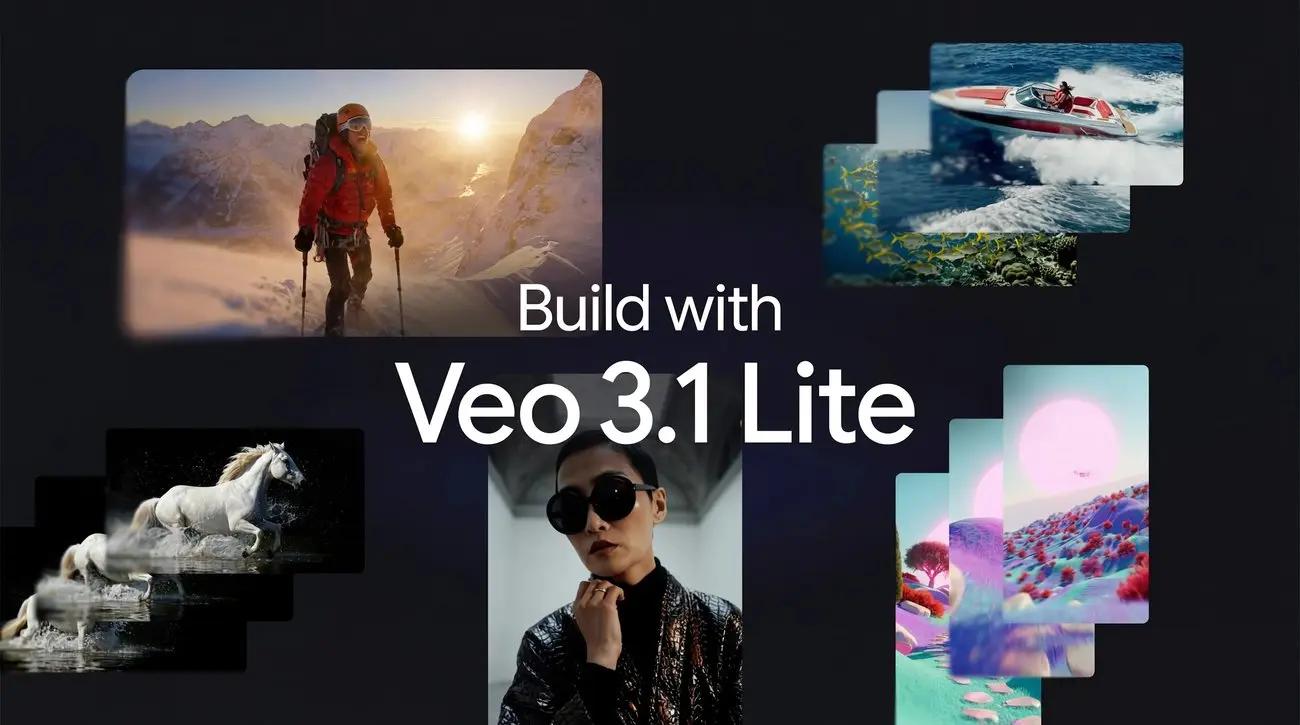
Google’s announcement of Veo 3.1 Lite comes at a pivotal moment in AI video generation. Just days after OpenAI shuttered its Sora video app without clear explanation, Google doubled down: “Video’s here to stay.” The new Lite tier makes professional-grade generative video dramatically more accessible, slashing barriers for startups, content teams, and enterprises.
What Is Veo 3.1 Lite?
Veo 3.1 Lite is Google DeepMind’s high-efficiency, developer-first video generation model built on the state-of-the-art Veo 3.1 architecture. Launched in preview on March 31, 2026, via the Gemini API, it targets high-volume video applications where cost, speed, and scalability matter most.
Unlike premium tiers focused on ultra-high-end cinematic output, Lite prioritizes affordability without sacrificing core realism, physics, prompt adherence, or native audio. It generates 4-, 6-, or 8-second clips (24 fps) in landscape (16:9) or portrait (9:16) formats — ideal for YouTube Shorts, TikTok, Instagram Reels, ads, and social-first content.
Key differentiator: It leverages the same foundational Veo 3.1 model but optimizes for efficiency, making it Google’s “most cost-effective video model” to date. Available immediately in Google AI Studio and the Gemini API (model ID: veo-3.1-lite-generate-preview), it democratizes access for teams that previously found even “Fast” tiers too expensive at scale.
Major updates in this release:
- >50% cost reduction versus Veo 3.1 Fast (exact per-second pricing detailed below).
- Same generation speed as Fast tier — no latency penalty for the savings.
- 1080p multi-format output (720p default; 1080p supported at slight premium).
- Expanded accessibility for high-volume workflows in API and Vertex AI.
- Native audio included by default across all outputs (dialogue, sound effects, ambient noise).
This positions Lite as the entry point for production-scale AI video, while Fast and Standard handle premium creative needs. Google also teased “more updates soon,” signaling ongoing investment.
What Can Veo 3.1 Lite Do?
1) Text-to-video and image-to-video
Veo 3.1 Lite supports both text prompts and image-based inputs. That means you can describe a scene from scratch or use an image as the foundation for a motion clip. The output is video with audio, so the model is not just a silent visual generator. It is designed to create a more complete output package, which is especially useful for ads, explainers, product teasers, and social video.
2) Portrait and landscape formats
The model supports both landscape (16:9) and portrait (9:16) framing. This is a deceptively important feature because it removes a lot of reformatting friction for creators who have to publish to YouTube Shorts, Reels-style placements, mobile ads, or product demo surfaces. Instead of generating in one format and manually repurposing it later, teams can generate for the target channel from the start.
3) 720p and 1080p generation
Google says Veo 3.1 Lite supports 720p and 1080p, which is enough for many commercial use cases where cost and turnaround matter more than top-end cinema output. The docs add one critical detail: 1080p is only supported for 8-second generations. That is a useful boundary to know before building workflows around it.
4) Short, controllable clips
Developers can choose 4-second, 6-second, or 8-second durations. That range is ideal for product ads, transitions, intros, looping social creatives, and rapid concept tests. The model is clearly meant for fast iteration rather than long-form storytelling. If you need extended clips or advanced multi-shot workflows, the flagship Veo 3.1 tier is the better fit.
5) Native Audio
A signature feature of the Veo 3.1 series, also present in the Lite version. The generated video comes with ambient sound effects and audio synchronization, not silent footage. For example, when generating a city street scene, it will automatically add traffic sounds and crowd noise.
Veo 3.1 Lite vs Veo 3.1 Fast vs Veo 3.1 Standard: Detailed Comparison
Google now offers a clear three-tier lineup. You can access them in CometAPI(Veo 3.1 and Veo 3.1 Pro).Here’s the official side-by-side:
| Feature | Veo 3.1 Lite | Veo 3.1 Fast | Veo 3.1 Standard |
|---|---|---|---|
| Best For | High-volume, cost-sensitive | Speed + quality balance | Premium cinematic quality |
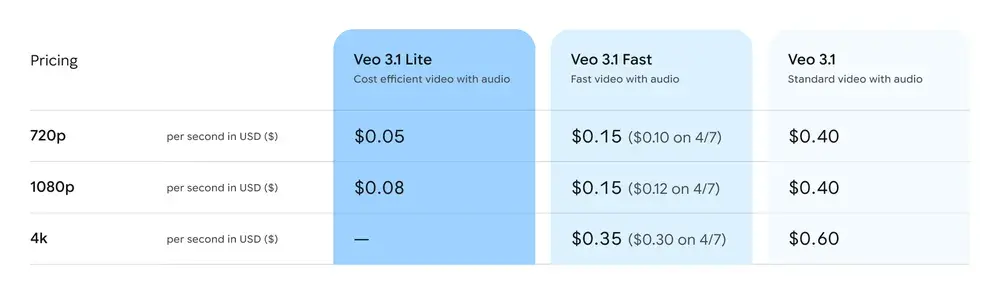
| Pricing (per second, with audio) | $0.05 (720p) $0.08 (1080p) | $0.15 (720p/1080p) → $0.10/$0.12 (Apr 7) | $0.40 (720p/1080p) $0.60 (4K) |
| Resolution | 720p, 1080p (no 4K) | 720p, 1080p, 4K | 720p, 1080p, 4K |
| Generation Speed | Same as Fast | Fastest | Standard (higher latency for quality) |
| Native Audio | Yes | Yes | Yes |
| Aspect Ratios | 16:9, 9:16 | 16:9, 9:16 | 16:9, 9:16 |
| Reference Images | Limited (single image-to-video) | Up to 3 | Up to 3 |
| Video Extension | No | Yes (up to 20x, ~148s total) | Yes |
| First/Last Frame | No | Yes | Yes |
| Max Duration per Clip | 4/6/8s | 4/6/8s | 4/6/8s |
| Ideal Use Cases | Batch ads, social, prototypes | A/B testing, rapid iteration | Final delivery, film-grade projects |
| Model ID | veo-3.1-lite-generate-preview | veo-3.1-fast-generate-preview | veo-3.1-generate-preview |
Price of Veo 3.1 Family Changes
Cost Example (8-second 720p video with audio):
- Lite: $0.40
- Fast (current): $1.20 (→ $0.80 after April 7 cut)
- Standard: $3.20
Lite delivers 67%+ savings versus current Fast pricing — exactly as advertised
Starting April 7th, the entire Veo 3.1 Fast lineup saw price reductions: 720p from $0.15 to $0.10 (a 5-cent drop), 1080p from $0.18 to $0.15 (a 3-cent drop), and 4K from $0.40 to $0.35 (a 5-cent drop).
The entire Veo 3.1 family is seeing price reductions.
Limitations of Veo 3.1 Lite
It does not support 4K output or video extension. These two features are only available in the Standard version. In other words, the Lite version generates videos that are a maximum of 8 seconds long, cannot be extended, and will not have 4K quality. It's sufficient but has its limitations.
- No video extension or multi-clip sequencing (use higher tiers or stitch manually).
- No multi-reference images (single image-to-video only).
- No 4K output.
- Max 1 video per API call; 1,024 token prompt limit.
- Videos stored only 2 days — download promptly.
- Latency: 11 seconds to ~6 minutes depending on load.
- Regional restrictions on person generation (e.g., “allow_adult” in EU/UK).
How to Use Veo 3.1 Lite: Step-by-Step + Python Code Example
1. Get Access
- Sign up for API (paid tier) .
- Get your API key.
- Test in PlayGround first (no code needed).
2. Python SDK Example (Text-to-Video with 720p Portrait)
Python
import time
from google import genai
from google.genai import types

client = genai.Client()  # API key auto-loaded from env or credentials

prompt = "A montage of pizza making: a chef tossing and flattening the floury dough, ladling rich red tomato sauce in a spiral, sprinkling mozzarella cheese and pepperoni, and a final shot of the bubbling golden-brown pizza, upbeat electronic music with a rhythmical beat is playing, high energy professional video."

operation = client.models.generate_videos(
    model="veo-3.1-lite-generate-preview",
    prompt=prompt,
    config=types.GenerateVideosConfig(
        aspect_ratio="9:16",      # Portrait for Shorts/Reels
        resolution="720p",        # Or "1080p"
        duration_seconds=8
    ),
)

# Poll until complete (async operation)
while not operation.done:
    time.sleep(10)
    operation = client.operations.get(operation)

# Download video
generated_video = operation.response.generated_videos[0]
client.files.download(file=generated_video.video)
generated_video.video.save("pizza_making_1080p.mp4")  # Or 720p
print("Video saved!")
Image-to-Video Variant (replace prompt + add image parameter) follows the same pattern. Full docs include error handling and batch examples.
3. Best Practices
- Be specific: camera angles, lighting, audio cues in quotes.
- Use negative prompting: “avoid blurry backgrounds, text overlays.”
- Start with 720p for iteration, upscale to 1080p for final assets.
Google Veo 3.1 Lite vs Sora: Why Google Wins Post-Retirement
This release lands at an interesting moment in the market. OpenAI has announced that the Sora web and app experiences will be discontinued on April 26, 2026, and that the Sora API will be discontinued on September 24, 2026. OpenAI also says Sora 1 was removed in the United States on March 13, 2026, while Sora 2 is now the default experience there.
That does not mean “Sora is over” today. It does mean the competitive context is shifting fast. Google is expanding its video model family with a low-cost, high-throughput option, while OpenAI is moving away from older Sora experiences and consolidating users into Sora 2. For buyers, agencies, and developers, the question is less “which brand has the flashiest demo?” , “which platform gives me the best mix of cost, output control, and deployment reliability right now?” , and more CometAPI offers the best mix of cost, output control, and deployment reliability right now. It integrates with Veo 3.1 series, Sora 2, and Grok imagine Video etc at 20% off the official price. Developers can leverage CometAPI integration to test which video is best.
OpenAI’s Sora shutdown left a vacuum. Sora 2 offered strong visuals but lacked native audio, had higher costs, and limited availability. Veo 3.1 Lite counters with:
- Native synchronized audio.
- Lower pricing (often 50-70% cheaper than comparable tiers).
Independent tests and developer feedback show Veo 3.1 family leading in cinematic consistency, prompt adherence, and commercial readiness — especially for brand content and UGC.
Conclusion: The Future of Affordable AI Video Is Here
Veo 3.1 Lite isn’t just cheaper — it’s a strategic enabler. By cutting costs over 50%, supporting 1080p multi-format output, and delivering native audio at Fast-tier speed, Google has made professional AI video generation viable for every creator and business. Whether you’re prototyping, scaling social content, or building the next viral campaign, Veo 3.1 Lite delivers unmatched value in 2026.
Ready to start? Head to CometAPI, grab your API key, and run the code above. The era of expensive, gated video AI is over — Google just made it accessible to all.