模型支持企业博客
500+ AI 模型 API,一次搞定,就在 CometAPI
模型 API
开发者
快速入门文档API 仪表板
资源
AI 模型博客企业更新日志关于
2025 CometAPI。保留所有权利。隐私政策服务条款
Home/Models/Flux/FLUX 2 FLEX
F

FLUX 2 FLEX

每次请求:$0.008
FLUX 2 FLEX 是一款多功能、可适配的模型,旨在实现跨各类用例和硬件配置的灵活部署。它通过可调的质量设置提供可扩展的性能,非常适合需要动态资源分配的应用。该模型在质量、速度和资源效率之间实现了最佳平衡。
新
商用
Playground
概览
功能亮点
定价
API

什么是 FLUX.2 [flex]

FLUX.2 [flex] 是 Black Forest Labs 的 FLUX.2 系列中的“灵活控制”变体:这是一款面向生产环境的文生图与图像编辑模型,开放了可调的推理参数(steps、guidance scale、seed),使开发者能够在速度与保真度之间进行权衡,并精确调节排版 / 细节表现。Flex 支持多参考图编辑(Flex 层级最多支持 10 张参考图),可编辑最高约 ~4 百万像素的图像。


FLUX.2 [flex] 擅长什么

  • 精确控制质量与速度的平衡(用户可选择推理步数和 guidance scale)。
  • 文本/排版渲染能力出色,相较许多同类模型更优 —— 推荐用于海报、UI 模型图、信息图。
  • 多参考图编辑:可在最多 10 张输入图像(Flex)之间组合并保留身份/品牌元素,同时保持连贯的光照与材质。
  • 高原生分辨率与编辑能力:输出最高可达 4MP;大多数工作流建议的运行范围为 ≤2MP。
  • 支持结构化提示词:支持 JSON 或自然语言提示词;“prompt upsampling” 可自动丰富简短提示词。

FLUX.2 [flex] 与同类模型的比较

简表(摘要):

  • Nano Banana Pro(Google / 内部命名;高保真竞品):在高分辨率下具备相近的原始保真度;在某些提供方构建中,Nano Banana 面向更大尺寸输出;用户对比显示,两者在照片真实感方面相当,但在提示词响应行为和编辑一致性上各有优势。
  • Qwen-Image / Hunyuan Image:根据发布时的对比数据,FLUX.2 在文生图和多参考图编辑任务中的主观胜率更高(见发布报道)。
  • Midjourney / 商业 SaaS:Midjourney 往往使用超分辨率流程来提升最终像素规模;FLUX.2 则强调原生高分辨率输出和更严格的多参考图编辑。独立评测者认为,两者在构图风格和原生像素细节方面各有取舍。

实际结论:FLUX.2 的卖点在于多参考图编辑、稳健的排版能力,以及一系列可让团队在吞吐量/质量/成本之间做出取舍的端点。独立测试者认为,它在同一发布时间窗口内与顶级模型相比具备竞争力。

[flex] 专属参数:

ParameterTypeDefaultDescription
stepsinteger50[仅 flex] 推理步数。最大值:50,默认值:50。值越高 = 细节越丰富,但速度越慢。
guidancefloat4.5[仅 flex] Guidance scale。控制输出对提示词的遵循程度。最小值:1.5,最大值:10,默认值:4.5。值越高 = 越贴近提示词。

如何访问 Flux.2 Flex API

第一步:注册 API Key

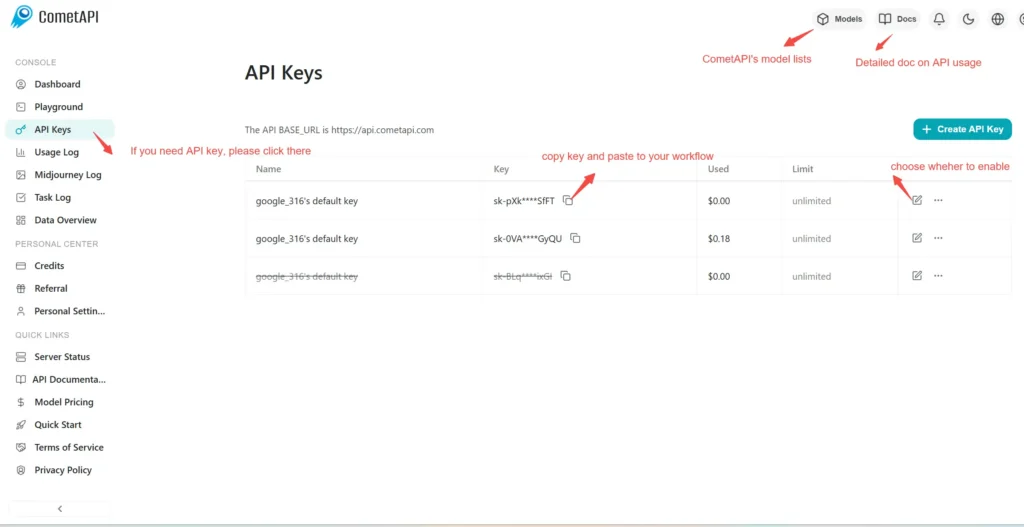
登录 cometapi.com。如果您还不是我们的用户,请先注册。登录您的 CometAPI 控制台。获取接口的访问凭证 API key。在个人中心的 API token 中点击“Add Token”,获取 token key:sk-xxxxx 并提交。

第二步:向 Flux.2 Flex API 发送请求

选择“flux-2-flex ”端点发送 API 请求,并设置请求体。请求方法和请求体可从我们网站的 API 文档中获取。我们的网站也提供 Apifox 测试,方便您使用。将 <YOUR_API_KEY> 替换为您账户中的实际 CometAPI key。base url 为 flux generate image(https://api.cometapi.com/flux/v1/flux-2-flex)

将您的问题或请求插入 content 字段——这就是模型将响应的内容。处理 API 响应以获取生成的答案。

第三步:获取并验证结果

生成完成后,您可以使用 /flux/v1/get_result 端点查询生成的图像或监控处理状态。处理完成后,API 将返回任务状态和输出数据。

👇 立即开始构建 Flux 图像生成 – API 文档

常见问题

What makes FLUX.2 [flex] different from other FLUX.2 models?

FLUX.2 [flex] is specialized for typography and text rendering, making it the best choice for preserving small details and generating text-heavy content.

Does FLUX.2 [flex] support adjustable generation steps?

Yes, FLUX.2 [flex] offers 'Quality with control' by allowing adjustable usage of steps and guidance, unlike the standard settings in [pro] and [max].

How many reference images can FLUX.2 [flex] handle?

Like the other FLUX.2 models, [flex] supports up to 8 reference images via the API (10 in Playground) for multi-reference generation.

What is the pricing for FLUX.2 [flex]?

FLUX.2 [flex] is priced at $0.06 per megapixel (MP), positioning it between the [pro] and [max] models.

Is FLUX.2 [flex] suitable for photo editing?

Yes, FLUX.2 [flex] combines powerful editing capabilities with its text specialization, allowing for changes to objects, colors, and adding text overlays sequentially.

What resolution does FLUX.2 [flex] support?

FLUX.2 [flex] supports high-resolution output up to 4 megapixels (4MP) across any aspect ratio, suitable for professional creative work.

When should I choose [flex] over [pro]?

Choose FLUX.2 [flex] when your project involves significant text elements, typography, or requires fine-grained control over generation steps that [pro] does not offer.

FLUX 2 FLEX 的功能

了解 FLUX 2 FLEX 的核心能力,帮助提升性能与可用性,并改善整体体验。

FLUX 2 FLEX 的定价

查看 FLUX 2 FLEX 的竞争性定价,满足不同预算与使用需求,灵活方案确保随需求扩展。
Comet 价格 (USD / M Tokens)官方定价 (USD / M Tokens)折扣
每次请求:$0.008
每次请求:$0.01
-20%

FLUX 2 FLEX 的示例代码与 API

FLUX.2 Flex 是 Black Forest Labs 的 FLUX.2 图像生成系列中面向开发者的中端成员。它开放了生成参数(尤其是采样步数和引导尺度),使开发者可以在延迟与文本/排版保真度及图像细节之间进行权衡。
POST
/flux/v1/{model}
Python
JavaScript
Curl
import os
import requests

# Get your CometAPI key from https://api.cometapi.com/console/token, and paste it here
COMETAPI_KEY = os.environ.get("COMETAPI_KEY") or "<YOUR_COMETAPI_KEY>"

# API endpoint for FLUX.2 [flex]
url = "https://api.cometapi.com/flux/v1/flux-2-flex"

# Request headers
headers = {
    "Authorization": COMETAPI_KEY,
    "Content-Type": "application/json",
    "Accept": "*/*",
}

# Request payload with all available parameters
# See: https://docs.bfl.ml/api-reference/models/generate-or-edit-an-image-with-flux2-[flex]
payload = {
    # Required: Text prompt for image generation
    "prompt": "A futuristic cyberpunk cityscape at sunset, neon signs with readable text 'WELCOME TO 2077', flying cars, ultra detailed, 8k",
    # Optional: Enable prompt upsampling for enhanced details (default: true)
    "prompt_upsampling": True,
    # Output dimensions (multiple of 16, min 64, max 4MP total)
    "width": 1920,
    "height": 1080,
    # FLEX-specific: Number of inference steps (1-50, default: 50)
    # Higher values produce more detailed images but take longer
    "steps": 50,
    # FLEX-specific: Guidance scale (1.5-10, default: 5)
    # Higher values improve prompt adherence at cost of reduced realism
    "guidance": 5.0,
    # Seed for reproducible results (optional)
    "seed": 42,
    # Moderation level: 0 (strict) to 5 (permissive), default: 2
    "safety_tolerance": 2,
    # Output format: "jpeg" or "png"
    "output_format": "jpeg",
}

# Submit the generation task
print("Submitting FLUX.2 [flex] image generation task...")
response = requests.post(url, headers=headers, json=payload)
result = response.json()

print(f"Status Code: {response.status_code}")
print(f"Task ID: {result.get('id')}")
print(f"Cost: {result.get('cost')} credits")
print(f"Output Megapixels: {result.get('output_mp')}")

Python Code Example

import os
import requests

# Get your CometAPI key from https://api.cometapi.com/console/token, and paste it here
COMETAPI_KEY = os.environ.get("COMETAPI_KEY") or "<YOUR_COMETAPI_KEY>"

# API endpoint for FLUX.2 [flex]
url = "https://api.cometapi.com/flux/v1/flux-2-flex"

# Request headers
headers = {
    "Authorization": COMETAPI_KEY,
    "Content-Type": "application/json",
    "Accept": "*/*",
}

# Request payload with all available parameters
# See: https://docs.bfl.ml/api-reference/models/generate-or-edit-an-image-with-flux2-[flex]
payload = {
    # Required: Text prompt for image generation
    "prompt": "A futuristic cyberpunk cityscape at sunset, neon signs with readable text 'WELCOME TO 2077', flying cars, ultra detailed, 8k",
    # Optional: Enable prompt upsampling for enhanced details (default: true)
    "prompt_upsampling": True,
    # Output dimensions (multiple of 16, min 64, max 4MP total)
    "width": 1920,
    "height": 1080,
    # FLEX-specific: Number of inference steps (1-50, default: 50)
    # Higher values produce more detailed images but take longer
    "steps": 50,
    # FLEX-specific: Guidance scale (1.5-10, default: 5)
    # Higher values improve prompt adherence at cost of reduced realism
    "guidance": 5.0,
    # Seed for reproducible results (optional)
    "seed": 42,
    # Moderation level: 0 (strict) to 5 (permissive), default: 2
    "safety_tolerance": 2,
    # Output format: "jpeg" or "png"
    "output_format": "jpeg",
}

# Submit the generation task
print("Submitting FLUX.2 [flex] image generation task...")
response = requests.post(url, headers=headers, json=payload)
result = response.json()

print(f"Status Code: {response.status_code}")
print(f"Task ID: {result.get('id')}")
print(f"Cost: {result.get('cost')} credits")
print(f"Output Megapixels: {result.get('output_mp')}")

JavaScript Code Example

// Get your CometAPI key from https://api.cometapi.com/console/token, and paste it here
const COMETAPI_KEY = process.env.COMETAPI_KEY || "<YOUR_COMETAPI_KEY>";

// API endpoint for FLUX.2 [flex]
const url = "https://api.cometapi.com/flux/v1/flux-2-flex";

// Request payload with all available parameters
// See: https://docs.bfl.ml/api-reference/models/generate-or-edit-an-image-with-flux2-[flex]
const payload = {
    // Required: Text prompt for image generation
    prompt: "A futuristic cyberpunk cityscape at sunset, neon signs with readable text 'WELCOME TO 2077', flying cars, ultra detailed, 8k",
    
    // Optional: Enable prompt upsampling for enhanced details (default: true)
    prompt_upsampling: true,
    
    // Output dimensions (multiple of 16, min 64, max 4MP total)
    width: 1920,
    height: 1080,
    
    // FLEX-specific: Number of inference steps (1-50, default: 50)
    // Higher values produce more detailed images but take longer
    steps: 50,
    
    // FLEX-specific: Guidance scale (1.5-10, default: 5)
    // Higher values improve prompt adherence at cost of reduced realism
    guidance: 5.0,
    
    // Seed for reproducible results (optional)
    seed: 42,
    
    // Moderation level: 0 (strict) to 5 (permissive), default: 2
    safety_tolerance: 2,
    
    // Output format: "jpeg" or "png"
    output_format: "jpeg"
};

// Submit the generation task
console.log("Submitting FLUX.2 [flex] image generation task...");

const response = await fetch(url, {
    method: "POST",
    headers: {
        "Authorization": COMETAPI_KEY,
        "Content-Type": "application/json",
        "Accept": "*/*"
    },
    body: JSON.stringify(payload)
});

const result = await response.json();

console.log(`Status Code: ${response.status}`);
console.log(`Task ID: ${result.id}`);
console.log(`Cost: ${result.cost} credits`);
console.log(`Output Megapixels: ${result.output_mp}`);

Curl Code Example

#!/bin/bash
# Get your CometAPI key from https://api.cometapi.com/console/token
# Export it as: export COMETAPI_KEY="your-key-here"

curl --location --request POST 'https://api.cometapi.com/flux/v1/flux-2-flex' \
--header "Authorization: $COMETAPI_KEY" \
--header 'Content-Type: application/json' \
--header 'Accept: */*' \
--data-raw '{
    "prompt": "A futuristic cyberpunk cityscape at sunset, neon signs with readable text WELCOME TO 2077, flying cars, ultra detailed, 8k",
    "prompt_upsampling": true,
    "width": 1920,
    "height": 1080,
    "steps": 50,
    "guidance": 5.0,
    "seed": 42,
    "safety_tolerance": 2,
    "output_format": "jpeg"
}'

更多模型

G

Nano Banana 2

输入:$0.4/M
输出:$2.4/M
核心能力概览:分辨率:最高 4K(4096×4096),与 Pro 相当。参考图像一致性:最多 14 张参考图像(10 个物体 + 4 个角色),保持风格/角色一致性。极端纵横比:新增 1:4、4:1、1:8、8:1 比例,适用于长图、海报和横幅。文本渲染:高级文本生成,适用于信息图和营销海报版式。搜索增强:集成 Google Search + 图片搜索。Grounding:内置思维过程;生成前先对复杂提示进行推理。
D

Doubao Seedream 5

每次请求:$0.028
Seedream 5.0 Lite 是一款统一的多模态图像生成模型,具备深度思考和在线搜索能力,在理解、推理与生成能力方面实现了全方位升级。
F

FLUX 2 MAX

每次请求:$0.008
FLUX.2 [max] 是 Black Forest Labs(BFL)推出的顶级视觉智能模型,面向生产级工作流程:市场营销、产品摄影、电子商务、创意流程,以及任何需要角色/产品形象一致性、精确文字渲染和在多百万像素分辨率下呈现照片级细节的应用。其架构经过工程化设计,具备强大的提示跟随能力、支持多参考融合(最多 10 张输入图像),并能实现 grounded generation(在生成图像时能够纳入最新的网络上下文)。
X

Black Forest Labs/FLUX 2 MAX

每次请求:$0.056
FLUX.2 [max] 是 Black Forest Labs(BFL)推出的 FLUX.2 系列中旗舰级、最高质量的变体。其定位为专业级文本→图像生成与图像编辑模型,专注于最大保真度、对提示词的遵从性,以及在角色、物体、光照与色彩方面的编辑一致性。BFL 及其合作伙伴的注册库将 FLUX.2 [max] 描述为 FLUX.2 系列的顶级变体,具备多参考编辑与有据可依的生成等功能。
O

GPT Image 1.5

输入:$6.4/M
输出:$25.6/M
GPT-Image-1.5 是 GPT Image 系列中的 OpenAI 图像模型。它是一个原生多模态的 GPT 模型,旨在根据文本提示生成图像,并对输入图像进行高保真编辑,同时严格遵循用户指令。
D

Doubao Seedream 4.5

每次请求:$0.032
Seedream 4.5 是 ByteDance/Seed 的多模态图像模型(文本→图像 + 图像编辑),专注于生产级图像保真度、更强的提示词遵从性,以及大幅提升的编辑一致性(主体保留、文本/排版渲染和面部真实感)。

相关博客

如何使用 Flux.2 API?你需要知道的一切
Nov 27, 2025
flux-2
flux-2-dev
flux-2-flex
flux-2-pro

如何使用 Flux.2 API?你需要知道的一切

FLUX.2 是 Black Forest Labs 的第二代图像生成与图像编辑模型系列(于 2025 年 11 月 25 日发布)。它提供生产级
Flux.2 Flex API
Nov 26, 2025
flux-2
flux-2-flex

Flux.2 Flex API

FLUX.2 Flex 是 Black Forest Labs 的 FLUX.2 图像生成家族中面向开发者的中端成员。它开放生成参数(尤其是采样步数和引导尺度),以便开发者在延迟与文本/排版保真度及图像细节之间进行权衡。
什么是 Flux.2,并且 Flux 2 现已在 CometAPI 上可用
Nov 26, 2025
flux-2
flux-2-dev
flux-2-flex
flux-2-pro

什么是 Flux.2,并且 Flux 2 现已在 CometAPI 上可用

FLUX.2 是 Black Forest Labs 新近宣布的图像生成与编辑模型家族,提供生产级保真度、多参考编辑