FLUX.2 [max] is a top-tier visual-intelligence model from Black Forest Labs (BFL) designed for production workflows: marketing, product photography, e-commerce, creative pipelines, and any application that requires consistent character/product identity, accurate text rendering, and photoreal detail at multi-megapixel resolutions. The architecture is engineered for strong prompt-following, multi-reference fusion (up to ten input images), and grounded generation (ability to incorporate up-to-date web context when producing images).
Technical specifications (table)
| Field | Value / notes |
|---|---|
| Model name / variant | FLUX.2 [max] (often written FLUX 2 Max). |
| Input types | Text prompts + reference images (image inputs accepted). |
| Output types | Image (photorealistic & stylized), image edits (inpainting/outpainting/retexturing) |
| Reference images (max) | Up to 8 reference images via API |
| Native max resolution | Up to 4 megapixels (e.g., ~2048×2048 or equivalent MP configurations); recommended production sizes typically ≤2MP for speed/cost tradeoffs. |
| Context (text) window | 32K text tokens (documented input token capacity for FLUX.2 family). |
| Latency / speed | “Sub-10-second” generation speeds cited for typical configurations |
What is the FLUX.2 [max] API?
The FLUX.2 [max] API is BFL’s managed endpoint that exposes the FLUX.2 [max] model for programmatic text→image generation, multi-reference image editing, and grounded generation workflows. It accepts JSON requests with prompt text and optional image references, supports standard image generation parameters (dimensions, steps, guidance scale, seeds), and returns generated image URLs or image blobs per the provider’s response format.
Typical API capabilities exposed:
- Text→Image generation endpoint.
- Image editing / inpainting / outpainting endpoints accepting reference images.
- Multi-reference indexing (tagging reference images within a request).
- Optional grounding / web search integration for up-to-date context in generated imagery (available in the [max] tier).
Main features
- Grounded generation (web context): [max] can incorporate recent, externally-sourced web context into its generations so visuals can reflect trending products or current events when requested. This is a headline differentiator.
- High fidelity / 4MP native output: realistic lighting, textures, and stable geometry at production-grade resolutions.
- Multi-reference editing & strong identity consistency: preserves faces and product identity across edits and across shots; supports many references to maintain consistent identity across outputs.
- Advanced prompt following & style fidelity: tuned to faithfully reproduce complex style instructions and maintain typography / small text fidelity better than typical image models (per vendor tests).
- Production controls: JSON control knobs, pose guidance, retexturing tools, and high control over colors (hex codes) and composition for studio workflows.
Benchmark performance
- LM Arena / Image Arena placement: FLUX.2 [max] sits high on public image-generation leaderboards; crowd-sourced ELO rankings (LM Arena / Image Arena) show it around the 1150–1170 ELO range (example: 1168 ELO on the Text-to-Image arena at the time of reporting), placing it among the top non-BigTech image models while trailing a few top entries from the largest vendors.
- Practical benchmarks: Strong visual quality vs. peer models (notably better color balance, texture detail and creative style range in many head-to-head tests).
FLUX 2 max Vs Midjourney vs Nano Banana
- Vs. Midjourney v7 / Midjourney family: reviewers note FLUX.2 variants (Pro/Max) aim directly at production fidelity and multi-reference identity consistency where Midjourney’s strengths remain style and aesthetic exploration. In hard identity/consistency tests, some reviewers place FLUX.2 ahead, while Midjourney still excels for certain creative stylizations. (compare: industry reviews and direct model comparison articles).
- Vs. Nano Banana Pro (and similar studio-grade models): Nano Banana Pro and a few other proprietary models are positioned as strong multi-reference / virtual-studio tools; FLUX.2 [max] competes closely on editing consistency and photoreal fidelity while offering a broader product family for speed/control tradeoffs.
Model Variants
| Variant | Target Use | Key Strength |
|---|---|---|
| FLUX.2 [max] | Professional workflows | Highest fidelity & editing consistency |
| FLUX.2 [pro] | Balanced performance | Good speed-quality tradeoff |
| FLUX.2 [flex] | Adjustable control | Fine-grained generation parameters |
| FLUX.2 [dev] | Open-weight research | Local development & experimentation |
Typical production use cases
- E-commerce / product photography: create consistent, brand-compliant product renders and multiple variants for A/B testing without a physical photoshoot.
- Advertising & marketing assets: produce marketplace-ready hero images, posters, and lifestyle shots at up to 4MP for campaign needs.
- Character & IP continuity: studios that need the same character/product to appear across multiple scenes and edits with identity preserved.
- Editorial & grounded visualizations: visualize current/real-world events or trending product concepts using grounded generation to add recent context. (Be careful about legal/ethical risk for real persons.)
- Design & prototyping: UI mockups, infographics and posters where legible text and controlled typography are required.
How to access Flux 2 Max API
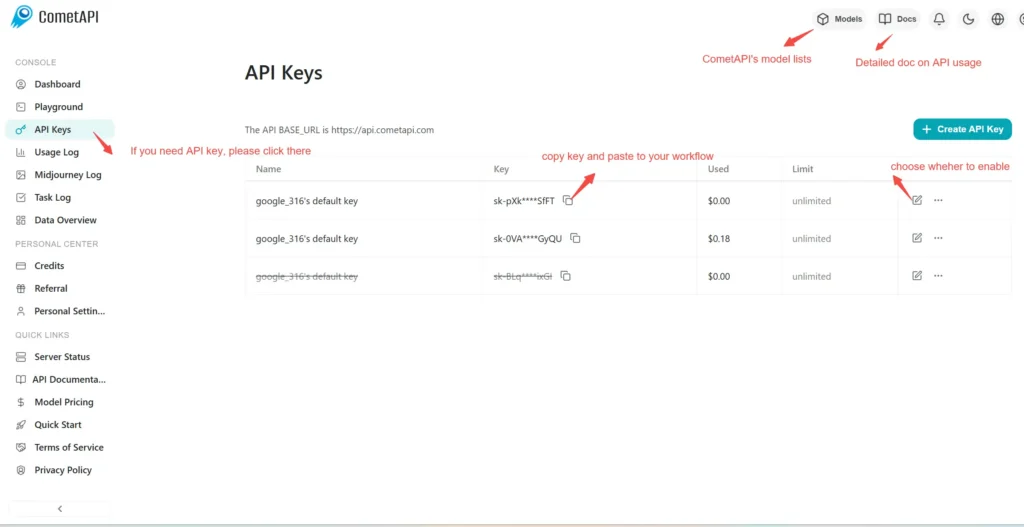
Step 1: Sign Up for API Key
Log in to cometapi.com. If you are not our user yet, please register first. Sign into your CometAPI console. Get the access credential API key of the interface. Click “Add Token” at the API token in the personal center, get the token key: sk-xxxxx and submit.
Step 2: Send Requests to Flux 2 Max API
Select the “flux-2-max ”endpoint to send the API request and set the request body. The request method and request body are obtained from our website API doc. Our website also provides Apifox test for your convenience. Replace <YOUR_API_KEY> with your actual CometAPI key from your account. base url is flux generate image(https://api.cometapi.com/flux/v1/flux-2-max)
Insert your question or request into the content field—this is what the model will respond to . Process the API response to get the generated answer.
Step 3: Retrieve and Verify Results
After generation, you can use the /flux/v1/get_result endpoint to query generated images or monitor process status.. After processing, the API responds with the task status and output data.
👇 Start Building Now Flux image generation – API Doc