What is MiniMax M2.1
MiniMax M2.1 is the follow-up release to the MiniMax M2 family, published by MiniMax on Dec 23, 2025. It is positioned as an open-source, production-oriented model designed specifically for coding, agentic multi-step workflows (tool use, multi-turn planning), and full-stack app generation (web, mobile, backend). The release emphasizes improved multi-language programming, better mobile / native app capabilities, concise responses, and improved tool/agent generalization.
Main features
- MoE efficiency: Large total parameter count but only a small active subset per token (architecture designed to trade peak capacity for inference efficiency).
- Coding-first optimizations: Strong polyglot code comprehension and generation across many languages (Python, TypeScript, Rust, Go, C++, Java, Swift, mobile native languages).
- Agentic & tool workflows: Designed for tool calls, multi-step plans, and “interleaved thinking” / chained execution of composite instruction constraints.
- Large context support & long outputs: Targeted at long-context developer workflows and agent trace/history.
- Low-latency / high-throughput: Practical for interactive coding assistants and scaled agent loops due to the selective-activation design and deployment optimizations.
Technical capabilities and specifications
- Architecture: Mixture-of-Experts (MoE) design.
- Parameters: Reported design: ~230 billion total parameters with ~10 billion active parameters used per inference (MoE active subset). This is the same active-parameter efficiency model used in the M2 family.
- Inference characteristics: Designed for low-latency interactive use, high-throughput batched inference, and agentic loops with frequent tool calls.
- Streaming / function calling: supports streaming token output and advanced function-call/tool interfaces for structured I/O.
Benchmark performance
MiniMax released comparative benchmark claims and third-party aggregators reported scores at launch; representative published figures include:
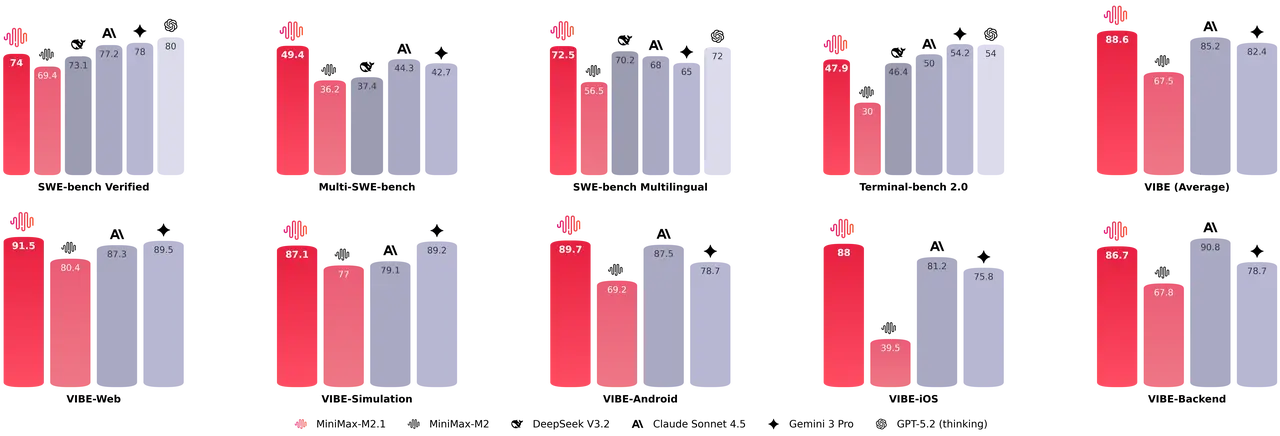
Multi-SWE Bench / SWE-Bench (coding/agentic suites): provider and aggregator listings cite 49.4% on Multi-SWE-Bench and 72.5% on SWE-Bench Multilingual for M2.1 (these are scoring aggregates for code-generation and code reasoning tasks).
M2.1 shows comprehensive improvements over M2 in test case generation, code optimization, code review and instruction following and M2.1 outperforms M2 and often matches or surpasses Claude Sonnet 4.5 on several coding subtasks.
Representative production use cases
- IDE code assistant & refactoring: Multi-file refactors, code review suggestions, automated test generation and patch generation across multiple languages.
- Agentic “Digital Employee”: Automating repetitive office workflows (searching ticket systems, summarizing documents, interacting with web apps through text-based commands) using tool integration and interleaved thinking.
- Multi-language engineering support: Teams that maintain polyglot codebases (Rust, Go, Java, C++, TypeScript) can use M2.1 for cross-language code synthesis and conversions.
- Automated code evaluation & test generation: Generating testcases, running code analysis and producing suggested fixes or optimizations as part of CI tooling.
- Local/on-prem research and customization: Organizations that require on-prem control can fine-tune or run M2.1 locally using published weights and recommended inference stacks.
How to access and use MiniMax M2.1 API
Step 1: Sign Up for API Key
Log in to cometapi.com. If you are not our user yet, please register first. Sign into your CometAPI console. Get the access credential API key of the interface. Click “Add Token” at the API token in the personal center, get the token key: sk-xxxxx and submit.
Step 2: Send Requests to MiniMax M2.1 API
Select the “minimax-m2.1” endpoint to send the API request and set the request body. The request method and request body are obtained from our website API doc. Our website also provides Apifox test for your convenience. Replace <YOUR_API_KEY> with your actual CometAPI key from your account. Where to call it: Chat-style APIs.
Insert your question or request into the content field—this is what the model will respond to . Process the API response to get the generated answer.
Step 3: Retrieve and Verify Results
Process the API response to get the generated answer. After processing, the API responds with the task status and output data.