模型支持企业博客
500+ AI 模型 API,一次搞定,就在 CometAPI
模型 API
开发者
快速入门文档API 仪表板
资源
AI 模型博客企业更新日志关于
2025 CometAPI。保留所有权利。隐私政策服务条款
Home/Models/OpenAI/gpt-audio-1.5
O

gpt-audio-1.5

输入:$2/M
输出:$8/M
用于在 Chat Completions 中实现音频输入与音频输出的最佳语音模型。
新
商用
概览
功能亮点
定价
API

gpt-audio-1.5 的技术规格

项目gpt-audio-1.5(公开规格)
模型家族GPT Audio 家族(音频优先变体)
输入类型文本、音频(语音输入)
输出类型文本、音频(语音输出)、结构化输出(支持函数调用)
上下文窗口128,000 个令牌。
最大输出令牌数16,384(在相关 gpt-audio 列表中有文档说明)。
性能层级更高智能;中等速度(均衡)。
延迟特性针对语音交互优化(中/低延迟,取决于端点)。
可用性Chat Completions API(音频输入/输出)和平台 Playground;集成于实时/语音界面。
安全/使用说明针对语音内容的防护措施;在生产级语音代理中按常规安全与校验要求对待模型输出。

注意:gpt-realtime-1.5 是一个密切相关的实时音频/语音优先变体,针对更低延迟和实时会话进行了优化;见下文对比。


什么是 gpt-audio-1.5?

gpt-audio-1.5 是一款具备音频能力的 GPT 模型,可通过 Chat Completions 及相关的音频能力 API 同时支持语音输入与语音输出。其定位是面向构建语音代理与语音优先体验的主力通用音频模型,在质量与速度之间取得平衡。


主要功能

  1. 语音输入/语音输出支持: 处理口语输入,并返回语音或文本回复,实现自然的语音交互流程。
  2. 面向音频工作流的大上下文: 支持非常大的上下文(文档标注为 128k 个令牌),适用于多轮、长对话历史或大型多模态会话。
  3. 流式与 Chat Completions 兼容性: 可在 Chat Completions 中工作,支持流式音频响应与函数调用的结构化输出。
  4. 性能/延迟均衡: 调校以在中等吞吐下提供高质量音频响应——适用于注重质量的聊天机器人与语音助理。
  5. 生态与集成: 在平台的 Playground 得到支持,并可用于官方的实时/语音端点与合作方集成(Azure/Microsoft Foundry 说明中也提及类似的音频模型)。

gpt-audio-1.5 与相关音频模型对比

属性gpt-audio-1.5gpt-realtime-1.5
主要侧重面向 Chat Completions 与会话流程的高质量音频输入/输出。面向实时语音代理与流式场景的低延迟实时 S2S(语音到语音)。
上下文窗口128k 个令牌。32k 个令牌(实时变体文档所述)。
最大输出令牌数16,384(有文档说明)。通常配置为较短的实时响应(文档列出了更小的最大令牌数)。
最佳用途需要完整聊天语义与音频能力的聊天机器人、语音助理。实时语音代理、自助终端与低延迟会话界面。

代表性用例

  • 用于客户支持与内部服务台的会话式语音代理。
  • 嵌入应用、设备与自助终端的语音助理。
  • 免手动操作的工作流(听写、语音搜索、无障碍)。
  • 通过 Chat Completions 将音频与文本 / 图像相结合的多模态体验。

限制与运营注意事项

  • 并非人类 QA 的即插即用替代:在生产流程中务必通过人工审核验证语音输出与后续动作。
  • 资源规划:较大的上下文与音频 I/O 会增加计算与时延——为长会话设计流式/分段策略。
  • 安全与政策约束:语音输出具有一定劝服力;大规模部署时请遵循平台安全指南与防护规范。
  • 如何访问 GPT Audio 1.5 API

步骤 1:注册获取 API 密钥

登录 cometapi.com。如您尚未成为我们的用户,请先注册。登录您的 CometAPI 控制台。获取接口的访问凭据 API 密钥。在个人中心的 API token 处点击“Add Token”,获取令牌密钥:sk-xxxxx 并提交。
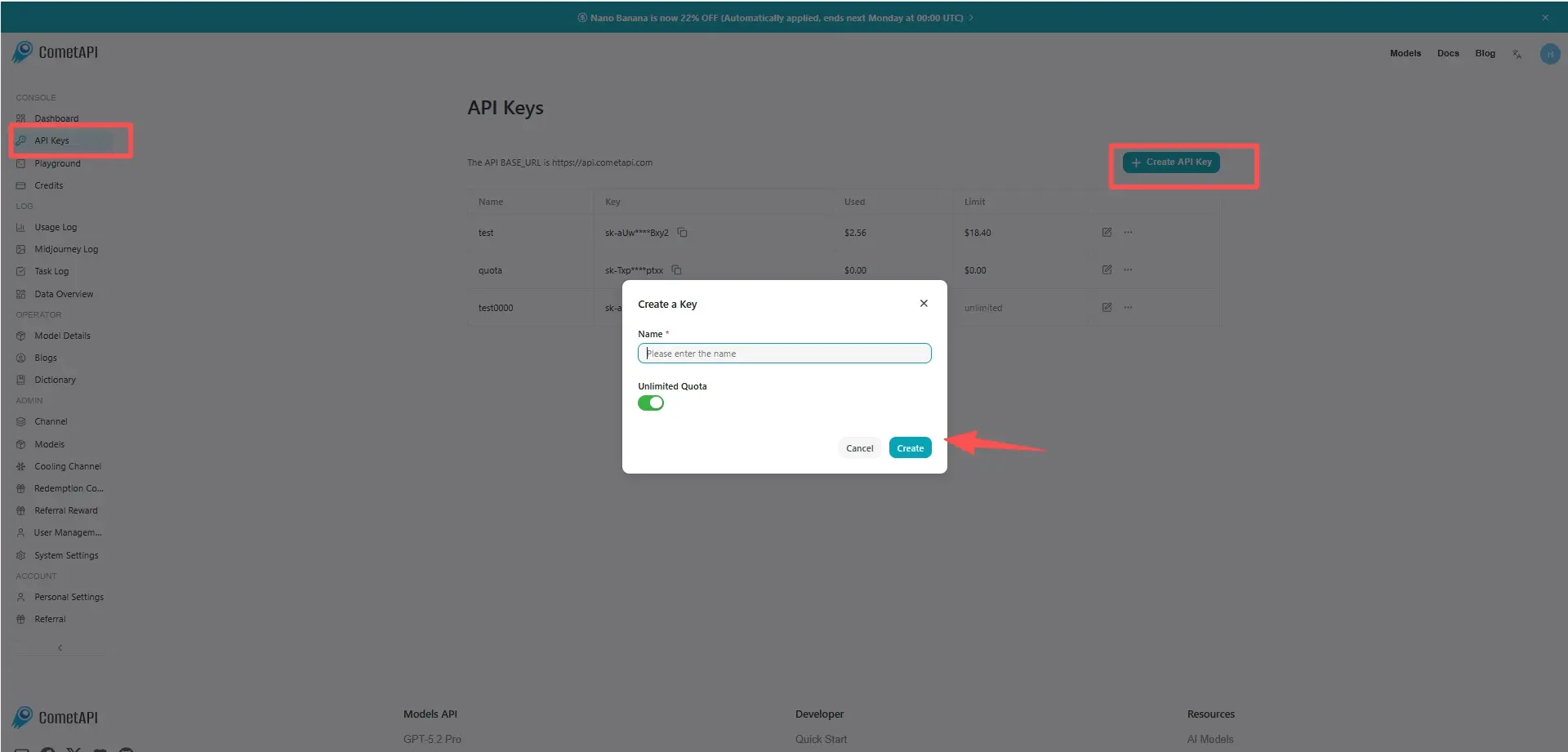
cometapi-key

步骤 2:向 GPT Audio 1.5 API 发送请求

选择“gpt-audio-1.5”端点发送 API 请求并设置请求体。请求方法与请求体可在我们网站的 API 文档中获取。我们的网站也提供 Apifox 测试以便您使用。将 <YOUR_API_KEY> 替换为您账户中的实际 CometAPI 密钥。基础 URL 是 Chat Completions

将您的问题或请求插入 content 字段——模型会对其进行响应。处理 API 响应以获取生成的答案。

步骤 3:获取并验证结果

处理 API 响应以获取生成的答案。处理完成后,API 会返回任务状态和输出数据。

常见问题

What are the official context and output token limits for gpt-audio-1.5 API?

gpt-audio-1.5 支持 128,000 个 token 的上下文窗口,文档列出了约 16,384 的最大输出 token 配置;请在开发者文档中根据各端点核实确切限制。 :contentReference[oaicite:44]{index=44}

Can gpt-audio-1.5 handle both speech-to-text and text-to-speech in the API?

可以——它接受音频输入,并可通过 Chat Completions/audio 端点返回音频输出或文本响应。 :contentReference[oaicite:45]{index=45}

When should I use gpt-audio-1.5 vs gpt-realtime-1.5 for a voice agent?

在需要更大上下文的 Chat Completions 流程中,为获取更高质量的音频请选择 gpt-audio-1.5;对于低延迟、实时流式语音交互请选择 gpt-realtime-1.5。 :contentReference[oaicite:46]{index=46}

Does gpt-audio-1.5 support streaming and function calling for tool integrations?

支持——该模型支持流式音频响应和结构化输出/函数调用,以集成外部工具与工作流。 :contentReference[oaicite:47]{index=47}

Is gpt-audio-1.5 suitable for production customer support voice agents?

适合——它面向语音助手与会话代理而设计,但在投入生产前应加入人工审核/QA、日志记录与安全控制。 :contentReference[oaicite:48]{index=48}

What are the main limitations to consider when deploying gpt-audio-1.5?

主要考量包括:在大上下文音频会话中的算力/延迟权衡、语音内容的安全防护,以及在你的领域内对 ASR/TTS 输出进行验证的必要性。 :contentReference[oaicite:49]{index=49}

gpt-audio-1.5 的功能

了解 gpt-audio-1.5 的核心能力,帮助提升性能与可用性,并改善整体体验。

gpt-audio-1.5 的定价

查看 gpt-audio-1.5 的竞争性定价,满足不同预算与使用需求,灵活方案确保随需求扩展。
Comet 价格 (USD / M Tokens)官方定价 (USD / M Tokens)折扣
输入:$2/M
输出:$8/M
输入:$2.5/M
输出:$10/M
-20%

gpt-audio-1.5 的示例代码与 API

获取完整示例代码与 API 资源,简化 gpt-audio-1.5 的集成流程,我们提供逐步指导,助你发挥模型潜能。
POST
/v1/chat/completions
Python
JavaScript
Curl
from openai import OpenAI
import os
import base64

# Get your CometAPI key from https://api.cometapi.com/console/token, and paste it here
COMETAPI_KEY = os.environ.get("COMETAPI_KEY") or "<YOUR_COMETAPI_KEY>"
BASE_URL = "https://api.cometapi.com/v1"

client = OpenAI(base_url=BASE_URL, api_key=COMETAPI_KEY)

completion = client.chat.completions.create(
    model="gpt-audio-1.5",
    modalities=["text", "audio"],
    audio={"voice": "alloy", "format": "wav"},
    messages=[
        {
            "role": "user",
            "content": "Is a golden retriever a good family dog?"
        }
    ],
)

# Print the text response
print(completion.choices[0].message.audio.transcript)

# Save the audio response to a file
wav_bytes = base64.b64decode(completion.choices[0].message.audio.data)
output_path = "gpt-audio-1.5-output.wav"
with open(output_path, "wb") as f:
    f.write(wav_bytes)
print(f"Audio saved to {output_path}")

Python Code Example

from openai import OpenAI
import os
import base64

# Get your CometAPI key from https://api.cometapi.com/console/token, and paste it here
COMETAPI_KEY = os.environ.get("COMETAPI_KEY") or "<YOUR_COMETAPI_KEY>"
BASE_URL = "https://api.cometapi.com/v1"

client = OpenAI(base_url=BASE_URL, api_key=COMETAPI_KEY)

completion = client.chat.completions.create(
    model="gpt-audio-1.5",
    modalities=["text", "audio"],
    audio={"voice": "alloy", "format": "wav"},
    messages=[
        {
            "role": "user",
            "content": "Is a golden retriever a good family dog?"
        }
    ],
)

# Print the text response
print(completion.choices[0].message.audio.transcript)

# Save the audio response to a file
wav_bytes = base64.b64decode(completion.choices[0].message.audio.data)
output_path = "gpt-audio-1.5-output.wav"
with open(output_path, "wb") as f:
    f.write(wav_bytes)
print(f"Audio saved to {output_path}")

JavaScript Code Example

import OpenAI from "openai";
import fs from "fs";

// Get your CometAPI key from https://api.cometapi.com/console/token, and paste it here
const api_key = process.env.COMETAPI_KEY || "<YOUR_COMETAPI_KEY>";
const base_url = "https://api.cometapi.com/v1";

const openai = new OpenAI({ apiKey: api_key, baseURL: base_url });

const completion = await openai.chat.completions.create({
  model: "gpt-audio-1.5",
  modalities: ["text", "audio"],
  audio: { voice: "alloy", format: "wav" },
  messages: [
    {
      role: "user",
      content: "Is a golden retriever a good family dog?",
    },
  ],
});

// Print the text transcript
console.log(completion.choices[0].message.audio.transcript);

// Save the audio response to a file
const wavBytes = Buffer.from(completion.choices[0].message.audio.data, "base64");
const outputPath = "gpt-audio-1.5-output.wav";
fs.writeFileSync(outputPath, wavBytes);
console.log(`Audio saved to ${outputPath}`);

Curl Code Example

# Get your CometAPI key from https://api.cometapi.com/console/token
# Export it as: export COMETAPI_KEY="your-key-here"

RESPONSE=$(curl https://api.cometapi.com/v1/chat/completions \
  -s \
  -H "Content-Type: application/json" \
  -H "Authorization: Bearer $COMETAPI_KEY" \
  -d '{
    "model": "gpt-audio-1.5",
    "modalities": ["text", "audio"],
    "audio": {
      "voice": "alloy",
      "format": "wav"
    },
    "messages": [
      {
        "role": "user",
        "content": "Is a golden retriever a good family dog?"
      }
    ]
  }')

# Print the text transcript
echo "$RESPONSE" | python3 -c "import sys, json; r=json.load(sys.stdin); print(r['choices'][0]['message']['audio']['transcript'])"

# Save the audio to a WAV file
echo "$RESPONSE" | python3 -c "
import sys, json, base64
r = json.load(sys.stdin)
audio_data = r['choices'][0]['message']['audio']['data']
with open('gpt-audio-1.5-output.wav', 'wb') as f:
    f.write(base64.b64decode(audio_data))
print('Audio saved to gpt-audio-1.5-output.wav')
"

更多模型

O

gpt-realtime-1.5

输入:$3.2/M
输出:$12.8/M
用于音频输入与音频输出的最佳语音模型。
O

Whisper-1

输入:$24/M
输出:$24/M
Speech to text, creating translations
O

TTS

输入:$12/M
输出:$12/M
OpenAI Text-to-Speech
K

Kling TTS

每次请求:$0.006608
[Speech Synthesis] Newly launched: text-to-broadcast audio online, with preview function ● Can simultaneously generate audio_id, usable with any Keling API.
K

Kling video-to-audio

K

Kling video-to-audio

每次请求:$0.03304
Kling video-to-audio
K

Kling text-to-audio

K

Kling text-to-audio

每次请求:$0.03304
Kling text-to-audio