Features
- Generative Chatbot: Grok 4 continues xAI’s lineage of chat-based LLMs (Grok‑1 through Grok‑3), now integrated deep across Musk’s X platform, standalone web app, and mobile application.
- Multimodality: In addition to text, Grok 4 introduces early support for vision inputs—paving the way for image understanding and generation. Primarily text, with upcoming support for vision and image generation
- Expressive Voice Assistant: The “Eve” persona, introduced earlier, now benefits from its refined speech synthesis, offering singing and expressive dialogue.
Technical Architecture and Model Versions
- Architecture: Grok 4 builds on a transformer-based backbone with significant architectural refinements geared toward logical consistency and context retention over extended dialogues.
- Training Regimen: Trained on a bespoke corpus scraped from publicly available X posts, open web sources, and licensed datasets. xAI emphasizes data refinement to filter “garbage data” and mitigate bias.
Benchmark Performance
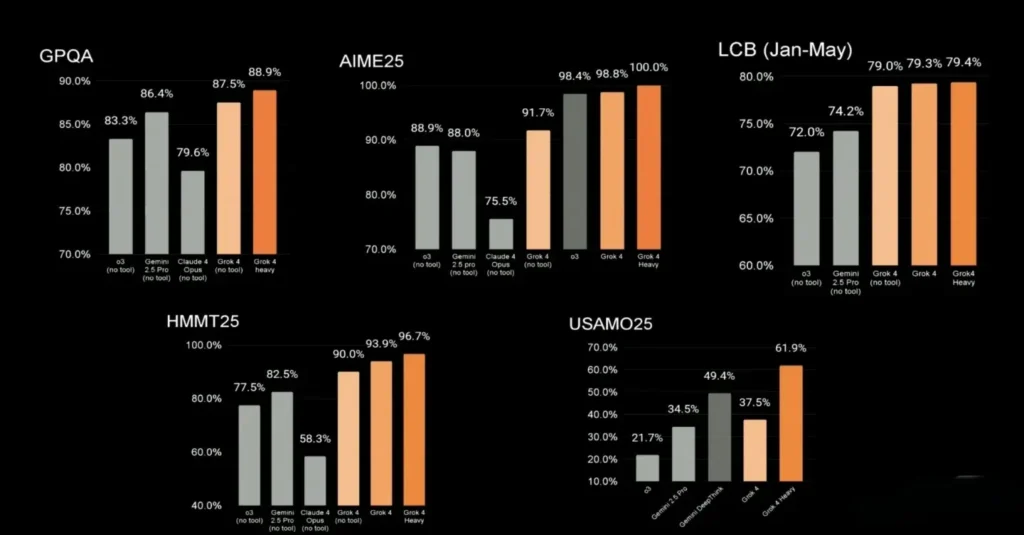
xAI highlights that Grok 4 outperforms most AI systems on key academic and coding benchmarks:
- AIME: 98.8 (Advanced Intelligence Math Exam)
- GPQA: 88 (Graduate-level Prompted QA)
- SWE‑Bench: 75 (Software Engineering tasks)
- Humanity Last Exam (HLE): 45% overall with advanced reasoning.
In live demos, Elon Musk claimed Grok 4 is “smarter than almost all graduate students,” underscoring its leadership in multi-disciplinary performance .
How to access Grok 4 API
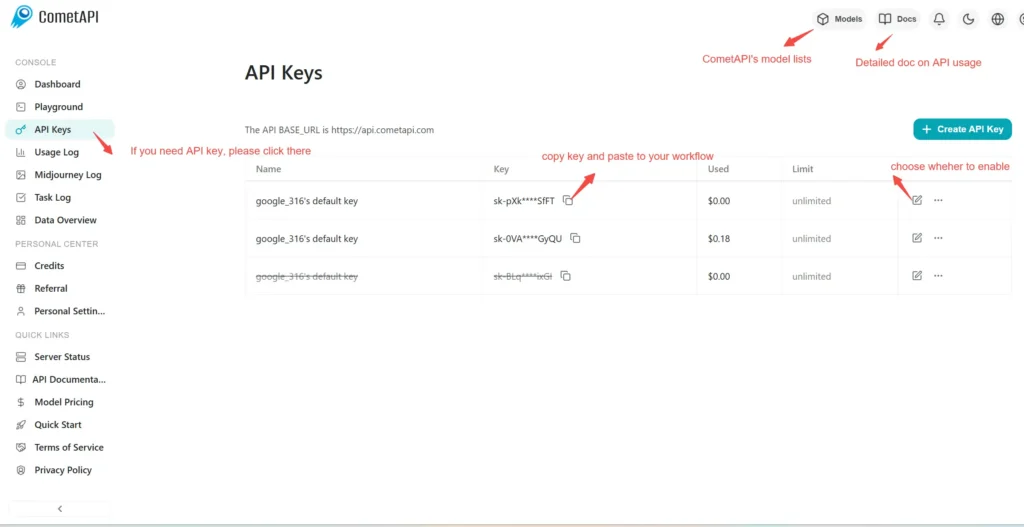
Step 1: Sign Up for API Key
Log in to cometapi.com. If you are not our user yet, please register first. Sign into your CometAPI console. Get the access credential API key of the interface. Click “Add Token” at the API token in the personal center, get the token key: sk-xxxxx and submit.
Step 2: Send Requests to Grok 4 API
Select the “\grok-4\” endpoint to send the API request and set the request body. The request method and request body are obtained from our website API doc. Our website also provides Apifox test for your convenience. Replace <YOUR_API_KEY> with your actual CometAPI key from your account. base url is Chat format(https://api.cometapi.com/v1/chat/completions).
Insert your question or request into the content field—this is what the model will respond to . Process the API response to get the generated answer.
Step 3: Retrieve and Verify Results
Process the API response to get the generated answer. After processing, the API responds with the task status and output data.