Veo 3.1-Pro 指的是 Google 的 Veo 3.1 系列的高能力存取/設定層級——這一代短格式、可啟用音訊的影片模型新增了更豐富的原生音訊、更完善的敘事與剪輯控制,以及場景延伸工具;「Pro」標籤在 Google 的訂閱與產品生態系中通常用來指示較高的存取或品質等級,而非表示公開架構上存在根本性差異。
登入 cometapi.com。若您尚未成為我們的使用者,請先註冊。登入您的 CometAPI 控制台。取得該介面的存取憑證 API 金鑰。在個人中心的 API token 中點擊 “Add Token”,取得 token 金鑰:sk-xxxxx 並提交。
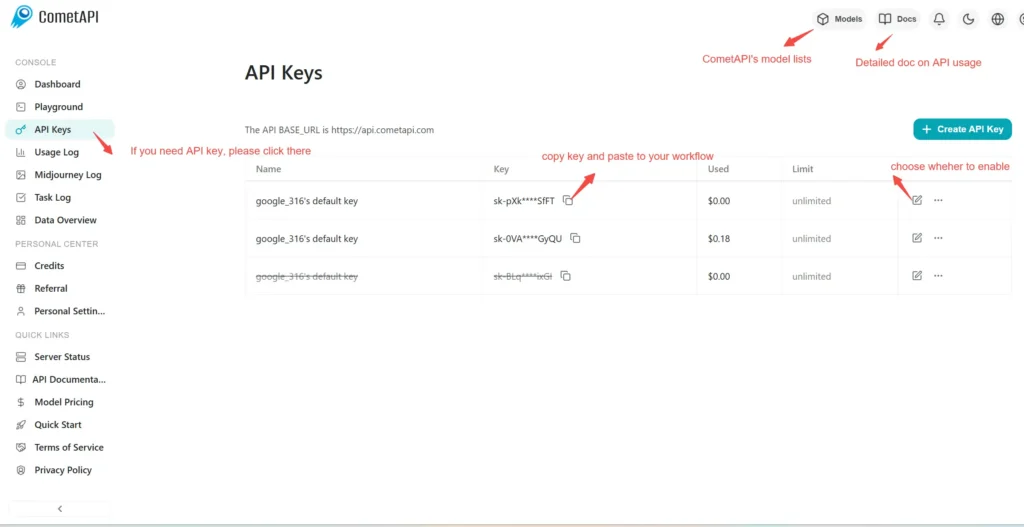
選擇 “\veo3.1-pro \” 端點來發送 API 請求並設定請求本文。請求方法與請求本文可從我們網站的 API 文件取得。我們的網站也提供 Apifox 測試以供便利使用。將 <YOUR_API_KEY> 替換為您帳戶中的實際 CometAPI 金鑰。基本 URL 為 Veo3 Async Generation(https://api.cometapi.com/v1/videos)。
將您的問題或請求填入 content 欄位——模型將對該欄位的內容做出回應。處理 API 回應以取得生成的答案。
處理 API 回應以取得生成的答案。處理完成後,API 會回應任務狀態與輸出資料。
如需進一步了解 Veo3.1,請參見 Veo3.1 頁面。
| 彗星價格 (USD / M Tokens) | 官方價格 (USD / M Tokens) |
|---|---|
每次請求:$2.00 | 每次請求:$2.50 |
import os
import time
import requests
# Get your CometAPI key from https://api.cometapi.com/console/token, and paste it here
COMETAPI_KEY = os.environ.get("COMETAPI_KEY") or "<YOUR_COMETAPI_KEY>"
BASE_URL = "https://api.cometapi.com/veo/v1/video"
# Create video generation task
create_response = requests.post(
f"{BASE_URL}/create",
headers={
"Authorization": COMETAPI_KEY,
"Content-Type": "application/json",
},
json={
"prompt": "An orange cat flying in the blue sky with white clouds, sunlight pouring onto its fur, creating a beautiful and dreamlike scene",
"model": "veo3.1-pro",
"enhance_prompt": True,
},
)
task = create_response.json()
task_id = task["id"]
print(f"Task created: {task_id}")
print(f"Status: {task['status']}")
# Poll until video is ready
while True:
query_response = requests.get(
f"{BASE_URL}/query/{task_id}",
headers={
"Authorization": f"Bearer {COMETAPI_KEY}",
},
)
result = query_response.json()
status = result["data"]["status"]
progress = result["data"].get("progress", "")
print(f"Checking status... {status} {progress}")
if status == "SUCCESS" or result["data"]["data"]["status"] == "completed":
video_url = result["data"]["data"]["video_url"]
print(f"
Video URL: {video_url}")
break
elif status == "FAILED":
print(f"Failed: {result['data'].get('fail_reason', 'Unknown error')}")
break
time.sleep(10)