模型支援企業部落格
500+ AI 模型 API,全部整合在一個 API 中。就在 CometAPI
模型 API
開發者
快速入門說明文件API 儀表板
資源
AI模型部落格企業更新日誌關於
2025 CometAPI. 保留所有權利。隱私政策服務條款
Home/Models/OpenAI/gpt-audio-1.5
O

gpt-audio-1.5

輸入:$2/M
輸出:$8/M
搭配 Chat Completions 進行音訊輸入、音訊輸出的最佳語音模型。
新
商業用途
概覽
功能
定價
API

gpt-audio-1.5 的技術規格

項目gpt-audio-1.5(公開規格)
模型家族GPT Audio 家族(音訊優先變體)
輸入類型文字、音訊(語音輸入)
輸出類型文字、音訊(語音輸出)、結構化輸出(支援函式呼叫)
上下文視窗128,000 tokens。
最大輸出 tokens16,384(於相關 gpt-audio 清單中有文件記載)。
效能層級較高智慧;中等速度(平衡型)。
延遲特性針對語音互動進行最佳化(依端點而定,為中/低延遲)。
可用性Chat Completions API(音訊輸入/輸出)與平台 playground;整合於 realtime/voice 相關介面中。
安全性/使用注意事項針對語音內容設有防護機制;在生產級語音代理中,仍應依一般安全與驗證流程審慎處理模型輸出。

注意:gpt-realtime-1.5 是一個密切相關的即時音訊/語音優先變體,針對更低延遲與即時工作階段進行最佳化;請見下方比較。


什麼是 gpt-audio-1.5?

gpt-audio-1.5 是一個具備音訊能力的 GPT 模型,支援透過 Chat Completions 與相關音訊 API 進行語音輸入與語音輸出。它被定位為建構語音代理與語音優先體驗的主要通用可用音訊模型,同時兼顧品質與速度。


主要功能

  1. 語音輸入/語音輸出支援: 可處理口語輸入,並回傳語音或文字回應,以實現自然的語音互動流程。
  2. 適用於音訊工作流程的大型上下文: 支援非常大的上下文(文件記載為 128k tokens),可支援多輪對話、長對話歷史或大型多模態工作階段。
  3. 串流與 Chat Completions 相容性: 可在 Chat Completions 中運作,支援串流音訊回應與函式呼叫結構化輸出。
  4. 平衡的效能/延遲: 針對在中等吞吐量下提供高品質音訊回應進行調校——適合重視品質的聊天機器人與語音助理。
  5. 生態系與整合: 支援平台 playground,並可於官方 realtime/voice 端點與合作夥伴整合中使用(Azure/Microsoft Foundry 的說明中也提及類似音訊模型)。

gpt-audio-1.5 與相關音訊模型比較

屬性gpt-audio-1.5gpt-realtime-1.5
主要定位用於 Chat Completions 與對話流程的高品質音訊輸入/輸出。用於即時語音代理與串流情境的低延遲 Realtime S2S(speech-to-speech)。
上下文視窗128k tokens。32k tokens(文件記載的即時變體)。
最大輸出 tokens16,384(有文件記載)。通常設定為較短的即時回應(文件列出較小的最大 tokens)。
最佳使用情境需要完整聊天語義加上音訊能力的聊天機器人與語音助理。即時語音代理、資訊亭與低延遲對話介面。

代表性使用案例

  • 用於客服與內部服務台的對話式語音代理。
  • 內嵌於應用程式、裝置與資訊亭中的語音助理。
  • 免手持工作流程(聽寫、語音搜尋、無障礙存取)。
  • 透過 Chat Completions 混合音訊與文字/圖片的多模態體驗。

限制與操作注意事項

  • 不能直接取代人工 QA: 在生產流程中,應始終以人工審核驗證語音輸出與下游動作。
  • 資源規劃: 大型上下文與音訊 I/O 可能增加運算需求與延遲——請為長時間工作階段設計串流/分段策略。
  • 安全與政策限制: 語音輸出可能具有說服力;大規模部署時請遵循平台安全指南與防護機制。
  • 如何存取 GPT Audio 1.5 API

步驟 1:註冊 API 金鑰

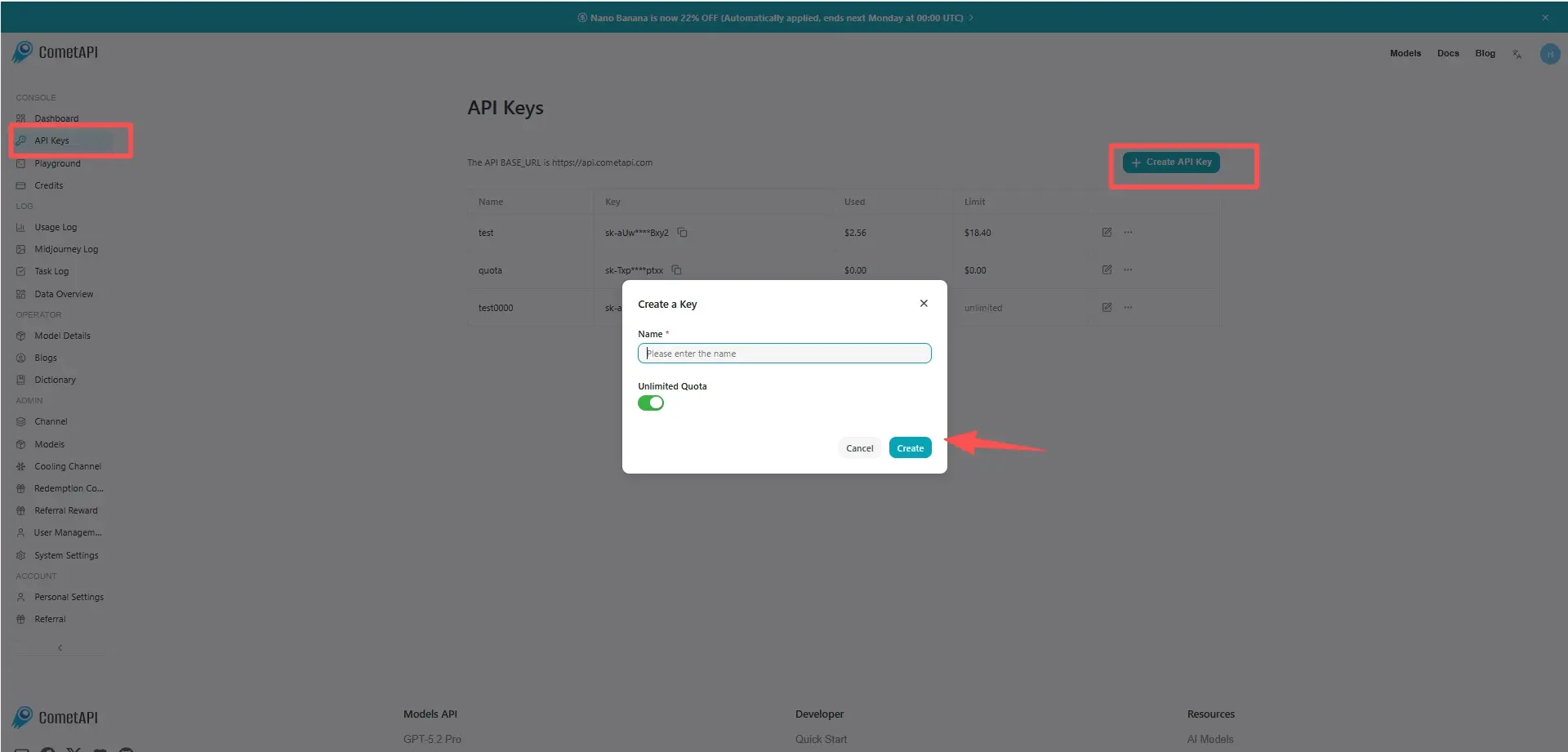
登入 cometapi.com。若您尚未成為我們的使用者,請先註冊。登入您的 CometAPI console。取得介面的存取憑證 API key。在個人中心的 API token 中點擊「Add Token」,取得 token key:sk-xxxxx 並提交。

cometapi-key

步驟 2:向 GPT Audio 1.5 API 發送請求

選擇「gpt-audio-1.5」端點以發送 API 請求,並設定 request body。請求方法與 request body 可從我們網站的 API 文件取得。我們的網站也提供 Apifox 測試供您使用。請將 <YOUR_API_KEY> 替換為您帳戶中的實際 CometAPI key。base url 為 Chat Completions

將您的問題或請求插入 content 欄位——模型將針對此內容進行回應。處理 API 回應以取得生成的答案。

步驟 3:擷取並驗證結果

處理 API 回應以取得生成的答案。處理完成後,API 會回傳任務狀態與輸出資料。

常見問題

What are the official context and output token limits for gpt-audio-1.5 API?

gpt-audio-1.5 支援 128,000 個 token 的上下文視窗,且文件列出最大輸出 token 設定約為 16,384;請在開發者文件中依各端點核實確切限制。 :contentReference[oaicite:44]{index=44}

Can gpt-audio-1.5 handle both speech-to-text and text-to-speech in the API?

是的 — 它接受音訊輸入,並可透過 Chat Completions/audio 端點返回音訊輸出或文字回應。 :contentReference[oaicite:45]{index=45}

When should I use gpt-audio-1.5 vs gpt-realtime-1.5 for a voice agent?

在需要較大上下文的 Chat Completions 流程中,選擇 gpt-audio-1.5 以獲得更高品質的音訊;若需低延遲、即時串流的語音互動,則選擇 gpt-realtime-1.5。 :contentReference[oaicite:46]{index=46}

Does gpt-audio-1.5 support streaming and function calling for tool integrations?

是的 — 該模型支援串流音訊回應,以及結構化輸出/函式呼叫,以整合外部工具與工作流程。 :contentReference[oaicite:47]{index=47}

Is gpt-audio-1.5 suitable for production customer support voice agents?

是的 — 它是為語音助理與對話代理設計的,但在生產部署前,你應加入人工審核/品質保證、日誌記錄與安全控管。 :contentReference[oaicite:48]{index=48}

What are the main limitations to consider when deploying gpt-audio-1.5?

主要考量包括大型上下文音訊工作階段中的運算/延遲權衡、語音內容的安全防護,以及在你所在領域對 ASR/TTS 輸出進行驗證的需求。 :contentReference[oaicite:49]{index=49}

gpt-audio-1.5 的功能

探索 gpt-audio-1.5 的核心功能,專為提升效能和可用性而設計。了解這些功能如何為您的專案帶來效益並改善使用者體驗。

gpt-audio-1.5 的定價

探索 gpt-audio-1.5 的競爭性定價,專為滿足各種預算和使用需求而設計。我們靈活的方案確保您只需為實際使用量付費,讓您能夠隨著需求增長輕鬆擴展。了解 gpt-audio-1.5 如何在保持成本可控的同時提升您的專案效果。
彗星價格 (USD / M Tokens)官方價格 (USD / M Tokens)折扣
輸入:$2/M
輸出:$8/M
輸入:$2.5/M
輸出:$10/M
-20%

gpt-audio-1.5 的範例程式碼和 API

存取完整的範例程式碼和 API 資源,以簡化您的 gpt-audio-1.5 整合流程。我們詳盡的文件提供逐步指引,協助您在專案中充分發揮 gpt-audio-1.5 的潛力。
POST
/v1/chat/completions
Python
JavaScript
Curl
from openai import OpenAI
import os
import base64

# Get your CometAPI key from https://api.cometapi.com/console/token, and paste it here
COMETAPI_KEY = os.environ.get("COMETAPI_KEY") or "<YOUR_COMETAPI_KEY>"
BASE_URL = "https://api.cometapi.com/v1"

client = OpenAI(base_url=BASE_URL, api_key=COMETAPI_KEY)

completion = client.chat.completions.create(
    model="gpt-audio-1.5",
    modalities=["text", "audio"],
    audio={"voice": "alloy", "format": "wav"},
    messages=[
        {
            "role": "user",
            "content": "Is a golden retriever a good family dog?"
        }
    ],
)

# Print the text response
print(completion.choices[0].message.audio.transcript)

# Save the audio response to a file
wav_bytes = base64.b64decode(completion.choices[0].message.audio.data)
output_path = "gpt-audio-1.5-output.wav"
with open(output_path, "wb") as f:
    f.write(wav_bytes)
print(f"Audio saved to {output_path}")

Python Code Example

from openai import OpenAI
import os
import base64

# Get your CometAPI key from https://api.cometapi.com/console/token, and paste it here
COMETAPI_KEY = os.environ.get("COMETAPI_KEY") or "<YOUR_COMETAPI_KEY>"
BASE_URL = "https://api.cometapi.com/v1"

client = OpenAI(base_url=BASE_URL, api_key=COMETAPI_KEY)

completion = client.chat.completions.create(
    model="gpt-audio-1.5",
    modalities=["text", "audio"],
    audio={"voice": "alloy", "format": "wav"},
    messages=[
        {
            "role": "user",
            "content": "Is a golden retriever a good family dog?"
        }
    ],
)

# Print the text response
print(completion.choices[0].message.audio.transcript)

# Save the audio response to a file
wav_bytes = base64.b64decode(completion.choices[0].message.audio.data)
output_path = "gpt-audio-1.5-output.wav"
with open(output_path, "wb") as f:
    f.write(wav_bytes)
print(f"Audio saved to {output_path}")

JavaScript Code Example

import OpenAI from "openai";
import fs from "fs";

// Get your CometAPI key from https://api.cometapi.com/console/token, and paste it here
const api_key = process.env.COMETAPI_KEY || "<YOUR_COMETAPI_KEY>";
const base_url = "https://api.cometapi.com/v1";

const openai = new OpenAI({ apiKey: api_key, baseURL: base_url });

const completion = await openai.chat.completions.create({
  model: "gpt-audio-1.5",
  modalities: ["text", "audio"],
  audio: { voice: "alloy", format: "wav" },
  messages: [
    {
      role: "user",
      content: "Is a golden retriever a good family dog?",
    },
  ],
});

// Print the text transcript
console.log(completion.choices[0].message.audio.transcript);

// Save the audio response to a file
const wavBytes = Buffer.from(completion.choices[0].message.audio.data, "base64");
const outputPath = "gpt-audio-1.5-output.wav";
fs.writeFileSync(outputPath, wavBytes);
console.log(`Audio saved to ${outputPath}`);

Curl Code Example

# Get your CometAPI key from https://api.cometapi.com/console/token
# Export it as: export COMETAPI_KEY="your-key-here"

RESPONSE=$(curl https://api.cometapi.com/v1/chat/completions \
  -s \
  -H "Content-Type: application/json" \
  -H "Authorization: Bearer $COMETAPI_KEY" \
  -d '{
    "model": "gpt-audio-1.5",
    "modalities": ["text", "audio"],
    "audio": {
      "voice": "alloy",
      "format": "wav"
    },
    "messages": [
      {
        "role": "user",
        "content": "Is a golden retriever a good family dog?"
      }
    ]
  }')

# Print the text transcript
echo "$RESPONSE" | python3 -c "import sys, json; r=json.load(sys.stdin); print(r['choices'][0]['message']['audio']['transcript'])"

# Save the audio to a WAV file
echo "$RESPONSE" | python3 -c "
import sys, json, base64
r = json.load(sys.stdin)
audio_data = r['choices'][0]['message']['audio']['data']
with open('gpt-audio-1.5-output.wav', 'wb') as f:
    f.write(base64.b64decode(audio_data))
print('Audio saved to gpt-audio-1.5-output.wav')
"

更多模型

O

gpt-realtime-1.5

輸入:$3.2/M
輸出:$12.8/M
用於音訊輸入、音訊輸出的最佳語音模型。
O

Whisper-1

輸入:$24/M
輸出:$24/M
語音轉文字,生成翻譯
O

TTS

輸入:$12/M
輸出:$12/M
OpenAI 文字轉語音
K

Kling TTS

每次請求:$0.006608
[語音合成] 全新上線:線上文字轉廣播級音訊,支援預覽功能 ● 可同時生成 audio_id,適用於任何 Keling API。
K

Kling video-to-audio

K

Kling video-to-audio

每次請求:$0.03304
Kling 影片轉音訊
K

Kling text-to-audio

K

Kling text-to-audio

每次請求:$0.03304
Kling 文字轉音訊