
GPT-5.5 Instant represents OpenAI's latest upgrade to the everyday intelligence powering ChatGPT. Released on May 5, 2026, it replaces GPT-5.3 Instant as the default model for hundreds of millions of users. It delivers smarter, more accurate responses with significantly reduced hallucinations while maintaining the low-latency "instant" experience users expect.
For developers, entrepreneurs, SaaS builders, and enterprise teams, this model upgrade opens new possibilities for reliable AI integration without sacrificing speed or ballooning costs. This comprehensive guide covers everything from quick ChatGPT access to production-grade API usage, with practical examples and optimization strategies.
What Is GPT-5.5 Instant and Why It Matters
GPT-5.5 Instant is the fast, efficient variant optimized for daily interactions, search-augmented responses, image analysis, and personalized context recall. It powers the default ChatGPT experience while delivering measurable improvements over its predecessor.
Key Improvements (Backed by OpenAI Evaluations):
- GPT-5.5 Instant produced 52.5% fewer hallucinated claims than GPT-5.3 Instant on high-stakes prompts
- 37.3% reduction in inaccurate claims on challenging conversations.
- Stronger performance in photo/image analysis, STEM questions, and knowing when to invoke web search.
- More concise, natural, and personalized responses with better context management from past chats, files, and connected Gmail.
Unlike the heavier GPT-5.5 (Thinking/Pro variants) designed for deep reasoning and complex agentic tasks, GPT-5.5 Instant prioritizes speed and reliability for general use while still offering substantial capability gains.
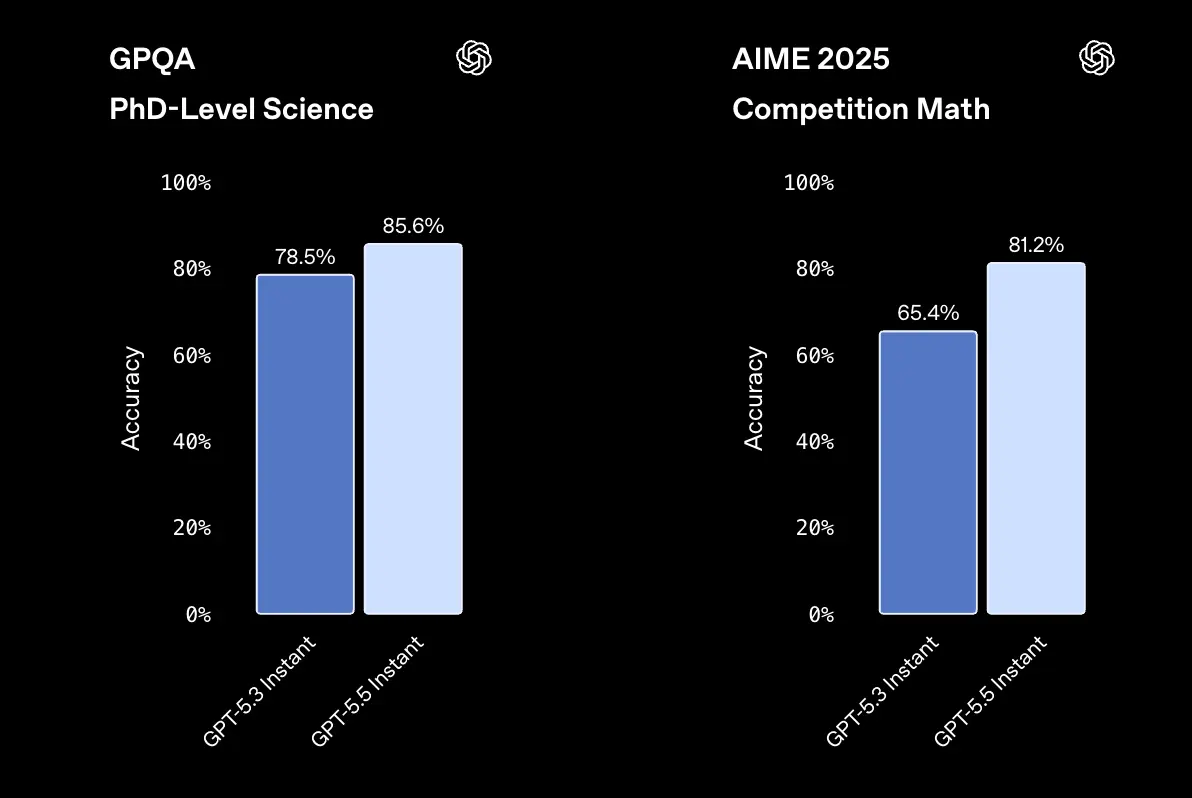
GPT-5.5 Instant vs. GPT-5.5 vs. Previous Models: Comparison Table
| Feature/Model | GPT-5.5 Instant (Default) | GPT-5.5 (Full/Thinking) | GPT-5.3 Instant (Previous) |
|---|---|---|---|
| Primary Strength | Speed + Reliability | Deep Reasoning & Agents | General Use |
| Latency | Lowest | Higher | Low |
| Hallucination Reduction | 52.5% fewer (high-stakes) | Highest | Baseline |
| Personalization | Excellent (memory search) | Strong | Good |
| Image/STEM Performance | Significantly Improved | Superior | Good |
| API Pricing (approx.) | Competitive via providers | $5/$30 per M tokens | Lower |
| Best For | Chat, quick tasks, apps | Complex workflows | Legacy |
When to Choose Instant: Everyday applications, customer support bots, content generation, and latency-sensitive interfaces.
Essentially, GPT-5.5 Instant and GPT-5.5 Thinking share the same underlying architecture. The difference lies in the depth of reasoning, not the level of knowledge. Paid users can use GPT-5.5 Thinking, while free users can use a limited quota of GPT-5.5 Instant on chatgpt.
For more information, please refer to the GPT-5.5 overview and mechanism.
How to Access GPT-5.5 Instant in ChatGPT
If you are using ChatGPT directly, GPT-5.5 Instant is the default for all logged-in users. OpenAI says it is rolling out to all ChatGPT users and replacing GPT-5.3 Instant as the default model. That means many users do not need to manually switch anything to benefit from the new Instant experience.
For paid users, ChatGPT exposes a model picker that allows manual selection of GPT-5.5 Instant or GPT-5.5 Thinking(For paid users, GPT‑5.3 Instant will remain available for three months). OpenAI’s help center says Plus, Pro, and Business users have access to the picker, while GPT-5.5 Pro is reserved for Pro, Business, Enterprise, and Edu plans.
Free users can still use GPT-5.5 in ChatGPT, but there are usage limits. OpenAI states that Free tier accounts can send up to 10 messages with GPT-5.5 every 5 hours, while Plus and Go users can send up to 160 messages every 3 hours. After hitting the limit, chats switch to GPT-5.5 mini version until the limit resets. The Pro and business teams will not revert and can continue using GPT-5.5.
If you're using the Pro or Enterprise edition and want to compare the performance of Instant and Thinking in a real-world task, open two tabs side-by-side, pin one tab to each, and enter the same prompts into them. The difference is particularly noticeable in tasks involving implicit multi-step reasoning, as Thinking explores different branches of reasoning before responding. For everyday chat, Instant is faster at initial responses.
Practical ChatGPT access flow
For most users, the flow is simple:
- Sign in to ChatGPT.
- Use the default Instant experience.
- On paid plans, open the model picker if you want to manually choose GPT-5.5 Instant.
- Switch to GPT-5.5 Thinking only when the task truly needs deeper reasoning.
That is the user-facing path. For product teams, though, the real question is how to operationalize the same quality in your own application. That is where the API path matters.
Advanced Features
- Memory and Personalization: The model intelligently pulls from conversation history, uploaded files, and Gmail (where connected). It decides when personalization adds value.
- Image Analysis: Upload photos for improved visual reasoning.
- Web Search Integration: Automatic when needed for up-to-date information.
Pro Tip: Start new chats for the cleanest default experience. Use custom instructions in settings for consistent tone and context across sessions.
How to Access and Use GPT-5.5 Instant via API
Direct OpenAI API access uses model aliases like chat-latest . chat-latest points to the latest Instant model currently used in ChatGPT. Many teams prefer unified providers like CometAPI for lower costs, higher rate limits, and simplified integration across multiple models.
In the API, GPT-5.5 Instant and GPT-5.5 Thinking collapse into a single model identifier: gpt-5.5. There is no separate gpt-5.5-instant endpoint. Instead, you control reasoning depth with the reasoning_effort parameter, which accepts minimal, low, medium, or high. Setting reasoning_effort: "minimal" is the closest API equivalent to the Instant experience in ChatGPT.
GPT-5.5 ships in two endpoints:
- Responses API (
/v1/responses): the recommended endpoint for new builds, with first-class support for tools, structured output, and streaming. - Chat Completions API (
/v1/chat/completions): the legacy endpoint, kept for backward compatibility.
Step-by-Step API Setup with CometAPI (Recommended for Most Teams)
1. Sign Up and Get Your API Key
- Visit CometAPI.com and create an account.
- Navigate to the console/dashboard to generate an API key (starts with
sk-).
2. Basic Integration Example (Python)
from openai import OpenAI
import os

client = OpenAI(
    api_key=os.getenv("COMETAPI_KEY"),  # Your CometAPI key
    base_url="https://api.cometapi.com/v1"
)

response = client.chat.completions.create(
    model="gpt-5.5",  # or specific alias
    messages=[
        {"role": "system", "content": "You are a helpful, concise assistant."},
        {"role": "user", "content": "Explain how GPT-5.5 Instant improves factuality."}
    ],
    temperature=0.7,
    max_tokens=500
)

print(response.choices[0].message.content)
3. Streaming Response for Better UX
stream = client.chat.completions.create(
    model="gpt-5.5",
    messages=[...],
    stream=True
)

for chunk in stream:
    if chunk.choices[0].delta.content is not None:
        print(chunk.choices[0].delta.content, end="")
JavaScript, cURL, and other language examples follow similar OpenAI SDK compatibility patterns.
Key API Parameters for GPT-5.5 Instant
- temperature: 0.0–1.0 (lower for factual tasks).
- reasoning_effort (if supported in variants): low/medium for balance.
- tools/function calling: Fully supported for agentic workflows.
- Vision: Pass image URLs or base64 for multimodal prompts.
Best Practices for Getting Better Results
GPT-5.5 is not a “write one vague prompt and pray” model. I strongly recommend outcome-first prompting: specify the expected result, success criteria, constraints, side effects, and output shape. The docs also advise reducing step-by-step process guidance unless the path itself is part of the product requirement. In practice, that means you should describe the destination, not micromanage every turn.
Structured Outputs are another important lever. OpenAI recommends using structured outputs instead of describing the schema in the prompt, especially for production-grade systems that need automatic validation and more reliable downstream parsing. This matters for SaaS products because the less time your app spends cleaning model output, the more stable your UX becomes.
Prompting checklist for GPT-5.5 Instant
Write prompts that:
- State the goal clearly.
- Define acceptance criteria.
- Mention required formatting.
- Limit unnecessary instructions.
- Leave room for the model to choose the best path.
Reasoning effort guidance
OpenAI says medium is the default and recommended balanced setting, low can work well for many workloads, none is for latency-critical jobs that do not need reasoning, and high or xhigh should be reserved for tasks where evaluation shows a measurable quality gain. That advice is subtle but important: more reasoning is not automatically better, especially when the task has weak stopping criteria or too much open-ended tool access.
A useful production pattern
For customer support, internal knowledge assistants, and workflow automation, a strong setup is:
- Responses API for conversation state
- Structured Outputs for predictable parsing
- Reasoning effort tuned by use case
- Prompt caching for repeated prefixes
- Hosted tools where they fit the workflow
That combination is where GPT-5.5 starts looking less like a chat model and more like a production engine.
Cost Optimization Strategies
- Cache common prompts/responses.
- Use structured outputs (JSON mode) for reliable parsing.
- Monitor token usage and choose effort levels wisely.
- Route simple queries to lighter models and escalate to Instant/GPT-5.5 as needed.
Step-by-Step Implementation Examples
1) ChatGPT workflow
The simplest way to use GPT-5.5 Instant is inside ChatGPT itself. Sign in, let the default Instant experience handle routine work, and switch to the model picker on paid tiers if you need to manually choose GPT-5.5 Instant or GPT-5.5 Thinking. OpenAI says the default Instant experience is already tuned for info-seeking questions, walkthroughs, technical writing, and translation.
This is the right option for founders, operators, and product managers who need fast answers without shipping code. It is also the best place to benchmark whether GPT-5.5’s tone and factuality improve your typical workflows before investing in integration.
2) Direct API workflow
For product development, use the API path. OpenAI’s documentation says to update the model slug to gpt-5.5, use the Responses API for reasoning and tool use, and set reasoning.effort intentionally. The docs also call out prompt caching, structured outputs, and multi-turn handling as core parts of a good integration.
A practical implementation sequence looks like this:
- Start with a fresh prompt baseline.
- Set the model to
gpt-5.5. - Use the Responses API.
- Add structured outputs if the app needs machine-readable responses.
- Tune
reasoning.effortby latency and quality goals. - Benchmark end-to-end behavior before shipping.
3) Unified gateway workflow with CometAPI
CometAPI positions itself as a unified, OpenAI-style API aggregation platform with access to more than 500 AI models through a single interface, a single API key, and pay-as-you-go billing. It emphasize lower integration friction, one credential, and the ability to switch models without re-authentication or major migration work.
For teams building multi-model products, that matters. Instead of locking your stack to one provider integration path, a gateway approach lets you standardize request handling, simplify vendor experiments, and reduce the maintenance overhead of model-specific SDK sprawl.
CometAPI Advantages: Significantly lower pricing (e.g., ~20% discount vs. official), one API key for 500+ models, generous rate limits, and playground for testing. This makes it ideal for startups scaling AI features without immediate high OpenAI bills.
If you want to know about the price changes of GPT-5.5, here's a detailed analysis of GPT-5.5 pricing breakdowns.
FAQ
1. How do I access GPT-5.5 Instant in ChatGPT?
GPT-5.5 Instant is the default for all logged-in users, and paid tiers can manually select GPT-5.5 Instant or GPT-5.5 Thinking from the model picker.
2. Is GPT-5.5 Instant available in the API?
OpenAI says GPT-5.5 Instant is rolling out in the API as chat-latest, while the API model docs use gpt-5.5 as the developer-facing slug.
3. What is the difference between GPT-5.5 Instant and GPT-5.5 Thinking?
GPT-5.5 Instant is the fast, low-latency default optimized for everyday use and ChatGPT. GPT-5.5 (and Pro) variants offer deeper reasoning for complex, multi-step tasks at higher latency and cost. OpenAI says Thinking keeps better track of prior steps and may show a short preamble before reasoning starts.
4. Which API should I use with GPT-5.5?
OpenAI recommends the Responses API for reasoning, tool calling, and multi-turn use cases.
5. What reasoning setting should I start with?
OpenAI recommends starting with medium, then testing low for latency-sensitive workloads or high and xhigh only when evaluation shows a measurable quality gain.
6. Can GPT-5.5 handle tool-heavy workflows?
Yes. OpenAI says GPT-5.5 is especially useful on large tool surfaces, multi-step service workflows, and long-running agent tasks, with stronger precision in tool selection and argument use.
7. Why would a team use CometAPI instead of going direct?
CometAPI positions itself as an OpenAI-style unified gateway with one API key, access to 500+ models, and lower integration friction when switching providers.
Conclusion and Next Steps
GPT-5.5 Instant raises the bar for accessible, reliable AI. Whether you're enhancing ChatGPT workflows or building the next generation of AI-powered products, mastering its access and usage is essential.
Ready to integrate? Get started with CometAPI for instant access to GPT-5.5 Instant and the full GPT-5.5 family at competitive rates. Sign up free, explore the playground, and deploy in minutes with familiar OpenAI SDK compatibility.