
Quick summary: Claude Fable 5.1 is worth evaluating for difficult debugging, repository-scale refactoring, and implementation that spans many files and tool calls. In Claude Code, select the model explicitly, verify the active model and connection, and choose an effort level that fits the task. This guide covers native access, optional CometAPI routing, persistent configuration, and a practical inspect–implement–test–review workflow. The aim is a working, reviewable change—not simply a longer model response.
Key Takeaways
- Select and verify: use /model or --model when the model is available to your account or provider, then check
/statusbefore starting substantial work. - Match capability to the job: reserve the model for hard, multi-step tasks where added reasoning is worth the latency and cost; benchmark scores are not a guarantee for your repository.
- Tune effort deliberately: begin with high for demanding coding work, compare medium on routine tasks, and use xhigh or max only when your own evaluations justify them.
- Protect the workflow: keep API keys out of shared project settings, validate the connection, agree on scope, run relevant tests, and review the final diff.
What Is Claude Fable 5.1?
Claude Fable 5.1 is the September 2026 successor to Claude Fable 5. Anthropic positions it for demanding reasoning and long-horizon agentic work. It supports a 1-million-token context window, up to 128K output tokens, text and image input, always-on adaptive thinking, and five effort levels from low to max.
Workload shape matters more than the label. Fable 5.1 is designed for tasks that may span many files, commands, tests, revisions, and recovery steps. Anthropic still recommends starting most workloads with Opus 5 and moving to Fable 5.1 when higher-effort Opus evaluations are insufficient.
| Official specification | Claude Fable 5.1 |
|---|---|
| Developer | Anthropic |
| Model ID | claude-fable-5-1 |
| Release date | September 1, 2026 |
| Context window | 1M tokens |
| Maximum output | 128K tokens |
| Input / output | Text and images → text |
| Thinking | Adaptive, always on |
| Default effort | high |
| Effort levels | low, medium, high, xhigh, max |
| Knowledge cutoff | June 2026 |
| Official input price | $10 / MTok |
| Official output price | $50 / MTok |
| Cache read | $0.25 / MTok |
| Comparative latency | Slower |
Why Claude Fable 5.1 Is Relevant to Claude Code
Claude Code is an agentic coding environment: it can inspect a repository, edit files, run commands, and execute tests instead of only generating isolated snippets. Agentic coding and business-workflow benchmarks are therefore more relevant here than general trivia scores.
Which tasks justify using it? Consider Claude Fable 5.1 for a cross-module refactor, a recurring failure with an unclear root cause, or a feature requiring coordinated changes to APIs, persistence, and tests. Use this as a practical decision rule, not a benchmark-derived guarantee: start ordinary work with Claude Opus 5, and escalate when higher-effort evaluations still fall short. For tiny edits or rapid, inexpensive iterations, consider Claude Sonnet 5. Judge the choice by verified completion quality and total task cost on your own repository.
| Selected official benchmarks | Fable 5.1 | Fable 5 | Opus 5 | GPT-5.6 Sol |
|---|---|---|---|---|
| Terminal-Bench 4.0 | 55.8% | 42.0% | 52.3% | 37.3% |
| AutomationBench | 31.4% | 17.1% | 26.9% | 19.6% |
| CursorBench 3.2.0 | 73.4% | 70.5% | 70.0% | 67.2% |
Anthropic reports 55.8% on Terminal-Bench 4.0, 31.4% on AutomationBench, and 73.4% on CursorBench 3.2.0. These results support Fable 5.1’s intended role in terminal-driven and multi-step coding workflows, but they do not guarantee that it will be best on every codebase or at every effort level.
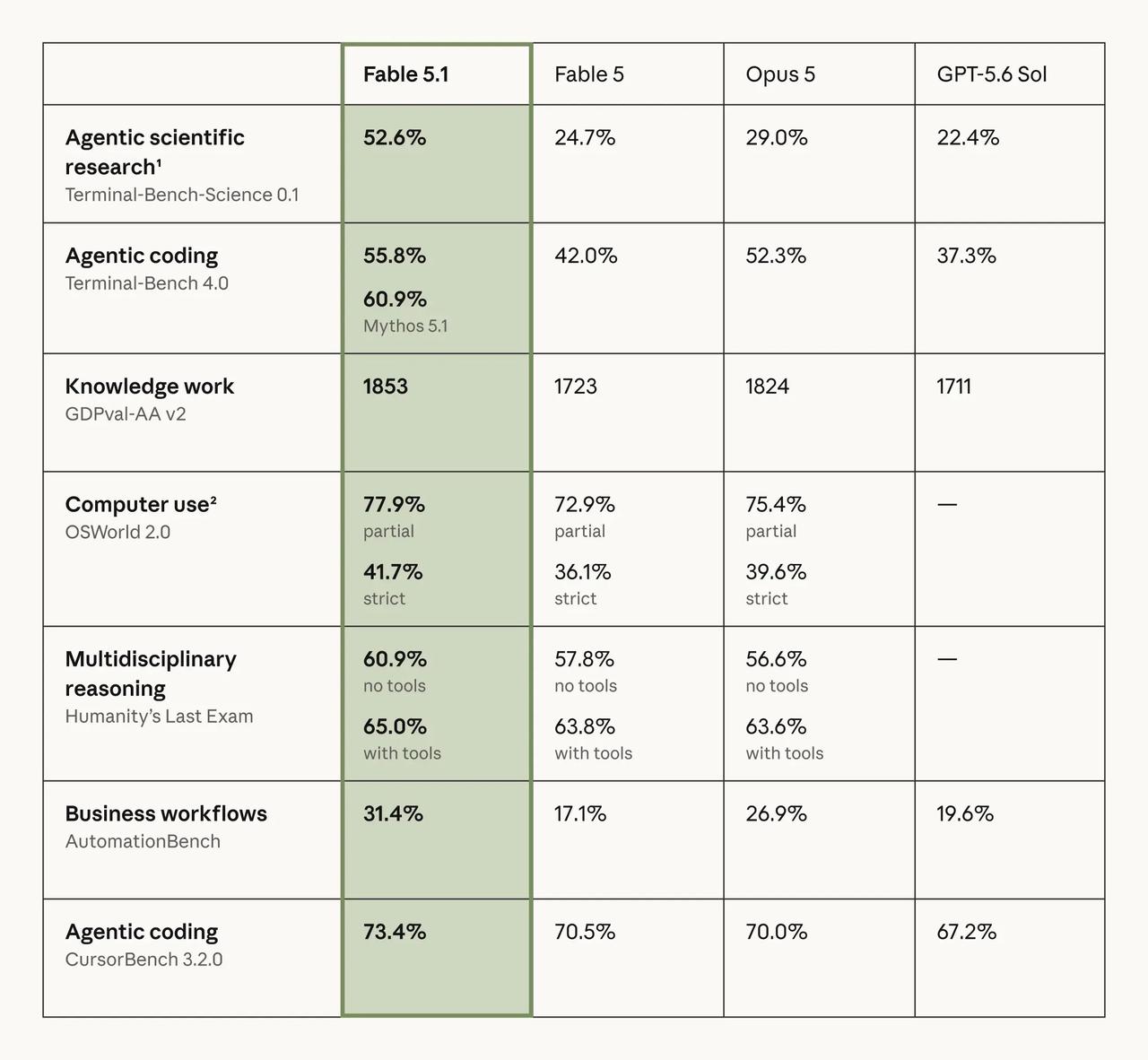
Official Anthropic benchmark image
What Do You Need Before Using Claude Fable 5.1 in Claude Code?
Before configuring Claude Fable 5.1 in Claude Code, complete these three preflight checks:
- Claude Code version: use Claude Code v2.1.255 or later. Run
claude --version, and update the client before troubleshooting model selection. - Account or API access: confirm that your Claude plan, Anthropic API account, or compatible gateway credentials are active.
- Model availability: verify that
claude-fable-5-1is enabled for your account, organization, or provider before adding persistent configuration.
claude --version
npm install -g @anthropic-ai/claude-code@latest
You also need access through your Claude plan or an API or gateway configuration. Anthropic lists the model as active on supported developer platforms.
Make the Configuration Persistent Without Leaking Your API Key
Shell exports apply only to the current terminal. Claude Code also supports an env block in user-level and project-local settings. On Windows, the user-level path is %USERPROFILE%\.claude\settings.json; on macOS and Linux it is ~/.claude/settings.json.
{
  "env": {
    "ANTHROPIC_BASE_URL": "https://api.cometapi.com",
    "ANTHROPIC_MODEL": "claude-fable-5-1"
  }
}
Keep the secret outside committed project settings. Anthropic explicitly warns not to place a credential in a shared project settings file. Supply COMETAPI_KEY or ANTHROPIC_AUTH_TOKEN through your local shell, operating-system credential workflow, or a secrets manager.
Method 1: Use Claude Fable 5.1 Directly in Claude Code
Step 1: Start Claude Code from the Repository Root
cd /path/to/your/project
claude
Starting from the repository root gives Claude Code the intended project context from the beginning.
Step 2: Select Fable 5.1 with /model
/model
Choose Claude Fable 5.1 from the picker. Claude Code supports model selection through an in-session command, a launch flag, an environment variable, or settings. The official reference confirms that /model and --model override ANTHROPIC_MODEL.
Step 3: Launch Directly on Fable 5.1
claude --model claude-fable-5-1
Use the launch flag when you already know that the session warrants Fable 5.1 and do not want to switch after launch.
Step 4: Verify the Active Model
/status
Verification matters when several configuration layers are present. The Status tab shows the active model, base URL, and credential source, making it easier to detect an unexpected user setting, project setting, environment variable, or gateway route.
Method 2: How Do You Connect Claude Code to CometAPI?
Claude Code can connect to a gateway that exposes a supported API format. Anthropic’s documentation explains how to set the gateway URL and credential and warns that third-party gateways are not endorsed or maintained by Anthropic. Validate every Claude Code feature your workflow depends on.
CometAPI lists Claude Fable 5.1 as live and exposes an Anthropic-compatible Messages endpoint at /v1/messages. Because Claude Code maps ANTHROPIC_AUTH_TOKEN to an Authorization bearer header, confirm the current authentication format on the live model page before production use.
macOS, Linux, or WSL
export COMETAPI_KEY="YOUR_COMETAPI_KEY"
export ANTHROPIC_BASE_URL="https://api.cometapi.com"
export ANTHROPIC_AUTH_TOKEN="$COMETAPI_KEY"
export ANTHROPIC_MODEL="claude-fable-5-1"

claude
Windows PowerShell
$env:COMETAPI_KEY = "YOUR_COMETAPI_KEY"
$env:ANTHROPIC_BASE_URL = "https://api.cometapi.com"
$env:ANTHROPIC_AUTH_TOKEN = $env:COMETAPI_KEY
$env:ANTHROPIC_MODEL = "claude-fable-5-1"

claude
After launch, run /status. The Anthropic base URL and credential lines should show the gateway route and an active auth token. Then send a small test prompt before starting a long task.
A gateway may lag behind new Claude Code fields or endpoints. If a feature behaves differently through CometAPI, repeat the same workflow against Anthropic directly before attributing the behavior to the model.
Which Effort Level Should You Choose for Coding?
Fable 5.1 uses adaptive thinking and supports low, medium, high, xhigh, and max effort. Anthropic recommends starting at the default high level and testing the others against your own evaluation set. Effort is the main control for balancing intelligence, latency, and cost.
| Effort | Good Claude Code use cases | Trade-off |
|---|---|---|
| low | Tiny edits, quick explanations, simple local changes | Lowest reasoning cost; may search less |
| medium | Routine implementation, straightforward fixes, normal code review | Good quality and cost balance |
| high | Serious multi-file work, debugging, implementation with tests | Recommended starting point |
| xhigh | Hard refactors, difficult debugging, architecture-sensitive work | More reasoning and latency |
| max | Capability-sensitive, unusually hard long-horizon tasks | Highest time and token use |
At medium effort, Anthropic says Fable 5.1 can roughly match Fable 5 at lower cost. At low effort, it may call search and retrieval tools less often, so low is not automatically the right choice for tasks that depend on current code or documentation.
A Practical Fable 5.1 Claude Code Workflow
The setup is only half the job. Fable 5.1 works best when the task explicitly separates inspection, scope confirmation, implementation, verification, and review.
Step 1: Start with Repository Analysis
Analyze this repository before editing anything.

Goal: add a new /api/v1/reports endpoint that returns a paginated report list.

First:
1. Find the current API routing pattern.
2. Identify the service and persistence layers involved.
3. Find existing pagination conventions.
4. Identify the relevant tests.
5. Propose the smallest implementation plan.

Do not modify files until you have summarized the plan.
This first pass exposes incorrect assumptions before they spread across multiple files.
Step 2: Confirm Scope, Then Implement
Implement the approved plan.

Constraints:
- Change only files required for this feature.
- Follow existing project conventions.
- Prefer targeted edits over whole-file rewrites.
- Do not refactor unrelated code.
- Add or update only the tests needed for this feature.
- Report unrelated defects instead of fixing them automatically.
This wording follows Anthropic’s recommendation to prefer targeted edits and keep work within the requested scope.
Step 3: Run the Relevant Tests
Run the relevant unit and integration tests after implementation.

If a test fails:
1. Identify the root cause.
2. Explain whether this change caused the failure.
3. Fix only failures caused by this change.
4. Rerun the smallest relevant test set before the broader suite.
The checkpoint is observable: the relevant tests pass, or Claude reports the remaining failure and its relationship to the requested change.
Step 4: Review the Diff Before Accepting the Work
Review your final changes as if you were a code reviewer.

Check for:
- behavior outside the requested scope,
- missing edge cases,
- regressions,
- duplicated logic,
- unnecessary file changes,
- tests that do not verify the new behavior.

Then summarize the final diff, tests run, and remaining risks.
This final pass gives a human reviewer a compact acceptance checklist and helps expose unnecessary work before it reaches a pull request.
Recommended CLAUDE.md Instructions for Claude Fable 5.1
A short repository-level instruction file can improve consistency across sessions. Include only rules and commands Claude would otherwise need to rediscover.
# Repository Instructions

- Inspect the existing implementation before editing.
- Keep changes within the requested scope.
- Prefer surgical edits over whole-file rewrites.
- Follow existing project conventions.
- Run relevant tests after implementation.
- Fix root causes rather than patching symptoms.
- Report unrelated issues instead of changing them automatically.
- Summarize files changed, tests run, and remaining risks.
For a large monorepo, add the package manager, test and lint commands, architecture boundaries, generated-file rules, and directories that should not be edited manually.
When Should You Use Claude Fable 5.1 Instead of Opus 5?
The practical question is not whether Claude Fable 5.1 is newer, but whether your task needs more sustained reasoning than Opus 5 can reliably deliver. Anthropic recommends starting most workloads with Opus 5; in Claude Code, treat Fable 5.1 as an escalation option for the hardest long-horizon work.
| Decision factor | Claude Fable 5.1 | Claude Opus 5 |
|---|---|---|
| Task scope | Repository-scale migrations, cross-module refactors, and ambiguous investigations | Features, bug fixes, reviews, and contained refactors |
| Reasoning horizon | Long autonomous sessions with repeated tool use, tests, revisions, and recovery | Shorter, well-scoped coding sessions with clearer completion paths |
| Quality vs speed | Use when verified completion quality on the hardest tasks matters most | Better default balance of quality, latency, and cost |
| Escalation trigger | Higher-effort Opus still fails, loses coherence, or needs repeated recovery | First choice for most Claude Code work |
| Latency and cost | Worth the premium only when it materially changes the verified result | Better fit for routine or interactive work |
| Best fit | Hard, long-horizon agentic coding | Default complex professional coding |
A practical escalation rule
Start with Opus 5 at high effort. Switch to Fable 5.1 when one or more of the following is true:
- Scope: The task spans many interdependent files or services and requires repeated tool use, testing, revision, and recovery.
- Reliability: Opus 5 at high effort still misses dependencies, loses coherence across steps, or fails to complete the workflow reliably.
- Failure cost: The cost of an incomplete or incorrect change is higher than the additional latency and API spend required by Fable 5.1.
Use Fable 5.1 only if it materially improves verified completion on the same repository task; otherwise, switch back to Opus 5.
In practice, Fable 5.1 is the stronger candidate for repository-wide migrations, cross-module debugging, multi-service feature work, and difficult root-cause analysis that requires repeated inspection, execution, testing, and recovery. For isolated fixes, routine feature work, code review, and documentation, Opus 5 remains the better default.
Troubleshooting
Claude Fable 5.1 Does Not Appear in /model
Update Claude Code, restart the terminal and session, and confirm that the account or organization has access. Then check whether managed settings restrict model selection.
Claude Code Uses the Wrong Model
Run /status and inspect every configuration layer. The official reference states that --model and /model override ANTHROPIC_MODEL. Also check user, project, and project-local settings.
CometAPI Returns 401 or Authentication Errors
Verify the API key, base URL, and credential variable. Claude Code sends ANTHROPIC_AUTH_TOKEN through Authorization: Bearer, while ANTHROPIC_API_KEY maps to x-api-key. Use the form accepted by the current CometAPI endpoint.
The Session Is Too Slow or Expensive
Do not use max effort for every task. Compare medium and high on a representative evaluation set, measure total task cost and completion quality, and reserve xhigh or max for cases where the added reasoning changes the result.
Fable 5.1 Rewrites More Code Than Necessary
Add the following scope constraint to the prompt or CLAUDE.md.
Prefer targeted edits over whole-file rewrites unless a rewrite is required for correctness.
Anthropic specifically documents this behavior and recommends targeted edits for small changes.
FAQs
Can Claude Fable 5.1 run in Claude Code?
Yes. Use the model picker or launch Claude Code with --model claude-fable-5-1 when the model is available to your account or provider.
What Is the Claude Fable 5.1 Model ID?
The official Claude API model ID is claude-fable-5-1.
How Do I Switch Models During a Session?
Run /model, choose Claude Fable 5.1, and use /status to confirm the active model and route.
What Effort Level Should I Use?
Start with high for serious coding work. Test medium for routine tasks, and use xhigh or max only when your own evaluations show a meaningful quality gain.
Can I Use CometAPI with Claude Code?
Claude Code supports compatible gateways, and CometAPI exposes an Anthropic-compatible Messages endpoint for Fable 5.1. Validate the authentication format and every Claude Code feature you rely on.
Is Fable 5.1 Always Better Than Opus 5?
No. Anthropic recommends Opus 5 for most workloads and Fable 5.1 for demanding reasoning, long-horizon agentic work, or cases where higher-effort Opus 5 is insufficient.
Why Use Fable 5.1 Instead of Sonnet 5?
Use Fable 5.1 when long-horizon reasoning and autonomous completion matter more than speed and price. Sonnet 5 is usually the more economical choice for fast, routine coding loops.
Conclusion
Claude Fable 5.1 is most compelling in Claude Code when the task is larger than a normal edit: a repository-scale feature, difficult investigation, multi-file migration, or autonomous session that must keep planning, executing, testing, and recovering over a long horizon.
The fastest native route is /model or claude --model claude-fable-5-1. If you prefer a unified API layer, CometAPI provides Claude Fable 5.1 through an Anthropic-compatible Messages endpoint. Whichever route you choose, treat effort level, scope control, tests, and final diff review as part of the model configuration.