ModelHargaPerusahaan
500+ API Model AI, Semua Dalam Satu API. Hanya Di CometAPI
API Model
Pengembang
Mulai CepatDokumentasiDasbor API
Perusahaan
Tentang kamiPerusahaan
Sumber Daya
Model AIBlogCatatan PerubahanDukungan
Syarat dan Ketentuan LayananKebijakan Privasi
© 2026 CometAPI · All rights reserved
Home/Models/MiniMax/MiniMax-M2.7
M

MiniMax-M2.7

Masukan:$0.24/M
Keluaran:$0.96/M
MiniMax-M2.7 menawarkan kecerdasan kelas teratas yang sama seperti versi standar—termasuk evolusi diri rekursif dan produktivitas perkantoran tingkat pakar—namun dirancang untuk aplikasi yang memerlukan latensi sub-detik dan generasi token berkecepatan tinggi. Dengan memanfaatkan arsitektur backbone inferensi yang ditingkatkan, kecepatan outputnya 66% lebih cepat daripada model standar (mencapai 100 tps). Ini adalah pilihan utama untuk asisten pemrograman interaktif, eksekusi loop agen secara real-time, dan pipeline perusahaan ber-throughput tinggi dengan persyaratan waktu penyelesaian yang ketat.
Baru
Penggunaan komersial
Playground
Ikhtisar
Fitur
Harga
API

Technical specifications of MiniMax-M2.7 API

ItemDetails
Model nameMiniMax-M2.7
Model IDminimax-m2.7
ProviderMiniMax
Model familyMiniMax text models
Input typeText
Output typeText
Context window204,800 tokens
Official speed note~60 tps for MiniMax-M2.7; ~100 tps for MiniMax-M2.7-highspeed
Primary strengthsProgramming, tool calling, search, office productivity, agent workflows
AvailabilityMiniMax API / text generation endpoints
Public multimodal spec on reviewed pagesNot published on the text-model pages reviewed

What is MiniMax-M2.7?

MiniMax-M2.7 is MiniMax’s current flagship text model for demanding coding, agent, and productivity workflows. The official docs position it as a model for multilingual programming, tool calling, search, and complex task execution, while the MiniMax model page highlights gains in real-world software engineering, office editing, and complex environment interaction.

Main features of MiniMax-M2.7

  • Strong software engineering performance for end-to-end delivery, log analysis, bug troubleshooting, code security, and machine learning tasks.
  • Large 204,800-token context window for long prompts, multi-file work, and extended agent sessions.
  • Strong office workflow support, including complex edits in Excel, PowerPoint, and Word.
  • Tool-calling and search-oriented behavior for agentic API workflows.
  • Broad integration support in popular coding tools such as Claude Code, OpenCode, Kilo Code, Cline, Roo Code, Grok CLI, and Codex CLI.

Benchmark performance of MiniMax-M2.7

The official MiniMax materials published the following benchmark claims for M2.7:

BenchmarkReported resultWhat it suggests
SWE-Pro56.22%Strong real-world software engineering performance
VIBE-Pro55.6%Full-project delivery capability
Terminal Bench 257.0%Strong understanding of complex engineering systems
GDPval-AAELO 1495Strong office-task performance and high-fidelity editing
Complex skills (>2,000 tokens)97% skill adherenceGood reliability in long, structured workflows

How MiniMax-M2.7 compares with nearby MiniMax models

ModelPositioningContext windowSpeed noteBest fit
MiniMax-M2.7Current flagship text model204,800~60 tpsHighest-end coding, tool use, search, and office tasks
MiniMax-M2.7-highspeed(coming soon in CometAPI)Faster variant of M2.7204,800~100 tpsSame capability profile when latency matters more
MiniMax-M2.5Prior high-end text model204,800~60 tpsStrong coding/productivity when M2.7 is not required
MiniMax-M2Efficient coding and agent workflows204,800Official docs list the model, but not the same M2.7 positioningCost-conscious agentic coding and general workflow automation

Best use cases for MiniMax-M2.7 API

  1. Large codebase refactoring and multi-file implementation work.
  2. Agentic debugging loops that require planning, search, and tool use.
  3. Office document generation and revision workflows in Word, Excel, and PowerPoint.
  4. Terminal-heavy automation where the model needs to reason across logs and build outputs.
  5. Search-assisted tasks that benefit from long context and multi-step reasoning.

Recommended comparison note

If you are choosing between MiniMax models, use M2.7 when you want the strongest public text-model positioning for engineering, tool use, search, and office editing. Use M2.5 or M2 when you want a nearby family member with a different performance or workflow tradeoff.

How to access MiniMax-2.7 API

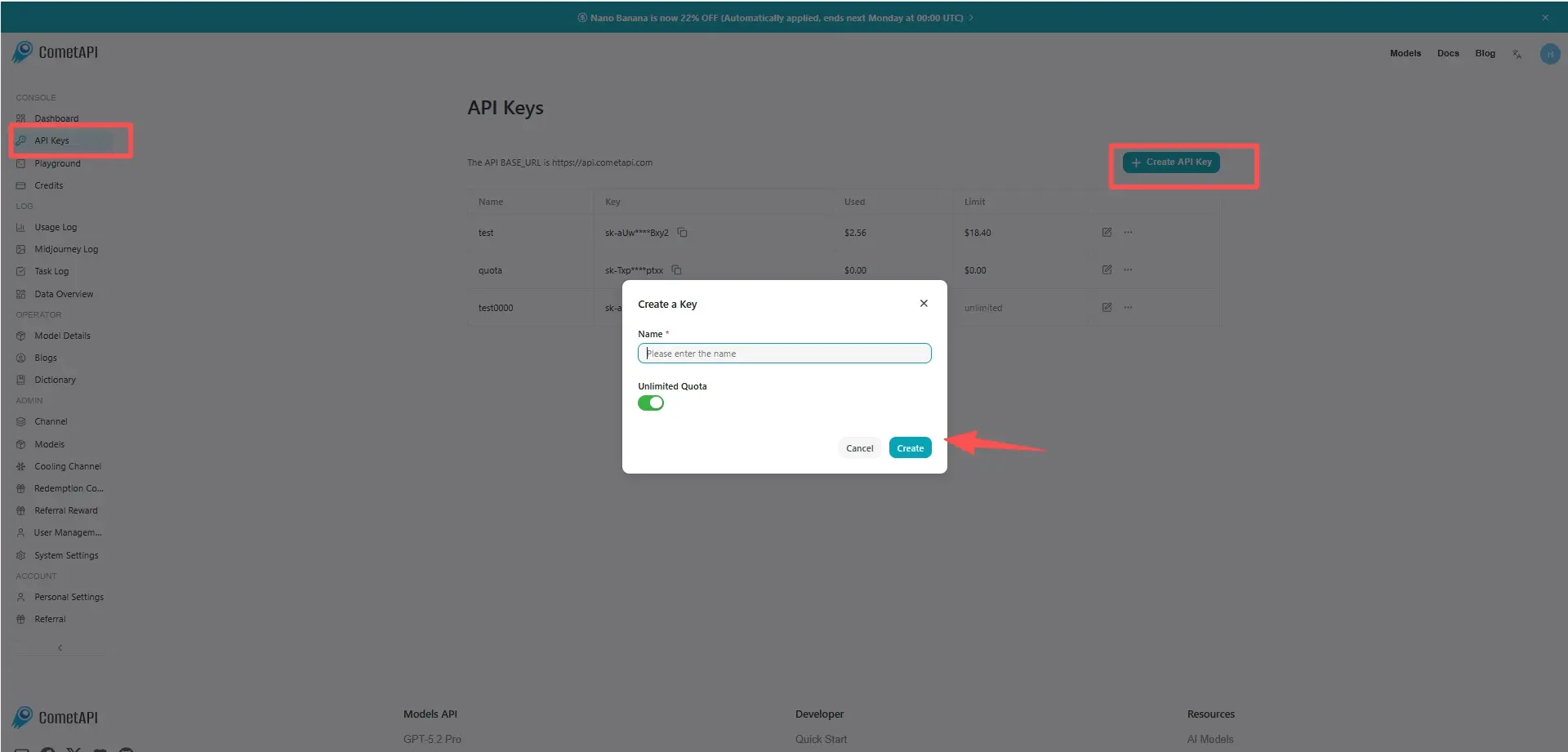
Step 1: Sign Up for API Key

Log in to cometapi.com. If you are not our user yet, please register first. Sign into your CometAPI console. Get the access credential API key of the interface. Click “Add Token” at the API token in the personal center, get the token key: sk-xxxxx and submit.

cometapi-key

Step 2: Send Requests to MiniMax-2.7 API

Select the “minimax-2.7” endpoint to send the API request and set the request body. The request method and request body are obtained from our website API doc. Our website also provides Apifox test for your convenience. Replace <YOUR_API_KEY> with your actual CometAPI key from your account. base url is Chat Completions .

Insert your question or request into the content field—this is what the model will respond to . Process the API response to get the generated answer.

Step 3: Retrieve and Verify Results

Process the API response to get the generated answer. After processing, the API responds with the task status and output data.

FAQ

Can MiniMax-M2.7 handle long coding sessions in the MiniMax API?

Ya. Dokumentasi resmi text-generation mencantumkan MiniMax-M2.7 dengan jendela konteks 204,800 token, sehingga cocok untuk prompt panjang, pekerjaan pengodean multi-berkas, dan sesi agen yang diperpanjang.

Is MiniMax-M2.7 good for real-world software engineering tasks?

Ya. MiniMax menyatakan M2.7 berkinerja kuat dalam pengiriman proyek end-to-end, analisis log, pemecahan masalah bug, keamanan kode, dan tugas machine learning, serta melaporkan 56.22% pada SWE-Pro.

When should I use MiniMax-M2.7 instead of MiniMax-M2.5?

Gunakan MiniMax-M2.7 ketika Anda menginginkan model teks flagship yang lebih baru dalam lini produk MiniMax untuk pemrograman, pemanggilan alat, pencarian, dan produktivitas perkantoran. MiniMax-M2.5 adalah model kelas atas sebelumnya, sedangkan M2.7 adalah yang disoroti oleh dokumentasi untuk penempatan keseluruhan model teks yang terkuat.

What is the MiniMax-M2.7-highspeed variant for?

MiniMax-M2.7-highspeed mempertahankan jendela konteks 204,800 token dan pemposisian model yang sama, tetapi MiniMax mendokumentasikannya sebagai lebih cepat dan lebih lincah, dengan kecepatan keluaran sekitar 100 tps alih-alih sekitar 60 tps.

Can MiniMax-M2.7 edit documents and spreadsheets well?

Ya. Materi resmi MiniMax menyebut M2.7 meningkatkan pengeditan kompleks di seluruh Excel, PowerPoint, dan Word, terutama revisi multi-putaran dan pengeditan dengan fidelitas tinggi, dan melaporkan GDPval-AA ELO sebesar 1495.

How do I integrate MiniMax-M2.7 with coding tools like Claude Code or Cline?

M2.7 dikonfigurasi melalui penyedia MiniMax API, dengan endpoint khusus wilayah dan nama model MiniMax-M2.7. Panduan yang sama mencakup jalur penyiapan untuk Claude Code, OpenCode, Kilo Code, Cline, Roo Code, Grok CLI, dan Codex CLI.

Does MiniMax-M2.7 work well for agent workflows?

Ya. MiniMax memosisikan M2.7 untuk pemrograman, pemanggilan alat, pencarian, dan skenario tugas yang kompleks, dan panduan alat pengodean secara khusus membingkainya untuk alur kerja pengembang bergaya agen dan alat yang terintegrasi dengan terminal.

Harga untuk MiniMax-M2.7

Jelajahi harga kompetitif untuk MiniMax-M2.7, dirancang untuk berbagai anggaran dan kebutuhan penggunaan. Paket fleksibel kami memastikan Anda hanya membayar untuk apa yang Anda gunakan, memudahkan untuk meningkatkan skala seiring berkembangnya kebutuhan Anda. Temukan bagaimana MiniMax-M2.7 dapat meningkatkan proyek Anda sambil menjaga biaya tetap terkendali.
Harga Comet (USD / M Tokens)Harga Resmi (USD / M Tokens)Diskon
Masukan:$0.24/M
Keluaran:$0.96/M
Masukan:$0.3/M
Keluaran:$1.2/M
-20%

Kode contoh dan API untuk MiniMax-M2.7

Akses kode sampel komprehensif dan sumber daya API untuk MiniMax-M2.7 guna mempermudah proses integrasi Anda. Dokumentasi terperinci kami menyediakan panduan langkah demi langkah, membantu Anda memanfaatkan potensi penuh MiniMax-M2.7 dalam proyek Anda.
POST
/v1/chat/completions
Python
JavaScript
Curl
from openai import OpenAI
import os

# Get your CometAPI key from https://api.cometapi.com/console/token, and paste it here
COMETAPI_KEY = os.environ.get("COMETAPI_KEY") or "<YOUR_COMETAPI_KEY>"
BASE_URL = "https://api.cometapi.com/v1"

client = OpenAI(base_url=BASE_URL, api_key=COMETAPI_KEY)

completion = client.chat.completions.create(
    model="minimax-m2.7",
    messages=[
        {"role": "system", "content": "You are a helpful assistant."},
        {"role": "user", "content": "Hello!"},
    ],
)

print(completion.choices[0].message.content)

Python Code Example

from openai import OpenAI
import os

# Get your CometAPI key from https://api.cometapi.com/console/token, and paste it here
COMETAPI_KEY = os.environ.get("COMETAPI_KEY") or "<YOUR_COMETAPI_KEY>"
BASE_URL = "https://api.cometapi.com/v1"

client = OpenAI(base_url=BASE_URL, api_key=COMETAPI_KEY)

completion = client.chat.completions.create(
    model="minimax-m2.7",
    messages=[
        {"role": "system", "content": "You are a helpful assistant."},
        {"role": "user", "content": "Hello!"},
    ],
)

print(completion.choices[0].message.content)

JavaScript Code Example

import OpenAI from "openai";

// Get your CometAPI key from https://api.cometapi.com/console/token, and paste it here
const api_key = process.env.COMETAPI_KEY || "<YOUR_COMETAPI_KEY>";
const base_url = "https://api.cometapi.com/v1";

const openai = new OpenAI({
  apiKey: api_key,
  baseURL: base_url,
});

const completion = await openai.chat.completions.create({
  model: "minimax-m2.7",
  messages: [
    { role: "system", content: "You are a helpful assistant." },
    { role: "user", content: "Hello!" },
  ],
});

console.log(completion.choices[0].message.content);

Curl Code Example

# Get your CometAPI key from https://api.cometapi.com/console/token
# Export it as: export COMETAPI_KEY="your-key-here"
curl https://api.cometapi.com/v1/chat/completions \
  -H "Content-Type: application/json" \
  -H "Authorization: Bearer $COMETAPI_KEY" \
  -d '{
    "model": "minimax-m2.7",
    "messages": [
      {
        "role": "system",
        "content": "You are a helpful assistant."
      },
      {
        "role": "user",
        "content": "Hello!"
      }
    ]
  }'