ModelsPricingEnterprise
500+ AI Model API, All In One API.Just In CometAPI
Models API
Developer
Quick StartDocumentationAPI Dashboard
Company
About usEnterprise
Resources
AI ModelsBlogChangelogSupport
Terms of ServicePrivacy Policy
© 2026 CometAPI · All rights reserved
Home/Models/MiniMax/MiniMax-M2.7
M

MiniMax-M2.7

Input:$0.24/M
Output:$0.96/M
MiniMax-M2.7 offers the same top-tier intelligence as the standard version—including recursive self-evolution and expert-level office productivity—but is designed for applications requiring sub-second latency and high-speed token generation. Leveraging an enhanced inference backbone architecture, its output speed is 66% faster than the standard model (reaching 100 tps). It is the preferred choice for interactive programming assistants, real-time agent loop execution, and high-throughput enterprise pipelines with stringent completion time requirements.
New
Commercial Use
Playground
Overview
Features
Pricing
API

Technical specifications of MiniMax-M2.7 API

ItemDetails
Model nameMiniMax-M2.7
Model IDminimax-m2.7
ProviderMiniMax
Model familyMiniMax text models
Input typeText
Output typeText
Context window204,800 tokens
Official speed note~60 tps for MiniMax-M2.7; ~100 tps for MiniMax-M2.7-highspeed
Primary strengthsProgramming, tool calling, search, office productivity, agent workflows
AvailabilityMiniMax API / text generation endpoints
Public multimodal spec on reviewed pagesNot published on the text-model pages reviewed

What is MiniMax-M2.7?

MiniMax-M2.7 is MiniMax’s current flagship text model for demanding coding, agent, and productivity workflows. The official docs position it as a model for multilingual programming, tool calling, search, and complex task execution, while the MiniMax model page highlights gains in real-world software engineering, office editing, and complex environment interaction.

Main features of MiniMax-M2.7

  • Strong software engineering performance for end-to-end delivery, log analysis, bug troubleshooting, code security, and machine learning tasks.
  • Large 204,800-token context window for long prompts, multi-file work, and extended agent sessions.
  • Strong office workflow support, including complex edits in Excel, PowerPoint, and Word.
  • Tool-calling and search-oriented behavior for agentic API workflows.
  • Broad integration support in popular coding tools such as Claude Code, OpenCode, Kilo Code, Cline, Roo Code, Grok CLI, and Codex CLI.

Benchmark performance of MiniMax-M2.7

The official MiniMax materials published the following benchmark claims for M2.7:

BenchmarkReported resultWhat it suggests
SWE-Pro56.22%Strong real-world software engineering performance
VIBE-Pro55.6%Full-project delivery capability
Terminal Bench 257.0%Strong understanding of complex engineering systems
GDPval-AAELO 1495Strong office-task performance and high-fidelity editing
Complex skills (>2,000 tokens)97% skill adherenceGood reliability in long, structured workflows

How MiniMax-M2.7 compares with nearby MiniMax models

ModelPositioningContext windowSpeed noteBest fit
MiniMax-M2.7Current flagship text model204,800~60 tpsHighest-end coding, tool use, search, and office tasks
MiniMax-M2.7-highspeed(coming soon in CometAPI)Faster variant of M2.7204,800~100 tpsSame capability profile when latency matters more
MiniMax-M2.5Prior high-end text model204,800~60 tpsStrong coding/productivity when M2.7 is not required
MiniMax-M2Efficient coding and agent workflows204,800Official docs list the model, but not the same M2.7 positioningCost-conscious agentic coding and general workflow automation

Best use cases for MiniMax-M2.7 API

  1. Large codebase refactoring and multi-file implementation work.
  2. Agentic debugging loops that require planning, search, and tool use.
  3. Office document generation and revision workflows in Word, Excel, and PowerPoint.
  4. Terminal-heavy automation where the model needs to reason across logs and build outputs.
  5. Search-assisted tasks that benefit from long context and multi-step reasoning.

Recommended comparison note

If you are choosing between MiniMax models, use M2.7 when you want the strongest public text-model positioning for engineering, tool use, search, and office editing. Use M2.5 or M2 when you want a nearby family member with a different performance or workflow tradeoff.

How to access MiniMax-2.7 API

Step 1: Sign Up for API Key

Log in to cometapi.com. If you are not our user yet, please register first. Sign into your CometAPI console. Get the access credential API key of the interface. Click “Add Token” at the API token in the personal center, get the token key: sk-xxxxx and submit.
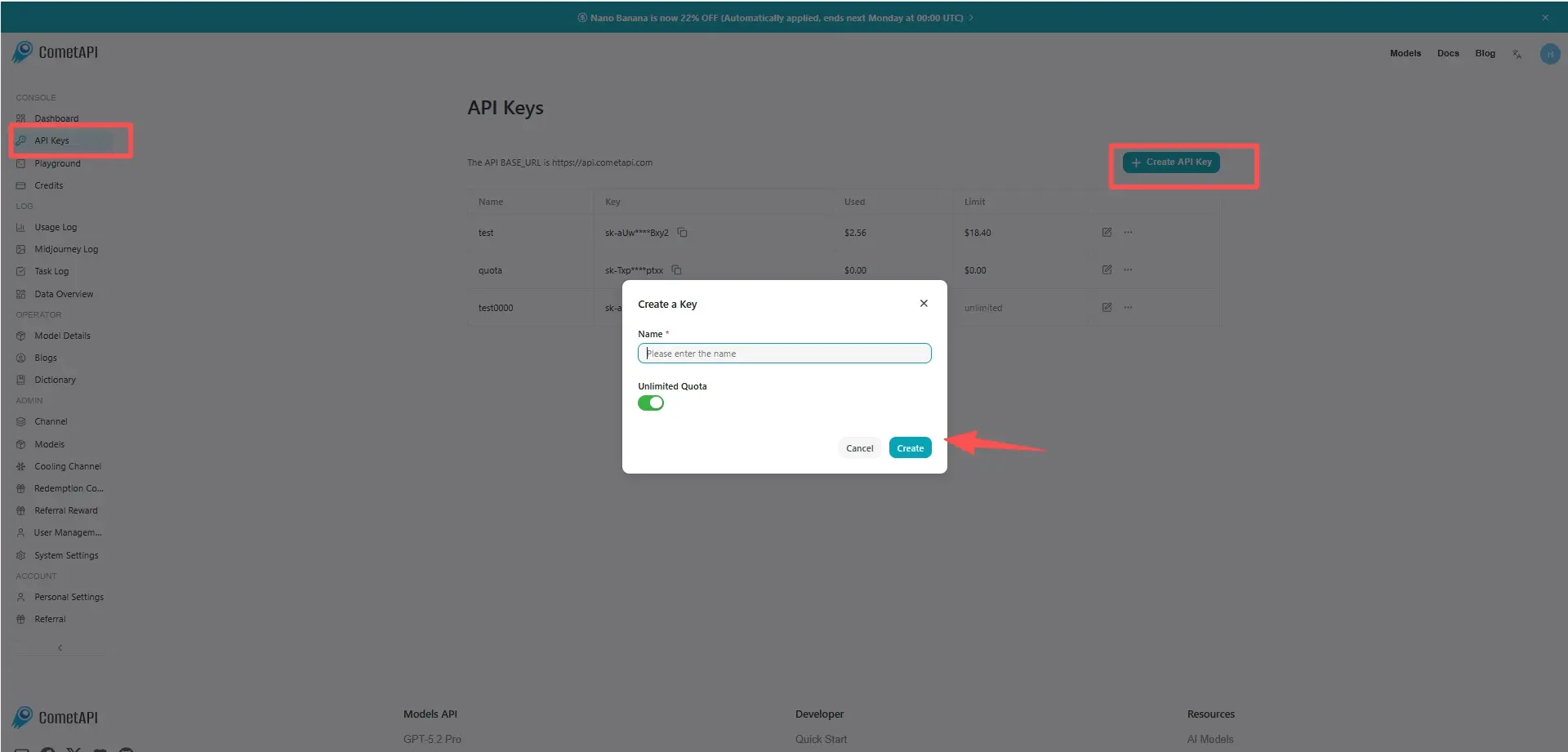
cometapi-key

Step 2: Send Requests to MiniMax-2.7 API

Select the “minimax-2.7” endpoint to send the API request and set the request body. The request method and request body are obtained from our website API doc. Our website also provides Apifox test for your convenience. Replace <YOUR_API_KEY> with your actual CometAPI key from your account. base url is Chat Completions .

Insert your question or request into the content field—this is what the model will respond to . Process the API response to get the generated answer.

Step 3: Retrieve and Verify Results

Process the API response to get the generated answer. After processing, the API responds with the task status and output data.

FAQ

Can MiniMax-M2.7 handle long coding sessions in the MiniMax API?

Yes. The official text-generation docs list MiniMax-M2.7 with a 204,800-token context window, which makes it suitable for long prompts, multi-file coding work, and extended agent sessions.

Is MiniMax-M2.7 good for real-world software engineering tasks?

Yes. MiniMax says M2.7 performs strongly on end-to-end project delivery, log analysis, bug troubleshooting, code security, and machine learning tasks, and it reports 56.22% on SWE-Pro.

When should I use MiniMax-M2.7 instead of MiniMax-M2.5?

Use MiniMax-M2.7 when you want the newer flagship text model in MiniMax’s lineup for programming, tool calling, search, and office productivity. MiniMax-M2.5 is the prior high-end model, while M2.7 is the one the docs highlight for the strongest overall text-model positioning.

What is the MiniMax-M2.7-highspeed variant for?

MiniMax-M2.7-highspeed keeps the same 204,800-token context window and model positioning, but MiniMax documents it as faster and more agile, with output speed of about 100 tps instead of about 60 tps.

Can MiniMax-M2.7 edit documents and spreadsheets well?

Yes. MiniMax’s official materials say M2.7 improved complex editing across Excel, PowerPoint, and Word, especially multi-round revisions and high-fidelity edits, and it reports a GDPval-AA ELO of 1495.

How do I integrate MiniMax-M2.7 with coding tools like Claude Code or Cline?

M2.7 configured through the MiniMax API provider, with region-specific endpoints and the model name MiniMax-M2.7. The same guide includes setup paths for Claude Code, OpenCode, Kilo Code, Cline, Roo Code, Grok CLI, and Codex CLI.

Does MiniMax-M2.7 work well for agent workflows?

Yes. MiniMax positions M2.7 for programming, tool calling, search, and complex task scenarios, and the coding-tool guide specifically frames it for agent-style developer workflows and terminal-integrated tools.

Features for MiniMax-M2.7

Explore the key features of MiniMax-M2.7, designed to enhance performance and usability. Discover how these capabilities can benefit your projects and improve user experience.

Pricing for MiniMax-M2.7

Explore competitive pricing for MiniMax-M2.7, designed to fit various budgets and usage needs. Our flexible plans ensure you only pay for what you use, making it easy to scale as your requirements grow. Discover how MiniMax-M2.7 can enhance your projects while keeping costs manageable.
Comet Price (USD / M Tokens)Official Price (USD / M Tokens)Discount
Input:$0.24/M
Output:$0.96/M
Input:$0.3/M
Output:$1.2/M
-20%

Sample code and API for MiniMax-M2.7

Access comprehensive sample code and API resources for MiniMax-M2.7 to streamline your integration process. Our detailed documentation provides step-by-step guidance, helping you leverage the full potential of MiniMax-M2.7 in your projects.
POST
/v1/chat/completions
Python
JavaScript
Curl
from openai import OpenAI
import os

# Get your CometAPI key from https://api.cometapi.com/console/token, and paste it here
COMETAPI_KEY = os.environ.get("COMETAPI_KEY") or "<YOUR_COMETAPI_KEY>"
BASE_URL = "https://api.cometapi.com/v1"

client = OpenAI(base_url=BASE_URL, api_key=COMETAPI_KEY)

completion = client.chat.completions.create(
    model="minimax-m2.7",
    messages=[
        {"role": "system", "content": "You are a helpful assistant."},
        {"role": "user", "content": "Hello!"},
    ],
)

print(completion.choices[0].message.content)

Python Code Example

from openai import OpenAI
import os

# Get your CometAPI key from https://api.cometapi.com/console/token, and paste it here
COMETAPI_KEY = os.environ.get("COMETAPI_KEY") or "<YOUR_COMETAPI_KEY>"
BASE_URL = "https://api.cometapi.com/v1"

client = OpenAI(base_url=BASE_URL, api_key=COMETAPI_KEY)

completion = client.chat.completions.create(
    model="minimax-m2.7",
    messages=[
        {"role": "system", "content": "You are a helpful assistant."},
        {"role": "user", "content": "Hello!"},
    ],
)

print(completion.choices[0].message.content)

JavaScript Code Example

import OpenAI from "openai";

// Get your CometAPI key from https://api.cometapi.com/console/token, and paste it here
const api_key = process.env.COMETAPI_KEY || "<YOUR_COMETAPI_KEY>";
const base_url = "https://api.cometapi.com/v1";

const openai = new OpenAI({
  apiKey: api_key,
  baseURL: base_url,
});

const completion = await openai.chat.completions.create({
  model: "minimax-m2.7",
  messages: [
    { role: "system", content: "You are a helpful assistant." },
    { role: "user", content: "Hello!" },
  ],
});

console.log(completion.choices[0].message.content);

Curl Code Example

# Get your CometAPI key from https://api.cometapi.com/console/token
# Export it as: export COMETAPI_KEY="your-key-here"
curl https://api.cometapi.com/v1/chat/completions \
  -H "Content-Type: application/json" \
  -H "Authorization: Bearer $COMETAPI_KEY" \
  -d '{
    "model": "minimax-m2.7",
    "messages": [
      {
        "role": "system",
        "content": "You are a helpful assistant."
      },
      {
        "role": "user",
        "content": "Hello!"
      }
    ]
  }'

More Models

C

Claude Opus 4.7

Input:$4/M
Output:$20/M
Mô hình thông minh nhất cho tác tử và lập trình
A

Claude Sonnet 4.6

Input:$2.4/M
Output:$12/M
Claude Sonnet 4.6 is our most capable Sonnet model yet. It’s a full upgrade of the model’s skills across coding, computer use, long-context reasoning, agent planning, knowledge work, and design. Sonnet 4.6 also features a 1M token context window in beta.
X

Grok 4.3

Input:$1/M
Output:$2/M
Xuất sắc trong suy luận tác nhân, công việc tri thức và sử dụng công cụ.
O

GPT 5.5 Pro

Input:$24/M
Output:$144/M
一款專為極其複雜的邏輯與專業需求而設計的先進模型,代表深度推理與精準分析能力的最高標準。
O

GPT 5.5

Input:$4/M
Output:$24/M
A next-generation multimodal flagship model balancing exceptional performance with efficient response, dedicated to providing comprehensive and stable general-purpose AI services.
O

GPT Image 2 ALL

Per Request:$0.04
GPT Image 2 is openai state-of-the-art image generation model for fast, high-quality image generation and editing. It supports flexible image sizes and high-fidelity image inputs.

Related Blog

How Much Does OpenClaw Cost in 2026? Complete Pricing Breakdown
May 7, 2026
openclaw

How Much Does OpenClaw Cost in 2026? Complete Pricing Breakdown

OpenClaw’s core software is 100% free (MIT license). Real-world monthly costs range from $0–$13 for light personal use** (free-tier hosting + cheap models) to **$25–$100 for small teams and $100–$200+ for heavy automation. The official OpenClaw Cloud managed plan is a flat $59/month ($29.50 first month). API tokens are the biggest variable—smart optimization can slash them by 90%.
MiniMax-M2.7 Explained: Features, Benchmarks, Access & Price
Mar 19, 2026
minimax-m2-7

MiniMax-M2.7 Explained: Features, Benchmarks, Access & Price

MiniMax-M2.7 is the evolution in MiniMax’s M2-series large language models (LLMs), designed for high-efficiency reasoning, coding, and agentic workflows. Building on the success of M2 and M2.5, it introduces improvements in batch generation, cost efficiency, and scalable API deployment (e.g., via CometAPI). It targets enterprise AI use cases including automation, multi-step reasoning, and large-scale content generation.