ModelsPricingEnterprise
500+ AI Model API, All In One API.Just In CometAPI
Models API
Developer
Quick StartDocumentationAPI Dashboard
Company
About usEnterprise
Resources
AI ModelsBlogChangelogSupport
Terms of ServicePrivacy Policy
© 2026 CometAPI · All rights reserved
Home/Models/OpenAI/GPT-5.4 nano
O

GPT-5.4 nano

Input:$0.16/M
Output:$1/M
Context:400,000
Max Output:128,000
GPT-5.4 nano is designed for tasks where speed and cost matter most like classification, data extraction, ranking, and sub-agents.
New
Commercial Use
Playground
Overview
Features
Pricing
API
Versions

Technical Specifications of GPT-5.4 Nano

ItemGPT-5.4 Nano (estimated from official + cross-validation)
Model familyGPT-5.4 series (ultra-lightweight “nano” variant)
ProviderOpenAI
Input typesText
Output typesText
Context window128,000 – 200,000 tokens (range based on nano tier patterns)
Max output tokens32,000 – 64,000 tokens (estimated)
Knowledge cutoff~May 31, 2024 (inherited mini/nano lineage)
Reasoning supportLimited (optimized for efficiency over depth)
Tool supportBasic function calling (limited agent capabilities)
PositioningUltra-low-cost, high-throughput inference model

What is GPT-5.4 Nano?

GPT-5.4 Nano is the smallest and most cost-efficient model in the GPT-5.4 family, designed for massive-scale, low-compute workloads. It prioritizes speed, throughput, and cost efficiency over deep reasoning, making it ideal for simple, repeatable tasks.

Unlike GPT-5.4 or GPT-5.4 Mini, Nano is optimized for high-frequency API usage, where millions of requests must be processed quickly and cheaply.


Key Features of GPT-5.4 Nano

  • Ultra-low latency inference: Designed for real-time pipelines and high-QPS systems
  • Extreme cost efficiency: Ideal for large-scale deployments (classification, tagging, routing)
  • Lightweight reasoning: Handles simple instructions reliably but not deep chains
  • High throughput optimization: Built for batch processing and parallel workloads
  • Stable structured output: Works well for JSON formatting, extraction, and labeling tasks
  • Pipeline-friendly design: Commonly used as a “worker model” in multi-model architectures

Benchmark Performance of GPT-5.4 Nano

  • Not positioned for frontier benchmarks (e.g., SWE-Bench, GPQA)
  • Optimized for:
    • Classification accuracy consistency
    • Structured output reliability
    • Latency benchmarks (substantially faster than Mini/Pro tiers)
  • Typically achieves high precision on narrow tasks but significantly lower performance on reasoning-heavy benchmarks

👉 If you're wondering whether to use the GPT-5.4 Nano or Mini, the key difference is: GPT-5.4 Nano excels in efficiency benchmarks, not reasoning leaderboards.


GPT-5.4-Nano vs Other Models

ModelStrengthContext WindowBest Use Case
GPT-5.4Maximum intelligence~1M tokensComplex reasoning, research
GPT-5.4 MiniBalanced performance + speed~400K tokensCoding, agents
GPT-5.4 NanoFastest + cheapest~400K tokensClassification, extraction
GPT-5 NanoOlder nano baseline~400K tokensBasic NLP tasks

👉 Key takeaway:

  • Use Nano for scale
  • Use Mini for balanced intelligence
  • Use Full/Pro for complex reasoning

Limitations of GPT-5.4 Nano

  • Poor performance on multi-step reasoning or complex logic tasks
  • Limited effectiveness in code generation or advanced analysis
  • Reduced multimodal capability (primarily text-focused)
  • Not suitable for decision-critical or high-accuracy reasoning tasks

Representative Use Cases

  1. Text classification & tagging — sentiment, categories, moderation
  2. Data extraction pipelines — structured JSON output at scale
  3. Routing & orchestration — decide which model/tool to call next
  4. Search indexing & preprocessing — chunk labeling, metadata generation
  5. High-volume automation tasks — millions of lightweight API calls

How to access GPT-5.4 Nano API

Step 1: Sign Up for API Key

Log in to cometapi.com. If you are not our user yet, please register first. Sign into your CometAPI console. Get the access credential API key of the interface. Click “Add Token” at the API token in the personal center, get the token key: sk-xxxxx and submit.
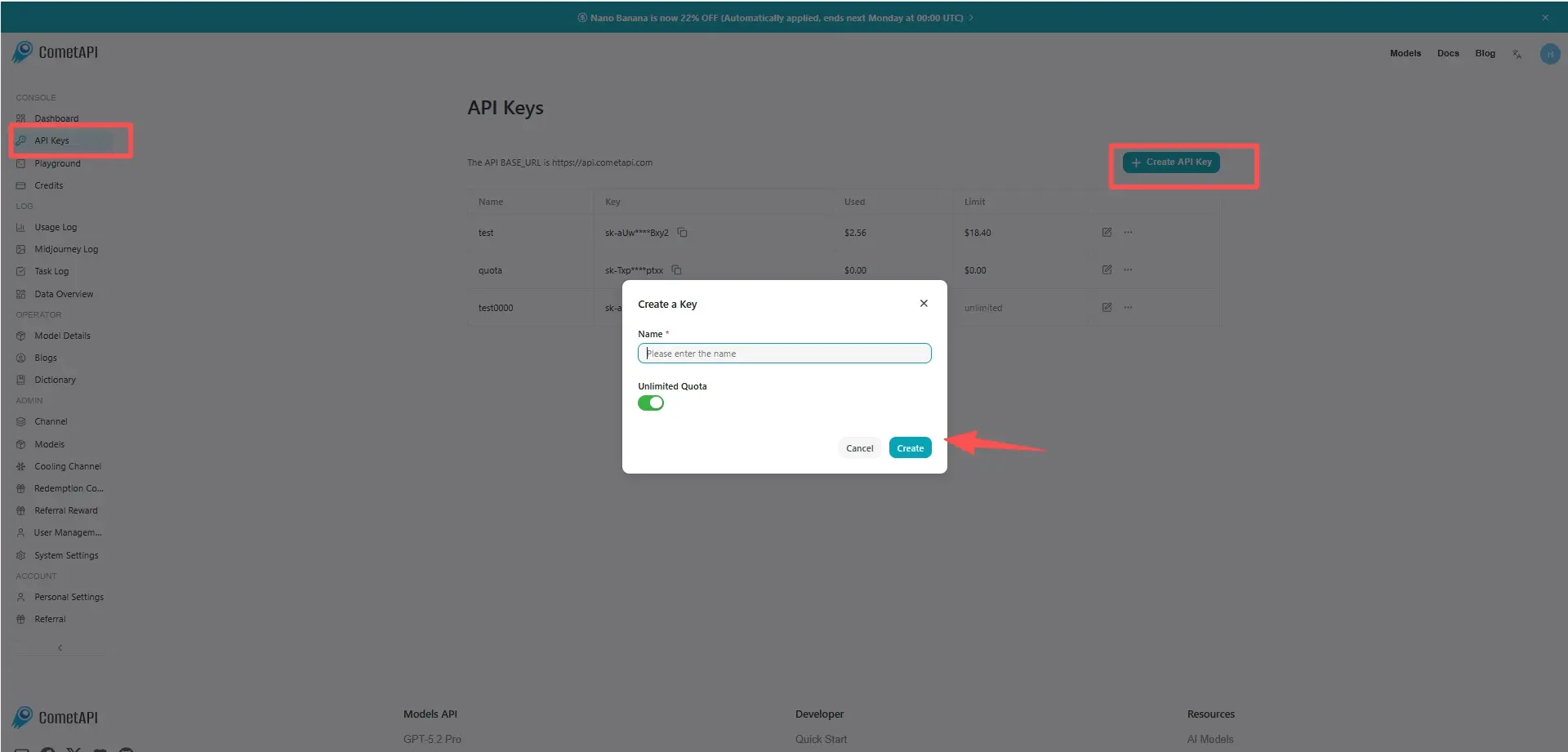
cometapi-key

Step 2: Send Requests to GPT-5.4 Nano API

Select the “gpt-5.4-nano” endpoint to send the API request and set the request body. The request method and request body are obtained from our website API doc. Our website also provides Apifox test for your convenience. Replace <YOUR_API_KEY> with your actual CometAPI key from your account. base url is Chat Completions and Responses.

Insert your question or request into the content field—this is what the model will respond to . Process the API response to get the generated answer.

Step 3: Retrieve and Verify Results

Process the API response to get the generated answer. After processing, the API responds with the task status and output data.

FAQ

What tasks is GPT-5.4 Nano API best suited for?

GPT-5.4 Nano is best suited for high-volume tasks like classification, tagging, routing, and structured data extraction where speed and cost efficiency are critical.

How does GPT-5.4 Nano compare to GPT-5.4 Mini?

GPT-5.4 Nano is significantly faster and cheaper but has much weaker reasoning and coding capabilities compared to GPT-5.4 Mini.

Can GPT-5.4 Nano API handle complex reasoning or multi-step workflows?

No, GPT-5.4 Nano is not designed for deep reasoning and performs poorly on complex multi-step tasks compared to larger models.

Is GPT-5.4 Nano API suitable for real-time high-throughput systems?

Yes, it is optimized for ultra-low latency and high throughput, making it ideal for real-time pipelines and large-scale API workloads.

Does GPT-5.4 Nano support structured outputs like JSON?

Yes, GPT-5.4 Nano is highly effective at generating consistent structured outputs such as JSON for extraction and labeling tasks.

When should I use GPT-5.4 Nano instead of GPT-5.4 or Mini?

Use GPT-5.4 Nano when cost and speed matter more than reasoning quality, especially in simple, repeatable tasks at scale.

What are the limitations of GPT-5.4 Nano API?

Its main limitations include weak reasoning ability, limited coding performance, and reduced effectiveness for complex or decision-critical applications.

Features for GPT-5.4 nano

Explore the key features of GPT-5.4 nano, designed to enhance performance and usability. Discover how these capabilities can benefit your projects and improve user experience.

Pricing for GPT-5.4 nano

Explore competitive pricing for GPT-5.4 nano, designed to fit various budgets and usage needs. Our flexible plans ensure you only pay for what you use, making it easy to scale as your requirements grow. Discover how GPT-5.4 nano can enhance your projects while keeping costs manageable.
Comet Price (USD / M Tokens)Official Price (USD / M Tokens)Discount
Input:$0.16/M
Output:$1/M
Input:$0.2/M
Output:$1.25/M
-20%

Sample code and API for GPT-5.4 nano

Access comprehensive sample code and API resources for GPT-5.4 nano to streamline your integration process. Our detailed documentation provides step-by-step guidance, helping you leverage the full potential of GPT-5.4 nano in your projects.
POST
/v1/chat/completions
POST
/v1/responses
Python
JavaScript
Curl
from openai import OpenAI
import os

# Get your CometAPI key from https://api.cometapi.com/console/token, and paste it here
COMETAPI_KEY = os.environ.get("COMETAPI_KEY") or "<YOUR_COMETAPI_KEY>"
BASE_URL = "https://api.cometapi.com/v1"

client = OpenAI(base_url=BASE_URL, api_key=COMETAPI_KEY)

response = client.responses.create(
    model="gpt-5.4-nano",
    input="How much gold would it take to coat the Statue of Liberty in a 1mm layer?",
    reasoning={"effort": "none"},
)

print(response.output_text)

Python Code Example

from openai import OpenAI
import os

# Get your CometAPI key from https://api.cometapi.com/console/token, and paste it here
COMETAPI_KEY = os.environ.get("COMETAPI_KEY") or "<YOUR_COMETAPI_KEY>"
BASE_URL = "https://api.cometapi.com/v1"

client = OpenAI(base_url=BASE_URL, api_key=COMETAPI_KEY)

response = client.responses.create(
    model="gpt-5.4-nano",
    input="How much gold would it take to coat the Statue of Liberty in a 1mm layer?",
    reasoning={"effort": "none"},
)

print(response.output_text)

JavaScript Code Example

import OpenAI from "openai";

// Get your CometAPI key from https://api.cometapi.com/console/token, and paste it here
const COMETAPI_KEY = process.env.COMETAPI_KEY || "<YOUR_COMETAPI_KEY>";
const BASE_URL = "https://api.cometapi.com/v1";

const client = new OpenAI({
  apiKey: COMETAPI_KEY,
  baseURL: BASE_URL,
});

const response = await client.responses.create({
  model: "gpt-5.4-nano",
  input: "How much gold would it take to coat the Statue of Liberty in a 1mm layer?",
  reasoning: {
    effort: "none",
  },
});

console.log(response.output_text);

Curl Code Example

#!/usr/bin/env bash
# Get your CometAPI key from https://api.cometapi.com/console/token
# Export it as: export COMETAPI_KEY="your-key-here"

response=$(curl --silent --location --request POST "https://api.cometapi.com/v1/responses" \
  --header "Authorization: Bearer $COMETAPI_KEY" \
  --header "Content-Type: application/json" \
  --header "Accept: application/json" \
  --data-raw '{
    "model": "gpt-5.4-nano",
    "input": "How much gold would it take to coat the Statue of Liberty in a 1mm layer?",
    "reasoning": {
      "effort": "none"
    }
  }')

if command -v jq >/dev/null 2>&1; then
  printf '%s\n' "$response" | jq -r '(
    [
      .output[]?
      | select(.type == "message")
      | .content[]?
      | select(.type == "output_text")
      | .text
    ][0]
  ) // .output_text // .'
else
  printf '%s\n' "$response"
fi

Versions of GPT-5.4 nano

The reason GPT-5.4 nano has multiple snapshots may include potential factors such as variations in output after updates requiring older snapshots for consistency, providing developers a transition period for adaptation and migration, and different snapshots corresponding to global or regional endpoints to optimize user experience. For detailed differences between versions, please refer to the official documentation.
version
gpt-5.4-nano
gpt-5.4-nano-2026-03-17

More Models

C

Claude Opus 4.7

Input:$3/M
Output:$15/M
Claude Opus 4.7 is a hybrid reasoning model designed specifically for frontier-level coding, AI agents, and complex multi-step professional work. Unlike lighter models (e.g., Sonnet or Haiku variants), Opus 4.7 prioritizes depth, consistency, and autonomy on the hardest tasks.
A

Claude Sonnet 4.6

Input:$2.4/M
Output:$12/M
Claude Sonnet 4.6 is our most capable Sonnet model yet. It’s a full upgrade of the model’s skills across coding, computer use, long-context reasoning, agent planning, knowledge work, and design. Sonnet 4.6 also features a 1M token context window in beta.
O

GPT 5.5 Pro

Input:$24/M
Output:$144/M
An advanced model engineered for extremely complex logic and professional demands, representing the highest standard of deep reasoning and precise analytical capabilities.
O

GPT 5.5

Input:$4/M
Output:$24/M
A next-generation multimodal flagship model balancing exceptional performance with efficient response, dedicated to providing comprehensive and stable general-purpose AI services.
O

GPT Image 2 ALL

Per Request:$0.04
GPT Image 2 is openai state-of-the-art image generation model for fast, high-quality image generation and editing. It supports flexible image sizes and high-fidelity image inputs.
O

GPT 5.5 ALL

Input:$4/M
Output:$24/M
GPT-5.5 excels in code writing, online research, data analysis, and cross-tool operations. The model not only improves its autonomy in handling complex multi-step tasks but also significantly improves reasoning capabilities and execution efficiency while maintaining the same latency as its predecessor, marking an important step towards automated office automation in AI.

Related Blog

Can ChatGPT Generate Music in 2026? The Ultimate Guide
Apr 2, 2026

Can ChatGPT Generate Music in 2026? The Ultimate Guide

ChatGPT cannot directly generate audio files, vocals, or playable music tracks in 2026. It excels as a creative collaborator for lyrics, song structure, chord progressions, and optimized prompts. However, by combining ChatGPT + Suno v5.5 + CometAPI, anyone can create full professional songs with realistic vocals in minutes.
GPT 5.4 Mini and Nano are available in CometAPI: What are they bring
Mar 18, 2026

GPT 5.4 Mini and Nano are available in CometAPI: What are they bring

GPT-5.4 Mini and GPT-5.4 Nano are OpenAI’s new compact variants of its GPT-5.4 frontier family: Mini targets a best-in-class performance/latency tradeoff for coding, multimodal UI tasks, and subagent workloads; Nano targets ultra-low cost and latency for classification, extraction, ranking and massively parallel subagents. Mini offers near-frontier accuracy on many developer benchmarks while running >2× faster than previous minis; Nano is significantly cheaper per token and ideal where throughput and responsiveness matter most. These models are live in the API (GPT 5.4 Mini and Nano are available in CometAPI).
Unpacking OpenAI’s Agents SDK: A Guide
Mar 11, 2025
agents-sdk
open-ai
responses-api

Unpacking OpenAI’s Agents SDK: A Guide

OpenAI is introducing several new offerings: Responses API, built-in tools for web and file search, a computer use tool and the open-source Agents SDK. While