Spécifications techniques de GLM-5-Turbo
| Élément | GLM-5-Turbo (estimé / sortie anticipée) |
|---|---|
| Famille de modèles | GLM-5 (variante Turbo – optimisée pour faible latence) |
| Fournisseur | Zhipu AI (Z.ai) |
| Architecture | Mélange d'experts (MoE) avec attention clairsemée |
| Types d'entrée | Texte |
| Types de sortie | Texte |
| Fenêtre de contexte | ~200,000 jetons |
| Jetons de sortie max | Jusqu'à ~128,000 (rapports précoces) |
| Objectif principal | Flux de travail d'agents, utilisation d'outils, inférence rapide |
| Statut de publication | Expérimental / partiellement à code fermé |
Qu'est-ce que GLM-5-Turbo
GLM-5-Turbo est une variante optimisée pour la latence de la famille de modèles GLM-5, conçue spécifiquement pour les flux de travail d'agents de niveau production et les applications en temps réel. Il s'appuie sur l'architecture MoE à grande échelle de GLM-5 (~745B paramètres) et déplace l’accent vers la vitesse, la réactivité et la fiabilité de l’orchestration des outils plutôt que la profondeur de raisonnement maximale.
Contrairement au GLM-5 de base (qui vise des performances de pointe en raisonnement et en benchmarks de programmation), la version Turbo est ajustée pour les systèmes interactifs, les pipelines d’automatisation et l’exécution d’outils en plusieurs étapes.
Caractéristiques clés de GLM-5-Turbo
- Inférence à faible latence : Optimisé pour des temps de réponse plus rapides que GLM-5 standard, ce qui le rend adapté aux applications en temps réel.
- Entraînement axé sur les agents : Conçu autour de l’utilisation d’outils et de flux de travail multi-étapes dès la phase d’entraînement, et non pas seulement via un affinage post-entraînement.
- Grande fenêtre de contexte (200K) : Gère de longs documents, des bases de code et des chaînes de raisonnement multi-étapes dans une seule session.
- Fiabilité élevée des appels d’outils : Amélioration de l’exécution de fonctions et du chaînage de flux pour les systèmes d’agents.
- Architecture MoE efficace : N’active qu’un sous-ensemble de paramètres par jeton, équilibrant coût et performances.
- Conception orientée production : Privilégie la stabilité et le débit plutôt que des scores de référence maximaux.
Benchmarks et informations de performance
Bien que les benchmarks spécifiques à GLM-5-Turbo ne soient pas entièrement divulgués, il hérite des caractéristiques de performance de GLM-5 :
- ~77.8% sur SWE-bench Verified (base GLM-5)
- Solides performances en codage agentique et tâches à long horizon
- Compétitif face à des modèles comme Claude Opus et des systèmes de classe GPT en raisonnement et programmation
👉 Turbo sacrifie une partie de la précision maximale au profit d’une inférence plus rapide et d’une meilleure utilisabilité en temps réel.
GLM-5-Turbo vs modèles comparables
| Modèle | Force | Faiblesse | Meilleur cas d’utilisation |
|---|---|---|---|
| GLM-5-Turbo | Rapide, centré sur les agents, contexte étendu | Raisonnement de pointe inférieur au modèle phare | Agents en temps réel, automatisation |
| GLM-5 (base) | Raisonnement solide, scores élevés | Inférence plus lente | Recherche, programmation complexe |
| Modèles de classe GPT-5 | Raisonnement de premier plan, multimodal | Coût plus élevé, fermé | IA de niveau entreprise |
| Claude Opus (dernière version) | Raisonnement fiable, sécurité | Plus lent dans les boucles d’agents | Raisonnement long |
Meilleurs cas d’utilisation
- Agents IA et pipelines d’automatisation (flux de travail multi-étapes)
- Systèmes de chat en temps réel nécessitant une faible latence
- Applications intégrant des outils (API, recherche, appels de fonctions)
- Copilotes développeurs avec boucles de rétroaction rapides
- Applications à contexte étendu comme l’analyse de documents
Comment accéder à l’API GLM-5 Turbo
Étape 1 : Inscrivez-vous pour obtenir une clé API
Connectez-vous à cometapi.com. Si vous n’êtes pas encore utilisateur, veuillez vous inscrire d’abord. Connectez-vous à votre CometAPI console. Obtenez la clé API d’identification d’accès de l’interface. Cliquez sur “Add Token” dans la section des jetons API du centre personnel, obtenez la clé de jeton : sk-xxxxx et soumettez.
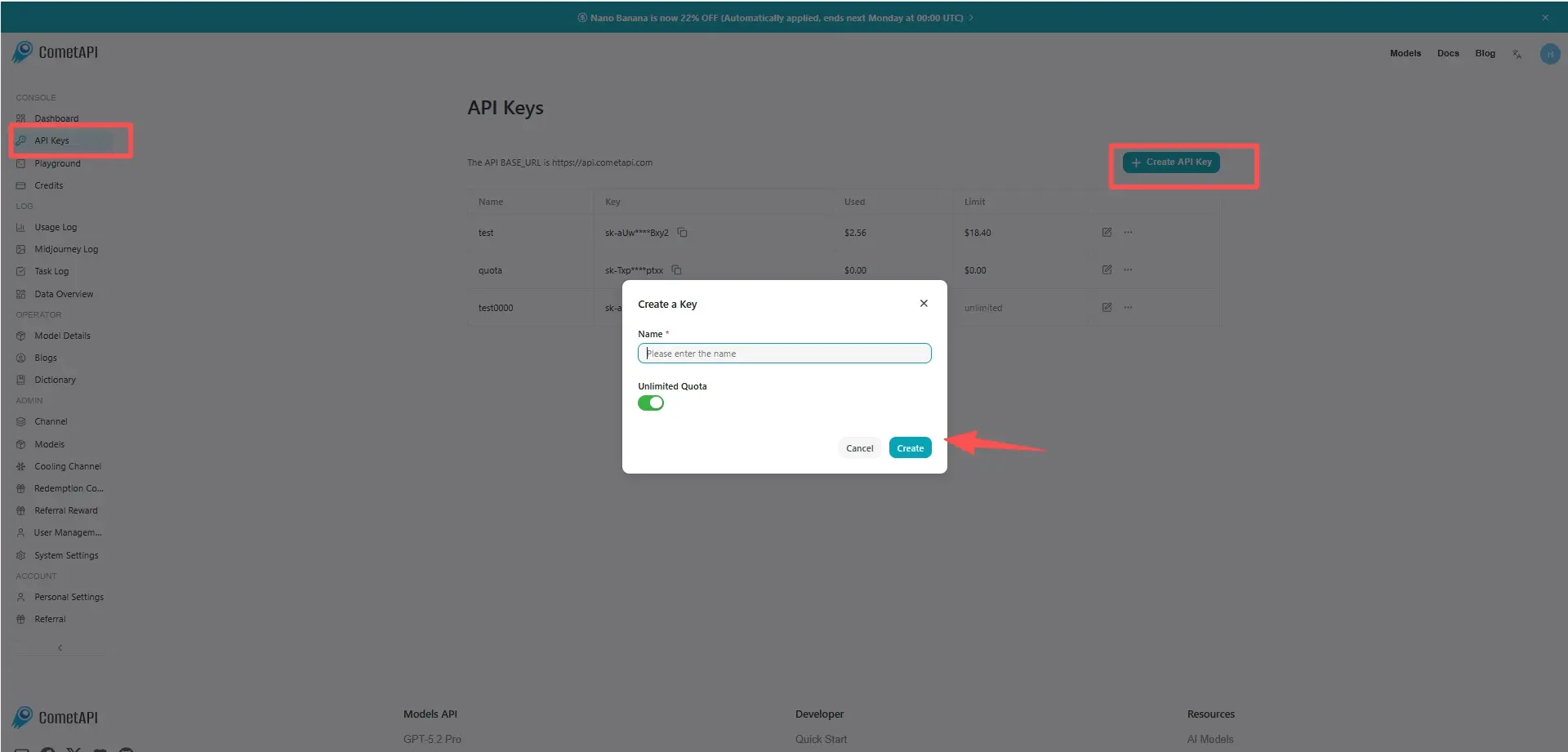
Étape 2 : Envoyer des requêtes à l’API GLM-5 Turbo
Sélectionnez le point de terminaison “glm-5-turbo” pour envoyer la requête API et définissez le corps de la requête. La méthode de requête et le corps de la requête sont obtenus à partir de la documentation API de notre site web. Notre site propose également des tests Apifox pour votre commodité. Remplacez <YOUR_API_KEY> par votre clé CometAPI réelle depuis votre compte. L’URL de base est Chat Completions
Insérez votre question ou votre demande dans le champ content — c’est à cela que le modèle répondra. Traitez la réponse de l’API pour obtenir la réponse générée.
Étape 3 : Récupérer et vérifier les résultats
Traitez la réponse de l’API pour obtenir la réponse générée. Après traitement, l’API renvoie le statut de la tâche et les données de sortie.