Basic features (what it offers)
- Dual inference modes: deepseek-chat (non-thinking / faster) and deepseek-reasoner (thinking / stronger chain-of-thought/agent skills). The UI exposes a “DeepThink” toggle for end users.
- Long context: official materials and community reports emphasize a 128k token context window for the V3 family lineage. This enables end-to-end processing of very long documents.
- Improved tool/agent handling: post-training optimization targeted at reliable tool calling, multi-step agent workflows, and plugin/tool integrations.
Technical details (architecture, training, and implementation)
Training corpus & long-context engineering. The Deepseek V3.1 update emphasizes a two-phase long-context extension on top of earlier V3 checkpoints: public notes indicate major additional tokens devoted to 32k and 128k extension phases (DeepSeek reports hundreds of billions of tokens used in the extension steps). The release also updated the tokenizer configuration to support the larger context regimes.
Model size and micro-scaling for inference. Public and community reports give somewhat different parameter tallies (a result common to new releases): third-party indexers and mirrors list ~671B parameters (37B active) in some runtime descriptions, while other community summaries report ~685B as the hybrid reasoning architecture’s nominal size.
Inference modes & engineering tradeoffs. Deepseek V3.1 exposes two pragmatic inference modes: deepseek-chat (optimized for standard turn-based chat, lower latency) and deepseek-reasoner (a “thinking” mode that prioritizes chain-of-thought and structured reasoning).
Limitations & risks
- Benchmark maturity & reproducibility: many performance claims are early, community-driven, or selective. Independent, standardized evaluations are still catching up. (Risk: overclaiming).
- Safety & hallucination: like all large LLMs, Deepseek V3.1 is subject to hallucination and harmful-content risks; stronger reasoning modes can sometimes produce confident but incorrect multi-step outputs. Users should apply safety layers and human review on critical outputs. (No vendor or independent source claims elimination of hallucination.)
- Inference cost & latency: the reasoning mode trades latency for capability; for large-scale consumer inference this adds cost. Some commentators note that the market reaction to open, cheap, high-speed models can be volatile.
Common & compelling use cases
- Long-document analysis & summarization: law, R\&D, literature reviews — leverage the 128k token window for end-to-end summaries.
- Agent workflows and tool orchestration: automations that require multi-step tool calls (APIs, search, calculators). Deepseek V3.1’s post-training agent tuning is intended to improve reliability here.
- Code generation & software assistance: early benchmark reports emphasize strong programming performance; suitable for pair-programming, code review, and generation tasks with human oversight.
- Enterprise deployment where cost/latency choice matters: choose chat mode for cheap/faster conversational assistants and reasoner for offline or premium deep reasoning tasks.
- How to access deepseek-v3.1 API
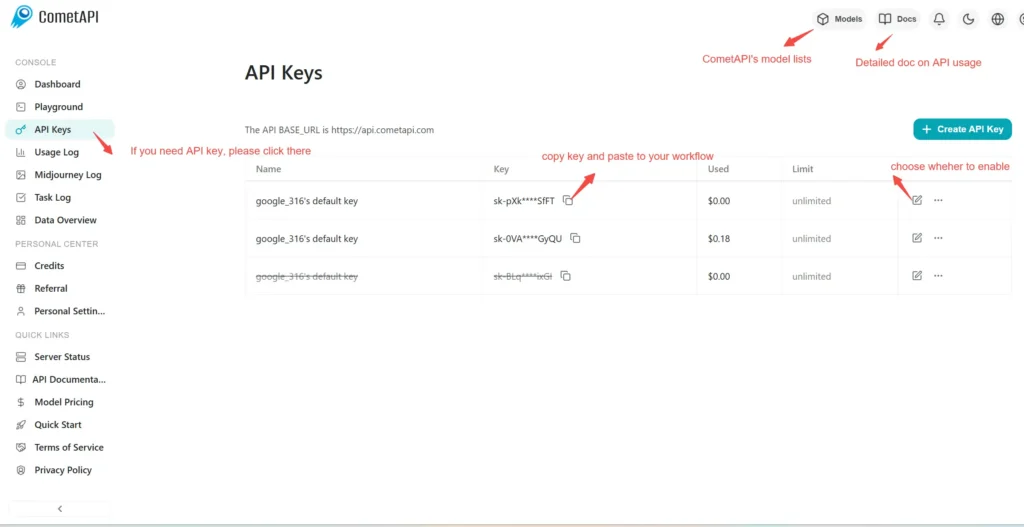
Step 1: Sign Up for API Key
Log in to cometapi.com. If you are not our user yet, please register first. Sign into your CometAPI console. Get the access credential API key of the interface. Click “Add Token” at the API token in the personal center, get the token key: sk-xxxxx and submit.
Step 2: Send Requests to deepseek-v3.1 API
Select the “deepseek-v3.1” endpoint to send the API request and set the request body. The request method and request body are obtained from our website API doc. Our website also provides Apifox test for your convenience. Replace <YOUR_API_KEY> with your actual CometAPI key from your account. base url is Chat format.
Insert your question or request into the content field—this is what the model will respond to . Process the API response to get the generated answer.
Step 3: Retrieve and Verify Results
Process the API response to get the generated answer. After processing, the API responds with the task status and output data.