
ByteDance’s Seedream 5.0 arrives as a clear iterative leap in image-generation and image-editing capabilities aimed at professional creators and product workflows. It ships with improved prompt-following, better multi-image consistency, and integrations that make it accessible inside creative apps (notably CapCut and CometAPI endpoints). Seedream 5.0 competes directly with Google’s Nano Banana Pro and OpenAI’s GPT Image 1.5; each model has different design trade-offs — Seedream emphasizes intent-following and editorial control, Nano Banana Pro focuses on photoreal fidelity, and GPT Image 1.5 positions itself on speed + strong editing fidelity.
What is new in Seedream 5.0?
Better prompt understanding and “intention-aware” generation
Seedream 5.0 tightens the link between natural-language instructions and the model’s action plan for the image (layout, spatial relationships, and sequencing). ByteDance’s internal evaluation (their “MagicBench”) reports marked improvements across prompt adherence, alignment and multi-image editing compared with earlier Seedream versions. Independent reviewers find the model especially strong at cinematic composition and atmospheric lighting while keeping edits faithful to instructions.
Real-time web-informed rendering (preview / optional)
One of the headlining additions for 5.0 is an optional real-time retrieval capability: the model can consult recent web data to ground certain outputs (brand logos, current event references, up-to-date text for news visuals). That reduces hallucinated logos/landmarks when the prompt asks for current-event visuals — handy for social-media work. (This feature is opt-in in platform rollouts; it’s not a free pass for unrestricted web copying — platform constraints and filtering apply.)
Higher multi-image consistency & improved text rendering
Seedream 5.0 extends Seedream 4.x’s improvements in consistent subject rendering across multiple frames or variations (useful for product catalogs, character sheets, or A/B creative grids). Text-in-image rendering (for posters, banners, UI mockups) is also improved, a capability that many image models historically struggle with. ByteDance’s docs and reviews cite better typographic fidelity and denser text handling.
Integrated editing & resolution options
Like previous Seedream releases, 5.0 exposes both generation (text→image) and editing (image→image, inpainting, background swap) in the same architecture. Enhanced cross-modal understanding helps Seedream maintain identity and lighting when editing or generating multiple frames of the same character or object. The model’s edit controllers better preserve non-edited areas and reproduce complex attributes reliably (letters, time, small numbers) in scene grids.
How can I access and use Seedream 5.0 via CapCut and CometAPI?
CapCut’s JS/GUI path is ideal for creatives, while the CometAPI approach is best for engineers and product teams.
There are two primary access patterns for Seedream 5.0 today:
1) Consumer/creator route — CapCut (no-code / GUI)
CapCut exposes Seedream 5.0 inside its AI tools so creators can generate images directly from the browser or the CapCut app. Typical steps:
- Open CapCut → All Tools → AI Design → choose Seedream 5.0.
- Type a prompt, optionally upload reference images, toggle style or real-time search, then click Generate.
- Use the conversational prompts to refine outputs, then Export. CapCut embeds these workflows into desktop, mobile, and online editors.
CapCut’s UX is ideal when you want fast asset creation for social, marketing, or quick production tasks without writing code. It also means you can iterate visually (select a generated image, ask for a local edit, etc.) and export to common formats.
2) Developer route — CometAPI (programmatic)
If you’re embedding Seedream into an app or automation pipeline, CometAPI provides a single REST gateway to many models, including ByteDance’s Seedream endpoints.
Below are example API snippets illustrating how you might call Seedream (or an equivalent Seedream wrapper offered via an API marketplace). Replace MODEL_ID with the marketplace’s model name and API_KEY with your key.
Example: simple curl (image generation)
#!/bin/bash
# Get your CometAPI key from https://api.cometapi.com/console/token
# Export it as: export COMETAPI_KEY="your-key-here"

curl -s https://api.cometapi.com/v1/images/generations \
  -H "Authorization: Bearer $COMETAPI_KEY" \
  -H "Content-Type: application/json" \
  -d '{
    "model": "doubao-seedream-5-0-260128",
    "prompt": "Generate a series of 4 coherent illustrations focusing on the same corner of a courtyard across the four seasons, presented in a unified style that captures the unique colors, elements, and atmosphere of each season.",
    "size": "2K",
    "response_format": "url",
    "watermark": false,
    "sequential_image_generation": "auto",
    "sequential_image_generation_options": {
      "max_images": 4
    }
  }' | jq -r '.data[]
Example: Python requests (download image)
import os
import requests
import json

# Get your CometAPI key from https://api.cometapi.com/console/token, and paste it here
COMETAPI_KEY = os.environ.get("COMETAPI_KEY") or "<YOUR_COMETAPI_KEY>"
BASE_URL = "https://api.cometapi.com/v1"

headers = {
    "Authorization": f"Bearer {COMETAPI_KEY}",
    "Content-Type": "application/json",
}

payload = {
    "model": "doubao-seedream-5-0-260128",
    "prompt": "Generate a series of 4 coherent illustrations focusing on the same corner of a courtyard across the four seasons, presented in a unified style that captures the unique colors, elements, and atmosphere of each season.",
    "size": "2K",
    "response_format": "url",
    "watermark": False,
    "sequential_image_generation": "auto",
    "sequential_image_generation_options": {
        "max_images": 4
    },
}

response = requests.post(
    f"{BASE_URL}/images/generations", headers=headers, json=payload
)
result = response.json()

for image in result.get("data", []):
    print(f"URL: {image['url']}")
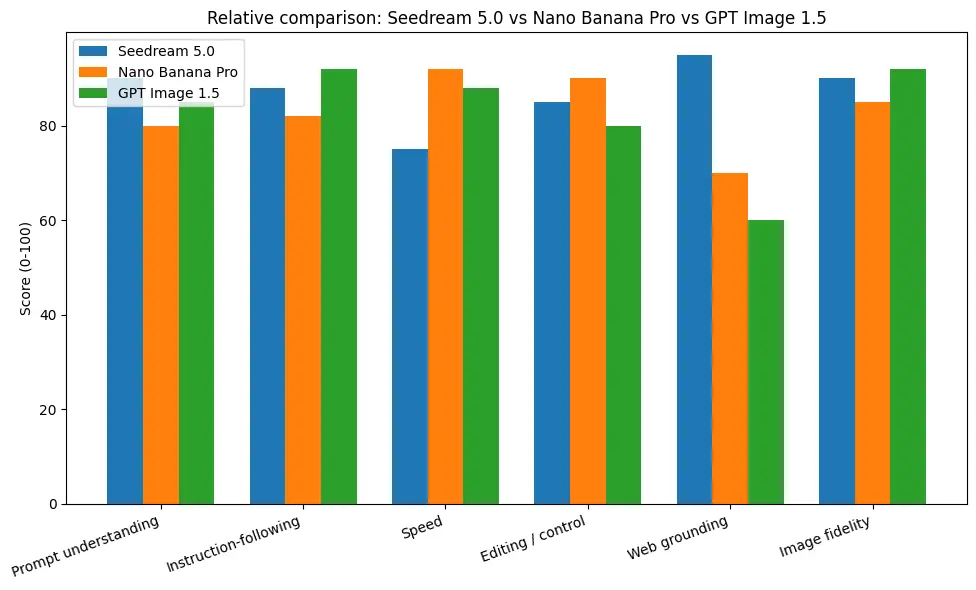
Seedream 5.0 vs Nano Banana Pro vs GPT Image 1.5 — where each model shines
Nano Banana Pro (Google / Gemini)
- Strengths: fast iteration, advanced local editing controls (camera angle, color grading), and a studio-grade editor for photographers and brand teams. Google’s Nano Banana Pro product messaging centers on deliverable control and production speed.
- Typical use cases: editorial photo retouch, quick multi-angle edits, and UX that supports creative studio workflows.
- Tradeoffs: less focus on web grounding and knowledge reasoning compared to Seedream 5.0.
GPT Image 1.5 (OpenAI)
- Strengths: high instruction adherence, polished fidelity, well-documented pricing tiers and throughput, and clear API endpoints for image generation and edits. OpenAI publishes token/image pricing and rates which are helpful when planning production costs.
- Typical use cases: enterprise apps that need consistent instruction-following and predictable pricing/latency (e.g., e-commerce mockups, enterprise creative tooling).
- Tradeoffs: less emphasis on live web grounding; best when prompt clarity and fidelity matter most.
Seedream 5.0 (ByteDance)
- Strengths: web grounding + visual reasoning + editing consistency. The real-time search and multi-step reasoning are natural fits for content that must be accurate and contextually aware (e.g., an infographic with today’s stats, or a poster referencing recent events).
- Typical use cases: education visuals, data visualizations that require current facts, posters for events, and multi-subject editorial content.
- Tradeoffs: Seedream 5.0 Lite is presented as a smaller model with room to scale aesthetics/realism further; ByteDance signals future scaling work for higher structural realism.
How to get the best out of Seedream 5.0
- Guided-scaffold prompts: start with scene layout (“foreground, subject, camera angle”), then style modifiers (“cinematic, f/2.8, dramatic rim light”), then color palette and material details. Seedream responds well to intention-focused scaffolding.
- Use reference images for consistency: Seedream 5.0 supports multiple reference images to lock subject appearance across variants; use a small set of high-quality refs to get consistency.
- Iterative editing: for product shots, iterate with small edits (crop, color balance) rather than wholesale re-generation — this preserves key likeness and speeds up convergence. GPT Image 1.5 and Seedream are both strong in this loop.
- Real-time web grounding: if you enable the web-aware mode, restrict it to cases where current events or current logos matter. Be mindful of brand/copyright constraints (see compliance below).
Example: a real workflow (Seedream + CometAPI + CapCut)
Scenario: you need a promotional poster showing local weather for 5 cities (today) and a skyline image composition — the images and text must reflect current temperatures.
- CometAPI call with real-time search flag (if the Seedream integration supports search via CometAPI; otherwise, fetch data yourself and include it in the prompt). CometAPI’s unified interface can route to Seedream; the model supports multi-step prompts and reference image inputs.
- Prompt example: include the city list and the numeric weather facts (or ask Seedream to search if supported) and request a composite 1920×1080 poster with labeled panels.
- Generate: iterate with local edits (e.g., adjust contrast, swap a panel).
- Export to CapCut for finishing, animation, or video integration — CapCut supports importing generated images directly for multi-slide video posts.
Final verdict
Seedream 5.0 is a meaningful evolution from ByteDance’s Seedream 4.x family: it leans into reasoning, knowledge grounding, and richer editing/layout control — a strong play for creators who want smarter image generation and production workflows inside tools like CapCut. If your priority is studio photorealism or maximum editing precision for complex composites, Google’s Nano Banana Pro remains a top contender; if you need speed and chat-integrated editing, OpenAI’s GPT Image 1.5 is optimized for that workflow. Choose by workflow (CapCut + seeded templates vs. chat + API vs. studio editing pipeline) rather than single metric.
Developers can access Nano Banana Pro, GPT Image 1.5, Seedream 5.0 via CometAPI now.To begin, explore the model’s capabilities in the Playground and consult the API guide for detailed instructions. Before accessing, please make sure you have logged in to CometAPI and obtained the API key. CometAPI offer a price far lower than the official price to help you integrate.
Ready to Go?→ Sign up fo M2.5 today !
If you want to know more tips, guides and news on AI follow us on VK, X and Discord!