สร้างด้วย CometAPIต้องการ API เดียวสำหรับหลายโมเดลใช่ไหมทดสอบเวิร์กโฟลว์ใน Playground แล้วสร้างคีย์ API เมื่อโมเดลและค่าใช้จ่ายเหมาะกับกรณีการใช้งานของคุณ
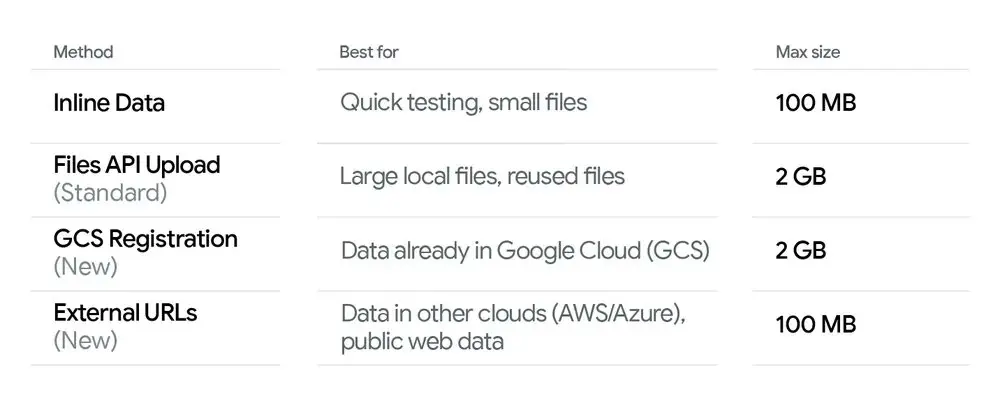
สำคัญที่ต้องทราบว่าแม้เพดานแบบอินไลน์จะเป็น 100MB ความสามารถของ Gemini API ในการประมวลผลชุดข้อมูลขนาดมหึมา (ระดับเทราไบต์) ยังทำได้ผ่าน Files API และการรองรับ External Link ใหม่ ซึ่งช่วยขจัดเพดานสำหรับงานหนักได้จริง
(2) Direct connection to Google Cloud Storage (GCS):
สำหรับข้อมูลที่อยู่ในระบบนิเวศของ Google อยู่แล้ว การผสานทำงานยิ่งแน่นแฟ้นขึ้น คุณสามารถทำ Object Registration ให้กับไฟล์ใน GCS ได้
แทนที่จะอัปโหลด คุณเพียง “ลงทะเบียน” gs:// URI ของไฟล์
กระบวนการนี้แทบจะทันทีเพราะไม่มีการถ่ายโอนข้อมูลจริงระหว่างไคลเอนต์ของคุณกับ API
How do you use the new features? — Usage examples (Python SDK)
ด้านล่างเป็นตัวอย่าง Python แบบซิงโครนัส 3 แบบที่แสดงแพทเทิร์นทั่วไป: (A) อินไลน์ไบต์ (จากไฟล์โลคัล), (B) HTTPS ภายนอกหรือ signed URL, และ (C) อ้างอิง GCS URI (ออบเจ็กต์ที่ลงทะเบียน) โค้ดเหล่านี้ใช้ Google Gen AI Python SDK (google-genai) ปรับชื่อโมเดล การยืนยันตัวตน และตัวแปรสภาพแวดล้อมให้ตรงกับการตั้งค่าของคุณ คุณสามารถใช้คีย์ของ CometAPI เพื่อเข้าถึง Gemini API ซึ่งเป็นแพลตฟอร์มรวม API AI ที่เสนอราคาการเรียก API ที่ถูกกว่าเพื่อช่วยนักพัฒนา
เงื่อนไขเบื้องต้น: pip install --upgrade google-genai และตั้งค่าการยืนยันตัวตน/ตัวแปรสภาพแวดล้อม (สำหรับ Developer API ใช้ API_KEY, สำหรับ Vertex AI ตั้ง GOOGLE_GENAI_USE_VERTEXAI, GOOGLE_CLOUD_PROJECT, GOOGLE_CLOUD_LOCATION)
Example A: Inline bytes (local file → send up to 100 MB)
# Example A: send a local file's bytes inline (suitable up to 100 MB)from google import genaifrom google.genai import types# Create client (Developer API)client = genai.Client(api_key="YOUR_GEMINI_API_KEY")MODEL = "gemini-2.5-flash" # choose model; production models may differfile_path = "large_document.pdf" # local file <= ~100 MBmime_type = "application/pdf"# Read bytes and create an inline Partwith open(file_path, "rb") as f: data = f.read()part = types.Part.from_bytes(data=data, mime_type=mime_type)# Send the file inline with a textual promptresponse = client.models.generate_content( model=MODEL, contents=[ "Please summarize the attached document in one paragraph.", part, ],)print(response.text)client.close()
Example B: External HTTPS / signed URL (Gemini fetches the payload)
# Example B: reference a public HTTPS URL or a signed URL (Gemini fetches it)from google import genaifrom google.genai import typesclient = genai.Client(api_key="YOUR_API_KEY")MODEL = "gemini-2.5-flash"# Public or signed URL to a PDF/image/audio/etc.external_url = "https://example.com/reports/quarterly_report.pdf"# or a pre-signed S3/Azure URL:# external_url = "https://s3.amazonaws.com/yourbucket/obj?X-Amz-..."part = types.Part.from_uri(file_uri=external_url, mime_type="application/pdf")response = client.models.generate_content( model=MODEL, contents=[ "Give me the three key takeaways from this report.", part, ],)print(response.text)client.close()
Example C: Reference a GCS object (gs://) directly
# Example C: reference a GCS file (ensure service account has storage access)from google import genaifrom google.genai import types# For Vertex AI usage, standard practice is to use ADC (Application Default Credentials)client = genai.Client(vertexai=True, project="your-project-id", location="us-central1")MODEL = "gemini-3-pro" # example model idgcs_uri = "gs://my-bucket/path/to/manual.pdf"part = types.Part.from_uri(file_uri=gcs_uri, mime_type="application/pdf")response = client.models.generate_content( model=MODEL, contents=[ "Extract the section titles from the attached manual and list them.", part, ],)print(response.text)client.close()
Notes: การเข้าถึง GCS ต้องมีการตั้งค่า IAM และ service account ที่ถูกต้อง (สิทธิ์ object viewer การยืนยันตัวตนที่เหมาะสม) เมื่อคุณลงทะเบียนหรืออ้างอิงออบเจ็กต์ GCS ให้แน่ใจว่าสภาพแวดล้อมรันไทม์ (Vertex / ADC / service account) มีสิทธิ์ที่จำเป็น
External URL / Signed URL — ดีที่สุดเมื่อไฟล์อยู่ที่อื่น (S3, Azure, เว็บสาธารณะ) ช่วยหลีกเลี่ยงการเคลื่อนย้ายไบต์และลดแบนด์วิดธ์ ใช้ signed URLs สำหรับแอสเซ็ตส่วนตัว
GCS / ออบเจ็กต์ที่ลงทะเบียน — ดีที่สุดเมื่อข้อมูลของคุณอยู่บน Google Cloud อยู่แล้ว และต้องการแพทเทิร์นโปรดักชันที่อ้างอิงคงที่พร้อมการควบคุม IAM
Files API — ใช้สำหรับไฟล์ที่คงอยู่หรือใหญ่มากซึ่งต้องการใช้ซ้ำหลายคำร้อง โปรดทราบโควตาต่อไฟล์และต่อโปรเจ็กต์ รวมถึงนโยบายการคงอยู่/ความเป็นชั่วคราว
ความปลอดภัยและความเป็นส่วนตัว
Signed URLs: ควรสร้าง pre-signed URLs ด้วยอายุสั้นและสิทธิ์แคบ หลีกเลี่ยงการฝังความลับที่มีอายุยืนยาวในคำร้อง
IAM & OAuth: สำหรับการเข้าถึงตรง GCS ตั้งค่า service accounts ตามหลัก least privilege (objectViewer สำหรับสิทธิ์อ่าน) ปฏิบัติตามแนวทางการหมุนคีย์และการบันทึกล็อกขององค์กร