
Most AI apps start with one simple integration.
You pick an LLM provider, add the API key, send a prompt, get a response, and ship the feature.
For a prototype, that is usually enough.
But production is different.
The moment your app depends on a single AI API, your reliability becomes tied to that provider’s uptime, latency, rate limits, and model availability. If the provider slows down, your app feels slow. If the provider returns errors, your users see broken features. If the provider has an outage, your core AI experience may stop working entirely.
That is why AI API failover has become a practical requirement for teams building production-ready LLM applications.
Instead of assuming one provider will always be available, resilient AI apps are designed to switch routes when something goes wrong.
What Is AI API Failover?
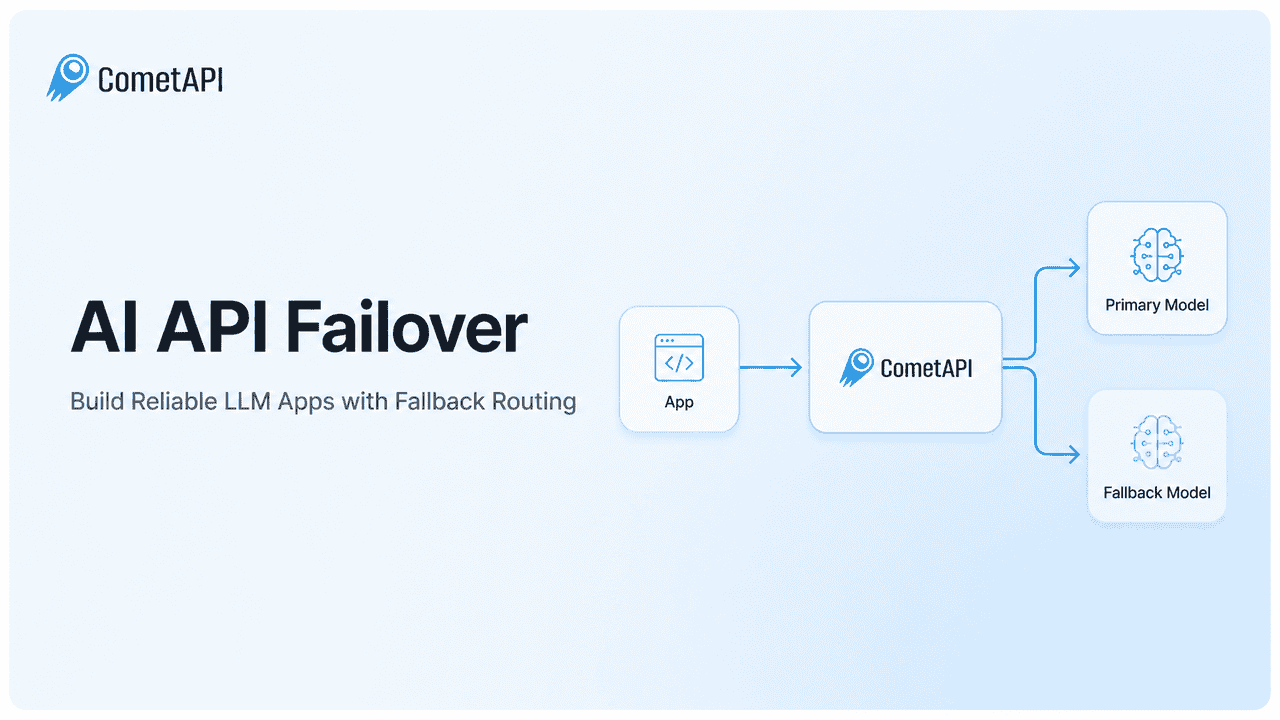
AI API failover is a reliability pattern where your application automatically switches to a backup AI model or provider route when the primary route fails.
A fragile direct integration looks like this:
Your App → Single AI Provider → Single Point of Failure
A more resilient architecture looks like this:
Your App → Unified LLM API Layer → Primary Model → Fallback Model
Your product code still sends one request to one stable interface. Behind the scenes, the infrastructure can route the request to a backup model if the primary route times out, hits rate limits, or returns a server-side error.
The user does not need to know which model handled the request.
They just get a response.
This is the main goal of AI API failover: turn a provider-side failure into a background routing event instead of a user-facing product failure.
Why Single-Provider AI Apps Are Fragile
Many AI products are still built around direct API calls to one provider.
That usually means the app is tightly coupled to:
- One API key
- One SDK
- One response format
- One model list
- One billing system
- One rate limit policy
- One uptime profile
This can work well in development, but it creates risk in production.
Common failure scenarios include:
- Provider outages The AI provider becomes unavailable or partially degraded.
- HTTP 429 rate limits Your app sends more requests than the provider allows.
- 5xx server errors The provider returns temporary backend errors.
- Latency spikes The model responds too slowly for your product experience.
- Model availability changes A model route becomes temporarily unavailable, deprecated, or restricted.
For an AI-native SaaS product, these are not minor backend issues. If users rely on your app to write, code, automate support, summarize data, or make decisions, the LLM is not just a feature.
It is part of the product infrastructure.
When the AI API fails, the product experience fails with it.
Direct Integration vs Unified LLM API Layer
The solution is not to randomly add multiple provider SDKs across your codebase.
That usually creates more complexity, not less.
A better pattern is to place a unified LLM API layer between your application and external model providers.
Instead of this:
Frontend → OpenAI SDKBackend Job → Anthropic SDKAgent Workflow → DeepSeek SDKVideo Feature → Separate Video API
Use this:
Application → Unified API Layer → Multiple Models / Providers
This abstraction gives your app one stable interface while allowing the model layer underneath to change.
With a unified API layer, your app can:
- Switch models without rewriting core business logic
- Add fallback routes when the primary model fails
- Compare model quality and cost more easily
- Reduce vendor lock-in
- Standardize monitoring and error handling
- Add new models faster
For example, your internal model call might stay simple:
await generateText({ messages, model: "gpt-5.6", temperature: 0.7});
Your product logic should not need to care whether the request is served by GPT-5.6, Claude, DeepSeek, Gemini, or another suitable model.
The routing logic belongs in the model infrastructure layer, not scattered across the application.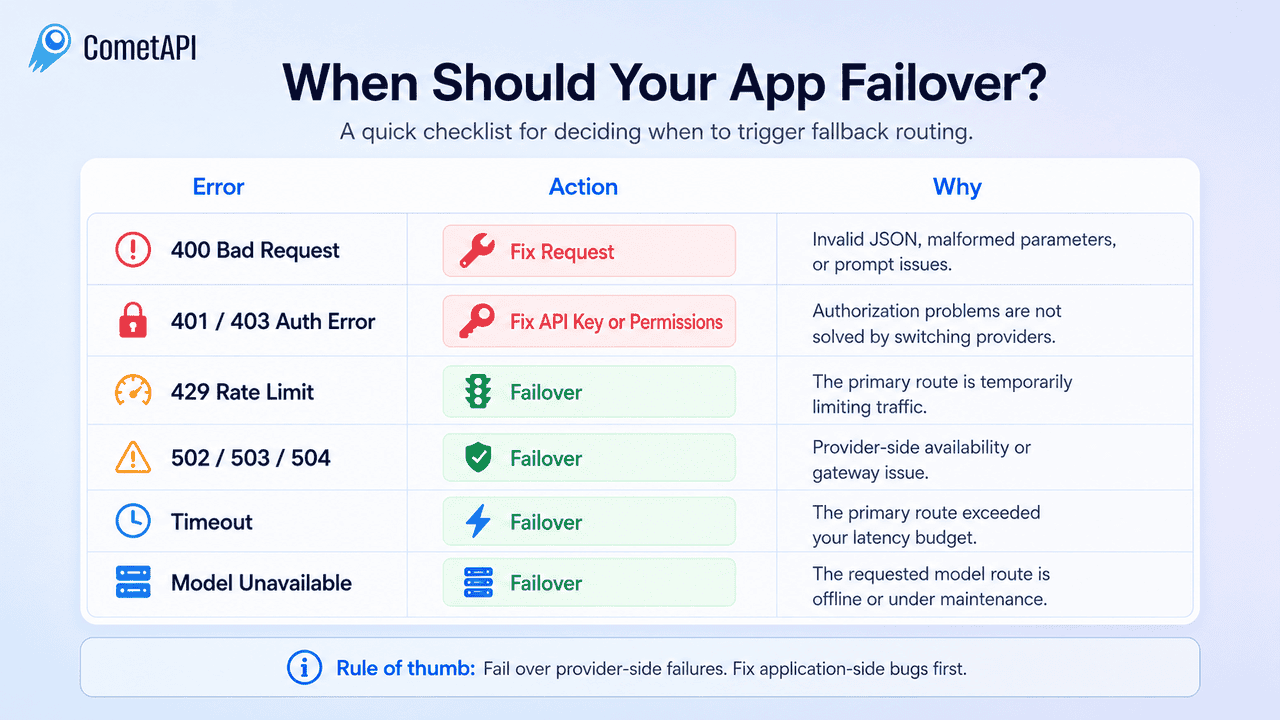
When Should Your App Switch Providers?
A good failover system should be precise.
It should not retry or reroute every failed request blindly. Some errors come from the provider side, while others are caused by your own request format, API key, permissions, or configuration.
A simple rule is:
Fail over provider-side failures. Fix application-side bugs first.
For example, errors like 400 Bad Request, 401 Unauthorized, and 403 Forbidden usually mean something is wrong with your request, authentication, or access permissions. Sending the same broken request to another provider will not solve the problem.
On the other hand, errors like 429 Rate Limit, 502 Bad Gateway, 503 Service Unavailable, 504 Gateway Timeout, request timeouts, or temporary model unavailability are better candidates for automatic fallback routing.
In these cases, the primary route may be overloaded, unavailable, rate-limited, or too slow to meet your latency budget. A backup route can help keep the product experience stable.
The goal is not to hide every error. The goal is to protect users from provider-side failures while keeping application bugs visible to your engineering team.
For HTTP status references, developers can check resources such as MDN’s HTTP 429 documentation or provider-specific API error documentation such as Anthropic API errors.
A good failover system should be precise.
It should not retry everything blindly, because not every error is a provider failure. Some errors are caused by your own request, API key, permissions, or prompt structure.
Do Not Failover These Errors
These errors usually mean something is wrong with your request or configuration:
| Error Type | Should Failover? | Why |
|---|---|---|
| HTTP 400 Bad Request | No | The request format, JSON body, parameters, or prompt structure may be invalid. |
| HTTP 401 Unauthorized | No | The API key may be missing, expired, or incorrect. |
| HTTP 403 Forbidden | No | The account may not have permission to access the model or route. |
Sending the same broken request to another provider will not fix the problem. It may only make debugging harder.
Trigger Failover for These Errors
These are better candidates for automatic fallback routing:
| Error Type | Should Failover? | Why |
|---|---|---|
| Timeout | Yes | The primary route did not respond within your latency budget. |
| HTTP 429 Rate Limit | Yes | The provider is temporarily limiting traffic. |
| HTTP 502 Bad Gateway | Yes | The provider or upstream service may be temporarily unavailable. |
| HTTP 503 Service Unavailable | Yes | The route may be overloaded or down. |
| HTTP 504 Gateway Timeout | Yes | The provider did not respond in time. |
| Model unavailable | Yes | The requested model route may be offline, restricted, or under maintenance. |
A simple rule:
Failover provider-side failures. Do not failover application-side bugs.
For HTTP status references, developers can check resources such as MDN’s HTTP 429 documentation or provider-specific API error documentation such as Anthropic API errors.
Building Resilient AI Apps with Claude Code and Cursor
AI-assisted development tools like Claude Code, Cursor, and GitHub Copilot can help teams build faster.
But there is a major difference between code that works locally and code that survives production traffic.
If you ask an AI coding assistant:
Add an AI chat feature to my application using an LLM API.
It will often generate a direct provider integration.
That may work for a demo, but it can create a fragile production architecture.
A better prompt is more specific:
Create a unified LLM provider abstraction layer.The application should call one stable internal interface.Configure a primary model route and a fallback route through CometAPI.If the primary route times out, returns HTTP 429, or returns a 5xx error, catch the exception and retry with the fallback model.Do not retry 400, 401, or 403 errors.Keep all provider-specific configuration separate from the core business logic.
This changes the output from feature-level code to architecture-level code.
That is the real difference between “it works” and “it can survive production.”
Add Observability Before the Outage Happens
Failover is much more useful when you can see what is happening.
If your app silently switches models but you do not track it, you may miss important reliability issues.
A lightweight AI observability setup should track:
- Active routing status Which model or provider is currently handling traffic?
- Fallback event logs When did fallback happen, and why?
- Error rates by route Are 429s, timeouts, or 5xx errors increasing?
- Latency and time-to-first-token Is the primary model becoming too slow?
- Traffic distribution How much traffic is going to the primary route versus fallback routes?
- Cost by model route Is failover increasing your cost unexpectedly?
This gives your team control.
If a primary model starts slowing down, you can shift traffic before users complain. If fallback usage suddenly spikes, your team can investigate the provider route, quota, or model availability.
Reliability should not be a guessing game.
It should be visible.
Best Practices for AI API Failover
AI API failover works best when it is designed early, not added as an emergency patch after the first outage.
Here are a few practical rules.
Set Clear Timeout Thresholds
Do not wait forever for the primary model.
Define a latency budget for your product. For example, a real-time chat interface may need a much shorter timeout than a background report generation workflow.
If the primary route exceeds that budget, trigger fallback.
Do Not Failover Bad Requests
If the request is malformed, unauthorized, or missing required parameters, fix the request first.
Failover should protect users from provider-side failures, not hide application bugs.
Use Comparable Backup Models
The fallback model does not need to be identical to the primary model, but it should be suitable for the same user-facing task.
For example:
- Coding tasks need a strong coding-capable backup.
- Customer support workflows need a model that follows instructions reliably.
- Creative workflows need a model that preserves output quality.
- Video workflows need a backup route that supports the same media type.
Log Every Fallback Event
Every fallback event should be logged.
Track:
- Original model
- Backup model
- Error type
- Request latency
- Retry count
- Final status
- Estimated cost
This helps your team understand whether fallback is working as expected or hiding a deeper infrastructure issue.
Review Fallback Quality Regularly
Models change quickly.
A fallback route that worked well last month may not be the best route today. Pricing, quality, speed, and availability can all shift.
Review your fallback setup regularly and update your routing strategy as your product grows.
Retry vs Failover
Retry and failover are related, but they are not the same.
A retry sends the same request again to the same model route.
Failover sends the request to a different backup route when the primary route appears unavailable or unreliable.
| Pattern | What It Does | Best For |
|---|---|---|
| Retry | Sends the request again to the same route | Short transient errors |
| Failover | Sends the request to a backup route | Outages, rate limits, timeouts, unavailable models |
| Retry + Failover | Retries briefly, then switches route | Production-grade reliability |
A practical production setup often uses both.
For example:
Request → Primary Model → Short Retry → Fallback Model → Response
This avoids switching routes too aggressively while still protecting the user experience when the primary route is genuinely unhealthy.
Final Thoughts: Failover Is Not Overengineering
For a weekend side project, relying on one AI provider may be acceptable.
For a production application with active users, relying on one provider is a reliability risk.
External APIs can slow down. Rate limits can be reached. Model routes can become unavailable. Quotas can change. Providers can have incidents.
The question is not whether external APIs will sometimes fail.
The question is whether your users will feel it.
A unified LLM API layer with failover turns a provider issue into a controlled routing event. It helps your team keep the product online, reduce vendor lock-in, simplify model switching, and manage AI infrastructure more cleanly.
Do not wait for the first outage to design reliability.
Build your AI API failover layer early.
Your users may never know it saved their experience, and that is exactly the point.
Ready to build more reliable AI apps? Get started with CometAPI.
FAQ
What is AI API failover?
AI API failover is a reliability pattern where an application automatically switches from a primary AI model or provider route to a backup route when the primary route fails, times out, hits rate limits, or becomes unavailable.
Why do LLM apps need failover?
LLM apps need failover because external AI providers can experience outages, rate limits, latency spikes, or temporary model availability issues. Without failover, one provider issue can break the entire user experience.
Should every API error trigger failover?
No. Errors like 400 Bad Request, 401 Unauthorized, and 403 Forbidden usually indicate problems with your request, API key, or permissions. Failover is more useful for timeouts, 429 rate limits, 5xx server errors, and unavailable model routes.
What is the difference between retry and failover?
Retry sends the same request again to the same route. Failover sends the request to a backup model or provider route when the primary route is unavailable or unreliable.
How does CometAPI help with AI API failover?
CometAPI provides an OpenAI-compatible API layer for accessing multiple AI models through one endpoint. This makes it easier for developers to test models, switch routes, and design fallback strategies without rebuilding every provider integration.
Can I use GPT-5.6 as a primary route and another model as fallback?
Yes. A common setup is to use a stronger model such as GPT-5.6 for primary reasoning tasks and configure another suitable model as a fallback route. The best fallback depends on your use case, quality requirements, latency budget, and cost target.