What Is Auto API in CometAPI?
CometAPI Auto API is an intelligent model routing endpoint that allows developers to access suitable AI models without specifying a fixed model name for every request. Instead of selecting an individual model such as GPT, Claude, Gemini, or another supported model, developers can send model=auto, and CometAPI automatically determines an appropriate model based on the characteristics and requirements of the request.
For workloads where higher response quality is preferred, developers can use auto-high. Both auto and auto-high are routing options rather than fixed AI models.
This approach allows applications to use a consistent API while CometAPI handles model selection behind the scenes.
Auto API Parameters and Specifications
Auto API uses the same API request structure supported by the corresponding CometAPI endpoint. The primary difference is the value of the model parameter.
| Parameter | Type | Description |
|---|---|---|
| model | string | Set to auto or auto-high |
| messages | array | Conversation messages |
| stream | boolean | Enables streaming when supported |
| tools | array | Tool definitions |
| response_format | object | Structured output configuration |
| Image input | object/array | Image content when supported |
| File input | object/array | File content when supported |
| Reasoning parameters | object/string | Reasoning-related settings supported by the selected model |
How does Auto API work?
When a request uses model=auto or model=auto-high, CometAPI first examines the characteristics of the request. These characteristics can include the client type, whether the request contains images or files, the estimated input length, tool usage, structured output requirements, streaming, and reasoning-related parameters.
Based on these characteristics, the request is matched to the appropriate routing scenario. CometAPI then selects an eligible model from the corresponding model pool according to the configured quality tier, model availability, priority, weight, user-group permissions, capabilities, pricing, and channel availability.
After a model has been selected, the request continues through CometAPI's normal channel routing system. Auto routing therefore determines which model should handle the request, while channel routing determines which available provider channel should process that model request.
Auto routing does not automatically create channels or bypass existing channel configuration. A model must have the necessary pricing and channel route configuration before it can successfully process requests.
The model returned in the API response may therefore be different from the model specified in the request. For example, a request using model=auto may return an actual model name in the model field. This is expected behavior and indicates which model was ultimately selected by the router.
Auto vs Auto-High: What Is the Difference?
auto and auto-high use the same intelligent routing concept but target different quality levels.
Auto is the general-purpose routing option. It is intended to provide a practical balance between response quality, cost, speed, and availability. It is suitable as the default choice for most everyday applications.
Auto-High is designed for users who prefer stronger models and higher response quality. It is more suitable for complex reasoning, advanced coding, detailed analysis, and other quality-sensitive workloads.
auto-high does not mean that every request is sent to one specific premium model. Like auto, it dynamically selects a model from the configured high-quality model pool according to the request characteristics.
| Feature | auto | auto-high |
|---|---|---|
| Purpose | General automatic routing | Higher-quality automatic routing |
| Model selection | Automatic | Automatic |
| Fixed model | No | No |
| Primary focus | Cost, speed, availability and capability balance | Higher-quality model selection |
| Best for | General production workloads | Complex or quality-sensitive workloads |
| Model can vary | Yes | Yes |
In simple terms, use auto when you want a balanced default, and use auto-high when response quality is the higher priority.
Use Cases
General AI applications
Auto is a convenient choice for chatbots, content generation, summarization, classification, customer support, and other general-purpose AI applications. Developers do not need to maintain a fixed model selection strategy for every request.
Coding and development
Coding applications can benefit from Auto routing because coding-related requests can be directed toward models configured for software engineering tasks. This is useful for coding assistants, IDE integrations, code generation, debugging, code review, and development agents.
Complex analysis and reasoning
auto-high is suitable for tasks where response quality is more important than minimizing model cost. Examples include technical analysis, complex reasoning, research tasks, detailed document analysis, and sophisticated agent workflows.
Multimodal applications
When supported by the configured routing rules and candidate models, Auto can route requests containing images or files toward models capable of processing those inputs.
High-volume applications
Auto can also be useful for applications that process a large variety of requests. Instead of implementing and maintaining model-selection logic in application code, developers can let CometAPI manage model selection centrally.
What Are the Limitations of Auto API?
Auto does not guarantee that every request will be handled by the same model. Because model selection is dynamic, the underlying model can change as routing conditions and configurations change.
Auto also does not guarantee the lowest possible price. It is designed for intelligent model selection rather than simply selecting the cheapest available model.
Another limitation is that model-specific capabilities can vary. Different models may support different context lengths, tools, image inputs, structured outputs, or other features. Therefore, Auto works best when the configured candidate models have accurate capability information.
Finally, selecting a model does not guarantee that the request can be completed successfully. The selected model must still have an available channel route for the relevant user group. If no suitable channel is available, the request can fail even though Auto successfully identified a model.
How Does Auto Handle Different Types of Requests?
The key benefit of Auto is that developers do not need to manually maintain separate model-selection logic for every common request type.
A normal text request can be handled by the default model pool. A coding request can be directed toward a coding-oriented model pool. A large-context request can be matched with models that support the required input size. An image request can be routed toward a model with vision capabilities.
This allows the same API entry point to support different application scenarios while keeping the client-side integration simple.
What Are the Benefits of Using CometAPI Auto API?
The primary benefit of Auto is that it separates application logic from model-selection logic.
Without automatic routing, developers often need to decide which model should handle each request and then maintain fallback strategies when models become unavailable, expensive, or unsuitable for a particular workload.
With Auto, applications can use a stable routing identifier while the underlying model strategy is managed centrally.
This approach can simplify multi-model applications, make model changes easier to deploy, and reduce the amount of model-specific routing logic that needs to be maintained inside the application.
For teams working with multiple AI providers and rapidly changing model capabilities, this abstraction can be particularly valuable.
Auto API vs Specific Model
| Feature | Auto | Specific Model |
|---|---|---|
| Automatic model selection | Yes | No |
| Fixed model identity | No | Yes |
| Application simplicity | High | Medium |
| Model control | Lower | High |
| Flexibility | High | Lower |
| Predictability | Lower | High |
| Suitable for mixed workloads | Yes | Depends on model |
| Suitable for reproducible testing | Limited | Yes |
| Best for | Dynamic production workloads | Model-specific applications |
How to Use CometAPI Auto API
CometAPI Auto API is designed to work with an OpenAI-compatible Chat Completions API. You do not need to choose a specific underlying model. Simply set the model parameter to auto or auto-high, and CometAPI will automatically select an appropriate model based on the request.
Step 1: Get API Access
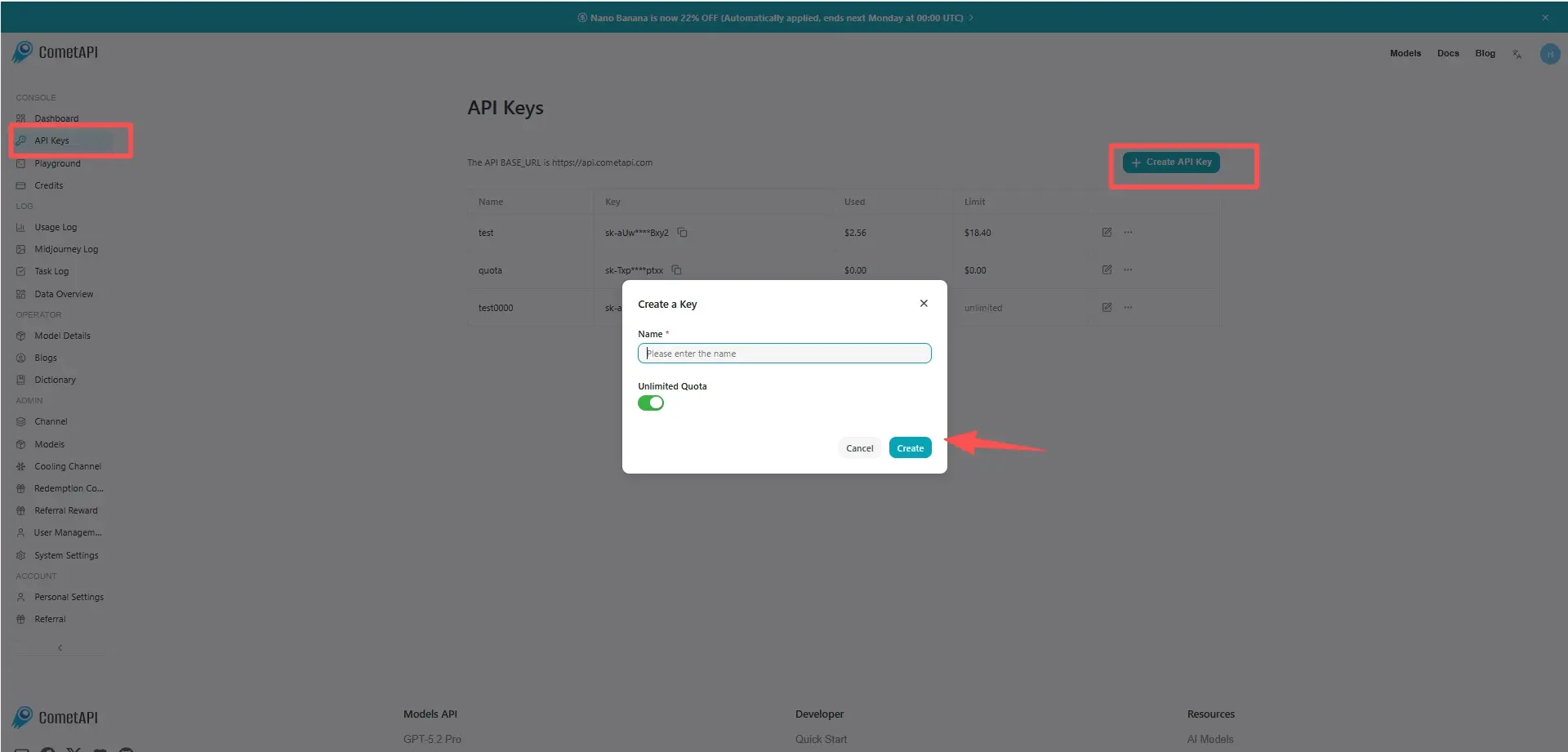
Log in to cometAPI. If you are not our user yet, please register first. Sign into your CometAPI console. Get the access credential API key of the interface. Click “Add Token” at the API token in the personal center, get the token key: sk-xxxxx and submit.
Step 2: Send Requests to Auto API
Select the “auto" or "auto-high” endpoint to send the API request and set the request body. The request method and request body are obtained from our website API doc. Our website also provides Apifox test for your convenience. Replace <YOUR_API_KEY> with your actual CometAPI key from your account.
The difference is simple:
auto— balanced choice for general workloads.auto-high— prioritizes higher-quality model selection.
Neither one represents a fixed underlying model.
Step 3: How Is a Model Selected by CometAPI Auto?
When you send a request with model=auto or model=auto-high, CometAPI first identifies the characteristics of the request and determines which routing scenario best matches it. The system can consider factors such as the client type, whether the request contains images or files, the estimated input context length, tool usage, structured output requirements, streaming, and other supported capabilities.
After identifying the appropriate routing lane, CometAPI selects candidate models from the corresponding auto or auto-high model pool. Models that are disabled, unavailable to the user's group, incompatible with the request, or unable to support the required context or capabilities are excluded. The remaining candidates are then evaluated according to the configured routing priority, weight, and availability.
The selected model is then passed to CometAPI's existing channel routing system, which finds an available channel for that model and user group. As a result, the final model is not necessarily fixed in advance and can vary according to the request and current routing configuration.